DMARC: what it is, how it works and how to set it up
What it is, which policy to choose and how to create the record in your DNS
DMARC is a protocol that tells Gmail, Outlook or Yahoo what to do with an email that claims to come from your domain but fails authentication. They can deliver it anyway, send it to spam or reject it.
It also sends you reports listing every server that uses your domain. That way you find out if someone is spoofing it.
Think of a building’s doorman. SPF and DKIM are the credentials you show; DMARC is the order you’ve given the doorman about what to do with anyone who doesn’t have them.
What is DMARC?
It stands for Domain-based Message Authentication, Reporting and Conformance. It was published as RFC 7489 in 2015, following the work of a group of companies that included Google, Microsoft, Yahoo and PayPal.
It doesn’t replace SPF or DKIM: it builds on them. SPF checks which servers can send on behalf of your domain. DKIM signs each message to prove it hasn’t been modified.
DMARC adds two things they were missing: a policy for emails that fail and a reporting system.
How does DMARC work?
Every time an email arrives, the recipient’s server follows these steps.
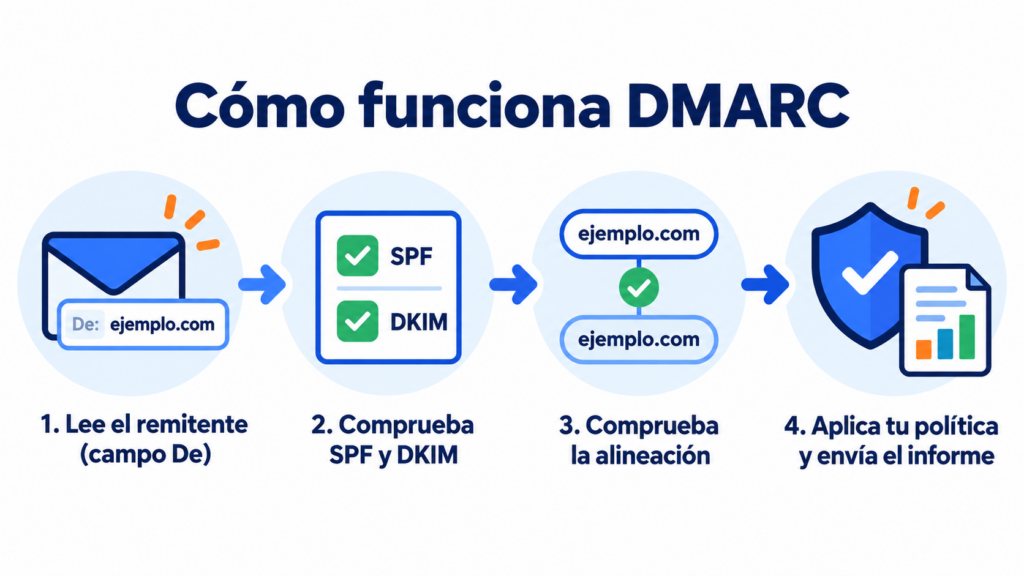
1. It reads the sender’s domain
It looks at the domain in the From field, the one the person receiving the email sees.
2. It checks SPF and DKIM
It verifies whether the sending server is authorized by SPF and whether the DKIM signature is valid.
3. It checks alignment
This is the step that makes this standard unique. It’s not enough for SPF or DKIM to return “pass”: the domain they authenticate has to match the one in the From field.
If at least one of the two passes and is aligned, the message passes DMARC.
4. It applies your policy and records the result
If the message fails, the receiver applies the policy you’ve published. It then includes the result in the report it sends you.
The three DMARC policies
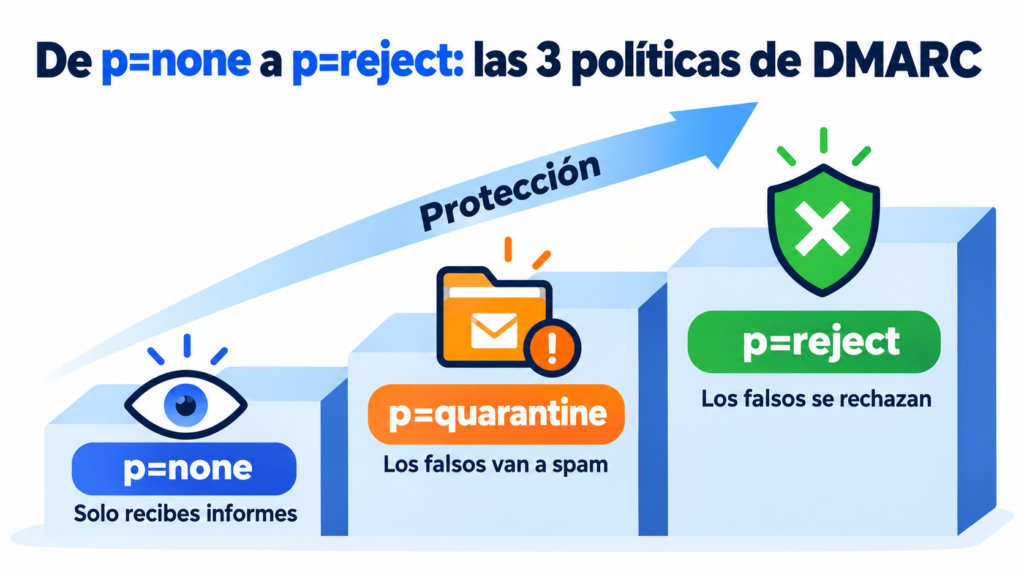
The policy is set with the p= tag and has three possible values:
| Policy | What happens to emails that fail | When to use it |
|---|---|---|
| p=none | They’re delivered as usual; you only receive reports | When starting out, to see who is sending with your domain |
| p=quarantine | They go to the spam folder | Once you’ve reviewed the reports and your legitimate emails pass |
| p=reject | They’re rejected and never arrive | When you have everything under control and want maximum protection |
The best approach is to move forward gradually: start with none, review the reports for a few weeks, then move up to quarantine and finally to reject.
What a DMARC record contains
The record is a TXT record published at _dmarc.yourdomain.com. A complete example:
v=DMARC1; p=quarantine; rua=mailto:[email protected]; pct=100
These are the most common tags:
| Tag | What it indicates | Example |
|---|---|---|
| v | Protocol version (required) | v=DMARC1 |
| p | Policy for your domain (required) | p=none |
| rua | Address that receives the aggregate reports | rua=mailto:[email protected] |
| pct | Percentage of emails the policy applies to | pct=50 |
| sp | Policy for subdomains | sp=reject |
| adkim / aspf | Strict alignment (s) or relaxed (r) | adkim=r |
There can only be one record of this type per domain. If you publish two, receivers ignore them.
Why is this so important?
Because the major providers already require it. Since February 2024, Gmail and Yahoo have required a DMARC record, even if it’s just p=none, from anyone sending more than 5,000 emails a day. Microsoft has applied similar requirements in Outlook since May 2025.
It also protects your brand from phishing. With p=reject, a fake email using your domain doesn’t reach the inbox.
And it improves your deliverability. A domain with SPF, DKIM and DMARC properly configured builds trust with email providers.
Finally, it’s a requirement for BIMI, which displays your brand’s logo next to your emails. For that you need a quarantine or reject policy.
Protect your domain and reach the inbox
Set up SPF, DKIM and DMARC in Mailrelay and send up to 80,000 emails a month for free to 20,000 contacts.
How to set up DMARC step by step
Before you start, make sure SPF and DKIM are already working. Without them, all your emails would fail the check.
1. Create the record with p=none
Go to your domain’s DNS and add a TXT record named _dmarc with a value such as v=DMARC1; p=none; rua=mailto:[email protected].
2. Review the reports
Receivers will send you a daily XML report listing the servers that have used your domain and their results. There are free tools that turn them into easy-to-read tables.
3. Fix the emails that fail
If a legitimate tool, such as your CRM or your online store, shows up with failures, add it to your SPF or set up its DKIM signature with your domain.
4. Tighten the policy
When all your legitimate emails pass, switch to p=quarantine. You can use pct=25 to apply it to part of your traffic first. Then move to p=reject.
Common mistakes when setting it up
The most common one is staying on p=none forever. It meets the Gmail and Yahoo requirement, but it doesn’t stop anyone spoofing your domain.
Other common mistakes:
- publishing two records on the same domain;
- moving to reject without reviewing the reports and blocking your own emails;
- forgetting the tools that send on your behalf, such as your CRM or invoicing system;
- using an address on another domain in rua without authorizing it.
How to set up DMARC in Mailrelay
In Mailrelay, first set up your domain’s SPF and DKIM. That way your campaigns are aligned with the sender and pass the check.
Then create a TXT record in your DNS named _dmarc.yourdomain.com with the value v=DMARC1; p=none; and replace yourdomain.com with your actual domain. Check that everything is correct in Settings → Email authentication.
You’ll find all three records together in the sending domain guide and the full context in email authentication.
If you have questions, support helps you by chat, ticket or phone on every plan, including the free account.
Send authenticated campaigns with your domain
Authenticate your domain in minutes and, if you get stuck, support will help you by chat, ticket or phone.
DMARC FAQ
These are the most common questions about this protocol.
What does DMARC stand for?
Domain-based Message Authentication, Reporting and Conformance: in other words, authenticating messages, reporting on them and enforcing compliance based on the sender’s domain.
Is DMARC mandatory?
No law requires it, but Gmail and Yahoo require it from anyone sending more than 5,000 emails a day, and Microsoft does the same in Outlook. For all other senders, it’s recommended.
Which DMARC policy should I use?
Start with p=none to receive reports without affecting your emails. When your legitimate emails pass, move up to quarantine and, finally, to reject.
What are DMARC reports?
They’re daily summaries sent to you by email providers. They show which servers have sent with your domain and whether they passed SPF, DKIM and alignment.
How do I know if my domain has DMARC?
Send yourself an email to Gmail and open “Show original”. If you see DMARC: PASS, it’s set up. You can also look up the _dmarc record with tools like MXToolbox.