Return path
The hidden sender that handles your bounces
You send a campaign to 5,000 contacts and 150 of the addresses don’t exist. The receiving servers send back a notice for each one. But where do those notices go? To an address your subscribers never see: the return path.
What is the return path?
The return path is the email address that receives error notices when an email can’t be delivered. It is also called the bounce address, envelope from or envelope sender.
Technically, it corresponds to the MAIL FROM command that the sending server issues during the SMTP connection. When the message reaches its destination, the receiving server records it in a header called “Return-Path”.
You can see it for yourself. Open any email, look for the “Show original” or “View source” option and you’ll find a line like this one:
Return-Path: <[email protected]>
If you want to learn more about the other lines that appear there, we explain them in our entry on email headers and in this guide to the header of an email.
Return path and From: two different senders
An email actually has two senders. And it’s best not to confuse them.
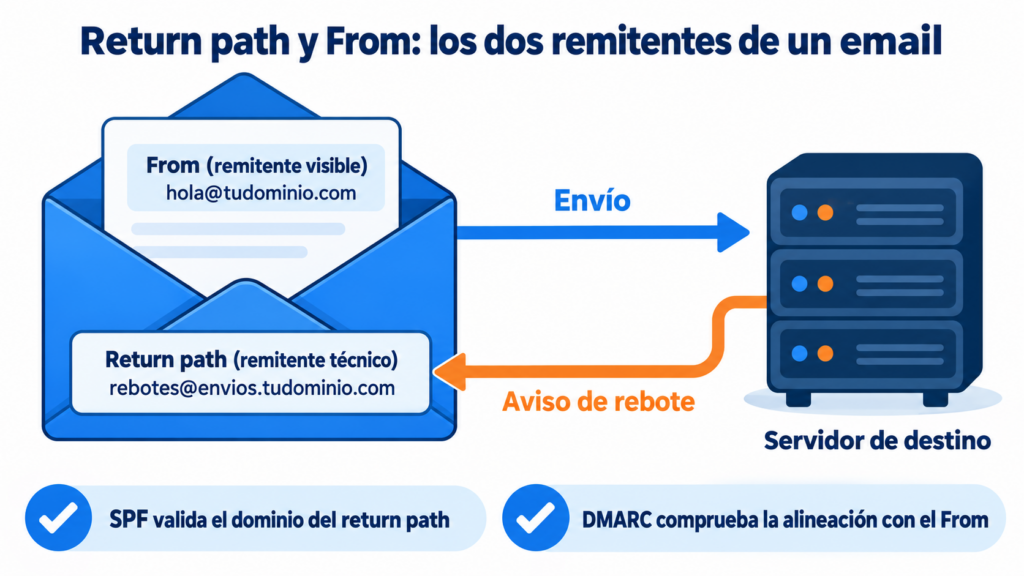
The From address is the one the recipient sees in their inbox. It’s your visible sender, for example “[email protected]”.
The return path is the technical sender. It travels on the message’s “envelope”, like the return address on a letter. The recipient doesn’t usually see it, but servers do use it.
The two addresses can be the same. But when you send with an email marketing platform, the technical sender is usually different. That way, the platform receives and processes the bounces for you.
What it’s for
Its main function is to handle bounces. Every time an email isn’t delivered, the receiving server sends a notice to that address with the reason.
This lets you tell apart two types of bounce:
- Hard bounce: a permanent error, such as an address that doesn’t exist or an invalid domain.
- Soft bounce: a temporary error, such as a full mailbox or a server that doesn’t respond.
With this information, a good platform automatically removes the addresses that fail permanently. It moves them to a suppression list so it doesn’t send to them again.
This matters because continuing to send to invalid addresses damages your domain reputation. And a poor reputation makes your emails end up in spam.
The return path and email authentication
This address plays a key role in email security.
The SPF protocol checks the return path’s domain, not the From address the user sees. In other words, it verifies whether the server sending the message is authorized to use that bounce domain.
DMARC, for its part, requires alignment. To pass it, the From domain must match one of these two: the one validated by SPF, which is the bounce address’s domain, or the one in the DKIM signature.
An example makes this clear. If your From is “[email protected]” and your return path is “[email protected]”, the domains are aligned in relaxed mode, because they share the same main domain. If that address belongs to another company’s domain, there is no SPF alignment. DMARC will then depend on DKIM alone.
Why it matters more since 2024
In February 2024, Gmail and Yahoo tightened their requirements for bulk senders. Anyone who sends high volumes must authenticate their domain with SPF and DKIM and publish a DMARC policy. In addition, the From address has to be aligned with one of the two.
That’s why more and more companies set up a custom return path on a subdomain of their own. Besides helping with alignment, it strengthens your brand’s consistency in the eyes of spam filters. It also makes it easier to build a sending reputation that belongs to you.
How to set up a custom return path
The process depends on your sending provider, but it usually follows these steps:
- Choose a subdomain dedicated to bounces, for example “bounces.yourdomain.com” or “mail.yourdomain.com”.
- Create the DNS record your provider tells you to, usually a CNAME or an MX record pointing to their servers.
- Update your SPF record if necessary, to authorize your platform’s servers.
- Verify the setup by sending a test email and checking the headers of the message you receive.
Before changing your DNS, check your provider’s documentation. A misconfigured record can affect your sending.
Common mistakes
The most common one is not knowing it exists. Many companies set up SPF for their main domain and think they’re all done. But they don’t check which domain actually appears as the envelope sender.
Another mistake is using a mailbox that nobody processes as the bounce address. Bounce notices pile up and invalid addresses stay on your list.
You should also avoid using domains you don’t control. If you can’t authenticate them, you lose alignment and some control over your deliverability.
How Mailrelay helps you
At Mailrelay, we handle your campaigns’ bounces automatically. We detect permanent errors and stop sending to those addresses to protect your reputation.
We also help you authenticate your domain with SPF, DKIM and DMARC so your emails reach the inbox. All of this on a free plan of up to 80,000 emails a month and 20,000 contacts. If you want to try it, you can create your Mailrelay account today.
Frequently asked questions about the return path
Can the return path be different from the From address? Yes, and that’s usually the case when you use a sending platform. What matters is that both domains are aligned to comply with DMARC.
Where can I see this address in an email? In the message’s full headers. In Gmail, open the email and choose “Show original”; in Outlook, look for the message properties.
Does it affect whether my email ends up in spam? Indirectly, yes. It affects SPF validation, DMARC alignment and bounce handling, three factors that weigh on deliverability.
In conclusion
The return path is one of those technical pieces that almost nobody sees, but that support a large part of your deliverability. It collects bounces, takes part in authentication and helps prove that your emails are legitimate.
Reviewing it and aligning it with your domain is a small technical step. But it can make the difference between the inbox and the spam folder.
Related posts
Discover how Mailrelay can help you with your email marketing strategy.