Scam: what it is, what it means and how to recognize one
The most common email, SMS and WhatsApp scams, how to spot them and what to do if you fall for one
A scam is a fraud: a trick designed to get someone to hand over money, personal data or access to their accounts. The word is an informal English term for a swindle, a con or a rip-off.
Today the word is used mostly for online tricks: emails, SMS, WhatsApp, social media or fake websites.
What does scam mean?
Scam means a swindle or a con. You’ll also come across these related words:
| Word | What it means | Example |
|---|---|---|
| Scam | A swindle, a con | “That prize message is a scam” |
| Scams | Swindles, cons (plural) | “Watch out for fake job offer scams” |
| Scammer | Fraudster, con artist | “The scammer was pretending to be the bank” |
| Scamming | The practice of swindling people | “SMS scamming keeps growing” |
| To scam | To swindle (informal) | “Someone tried to scam me in a buy-and-sell group” |
Don’t confuse it with spam, which is the mass sending of unsolicited messages. Spam is annoying; a scam is out to deceive you. Spammers often use spam to slip in a scam.
How does a scam work?
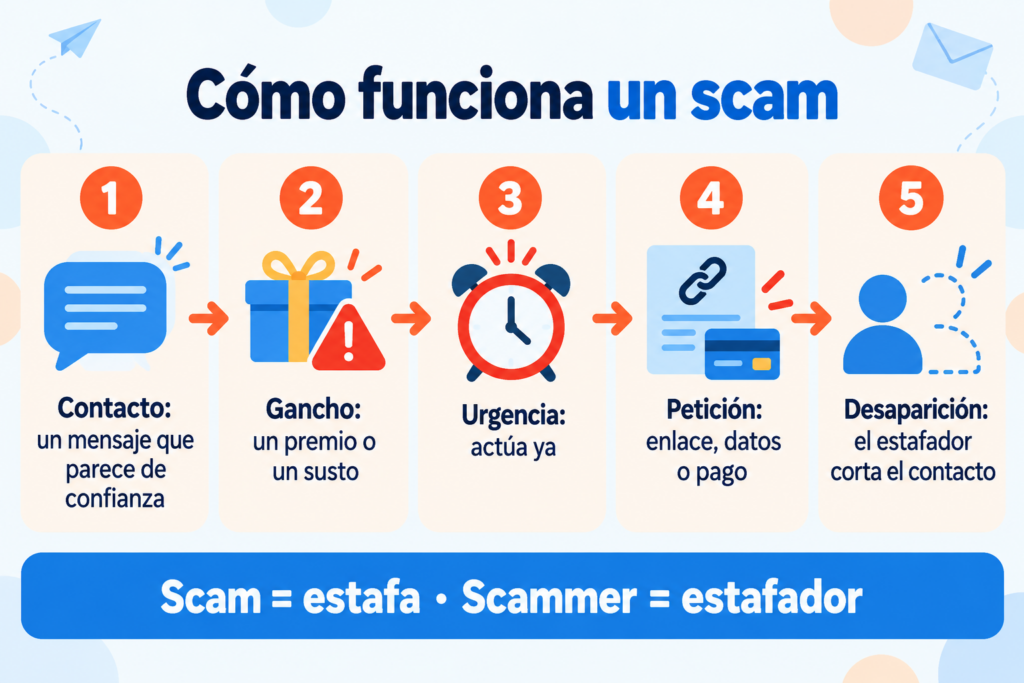
Almost all scams follow the same steps:
- Contact. You get a message, a call or an ad that seems to come from someone you trust.
- Hook. They offer you something great or scare you with a problem: a prize, a debt, a package being held.
- Urgency. You have to act now, before the offer expires or your account gets blocked.
- Request. They ask you to click a link, give your details, install an app or make a payment.
- Disappearance. Once they get what they want, the scammer cuts off contact.
The trick is always the same: get you to act fast without stopping to think.
Make sure your emails never look like a scam
Authenticate your domain and always send from a sender your subscribers recognize. Free for up to 80,000 emails a month.
Most common types of scams
| Type | How it reaches you | What they’re after |
|---|---|---|
| Phishing | Email imitating a bank, a store or a government agency | Passwords and card details |
| Smishing | SMS with a link (“Your package is being held”) | Personal data and small payments |
| Vishing | Call from a fake technician or from the “bank” | Passwords and remote access to your computer |
| “Hi Mom” | WhatsApp message from a supposed son or daughter with a new number | An urgent transfer |
| CEO fraud | Email from a fake executive to an employee | A payment into the scammer’s account |
| Investments and cryptocurrencies | Ads featuring celebrities and high returns | Money that is never recovered |
| Fake online stores | Online stores with very low prices | Your payment, with nothing ever shipped |
| Fake jobs | Offers that ask you to pay for a course or paperwork | Money and personal data |
Many of these scams pretend to be real companies. To do so, they fake the sender, a technique called spoofing.
How to recognize a scam
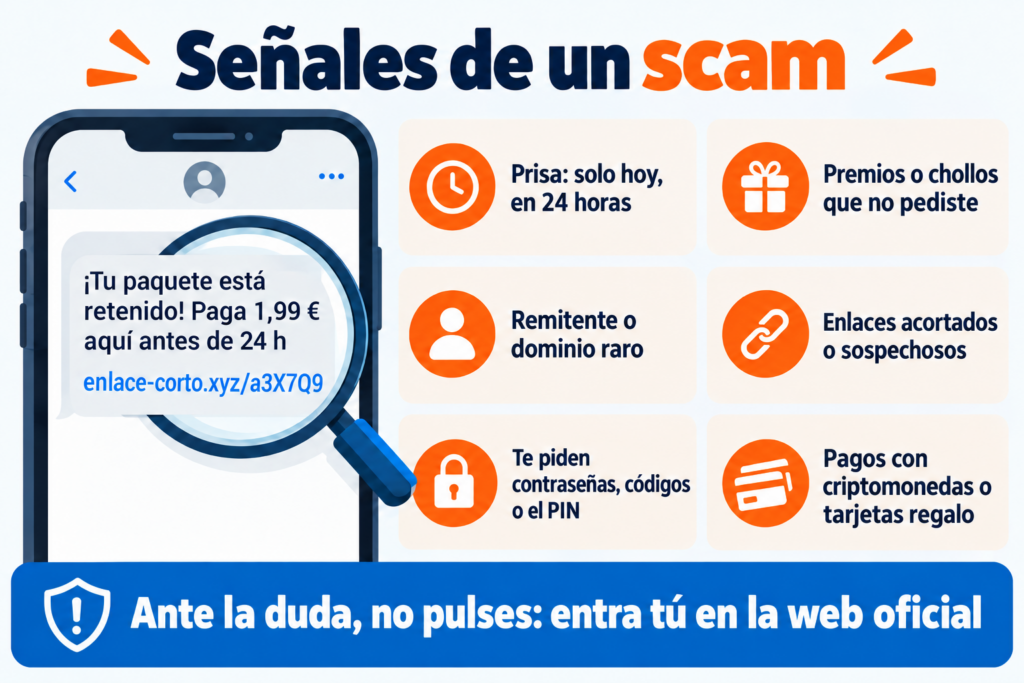
These signs should make you suspicious:
- Urgency: “today only”, “your account will be blocked in 24 hours”.
- Prizes or bargains you never asked for.
- An odd sender: the address doesn’t match the company, or the domain has a letter changed.
- Shortened links, or links that lead to a different website from the one they claim.
- Requests for information a company would never ask for by email: passwords, codes or your card PIN.
- Payment methods that make your money hard to recover: cryptocurrencies, gift cards or transfers to private individuals.
If in doubt, don’t click any links. Go to the official website yourself or call the number you always use.
What to do if you’ve been the victim of a scam
Act as soon as possible:
- Call your bank to block your card or try to stop the transfer.
- Change your passwords and turn on two-step verification.
- Keep the evidence: screenshots, emails, phone numbers and payment receipts.
- Report it to the Policía Nacional, the Guardia Civil or the regional police.
- Ask for help by calling 017, INCIBE’s free cybersecurity helpline.
Scams and email marketing
Scammers copy the look of emails from real brands. If you run a business, this affects you in two ways: they can impersonate your domain, and your customers become more wary of any email.
To protect your brand, authenticate your domain with SPF, DKIM and DMARC. That makes it harder for anyone to send emails in your name.
Always use the same sender and your own domain, never a free email account. Link to your own website and avoid link shorteners.
And never ask for sensitive data by email. Tell your customers: if they ever get an email from you asking for it, they’ll know it’s a scam.
How Mailrelay helps you
With Mailrelay, your subscribers recognize your emails for what they are: genuine messages from your brand.
We help you set up SPF, DKIM and DMARC on your domain so no one can use it in your name. You always send from your own domain, with the sender your subscribers know and a visible unsubscribe link.
The free account includes up to 80,000 emails a month and 20,000 contacts, with human support in English on all plans.
Email marketing with your own domain and brand
SPF, DKIM and DMARC set up with the help of our human support team, in English.
Frequently asked questions about scams
These are the most common questions.
What is a scam?
A fraud. It’s a trick, almost always online, to get money, personal data or access to your accounts.
What does scam mean?
A swindle, a con or a fraud. A scammer is a fraudster, and scamming is the practice of swindling people.
What’s the difference between a scam and spam?
Spam is mass advertising you didn’t ask for. A scam is a fraud. A spam message can carry a scam, but not always.
What should I do if I’ve clicked a scam link?
Don’t enter any information. If you already have, change your passwords, alert your bank and call 017 for guidance.
How do I report a scam?
To the Policía Nacional, the Guardia Civil or the regional police, in person or on their website. Bring screenshots and receipts.