
Let’s see how to move credits between multiple accounts.
If you have several paid accounts, you can transfer credit between them easily and instantly, without having to purchase a new plan. To do this, we need to meet three conditions:
- All accounts must be on a prepaid plan.
- The plans on both accounts must be the same version: standard or enterprise.
IMPORTANT: Credit transfers are not reversible, so credits cannot be recovered once they have been transferred, unless the administrator of the other account transfers them back using the same process.
The process is very simple: we just need to log in to our Mailrelay account and go to the menu Reports -> Plan statistics:
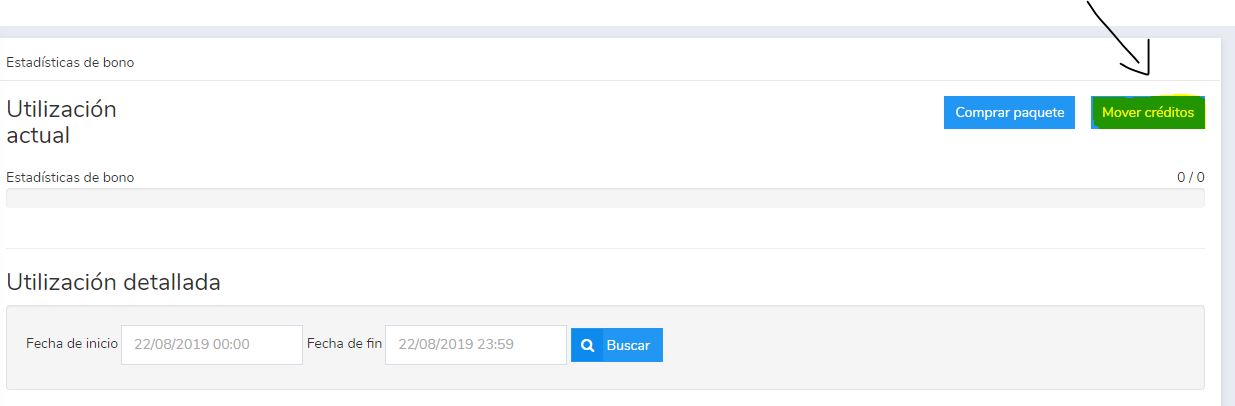
There we’ll see a Move credits button, so we click on it:
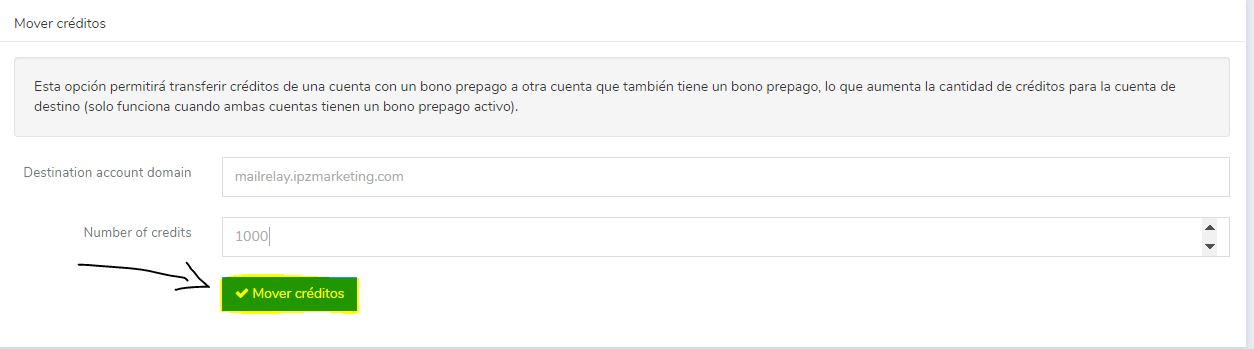
We just need to enter the destination Mailrelay account (account.ipzmarketing.com) and the number of credits we want to transfer, then click Move credits.
And that’s it! We have now transferred the credits between accounts.
If you want to learn more about the platform, what is Mailrelay gives you a complete introduction, and Mailrelay features shows you the rest of the options available for your account.