What is Mailrelay
What Mailrelay is, what it is used for, and all its features
Mailrelay is an email marketing platform that lets you create newsletters, capture subscribers, automate campaigns, analyze results and much more.
If Mailrelay is known for one thing, it is for offering the largest free email marketing account available
The free account allows you to send up to 80,000 free emails every month to a list of up to 20,000 contacts.
But it doesn’t stop there: the platform extends these features with landing pages, transactional emails via SMTP and API (included in paid plans, with a 30-day trial on the free account), SMS, WhatsApp and human support on every account.
If we had to summarize everything Mailrelay offers in a single sentence, although difficult, it would be something like this:
- Mailrelay offers all the essential features to handle email marketing from start to finish. Without having to pay from day one.
This is very important because many companies want to see results before investing large amounts of time and money.
Below we’ll look at everything you can find in Mailrelay from 0 euros a month.
Mailrelay features by category
· Easy-to-use dashboard
Mailrelay was developed with user-friendliness in mind. That is why the dashboard is so easy to use.
The Mailrelay dashboard includes:
- A general search where you can even “search” for actions like “Create newsletter”
- Direct links to the most common actions
- A logically organized sidebar menu
- Summary of the most recent statistics
- Access to help options
· Features for creating and sending email marketing campaigns
Mailrelay allows you to:
- Create newsletters with a visual drag-and-drop editor
- Generate newsletter designs using AI
- Use ready-made templates
- Use conditional content
- Improve your copy using AI
- Create images using AI, upload your own, or choose from free image repositories (included)
- Custom variables
- Responsive designs
- Dark mode templates: 8 dark mode email templates, one per category, which are worth checking with a test send
- Version control for newsletters (in case you need to recover a version prior to recent changes)
- Desktop and mobile views
This makes it easy to put together email campaigns quickly.
And also segment them, to ensure they are more relevant.
Additionally, Mailrelay allows you to:
- Create newsletters from RSS feeds
- Manage multiple senders
- Schedule campaigns
- A/B testing
- Create a public repository of sent newsletters that you can share
· Subscriber capture and management features
Mailrelay lets you import contacts easily and organize them into groups or dynamic segments.
In addition to this, you get:
- Custom fields, which are highly useful for better segmentation and message personalization.
- Subscription forms
- Hidden fields in subscription forms (to assign a default value)
- And landing pages, two fundamental elements for converting visitors into leads and building your own database
Forms include options such as:
- Visual editor that lets you create your forms easily
- Selection of visible or hidden registration groups
- Configuration of form landing pages (confirmation and successful subscription)
- Selection of the form sender
- Registration notifications
- Captcha
- Privacy acceptance
- Double opt-in and recording of the IP address from which each contact subscribes, as proof of consent
- Website embedding
- And duplicate detection when importing lists
With regard to data protection, Mailrelay processes data on servers located in the European Union and acts as a data processor (Article 28 of the GDPR). Its obligations are listed in Appendix A of the Terms of Use and apply to all accounts, including the free account.
To work with your subscribers you can use:
- Quick filters, based on status (active, bounced, unsubscribed, spam complaints, inactive, blacklist)
- Advanced search, which lets you filter by contact values, the actions they have taken (opens, clicks, etc.) or even custom field values
- Create dynamic segments. In other words, segments based on the conditions you choose: if a contact stops meeting them, they leave the segment, and if they meet them again, they are added back, without you having to do anything. Segmentation can be as simple or as complex as you like. With just a couple of conditions, or multiple groups with “and” and “or” conditions.
- Create and apply tags. You can create tags that are assigned to contacts as they go through different processes, such as subscription forms and automations. These tags let you build funnels and know where each contact is.
- Blacklists. To avoid sending to people who shouldn’t receive your emails.
- Bulk editing. To add contacts from one group to another, delete them, move them, etc.
· Automation and customer journey features
Mailrelay covers the most sought-after features in any email software.
You can:
- Create workflows for welcome emails
- Drip sequences
- Birthday automations
- Conditional actions based on campaign opens
- Conditional actions based on clicks
- Change contact groups
- Abandoned carts in WooCommerce
Mailrelay workflows include:
- Conditional blocks
- Wait blocks
- Email sends
- SMS sends
- Group actions
- Different workflow branches based on conditions
- And, of course, automation statistics
In practice, this allows you to build simple yet highly effective customer journeys without turning automation into an endless technical project.
· Advanced personalization features
Mailrelay lets you do much more than just adding the contact’s name in the greeting.
Some of the options include:
- Creating custom fields and adding them to emails
- Showing or hiding blocks based on conditions
This is especially useful when you want the same newsletter to be more relevant to different audiences, without duplicating campaigns.
It helps you scale personalization in a practical way.
· Analytics and optimization features
Most companies want to know what happens after they hit “send”.
Mailrelay offers:
- Real-time statistics covering opens, clicks, unsubscribes, and bounces
- Click maps or heatmaps to see which areas of your email get the most interaction
- Location of opens and clicks by city, province and country, as well as browser and operating system
- “Best times of day” heatmaps on the main dashboard, to see on which days and at what times your subscribers open and click
- Integration with Google Analytics: you define utm_campaign and Mailrelay fills in utm_source and utm_medium (see the real-time email analytics guide for more details)
- It also lets you run A/B tests to choose the most effective subject lines or senders
- Automation statistics
- And even statistics on SMTP and API sends: deliveries, bounces, opens and clicks for transactional emails (we explain this in SMTP and API with statistics)
With all this information, email marketing stops relying on guesswork and starts using real data.
· Deliverability and transactional email features
Mailrelay stands out for:
- Having its own IP ranges
- Using proprietary algorithms to improve deliverability and prevent blocks
- Including its own SMTP server
- Sending transactional emails via SMTP or API
- API documentation designed to be readable by AI (OpenAPI), for example Claude.
This opens the door to using Mailrelay not just for newsletters, but also for confirmations, alerts, password resets, notifications, or automated messages generated by an app, store, or CRM.
· Integration features
Mailrelay offers:
- REST API
- Developer documentation (OpenAPI)
- Connection with Make
- Official plugin for WordPress and WooCommerce, with abandoned cart recovery
- And resources to integrate forms and synchronize users
That’s why it fits both new businesses and companies that already work with other systems and need an email channel connected to their website or sales system.
API limits. Mailrelay’s REST API supports up to 250 requests every 5 minutes, on all plans. For bulk operations, such as syncing or updating many contacts, it has a batch function that groups up to 500 requests into a single call. And to send transactional emails (confirmations, notifications or password resets) you can use Mailrelay’s SMTP server, which has no request limit.
Mailrelay integrations (updated: October 2026):
| Tool | How it connects | What it lets you do |
|---|---|---|
| WordPress and WooCommerce | Free official plugin | Users, customers, products and carts; abandoned cart automation |
| Shopify | Make or API (no native integration) | Add new customers as subscribers |
| Zapier | No official app | The no-code alternative is Make |
| Google Sheets, HubSpot, Stripe and other apps | Make | Create or update subscribers and manage groups |
| Custom development | REST API (OpenAPI) and SMTP | Contacts, campaigns and transactional emails |
| ChatGPT and Claude | MCP server | Manage your account using natural language |
· Multichannel features
Although Mailrelay is primarily an email marketing tool, the platform also integrates:
- Native SMS campaigns, with a character counter and immediate or scheduled delivery
- SMS within automations, combined with emails (abandoned cart, birthdays or event reminders)
- A sender showing your company name, using the alias registered with Spain’s CNMC, right from the dashboard
- And WhatsApp campaigns
This allows you to complement the email channel with more immediate messages or multichannel workflows.
The idea is simple: use the best channel for each moment, without leaving the same workspace.
You can find the details of how SMS works on the platform in Mailrelay features, and the rates on the SMS pricing page.
Who Mailrelay is for
Mailrelay is designed for organizations that want to do professional email marketing without paying for features they won’t use.
Most of them need the same things: send campaigns that reach the inbox, automate their recurring messages and know what works. That’s what Mailrelay does well, with a simple dashboard and human support on every plan.
These are the cases where it fits best.
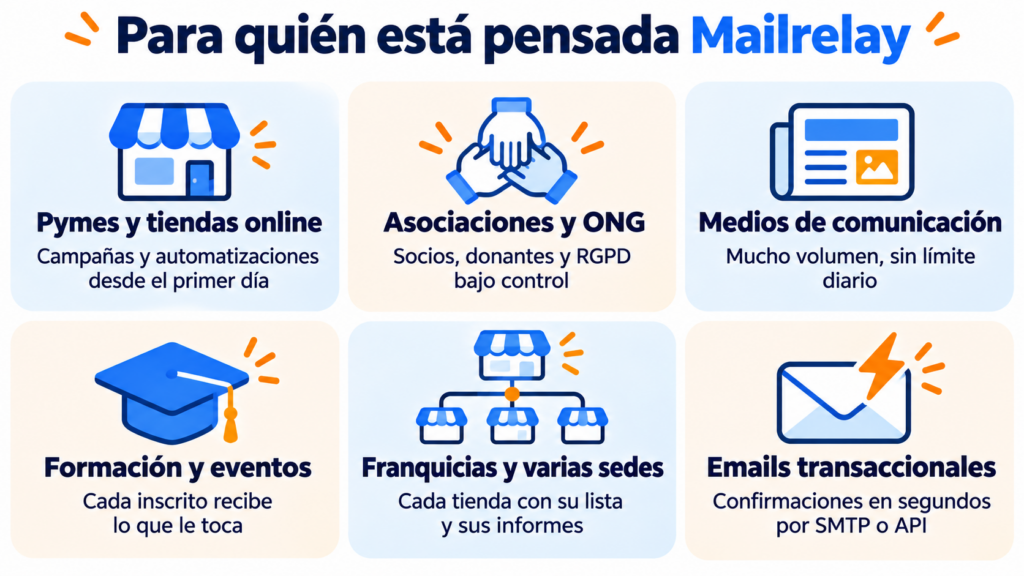
· SMBs and online stores
An SMB needs to get started quickly and without a technical team. With the drag-and-drop editor, the templates and welcome or WooCommerce abandoned cart automations, it can have its first campaigns up and running the same day. And the free account lets it do all this without paying from month one.
That’s what happened to Smöoy, an ice cream franchise present in 15 markets. It started from scratch with no technical knowledge, and its first send exceeded a 45% open rate and a 20% click rate.
· Associations, NGOs and professional bodies
These organizations send to members, donors and volunteers, and they need organization and safeguards. Mailrelay gives them groups and segments, forms with double opt-in, data processing in the European Union and human help whenever a question comes up.
APMiB, an association working for the inclusion of people with disabilities, used to send a personalized donation certificate to each donor by hand. It took three people three days. With custom development built on Mailrelay, the certificates now go out in 15 minutes. More than 300 chambers of commerce also trust Mailrelay.
A media outlet needs to send a lot, often and without waiting. Mailrelay has no daily or hourly limit, and offers plans of up to 10 million emails a month, automatic RSS newsletters and dedicated IPs.
Cadena SER Euskadi, which used to tie up a computer for a whole morning to send its emails, works this way, as does the Mexican newspaper El Siglo de Torreón. We explain this in detail in newsletters for media outlets.
· Training, academies and events
Anyone who launches courses or events frequently needs to notify a lot of people and follow up with every registrant. Automations and segments let you send each person what’s relevant to them, based on their course or interests.
AEPSIS, a psychology training association, handles more than 100,000 emails a month with Mailrelay without losing deliverability.
· Franchise networks and multi-location businesses
When each store or each country sends its own campaigns, what matters is that each one has its own space. With Mailrelay, each franchisee works with their own list and reports, without seeing anyone else’s.
That’s the case of Milar, a network of more than 400 home appliance stores in Spain.
· Websites, stores and apps that send transactional emails
Order confirmations, notifications and password resets need to arrive within seconds. Mailrelay sends them via SMTP or API, with statistics for each send.
Mediaset España uses Mailrelay’s engine, capable of sending up to 5 million emails an hour, so that its registration emails arrive just seconds after sign-up. And Todocoleccion.net saves around €9,000 a year compared with the SMTP provider it used before.
You can see more examples in Mailrelay’s success stories.
Why Mailrelay stands out in email marketing
One of Mailrelay’s key differentiators is that it combines a vast number of features with a very smooth learning curve.
Many tools promise automation, analytics, or integrations.
However, these features aren’t always easy to use.
At Mailrelay, we want everything to be user-friendly.
A clear dashboard.
An easy editor.
And useful automations for most businesses.
· The free account
Without a doubt, Mailrelay’s free account is key.
The free account lets you send up to 80,000 emails a month and manage up to 20,000 contacts, with no credit card required to open it.
In addition, the free plan includes human support via ticket (the Standard plan adds live chat, and the Enterprise plan adds phone support with priority service).
Free account and paid plan conditions (updated: October 2026)
| Condition | Free | Standard | Enterprise |
|---|---|---|---|
| Emails per month | 80.000 | 100.000 | 100.000 |
| Contacts | 20.000 | 20.000 | 20.000 |
| Daily or hourly limit | No limit | No limit | No limit |
| Human support | Ticket (standard) | Ticket and chat (priority) | Ticket, chat and phone (top priority) |
| Sending speed | Standard queue | Priority queue | Priority queue |
| Delivery, bounce and unsubscribe statistics | Included | Included | Included |
| Open and click tracking | Included | Not included¹ | Included |
| Mailrelay logo in the email footer | Yes (removable with a €4.95/month add-on) | No | No |
| Transactional emails via SMTP and API | 30-day trial; then €14.95/month | Included | Included |
| WhatsApp sending | 10-day trial; then €9.95/month | Included | Included |
¹ The Standard plan doesn’t track opens or clicks. If you need those metrics, choose Enterprise. The Standard and Enterprise figures are for the 100,000 emails a month tier. You can see all tiers and prices on the Mailrelay pricing page.
Frequently asked questions about Mailrelay features
· What kind of companies or organizations is Mailrelay for?
Mailrelay is designed for SMBs, online stores, associations and NGOs, media outlets, training centers, franchise networks and websites that send transactional emails.
In short, for organizations that want to do professional email marketing, with automations and human support, without paying for features they won’t use. You can start with the free account: 80,000 emails a month to a list of up to 20,000 contacts.
No. Mailrelay is used to create email marketing campaigns, capture subscribers with forms and landing pages, automate campaigns, analyze results, and send transactional emails.
Furthermore, it integrates SMS and WhatsApp on the same platform.
· Is it easy to learn how to use Mailrelay?
Yes. You can send your first newsletter in 7 steps with the getting-started guide. The editor uses a drag-and-drop interface, with ready-to-use templates, and its AI can generate a complete template, improve the text, and create images. Forms can be displayed as pop-ups or within your landing pages. And you get human support on every plan.
Yes. Plans allow for up to 10,000,000 emails per month, and there are larger, custom plans available. There are no daily or hourly limits, and you can use dedicated IPs and send automatic RSS newsletters. We explain this in detail in newsletters for media outlets.
· Does Mailrelay include email marketing automation?
Yes. The platform allows you to create automation workflows for welcome emails, drip campaigns, birthdays, abandoned carts, and actions based on opens, clicks, or group changes.
It also supports conditions, wait steps, webhooks, and SMS messaging within a workflow.
· Does Mailrelay send SMS messages?
Yes. Mailrelay sends SMS messages natively from the same dashboard as email: SMS campaigns to your groups and SMS steps within automations, combined with emails (for example, in an abandoned cart or a reminder). SMS messages work with prepaid packages; check the rates on the SMS pricing page.
· Can you run A/B tests with Mailrelay?
Yes. Mailrelay includes A/B tests, and its official content presents them as a tool for optimizing subject lines and senders before sending the final version to the rest of the list.
It is a key feature for improving open and click rates through data-driven decisions.
· Does Mailrelay allow sending transactional emails?
Yes. Mailrelay allows you to send transactional emails via SMTP or API.
This makes it useful for order confirmations, shipping notices, password resets, account alerts and other automated notifications from an ecommerce store or an app.
· Does Mailrelay provide statistics on transactional emails sent via SMTP or API?
Yes. In Reports > SMTP Emails you can see each email sent with its status, sender and date, bounces by category, spam complaints and unsubscribes. You also get a report on rejected messages, including the reason, and a report on opens and clicks—something that many transactional email tools don’t offer. We explain it in SMTP and API with statistics.
· Does Mailrelay integrate with WordPress or other tools?
Yes. Mailrelay offers an official plugin for WordPress and WooCommerce, a REST API and a connection with Make. Shopify has no native integration: its customers are synced through Make or the API. And there is no official Zapier app; the no-code alternative is Make.
· What statistics does Mailrelay offer?
It offers real-time statistics on opens, clicks, unsubscribes, bounces and spam complaints, as well as click maps or heatmaps to better understand the performance of each campaign.
Consequently, it becomes easier to optimize design, content, and segmentation for future campaigns.
· Does Mailrelay comply with the GDPR?
Yes. Mailrelay processes data on servers located in the European Union and acts as a data processor for your contacts’ data (Article 28 of the GDPR). Its obligations are listed in Appendix A of the Terms of Use and apply to all accounts, including the free account. In addition, the forms include a privacy checkbox and a double opt-in option, and Mailrelay records the IP address from which each contact subscribes.
· Does Mailrelay offer support on the free account?
Yes. Mailrelay offers human support for all accounts, including the free one. On paid plans, support gets priority.
If you’re comparing tools, this comparison of support by plan will show you which ones continue to offer support in their free plan after the first month.
· Do emails sent from the free account carry the Mailrelay logo?
Yes. Emails sent with the free account show the Mailrelay logo in the footer. You can remove it with a €4.95/month add-on. The logo doesn’t appear on the Standard and Enterprise plans.
· Is Mailrelay’s SMTP server free?
On the free account you can try sending transactional emails via SMTP and API for 30 days. After that, it costs €14.95/month. It’s included in the Standard and Enterprise plans.
· Does the free account have a daily sending limit?
No. You can spread the month’s 80,000 emails however you like, with no daily or hourly limit. That said, Mailrelay continuously monitors the activity of all accounts. This is how it protects the reputation of shared IP addresses and the deliverability of all its customers.
· What is the most noticeable advantage of Mailrelay compared to other tools?
The combination of broad functionality, ease of use, human support, and a massive free plan.
In other words, you can manage campaigns, automation, lead capture, analytics, SMTP, and integrations without starting with a complex plan or difficult setup.
For many businesses, that balance is exactly what is needed.