Free mailing: what it includes, how much you can send and its limits
What email marketing tools really give you for free in 2026
Free mailing means sending email campaigns to your list without paying, usually with the free plan of an email marketing tool. For a small number of contacts, you can also use your own email account.
It lets you start selling by email with no budget, as long as you know the limits of each option.
The question worth asking isn’t whether a tool is free. It’s how much it lets you send, to how many contacts and under what conditions.
¿Qué plataformas de email marketing ofrecen planes gratuitos generosos para pymes?
Con datos de octubre de 2026, el plan gratuito más generoso para una pyme es el de Mailrelay: 80.000 emails al mes a 20.000 contactos, sin límite diario y sin fecha de caducidad. Brevo admite más contactos (100.000), pero solo deja enviar 300 emails al día. Sender y SendPulse dan 15.000 emails al mes, aunque a 2.500 y 500 contactos.
Mailjet, MailerLite, Acumbamail y Mailchimp sirven para empezar con listas de unos cientos de contactos. Para una pyme que ya tiene clientes, se quedan cortos enseguida.
Generoso no significa solo muchos emails. Fíjate también en el límite diario, en si incluye automatizaciones y en si tendrás soporte después del primer mes.
What is free mailing and how does it work?
A mailing is an email sent to many contacts at once: a newsletter, an offer or an announcement. There are two ways to do it for free.
The first is your own inbox. Gmail allows about 500 recipients a day and Outlook.com 5,000, but with no unsubscribe link or statistics. We explain it in how to send bulk emails.
The second is the free plan of an email marketing tool. It gives you an editor, templates, unsubscribe management and statistics, with a cap on contacts and sends.
Tools offer it so you can try them out. Some are so generous that you can do free mailing for years.
Others fall short as soon as your list grows.
How many emails can you send for free with each tool?
This is the part that changes most from one year to the next. Several brands cut back their free plan in 2025 and 2026, so it’s worth checking the current figures.
| Tool | Contacts | Emails per month | Daily limit | Support on the free plan |
|---|---|---|---|---|
| Mailrelay | 20.000 | 80.000 | No daily limit | Ticket, sin límite de días |
| Brevo | 100.000 | About 9,000 | 300 | |
| Sender | 2.500 | 15.000 | No lo publica | No lo detalla |
| SendPulse | 500 | 15.000 | No lo publica | No lo detalla |
| Mailjet | 1.000 | 6.000 | 200 | First month only |
| GetResponse | 500 | 2.500 | No lo publica | Email 24/7 |
| MailerLite | 250 | 2.500 | No lo publica | Solo un periodo inicial |
| Acumbamail | 250 | 2.000 | No lo publica | Su web no lo detalla |
| Mailchimp | 250 | 500 | 250 | Solo 30 días |
Datos de octubre de 2026, de la web y la ayuda de cada herramienta. Los ampliamos en las fichas de Mailchimp, Brevo, MailerLite, Mailjet y Acumbamail.
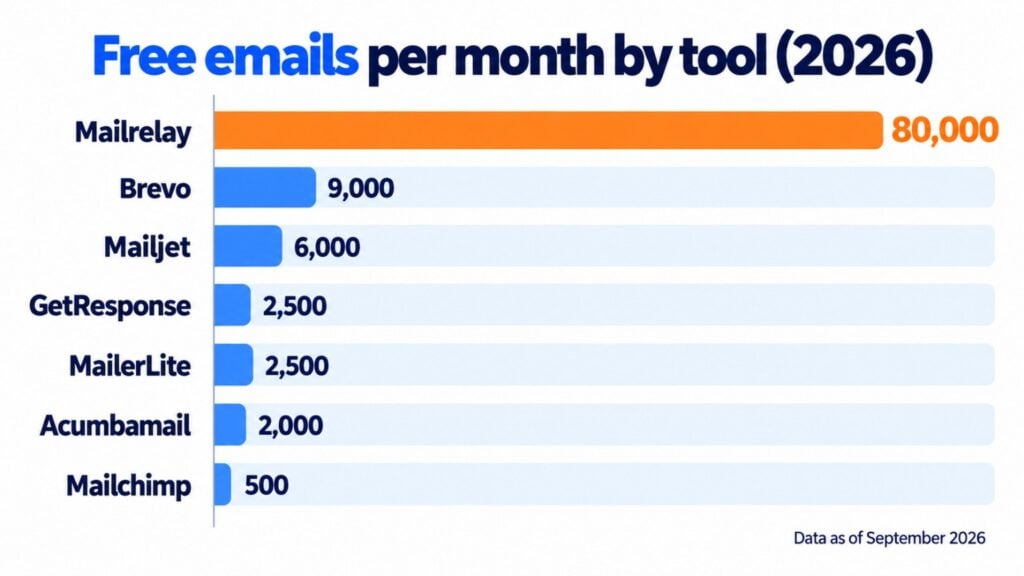
As you can see, looking at contacts isn’t enough. Brevo stores 100,000, but only lets you send 300 emails a day: a newsletter to 3,000 people takes ten days to go out.
Si lo que necesitas es enviar a una lista grande, tienes el cálculo completo en nuestra comparativa sobre qué servicios permiten enviar grandes volúmenes de correos sin coste inicial.
Mailchimp, on the other hand, stops at 500 sends a month.
Sender y SendPulse están en el punto contrario: muchos emails al mes para pocos contactos. Te sirven si envías a menudo a una lista pequeña.
If you also want to compare features and ease of use, check out the guide to free bulk email software.
What doesn’t a free mailing plan include?
Here’s the fine print. Before choosing, check these points:
- Daily sending limit: it slows your campaigns down even if you have contacts to spare.
- The tool’s logo or branding in your emails or in the campaign archive.
- Support that expires after 14 or 30 days, or that only an automated assistant answers.
- Automations, A/B tests or scheduled sending reserved for paid plans.
- Contacts that count even if they’ve unsubscribed, as happens with Mailchimp.
- A single user, with no way to give your team access.
None of these limits is bad in itself. The problem is finding out after you’ve imported your list.
How do you do free mailing step by step?
With a free plan, the process is the same as with a paid one. These are the five steps for your first campaign:
1. Create your account and authenticate your domain
Sign up with a company email and set up SPF and DKIM on your sending domain. Without that step, your emails are more likely to end up in spam.
2. Import a permission-based list
Upload your list from a CSV. We explain how in how to import contacts. Only include people who have agreed to receive your emails, ideally with double opt-in.
3. Choose a template
Start from an email template and adapt it to your brand. Almost every tool includes them in the free plan.
4. Segment and test
Use segmentation to send each group what it cares about. Send yourself a test and check it on your phone.
5. Send and measure
Check opens, clicks, bounces and unsubscribes after 48 hours. That data will tell you what to repeat in your next mailing.
Send your first free mailing today
Import your list, choose a template and send your campaign with Mailrelay’s free account.
Is it legal to send free mailings?
Yes, the cost doesn’t change the rules. You need each contact’s prior consent, unless they’re a customer and you’re writing to them about products similar to the ones they bought.
Every email must identify your company and include a visible unsubscribe link. That’s what the LSSI and the GDPR require.
If you send more than 5,000 emails a day to Gmail or Outlook, you’ll also have to meet the bulk sender requirements.
When does it pay to switch to a paid plan?
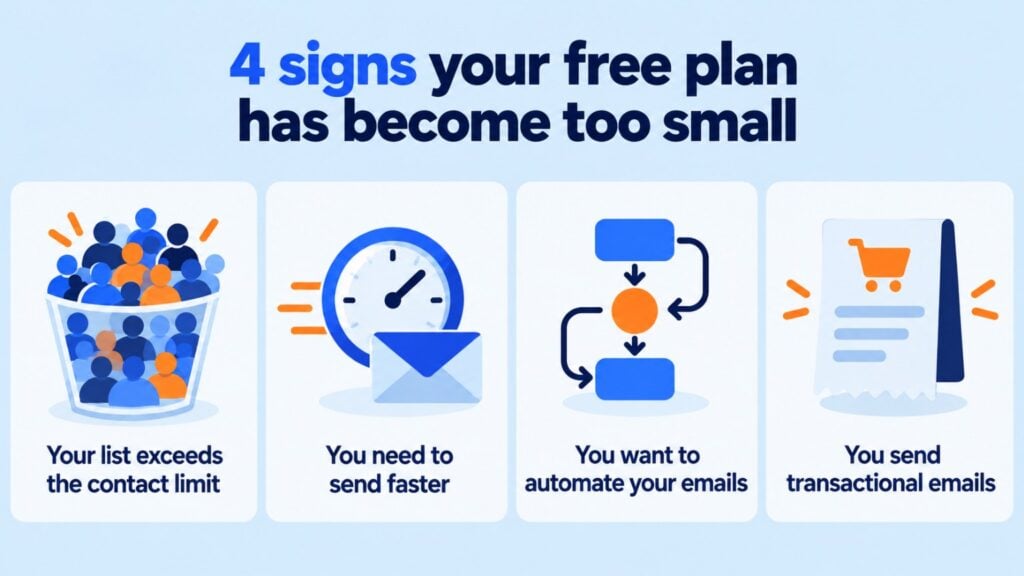
A free plan falls short when the limit starts making decisions for you. These are the signs:
Your list exceeds the contact cap. With 250 or 500 contacts, most free plans run out within a few months.
You need to send faster. A limit of 200 or 300 sends a day is no good for an offer with an expiry date.
You want to automate. Welcome emails, abandoned carts or birthdays require automations that many brands charge extra for.
You send transactional emails. Order confirmations or password emails usually go through an SMTP service, which is almost never free.
How Mailrelay helps you do free mailing
With Mailrelay you get the largest free account on the market: 80,000 emails a month and 20,000 contacts, with no daily limit. And it’s free forever.
The free plan includes the AI editor, the template gallery, groups and segments, A/B tests, scheduled sending, automations, landing pages and forms.
It also includes automatic list cleaning and statistics on opens, clicks, bounces and unsubscribes. Everything you need to do free mailing for real.
Y tienes soporte humano por ticket, como en los planes de pago. Si un día necesitas más, puedes ver los planes en precios.
80,000 emails a month without paying
20.000 contactos, sin límite diario y con soporte humano en todos los planes.
Frequently asked questions about free mailing
These are the most common questions before sending a free mailing.
Which tool lets you send the most emails for free?
Based on 2026 data, Mailrelay: 80,000 emails a month to 20,000 contacts, with no daily limit. Brevo stores more contacts (100,000), but only lets you send 300 emails a day.
¿Qué plataformas ofrecen límites altos de contactos en planes gratuitos?
Brevo guarda hasta 100.000 contactos y Mailrelay hasta 20.000. Sender admite 2.500 y el resto se queda entre 250 y 1.000. Pero fíjate en el envío: Brevo limita a 300 emails al día y Mailrelay no tiene límite diario.
¿Qué diferencia hay entre un plan gratuito y una prueba gratuita?
Un plan gratuito, o freemium, no caduca: puedes usarlo siempre dentro de sus límites. Una prueba gratuita te da acceso completo durante unos días, normalmente 14 o 30, y después tienes que pagar. La cuenta gratuita de Mailrelay es un plan gratuito permanente.
Can you do free mailing with Gmail?
Yes, up to about 500 recipients a day. You won’t have an unsubscribe link or statistics, and Google may block the account for a few hours if you exceed the limit. We cover it in detail in how to send bulk emails for free with Gmail.
Are there free mailing templates?
Yes. Most tools include a template gallery in the free plan. In Mailrelay you can use all of them, and also create designs with the help of AI.
Is there free mailing with no limits?
No. All free plans have a cap on contacts, sends or both. What matters is that the cap fits the size of your list and how often you send.
Yes, with the same free plan. You’ll find the steps in free newsletter.