Email marketing segmentation: what it is, types and how to segment your list
How to split your list so each contact gets the right email, without creating a thousand versions
Email marketing segmentation is the process of dividing your subscriber database into smaller groups based on shared characteristics or behaviors.
Instead of sending the same bulk email to all your contacts, you send each group the message that matches its interests.
For example, a clothing store can send the season’s new arrivals to people who bought recently, a discount to those who haven’t bought in months, and a welcome email to those who have just subscribed.
The list is the same, but each person gets a different email.
Why is segmentation important? – Key benefits
An email that isn’t interesting gets ignored, deleted or, worse, marked as spam. Segmentation reduces that risk, because each group receives something relevant to it.
These are the main benefits:
- More relevance: subscribers feel that the email speaks to them, not to an anonymous list.
- More opens and clicks: a subject line and content aligned with their interests increase the open rate and CTR.
- More conversions: the offer reaches the people most likely to take advantage of it.
- Fewer unsubscribes and complaints: when emails are useful, the unsubscribe rate and spam reports go down.
- Better deliverability: Gmail and Outlook value contacts who open and interact with your emails, and that protects your sender reputation.
- Getting to know your audience better: to segment, you have to look at your data, and that shows you who your readers are and what they are interested in.
Send each group the email that fits it
With Mailrelay you can create groups, custom fields and segments on every plan. Start for free with up to 80,000 emails a month.
Common criteria for segmenting your email list
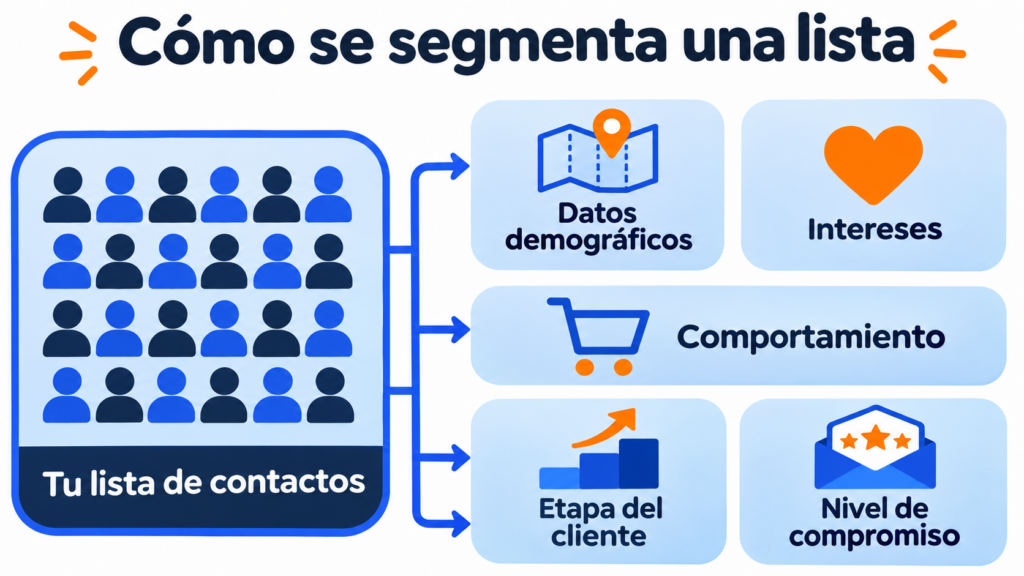
There are many ways to segment. The best one depends on your business and the data you have on each contact. These are the most common segmentation criteria:
| Criterion | Data it uses | Example |
|---|---|---|
| Demographic and geographic | Age, gender, language, country, city | A gym sends high-intensity classes to younger members and low-impact ones to older members |
| By interests (psychographic) | Topics chosen when subscribing, content they read | A media outlet separates its marketing readers from its technology readers |
| By behavior | Purchases, clicks, pages visited, downloads | An electronics store sends phone deals to people who have visited that section |
| By lifecycle stage | New subscriber, customer, inactive customer | A welcome for new subscribers, cross-selling for customers and re-engagement for inactive ones |
| By engagement level | Recent opens and clicks | More sends to active subscribers and a winback campaign for dormant ones |
| Firmographic (B2B) | Industry, size and country of the company | A software company sends different case studies to SMBs, agencies and large enterprises |
Segmentation criteria can be combined. A segment like “female customers in Madrid who have bought in the last 3 months” is valid if you have a campaign designed for them.
To fine-tune further, there are models such as RFM, which scores each customer by how recently, how often and how much they buy, or lead scoring, which measures each contact’s interest.
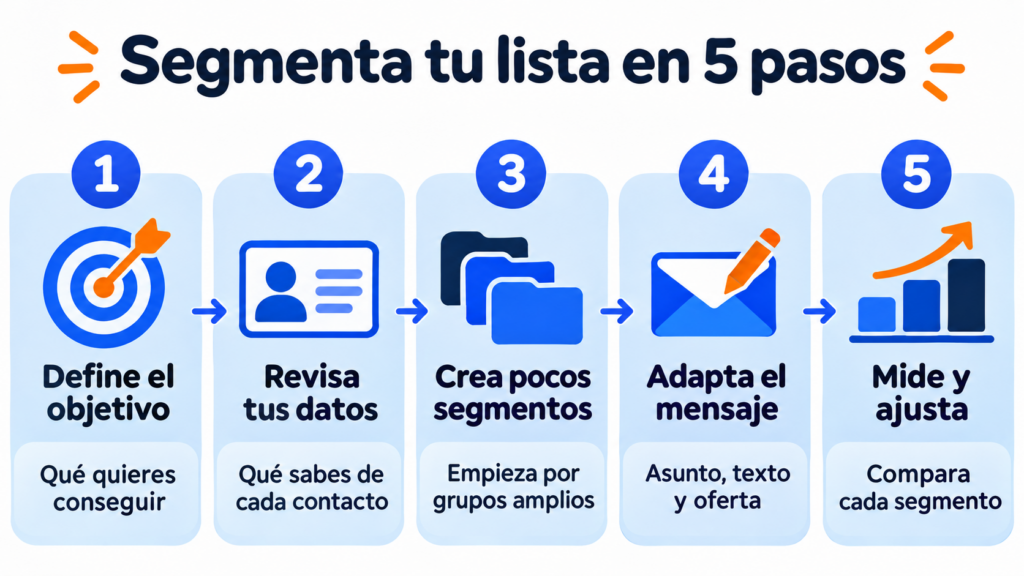
How to segment your email list step by step
You don’t need a huge database to get started with segmentation. Just follow this order:
- Define your objective. Do you want to sell a product, win back inactive subscribers or introduce a service? The objective determines which segment you need.
- Review the data you have. Look at what you know about each contact: source, interests, purchases, opens. If you’re missing a piece of data, ask for it in the signup form or store it in a custom field.
- Create a few broad segments. Start with simple splits, such as customers vs. non-customers or active vs. inactive.
- Adapt the message to each one. Change the subject line, the copy, the images or the offer. If you only change the recipient’s name, you’re not segmenting, you’re personalizing.
- Measure and adjust. Compare opens, clicks, conversions and unsubscribes by segment. Use what you learn to create more precise segments.
Segment, group or custom field: how they differ
These three terms are often confused. In most email marketing tools, they work like this:
| Term | What it is | Example |
|---|---|---|
| Subscriber group | A folder where you store contacts, manually or from a form | “Customers”, “Weekly newsletter” |
| Custom field | A piece of data stored in each contact’s record | City, date of last purchase, customer type |
| Segment | A filter with conditions on groups, fields or behavior | Contacts in the “Customers” group who live in Madrid |
In other words, groups and fields are the raw material. Segmentation is how you combine them to choose who receives each campaign.
Best practices for effective segmentation
Segmenting well is more than creating random groups. These are the recommendations that make the biggest difference to results:
- Keep your data up to date. Outdated data leads to the wrong segment. Let subscribers update their preferences.
- Don’t over-segment. If a segment is so small that it doesn’t justify its own email, merge it with another.
- Test before rolling out. An A/B test within a segment tells you which subject line or offer works best.
- Automate what repeats. The welcome email, the abandoned cart email or re-engaging inactive subscribers can be sent automatically when someone joins a group.
- Combine segmentation and personalization. Segmentation chooses who you send to, and personalization adapts what each person sees, with variables or dynamic content blocks.
How do you resend a campaign to people who didn’t open it?
You don’t need an automatic resend button. A segment is enough: you create a group with the subscribers who didn’t open the email and send them a second version a few days later.
Wait 3 to 5 days. Many people open their email late, and if you resend too soon you write to people who were still going to read you.
Change the subject line and the preview text. If you send the same thing, it will most likely go unnoticed again. Also try a different day and time.
Do it once, and only with your important sends. Doing it with every newsletter wears out your list.
Keep in mind that opens are not an exact figure. Apple Mail, for example, loads images on its own and can mark emails that nobody has read as opened.
Some of the people who didn’t read you won’t get the resend.
In Mailrelay, you create the segment of people who didn’t open with the segmentation tool. You need open tracking, which is available on the free account and the Enterprise plan.
How Mailrelay helps you
In Mailrelay you can organize your contacts into groups and store their data in custom fields on every plan, including the free account.
With those groups and fields, you create segments with the conditions you need. That way, segmentation is done from the same dashboard you send from.
On the free account and Enterprise, which track opens and clicks, each contact also has a reputation of 1 to 5 stars calculated from them.
You can use it as a condition in a segment, for example, to send an offer only to your most active subscribers.
Automations, included in the free account, can be triggered when a subscriber joins a group.
If only part of the message changes from one segment to another, you don’t need a separate campaign for each one. With dynamic content you send a single campaign, and each contact sees the block that matches their custom fields.
Variables also work in the subject line: use “Add variables” to insert the name or any other field. You’ll find it step by step in the guide on dynamic variables to personalize your emails.
If you prepare different versions for several segments, don’t repeat the parts they share. Mark a block as universal, such as the header, the footer or an offer button, and it is saved in the editor’s “Universal” tab so you can use it in any newsletter. It’s available on every account, including the free one.
The free account lets you send up to 80,000 emails a month to 20,000 contacts, with human support on every plan.
Segment your list at no cost
Groups, segments and automations included in the free account, with human support on every plan.
Key takeaways on segmentation
Email marketing segmentation means dividing your list to send each group the email it is interested in. It improves opens, clicks and deliverability, and reduces unsubscribes.
Start with a few broad segments, genuinely adapt the message to each one and measure the results separately. You can fine-tune the rest over time.
Frequently asked questions about email marketing segmentation
If you still have questions, you may find the answer here.
What is segmented email marketing?
It is email marketing that applies segmentation: it sends different campaigns to each group of contacts instead of a single email to the whole list.
It is the opposite of generic mass sending, where everyone receives the same message.
Why do you lose engagement when sending bulk emails without segmenting?
Without segmentation, part of the list receives emails it isn’t interested in. Those people stop opening them, unsubscribe or mark them as spam.
Over time, mailbox providers interpret this as a sign of low quality and send more emails to the spam folder, including to those who did want to read them.
Related entries
Here are some articles along the same lines: