Mailchimp
What it offers, what it really costs in 2026 and when another option suits you better
Mailchimp is an email marketing and automation platform founded in 2001 in Atlanta (United States) and owned by Intuit since 2021.
It is probably the best-known email marketing tool in the world.
Many people use its name as a synonym for “sending newsletters”. But its free plan has fallen short in 2026, and its prices rise quickly as your list grows.
Let’s look at what it is, what it’s for, how much it costs today and what its users think of it. And when another option suits you better, such as Mailrelay, which still offers a free account with 80,000 emails a month.
What is Mailchimp and what is it for?
Mailchimp started as a side project of Ben Chestnut, Dan Kurzius and Mark Armstrong, who ran a web design agency. Over the years it became the industry giant.
In 2021, Intuit (the company behind TurboTax and QuickBooks) bought it for around 12 billion dollars. At the time it had more than 13 million users.
In 2022, Ben Chestnut stepped down as CEO.
It does the same job as any email marketing tool: gathering your contacts, designing emails and sending them to your whole list or to part of it.
With it you can send a newsletter, launch promotions or automate the emails of an online store.
Today it presents itself as a broader marketing platform. It adds SMS, landing pages, forms, a small website and predictive analytics for ecommerce.
What features does Mailchimp have?
The platform brings together almost everything a business needs to communicate by email. These are its main features:
- Drag-and-drop editor with pre-designed templates and product blocks.
- Customer journeys (Customer Journey Builder) to automate welcome emails, abandoned carts or birthdays.
- Segmentation and predictive analytics, such as each customer’s likelihood of purchase.
- A/B tests and, on the Premium plan, multivariate tests.
- Landing pages, forms and a simple website builder.
- Intuit Assist, its AI assistant for writing and designing campaigns.
- Hundreds of integrations with Shopify, WooCommerce, WordPress, CRMs and other apps.
For transactional emails, such as order confirmations, Mailchimp offers a separate service: Mailchimp Transactional (formerly Mandrill). It is only available as a paid add-on on the Standard and Premium plans.
How do you get started with Mailchimp?
Creating an account takes a few minutes. You sign up with your email, confirm the account and choose a plan.
Next, it’s time to lay the groundwork. Add your company details, which will appear in the footer of every email, and authenticate your domain with SPF and DKIM. Without that step, your campaigns are more likely to end up in spam.
Then you import your contacts, create a subscription form to capture more and design your first campaign with a template. Before sending it, send yourself a test and check how it looks on mobile.
Keep in mind the free plan’s limit, though: if you import more than 250 contacts, you’ll have to upgrade to a paid plan. In Mailrelay the steps are the same, but you can import up to 20,000 contacts without paying.
How much does Mailchimp cost in 2026?
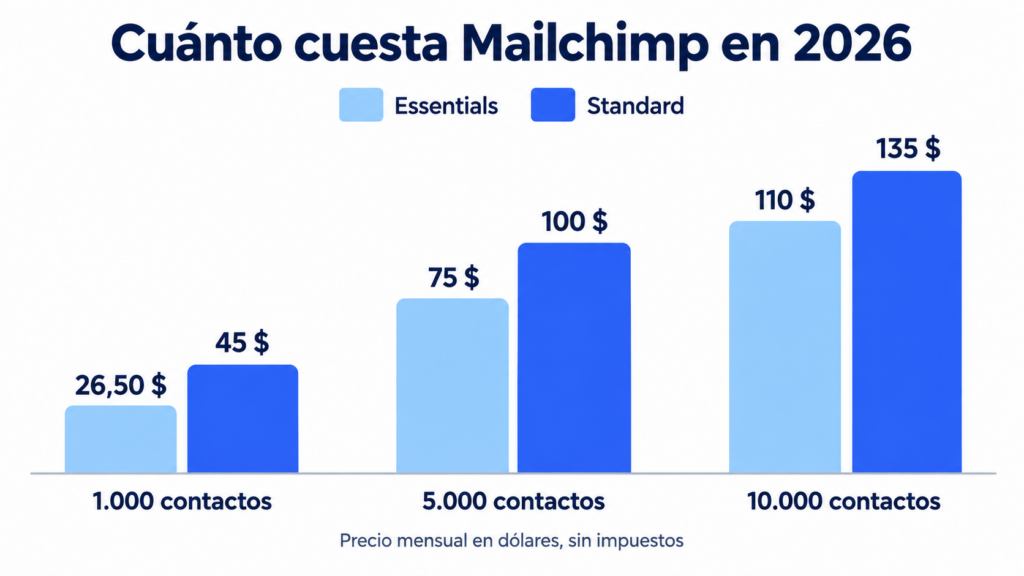
Mailchimp has three paid plans: Essentials, Standard and Premium. The price depends on the number of contacts in your account.
These are the monthly rates in dollars, excluding taxes, as of September 2026:
| Contacts | Essentials | Standard | Premium |
|---|---|---|---|
| 500 | $13 | $20 | $350 |
| 1.000 | $26.50 | $45 | $350 |
| 2.500 | $45 | $60 | $350 |
| 5.000 | $75 | $100 | $350 |
| 10.000 | $110 | $135 | $350 |
Each plan limits the number of sends per month. On Essentials you can send ten times your number of contacts; on Standard, twelve times; and on Premium, fifteen.
What changes between plans?
Essentials includes A/B tests and abandoned cart emails, but not multi-step journeys. Standard adds those journeys, advanced segmentation and more users. Premium adds phone support and unlimited users.
There’s one detail many people overlook.
Mailchimp charges for every contact in your audience, including unsubscribed and non-subscribed contacts. And if you go over your plan’s limit, it doesn’t cut off the service: it adds an extra charge to your bill.
That’s why it’s worth cleaning your list often. If you don’t, you may end up paying for people who no longer receive your emails.
Is Mailchimp free?
Yes, but it’s increasingly limited.
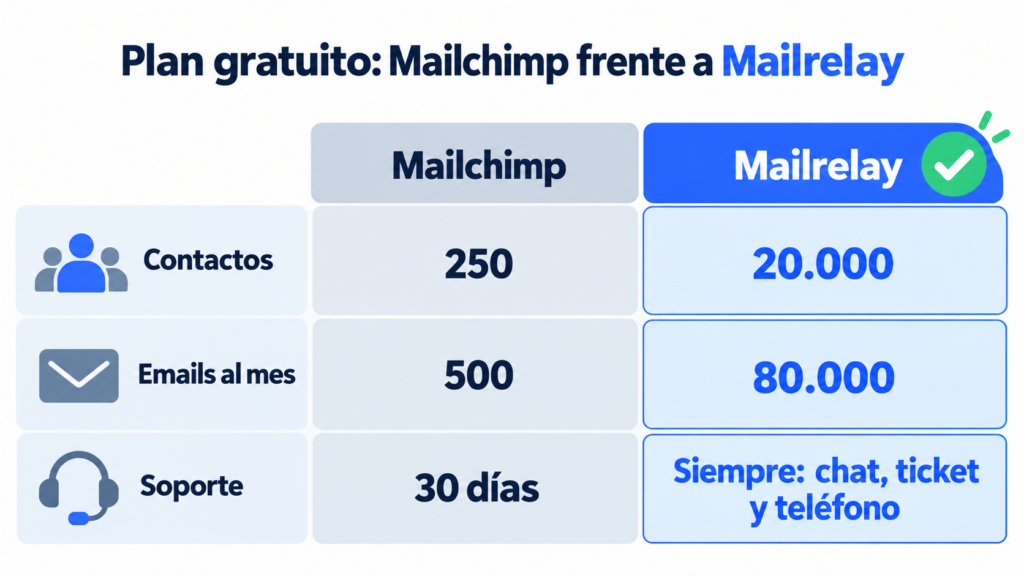
Since February 17, 2026, it allows 250 contacts and 500 sends a month, with a maximum of 250 a day. It used to allow 500 contacts and 1,000 sends.
With that plan you get a single audience and a single user. Templates are limited, and there are no automated journeys or scheduled sends. And support only lasts for the first 30 days.
If support matters to you, check what support each tool’s free plan includes: not all of them keep it after the first month.
As you can see, it’s good for trying out the tool or for a small list. With 250 contacts, one newsletter a week uses up the month’s 500 sends in two weeks.
With Mailrelay, on the other hand, you can send up to 80,000 emails a month to 20,000 contacts without paying.
Has your list outgrown Mailchimp’s free plan?
With Mailrelay you can send up to 80,000 emails a month to 20,000 contacts for free, with human support from day one.
Mailchimp pros and cons
There are reasons for its popularity. But it also has limitations worth knowing before you choose it.
Advantages:
- A well-known brand, with lots of documentation, courses and specialized agencies.
- An easy-to-use editor and polished templates.
- Integrations with almost any online store, CRM or form.
- Advanced ecommerce features, such as purchase prediction.
Disadvantages:
- Free plan cut down to 250 contacts and 500 sends a month.
- It also charges for unsubscribed and non-subscribed contacts.
- Phone support is only on the Premium plan, from 350 dollars a month, and only in English.
- Multi-step automated journeys require the Standard plan.
Mailchimp: user reviews
User reviews highlight its editor, its reports and its integrations. It’s a mature, reliable tool, and it shows.
The criticism focuses on price.
The review site EmailToolTester gives it 3 out of 5 and sums up the problem: paid plans get expensive quickly, and it charges even for inactive or unsubscribed contacts.
There are also complaints about support.
On paid plans they help you by chat and email, in Spanish too, but phone calls are only available on Premium and in English. And help migrating data from another platform is also reserved for the Premium plan.
How is Mailchimp different from Mailrelay?
Both are complete email marketing platforms. The big difference lies in what you get without paying, how the price is calculated and the support.
| Mailchimp | Mailrelay | |
|---|---|---|
| Contacts on the free plan | 250 | 20.000 |
| Free emails per month | 500 | 80.000 |
| Daily limit | 250 emails | No daily limit |
| Free A/B tests | No | Yes |
| Free automations | No | Included |
| Support on the free account | 30 days only | Always, via ticket, with no time limit |
| Phone support | Premium only, in English | Enterprise only |
| How the price is calculated | Per contact (including unsubscribed ones) | Per email sent |
| Transactional emails | Paid add-on (Standard and Premium) | SMTP and API in the same account (30 days free on the free account) |
| Servers | In the US | In the European Union |
| Connection with ChatGPT and Claude (MCP) | Official only for Mailchimp Transactional; for campaigns, third-party connectors | MCP server in beta, also on the free account |
Imagine you have a list of 10,000 contacts and send one newsletter a week.
With Mailchimp you need at least the Essentials plan, at a cost of 110 dollars a month. With Mailrelay you can do it with the free account, because about 43,000 sends a month stay below the 80,000 limit.
Mailchimp has been the industry’s leading email marketing tool for decades, especially in the United States. At Mailrelay we’ve tried to build an effective Spanish alternative, but with a different approach: genuinely helping small businesses grow, turn a profit and become profitable before they need a paid plan. I think that has been the differentiator that has let us compete all these years.
Jose Argudo, CMO at Mailrelay
When should you choose Mailchimp and when Mailrelay?
Mailchimp is a good fit if you have a high-volume online store and want its predictive analytics. Also if your team already knows it or you work with an agency that specializes in it.
Mailrelay suits you if your list exceeds 250 contacts and you want to keep sending without paying.
Or if you value being able to call and talk to a person who helps you, whatever your plan. Also if you’d rather pay for what you send and not for every contact you store.
You can compare the rates on the Mailrelay pricing page.
Mailchimp alternatives
Which tools compete with Mailchimp? These are the most common ones in the Spanish-speaking market:
MailerLite is simple and cheap, but it also cut its free plan to 250 subscribers in 2026. Brevo charges per email sent and adds SMS and WhatsApp. Mailjet stands out for transactional emails.
You can also look at Acumbamail, a Spanish tool, or Klaviyo and HubSpot if you’re after ecommerce or CRM features. You’ll find a full comparison in our guide to email marketing software.
If you already use it and want to switch, export your audience as a CSV and import it into Mailrelay in a few minutes.
We explain it step by step in our guide to the Mailchimp alternative. Don’t forget to authenticate your domain to meet the Gmail and Yahoo requirements and protect your deliverability.
How Mailrelay helps you
Mailrelay is the Mailchimp alternative for anyone who needs volume without paying. The free account includes up to 80,000 emails a month and 20,000 contacts.
All plans, including the free one, include an AI editor, email and SMS automations, custom fields, landing pages, A/B tests and automatic list cleaning.
And human support is available on every plan.
Switch from Mailchimp to Mailrelay hassle-free
Import your contacts in minutes and keep sending for free. If you have any questions, we’re here to help on every plan.
Frequently asked questions about Mailchimp
What is Mailchimp and what is it for? It’s an email marketing platform for sending newsletters, automating emails and creating landing pages and forms. It has belonged to Intuit since 2021.
Is Mailchimp free? Since February 2026, its free plan has allowed 250 contacts and 500 sends a month. For larger lists, paid plans start at 13 dollars a month.
How much does Mailchimp cost? It depends on your contacts. With 1,000 contacts, the Essentials plan costs 26.50 dollars a month and Standard, 45. Premium starts at 350.
Is Mailchimp available in Spanish? Yes. The website and the chat and email support are in Spanish. Phone support is only in English and only on the Premium plan.
Who owns Mailchimp? Intuit, the US company behind TurboTax and QuickBooks. It bought it in 2021 for around 12 billion dollars.
Which tools compete with Mailchimp? The best known are Mailrelay, MailerLite, Brevo, Mailjet, Acumbamail, Klaviyo and HubSpot. If you’re looking for a generous free plan, Mailrelay lets you send 80,000 emails a month to 20,000 contacts.