Opt-in and double opt-in: what they mean, how they work and what they are for
The confirmation click that cleans your list and proves you have permission
Opt-in is a person’s explicit agreement to receive your emails. Double opt-in adds one more step: confirming that subscription by clicking a link in an email. That way you know the address exists and that its owner wants to be on your list.
You’ll find both terms on any newsletter signup form. Let’s look at what each one means, when double opt-in is the better choice and how to write the confirmation email.
What does opt-in mean?
Opt-in comes from the English verb to opt in, meaning to choose to join. In Spanish it is rendered as «suscripción voluntaria» (voluntary subscription) or «aceptación» (acceptance).
In email marketing, a person opts in when they leave their address on a subscription form and indicate that they want to receive your emails. The opposite is opt-out: emailing someone without permission and waiting for them to unsubscribe.
In Spain and the European Union, email advertising requires opt-in, not opt-out. Permission comes before the first send.
What is double opt-in and how does it work?
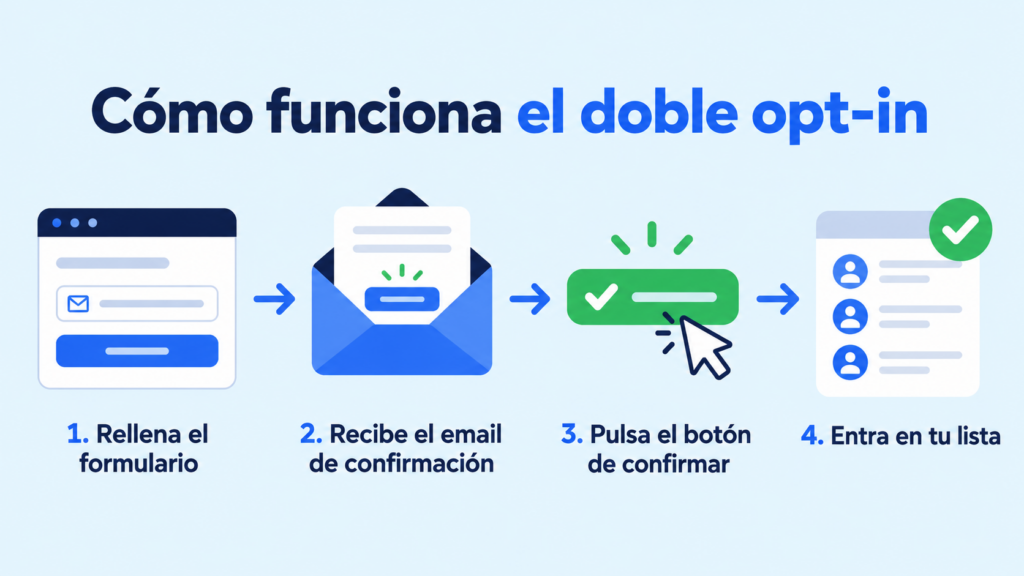
Double opt-in, also known as confirmed opt-in or subscription confirmation, is a two-step opt-in. Here’s how it works:
- The person enters their email address in your form and agrees to receive your emails.
- They instantly receive a confirmation email with a link or a button.
- They click the link and their subscription is confirmed.
- Only then are they added to your list and start receiving your campaigns.
If they don’t confirm, you don’t email them again. That click proves the address is theirs and that they wanted to subscribe. Sign-ups that are never confirmed never reach your database.
Differences between single opt-in and double opt-in
The difference lies in that second step. Here’s a quick comparison:
| Single opt-in | Double opt-in | |
|---|---|---|
| Steps to subscribe | One: fill in the form | Two: form and confirmation click |
| Fake or mistyped addresses | Get into your list | Are kept out |
| Bot sign-ups | Get into your list | Don’t confirm and are kept out |
| Proof of consent | The form submission | The form submission and the click in the email |
| List growth | Faster | Somewhat slower |
| List quality | Variable | High |
Single opt-in gets you more contacts; double opt-in gets you better ones. And in email marketing, a smaller but genuine list usually opens and buys more. On top of that, the Gmail, Outlook and Yahoo requirements penalize lists with lots of complaints.
What is double opt-in for?
Double opt-in helps you keep a clean list and be able to prove permission. In practice, it gives you five things:
Addresses that exist. A typo like “gmial.com” will never confirm, so it won’t cause you any bounces.
Fewer bots and malicious sign-ups. Bots that fill in forms don’t click the confirmation link. The same goes for anyone who subscribes someone else without their permission.
Fewer spam traps. Spamtraps don’t confirm subscriptions, so they never reach your list.
Better deliverability. Fewer bounces and fewer complaints improve your sender reputation. That helps Gmail, Outlook and Yahoo deliver your emails to the inbox rather than catching them in their spam filters.
Proof of permission. The click is recorded with its date and time, which comes in handy if someone claims they never subscribed.
Disadvantages of double opt-in
The main one is that some of the people who sign up never confirm. Some don’t see the email, others find it in spam and others leave it for later.
You can reduce that loss with three measures. Let them know on the thank-you page that you’ve sent them an email. Write a clear subject line. And, if your tool allows it, resend the confirmation to those who didn’t open it.
Even so, the contacts who don’t confirm would hardly ever have opened your campaigns. Removing them is part of list hygiene.
Is double opt-in mandatory?
No. Neither the GDPR nor Spain’s LSSI requires double opt-in. What they do require is each person’s prior consent and the ability to prove it.
Article 7 of the GDPR places that burden on the sender. And the LSSI prohibits email advertising to anyone who hasn’t requested or authorized it, except to your own customers about products similar to the ones they bought.
Double opt-in isn’t the only way to comply, but it is the easiest to prove. That’s why most email marketing tools use it.
Nor does it replace your other obligations: an unticked checkbox on the form, privacy information and an unsubscribe link in every campaign. You’ll find the full framework under data protection. And if someone wants to receive fewer emails instead of leaving, offer them a preference center.
Forms with double opt-in included
Create your free account and collect subscribers with email confirmation: you’ll have proof of permission for every contact.
Double opt-in confirmation email example
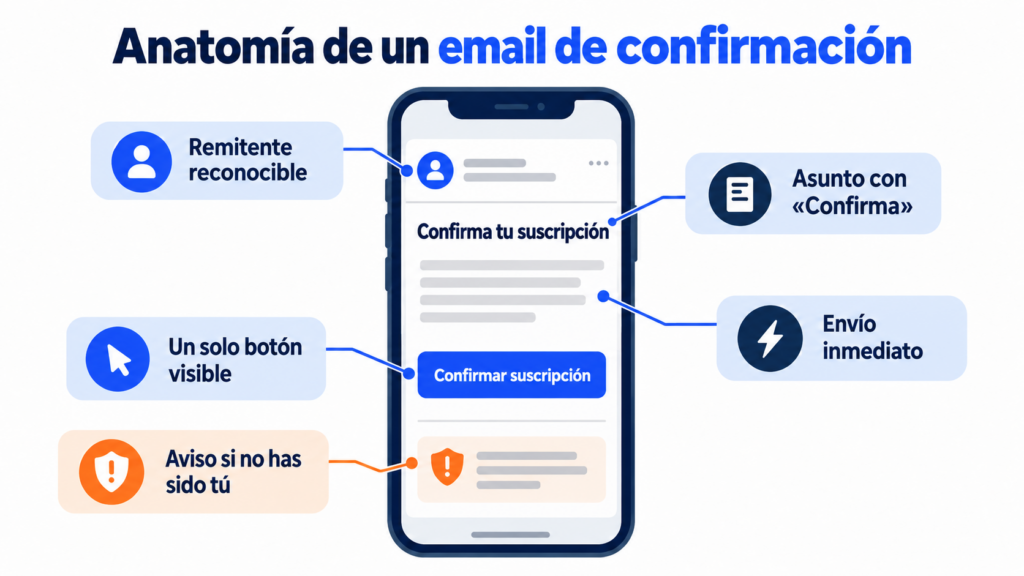
The confirmation email is a transactional email: it is sent automatically in response to the sign-up. It needs to be short and clear, with a single button. Here’s a template you can adapt:
Subject: Confirm your subscription to the [Brand] newsletter
Preheader: One click and you’re done. If this wasn’t you, please ignore this message.
Hi,
We’ve received a request to subscribe this email address to the [Brand] newsletter. Every [frequency] we’ll send you [what you’ll send].
[Confirm my subscription]
If you didn’t subscribe, there’s nothing you need to do: we won’t email you again.
Best regards,
The [Brand] team
To make it work, keep these guidelines in mind:
- A recognizable sender, the same one you’ll use in your campaigns.
- A direct subject line, with the word “confirm” and your brand name.
- A single button, visible without scrolling on mobile.
- Immediate sending, within seconds of the sign-up.
- A thank-you page that tells people to check their inbox, and their spam folder too.
- A welcome after confirmation, with a welcome email that delivers on what you promised.
Double opt-in in Mailrelay
In Mailrelay, subscription forms always use double opt-in. When someone signs up, they receive an email to confirm their subscription, and they only join your list once they do.
You don’t need to turn it on: you create the form, add it to your website or a landing page and the system sends the confirmation.
The confirmation email can be customized with your own text and branding. There’s one for the whole account, so write it with all your forms in mind.
You can then organize new contacts into groups and welcome them with an automation.
All of this is included in the free account, with up to 80,000 emails a month to 20,000 contacts and human support via chat, ticket and phone.
Grow a list that actually opens your emails
Double opt-in forms, automatic list cleaning and up to 80,000 free emails a month to 20,000 contacts.
Frequently asked questions about opt-in and double opt-in
These are the most common questions about these two terms.
What does opt-in mean, literally?
“To choose to join.” In email marketing it refers to voluntary subscription: the person explicitly agrees to receive your emails.
What’s the difference between opt-in and opt-out?
With opt-in, the person agrees before receiving anything. With opt-out, they are emailed without permission and only stop receiving emails if they unsubscribe. For email advertising in Spain, you need opt-in.
What happens if a subscriber doesn’t confirm the double opt-in?
They aren’t added to your list and don’t receive your campaigns. You can resend the confirmation once, but you shouldn’t email them again if they still don’t confirm.
Can I switch a list I already have to double opt-in?
Yes, with a re-confirmation campaign: an email asking your current contacts to confirm that they want to keep receiving your emails. You keep only those who respond. If you’re coming from another tool, first check how to import your contacts.
Does double opt-in also work for WhatsApp or SMS?
The idea is the same: ask for explicit permission and be able to prove it. With SMS or WhatsApp, it’s usually done with a confirmation message or a specific keyword that the person replies with.