
Before we talk about how to create a mailing, we need to look at the difference between: Email marketing vs mass email.
Let’s start with a short exercise, typical of talks and webinars:
How many times a day do you check your email?
Almost certainly more than once.
And when you check your email. How many useful emails do you find? Probably very few, or none.
So the mindset we have when checking our email is something like: I’ll see if I can clean out my inbox.
In other words, the perception is that we’re going to find a bunch of emails that are of no use to us, and our goal will be to delete them one after another without a second thought.
All in all, in an environment where billions of emails are already sent every day, where the average user receives hundreds of emails a day, we want to do our bit with our mailings and add even more emails to the pile.
But that’s not what we want at Mailrelay! Here’s a short summary video for you:
The difference between mass email, as it’s commonly misunderstood, or bulk email, and email marketing is the value you provide.
When we do email marketing, we aim to provide value to our subscribers, beyond the sale.
What is mailing?
Mailing is a digital marketing strategy that uses email to communicate with a list of subscribers.
This method isn’t just about sending a bunch of emails to users’ inboxes, but about doing it in a way that adds value and generates engagement.
What do we use mailing for? Objectives
Promoting Products and Services: Through mailing, you can inform your subscribers about new products, special offers and promotions. Think of it as a direct conversation with your customers, where you tell them what you have in store for them.
Customer Loyalty: Staying connected with your customers is vital. By sending relevant, useful content, you not only keep them interested, but also motivate them to come back and buy again. Don’t underestimate the power of good advice or an inspiring story.
Lead Generation: You can attract new customers by offering free content, such as guides or ebooks, in exchange for their email address. That way, you build your contact list with people who are genuinely interested in what you offer.
Communicating News and Updates: Keep your subscribers informed about what’s new at your company. This includes everything, from policy changes to important events. Good communication builds trust.
Before preparing your mailing: what is email marketing, or marketing via email?
Email marketing is a form of online marketing that uses email as the means of communication between a sending party (the sender) and 2 or more recipients (the subscribers). The email is used to send a message to the recipients, which can be:
- Promotional or sales-oriented
- Informational
- Contact-related
- Etc.
In other words, we can use an email campaign or mailing as a direct means of communication between us, our company, and a list of subscribers, customers or contacts, who will receive our message (email).
Other articles you may be interested in are the following:
1) How to Create a Mass Mailing?
2) Learn How to Write Your Subscription Form with Mailrelay
3) 4 Newsletter Templates for Your Next Promotional Campaign
4) 7 Advanced Techniques to Close More Sales with Your Emails
Types of mailing
Newsletters: These are news bulletins that you send out regularly. They’re not just for promoting, but also for educating and entertaining. Include news, tips and interesting content that your subscribers will want to read.
Promotional Emails: These are more direct and have a clear goal: to sell. Use attractive images and a concise message to capture your readers’ attention.
Transactional Emails: They are sent automatically in response to specific actions, such as a purchase or a sign-up. They make sure your customer feels supported every step of the way.
Welcome Emails: When someone subscribes to your list, send them a welcome email. Introduce your company and what they can expect to receive. It’s a great opportunity to make a positive first impression.
Sales vs Marketing?
Applied to sending mailings, it would be something like sending a pile of emails that sell anything from a tent to work clothes to shoes, and so on:
“With no segmentation at all, there’s no need to even worry about the customer’s real needs.”
If they sell something, great, and if they don’t, well, they just add more emails to the list. In short, it’s an inefficient technique.
Normally, these email campaigns are smaller in terms of email volume, but they’re better segmented and more targeted to the customer’s needs.
► What are some examples of mailing like this?
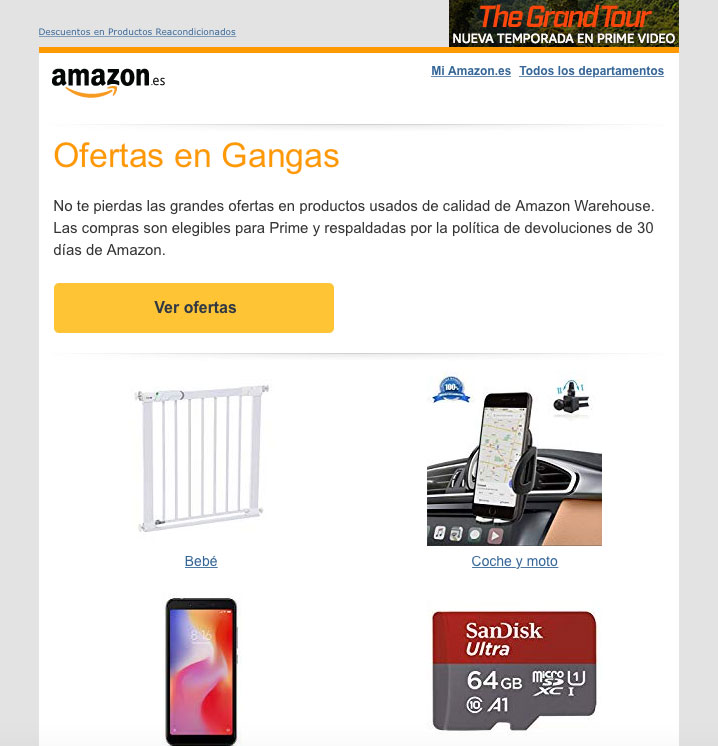
Amazon has segmented based on the customer’s preferences, drawing on previous purchases, and shows similar products in this email marketing campaign.
“Amazon surely doesn’t send this mailing to every customer it has in the world. Can you imagine if it did?”
It is segmented by:
- Language (Amazon Spain store)
- Product type (book)
- Category (children’s book)
- Related (books from the same publisher that were purchased, or on a similar topic)
This segmentation makes it a relevant email for the person receiving it.
Let’s look at one more example.
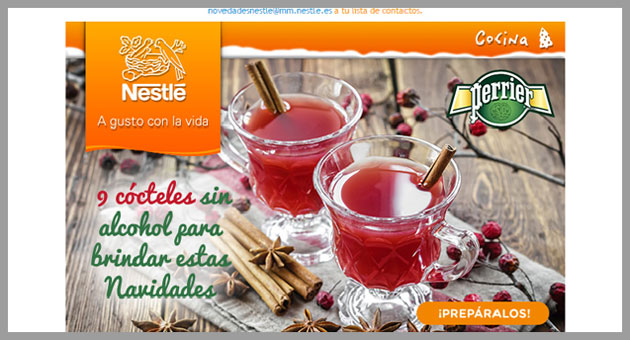
In this case, the value isn’t provided through related products of interest to the subscriber, but through content.
Thanks to the segmentation we have of our subscribers, we can identify those who may be interested in cooking recipes, such as the cocktails offered in this email.
“We don’t contact people just to sell, we offer useful content based on customers’ preferences.”
And this is where our strategy will be different: we’ll try to build a relationship with the customer, not just make a sale at all costs.
We’ll try to be useful, sending at the right frequency and without flooding people with emails of little interest, so that we get them to engage with us.
We’ll also want them to reply to our emails, open them, and click on the links. And of course, for our emails to stand out from the hundreds of other emails we mentioned earlier.
This interaction, or engagement, is going to be key to the results of our email marketing campaigns.
Do you know why?
· Engagement and mailing reputation
Engagement, or interaction, is nothing more or less than the extent to which subscribers react to the mailings we send them:
- Whether they open our emails
- Whether they click on the links we include in our emails
- Whether they reply to the emails we send them
- Whether they move them to a folder
- Whether, if an email lands in the “spam” folder, they mark it as “not spam”
- How long they spend reading it
These things, among others, and how often they do them.
Will we have all this information in our email marketing tool?
Not all of it. In our tool, and in other mass email tools, the information usually available relates to opens and clicks, and perhaps forwards.
So, who has the rest of the information mentioned?
Mainly the ISPs, such as:
- Gmail
- Hotmail / Outlook.com
- Yahoo
- AOL
You have to think that, for these companies, the subscribers you have are: their customers.
For you, it’s just one more subscriber, but for them, they are customers.
Customers who use their email program, customers who see their advertising (which is where they make their money), and so on.
They want their customers to have a good user experience.
That they receive only the emails they want, that they don’t find annoying spam in their inbox, but also that they don’t miss any email that is of interest to them.
Keep in mind that the way ISPs learn subscribers’ preferences is based on their actions.
So the actions we saw above would be positive signals, showing the subscriber’s interest in the emails we send.
But if, instead, they did the following:
- They delete emails without opening them
- They mark them as spam
- Or worse, as phishing
It would penalize us severely.
Important
ISPs are increasingly trying to manage this “engagement” with the mailings you send on an individual basis, for each subscriber.
In other words, taking each person’s preferences into account.
For example: in Gmail, if every time you receive an email from “Paco’s Blinds” you simply delete it, nothing will happen the first time, nor the second, but if you delete it 10 or 15 times, most likely those emails will end up in your spam folder.
The reason this happens is that Gmail clearly sees you aren’t interested in them, over time it learns your preferences, and puts those emails in spam so they don’t bother you.
But if someone else does open them and interact with them, they’ll keep receiving them as wanted email.
► But we need to be careful
Even though ISPs calculate this interaction individually, it is taken into account for the domain’s overall sending reputation.
Note
A domain’s sending reputation is a history that assesses what has been sent from your domain, and it is one of the determining factors in whether your emails reach the inbox or the spam folder
In other words, if one person doesn’t open your emails, no big deal.
But if you send a mailing to a hundred people and only one opens it, there’s a problem.
This will hurt your sending reputation, because subscribers aren’t interested in what you send.
It would be even worse if several subscribers mark your emails as spam. One wouldn’t be a problem, but if several do, your sending reputation will suffer.
And you’d pay for it in your next email campaigns.
“ISPs will conclude that you send unwanted emails and, when in doubt, won’t deliver your emails to the inbox.”
A situation that’s quite hard to fix.
► What else affects the results of a mailing?
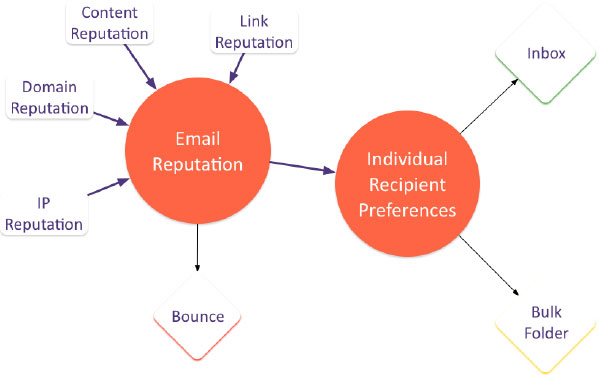
There are many factors we need to take into account:
- Link reputation ⇒ that is, if you insert a link in your email to a website, the reputation of the linked website. If you link to a website with a poor reputation, this will hurt the delivery of your email. So be careful with the links you include in your email (using URL shorteners isn’t advisable either)
- Content reputation ⇒ if the email’s content is about Viagra, the chances of it reaching the inbox are lower than if you talk about cooking recipes.
- Domain reputation ⇒ based on the sending history we mentioned earlier.
- Database quality ⇒ whether it includes many incorrect accounts, spam traps, many bounced emails, and so on.
- Correct configuration ⇒ SPF, for example.
- Individual preferences ⇒ has the subscriber opened your emails in the past? Have they deleted them? Have they marked them as spam?
- The email design
- Sending IP reputation ⇒ this depends on the email marketing tool you use.
Notice something curious: of all the points above,
- Only one depends on the subscriber ⇒ their preferences and past actions
- Only one depends on the tool used ⇒ the IP’s reputation
The rest of the factors depend on you and how you do things.
Take special care
After sending, the email marketing tool will tell you how many emails were delivered. But it has no information about which folder they end up in. We don’t know whether they go to the inbox or to the spam folder.
But going back a bit to what has been explained throughout this post, let’s move on to the next question.
If we’ve never sent a mailing before, we’ll have a good reputation, right?
The answer is no. If you’ve never sent a mailing, you have neither a good nor a bad reputation.
That normally means you need to be very careful with your first sends. Something we’ll look at in detail in the next section. Let’s go!
· How to start working on mailing with an existing database?

In the previous section we talked about the importance of adding value in our emails.
About how fundamental “engagement” with subscribers is, that interaction.
About all the aspects that influence the delivery of our emails.
Now, with all that knowledge, we’re ready to get started with our email marketing campaign
At this point I assume you already have a list of subscribers, whether from former customers, from contacts you’ve made at a trade show, etc.
We’ll talk about lead capture another time, but now we need to talk about getting started when you already have a list.
► Why work with an existing email list?
Because starting with a list is much more likely to cause problems than the opposite.
Curious, isn’t it?
It seems like it would be easier to run email campaigns if we already have contacts.
But that’s not always the case.
There are problems that are hard to solve, which is why it’s important to make clear how to work with an existing email list.
“Let’s be clear: the problem is volume.”
Remember when we talked at the beginning about the domain’s historical sending reputation?
If we’ve never sent an email marketing campaign using our domain before, and we suddenly send a mailing of 5 or 10 emails, most likely nothing will happen.
But if we go from sending nothing to sending 10,000 emails, then something can happen.
ISPs (remember Gmail, Hotmail, Yahoo …) keep histories, and this huge sudden growth will look “suspicious” to them.
Some of the questions these ISPs might ask themselves are the following:
- How can this huge increase be explained?
- Is it a purchased list, or emails obtained by shady means?
- What do the contacts do when they receive the emails? Do they open them? Do they mark them as spam?
- Does the list itself cause problems? Incorrect emails? Bounces? At what volume?
In these matters, the more failures the worse. It’s not the same for 24 out of 10,000 to bounce as for 1,000 to do so.
► But what are these bounces we keep mentioning?
A bounce indicates that the message could not be delivered to the email address specified as the destination. It can happen for various reasons.
There are two possible types of bounce:
- Soft bounces ⇒ which indicate a temporary error, and the message may be deliverable on a later attempt
- Hard bounces ⇒ which indicate a permanent error, so it’s not worth trying to send again
And some of the errors we may get are:
- Bad-configuration ⇒ there is an error in the destination server’s configuration that prevents the message from being delivered
- Bad-connection ⇒ connection problems prevent the message from being delivered to the destination email
- Bad-domain ⇒ the destination domain is incorrect and the message can’t be delivered
- Bad-mailbox ⇒ in this case the domain is correct, but the recipient’s address is not, or doesn’t exist. For example, [email protected]: hotmail.com is correct, but “noexiste” may be incorrect.
- Content-related ⇒ the message wasn’t delivered for reasons related to its content (it looks like spam)
There are many more possibilities to consider; if you’re curious about the topic, you can find much more information in the following post.
However, the ones we should worry about most in the case we’re discussing are “bad-domain” and “bad-mailbox”.
When working with an existing email list that we haven’t sent email marketing campaigns to before, some addresses may be wrong for one of the following reasons:
- Because they were entered incorrectly at the time
- Because the recipients no longer exist
- The domain has expired
► There is one case that is particularly dangerous for your mailings: spamtraps
Spamtraps, or spam traps, are email addresses that shouldn’t receive emails from anyone:
“Spamtraps are email addresses created and maintained by ISPs and third-party blacklist companies for the sole purpose of detecting spam senders. Using this type of address in an email can damage your reputation and get you blacklisted.” (Source: Microsoft)
In short, if we send an email to a spamtrap, we’ll be penalized.
Although spamtraps are created by ISPs (Gmail, Hotmail, …), sometimes a “normal” email address also ends up becoming a spamtrap.
How does this happen?
It can happen when a normal email address stops being used by the user.
Over time, ISPs start returning bounces when email is sent to that address, indicating that no more messages can be delivered to it.
After a reasonable period has passed, they turn this disused address into a spamtrap.
That time allows those who send emails to this recipient to receive the bounces and stop sending.
After that time, since the address is presumed to no longer be used by a person, it’s understood that it can’t have signed up to any mailing list.
And therefore whatever it receives will be spam.
You might also be interested in
What should be clear to us from all this?
That our existing contact base, if we’ve never sent it an email campaign, or haven’t sent it anything in a long time, can present problems in the form of:
- Incorrect emails
- Spamtraps
Don’t worry, we’ll now see how to deal with these problems.
What you should never do
Sending a first mailing thinking that it will detect the incorrect emails and “clean” the database. What we’d actually be doing is ruining our sending reputation. The higher the volume, the more problems.
· First steps in mailing when working with your existing email list
As we’ve seen, there are a number of errors and problems that can arise, so, as far as we can, we should review our subscriber list before sending email campaigns, to see:
- Whether there are duplicate or incorrect emails
- Whether it includes suspicious emails ([email protected], [email protected])
- Checking the number of bounces on import (if the tool gives us this information)
- Checking the dates when we collected the emails
The better we check this, the fewer problems we’ll have later.
If, when importing the list into the tool, we see that the volume of bounces is very high, watch out!
High volume of bounces on import = potential problems
► What could be an effective solution?
Segmenting our list, or in other words, dividing the list into smaller lists.
So that, instead of sending the first email campaign to the whole list, we send it to only a small percentage.
And if we’ve checked the dates beforehand, we’ll try to send first to the emails we obtained most recently, since they’re more likely to be correct (and for the person to remember us, of course)
► How much should we segment? How big should we make the lists?
We should make our lists as small as possible while still being manageable.
For example, if you have 100,000 contacts, maybe making 4 groups of 25,000 isn’t enough.
But if you have 5,000 contacts, you could easily make groups of 500, and even a first and second group of 250.
Once we have these divisions/groups, we’ll prepare the first send.
► The first send is critical
Before sending the first email marketing campaign, lower the sending speed of the mailing platform so that the emails go out little by little.
That way, any errors that occur will be more spread out over time. It’s not the same for 500 bounces to be generated in 1 minute as over 5 hours.
Always do it, not just for the first campaign: we should send mailings as slowly as we can.
If it’s a one-off offer with a set duration, we can’t go past the deadline, but in other cases we can send more slowly.
Don’t use a newly registered domain. Sending mailings from newly registered domains is a common practice among spammers!
If we’re not in a hurry, what we can do is start by sending our internal corporate emails and wait the recommended time to avoid being penalized. This time will be at least 15 days for the blacklists we mentioned earlier, and for ISPs’ internal filters we would recommend 3 months of prior activity.
Set up the SPF record correctly no matter which email marketing provider we use. This configuration is key, so we’re going to look at it in a little more detail.
You can find out more in depth here about how to create an SPF record for Mailrelay.
· What is the SPF record and why is it so important for your email marketing strategy?
The SPF protocol (Sender Policy Framework) is perhaps one of the most widely used in the fight against spam or junk mail.
It’s a record that we configure in the DNS of the domain we want to send our mailings from.
It’s then used in such a way that the server receiving the email compares the sender’s domain against the list of servers authorized to send messages from that domain, and based on the SPF makes the appropriate decisions to let the email through, block it, or let it through under certain conditions.
For example
When we send a message from an email marketing tool, it leaves from, or is sent by, the tool’s servers. So in our domain, we need to state that we “allow” emails to be sent from there on our behalf.
That is exactly what we do: state that we give permission to send emails on behalf of our domain, and if we don’t, there’s a much higher chance they’ll end up in spam.
Enabling the SPF protocol isn’t complicated: you simply need to access the DNS server and state there that you want to use it, as well as define a series of modifier parameters.
For example, this line would work as the SPF for Mailrelay:
[v=spf include:tucuenta.ipmarketing.com a mx -all]
In any case, it’s an essential configuration that you need to check carefully before launching your first send.
You might also be interested in
Your domain provider can also lend you a hand with this configuration.
And of course, so can the support team of the email marketing tool you’re going to use.
► How can we check that SPF is configured correctly?
It’s very easy. There are several ways, but we’ll see how to do it simply by sending ourselves an email to Gmail.
In Gmail, we need to open the menu at the top right of the email and choose the “Show original” option.
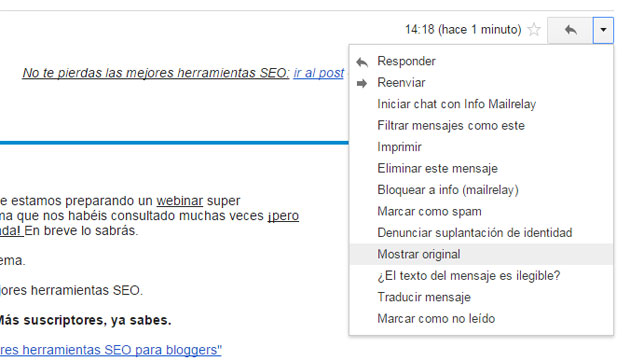
That will show us a screen where we can see the email’s headers.
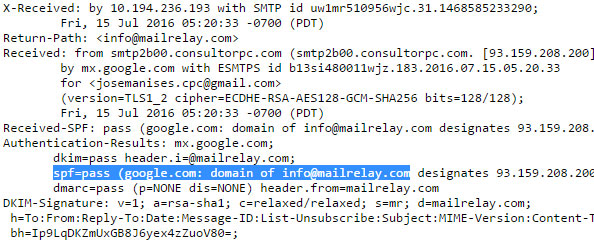
And that way we can check whether it says:
spf=pass
In that case, the configuration is correct.
Right, let’s recap what we’ve done so far:
- We’ve reviewed the database, looking for emails that may be incorrect
- We’ve split the database into small groups
- We’ve made the configurations recommended by our email marketing provider
Now the time has come to send ourselves some tests
· How to run a mailing test correctly?
Before sending the mailing, it doesn’t hurt to send some tests of the email design to our own addresses, to check that everything is fine.
Ideally, we’d have several email addresses at several ISPs — Gmail, Hotmail, Yahoo, our own domain — as many as possible so that we can test properly.
As for the test, it’s best to make it as realistic as possible.
That is, let’s not send something like this:
- Subject: let’s see if this gets through
- Text: afasafasfsaf
Let’s send an email with content as similar as possible to what we’re going to send to our subscribers, to really check how it arrives. And also in case the sending platform offers a spam-scoring feature.
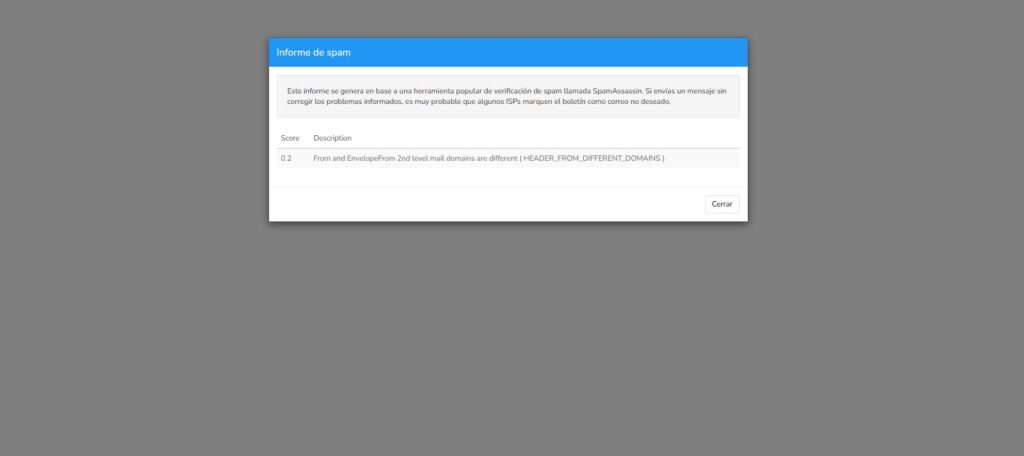
With this feature, the tool gives us information about the content of the email we want to send. So that we can make corrections before sending.
That’s why it’s important that the design is the one we’ll use later.
We also have external tools to check the email we want to send:
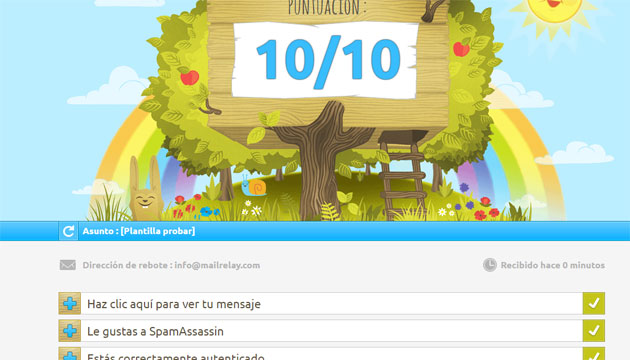
Another free alternative is email-spam-tester.com, which, besides the spam score, runs more than 40 technical checks (SPF, DKIM, DMARC, blacklists, etc.) and offers a plan of fixes.
With these tools and our own email addresses, we can run a good series of tests that give us an idea of the results we can expect.
In the next chapter we’ll see more about the content we’re going to send in the first email.
Let’s get started!
· Preparing the content of the first introductory send
We already have the database ready, and the configuration too. We’ve talked about the importance of running tests with the content we’re going to send in our mailing.
The email design.
But what content do we send?
We’re working on the assumption that we already have a list of subscribers.
We’ve already talked about the possibility that some of the emails we have no longer exist or are incorrect. But even if they’re correct, our contacts may:
- No longer be customers
- Not remember our company
- Still be customers but not want to receive emails from us on a regular basis
- Be contacts who gave their email at the time but are no longer interested
The more time that has passed, the more likely it is that contacts won’t remember giving us their email, and we don’t want to bother them or give them a bad first impression.
So, what do we do?
I think a good option is to introduce ourselves.
Example of a first mailing
“Hello [name]
I’m writing to you on behalf of (company name). A while ago we asked for your email when you hired us for (service hired, category, product).
Although we haven’t sent you anything since then, we’re launching our newsletter (monthly, weekly, etc.) where we’ll cover many interesting topics:
⇒ List of topics
⇒ More topics
If you’re interested in these topics, you don’t need to do anything; we’ll send you the emails every (month, week, etc.).
If, on the other hand, you don’t want to receive any more emails, you can unsubscribe now (unsubscribe link).
If you have any other questions, don’t hesitate to reply to this email or call us at (include phone number). I’d like to take this opportunity to say hello and welcome you to our newsletter.”
The truth is we don’t need to overcomplicate things much more, since it’s an introductory email. In addition to the text, we can include the company logo and a few other details.
But don’t overload it; if it looks too commercial, the recipient is much more likely to just delete it.
With this first mailing we achieve several goals:
- Telling the subscriber who we are, how we know them, and why we have their contact details.
- What content we’re going to send them and how often
- It gives the subscriber the option to unsubscribe if they’re not interested
► Why is the unsubscribe link so important in our mailings?
We might think it’s counterproductive to let them unsubscribe too easily, but that’s not the case.
If we don’t offer a clear option to unsubscribe, they’re very likely to mark our emails as spam, and we’ll be penalized.
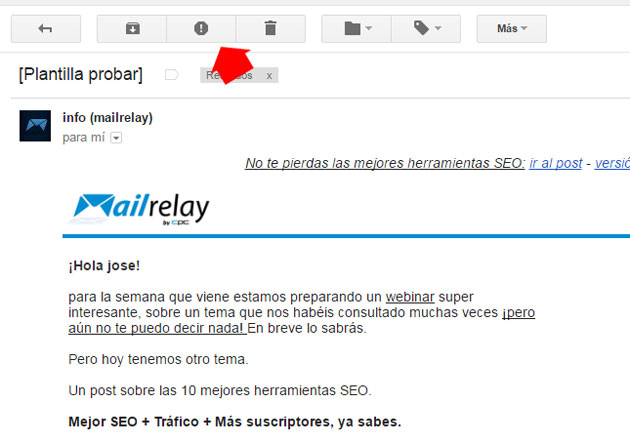
As you can see in the image above, the button Gmail offers for marking an email as spam is very visible. It’s very accessible, so if we don’t offer an option for the subscriber to unsubscribe, this is the option they’ll use.
An option that will affect our sending reputation, and can cause our later emails not to reach their destination. Not even the people who do want to receive them.
Also, remember everything we’ve said about engagement and its importance.
Therefore, we don’t want subscribers who aren’t interested in receiving our emails, so we offer them the option to unsubscribe.
► Can we do even better?
Well, the truth is yes, we have an even better option for keeping only the subscribers who will be truly interested.
The option would be, in this case, to send a first email with a link that leads to a page where they can sign up for the list.
That way we can be sure that the subscribers who click the link and sign up will genuinely be interested in receiving the emails we’re going to send them.
There will be fewer of them, but we’ll get better results from our campaigns. Remember that in email marketing, quality matters more than quantity.
And after this first send, how often are we going to send?
We need to think of a sending frequency for our email campaigns that allows us to:
- Keep the subscriber from forgetting about us
- And also not overwhelm them with too many emails
As a general rule, it’s best to avoid extremes: neither one email every 6 months nor one every day.
My recommendation
The best approach is to start with a reasonable frequency, 1 mailing a week or every 15 days, and from there, looking at the statistics, run tests.
That said, remember that there’s no point in sending just for the sake of sending.
Every send we make must have a goal, or fit within a strategy.
- Selling a product or service
- Sharing content from our blog, as part of a content marketing strategy
- Showcasing a new product or service
- Or simply seeking our contacts’ opinion
Avoid self-promotion in your mailings whenever you can.
Remember those newsletters full of news about the company that sent them? Nobody reads that, it’s boring.
We have to think about our subscribers’ interests, to give them what they need, and keep them interested until the moment comes when we try to sell to them again.
· What do we do if we don’t have a list?
If we start with 0 subscribers, we’ll be avoiding some problems. Of course, we’ll have others, such as the low initial impact of our actions.
What’s clear is that we need to maximize our ability to capture emails, so that the traffic we bring in signs up.
But before we start, there’s something we need to have properly configured: the SPF record we mentioned earlier.
This will be very necessary; even if we start without a list, it’s required for sending emails from the email marketing tool you choose.
If you didn’t do this configuration in the previous chapter, do it now.
Ways of capturing subscribers, types of opt-in
► What is single opt-in? ⇒ in this case the visitor arrives at our site, enters their details in the form (name, email, etc.) and signs up.
The email is registered directly in the list and the user doesn’t need to do anything else. In some cases the subscriber may receive an email informing them of the subscription, but it will be a purely informational email.
► What is double opt-in? ⇒ on the other hand, in this case, the user arrives at our website and signs up in the form.
To validate the email and have it activated in our subscriber list and database, the user must first confirm the subscription by clicking a link they’ll receive in an email. That is, they receive an email informing them of the subscription, which also includes a link that they must click to validate the subscription.
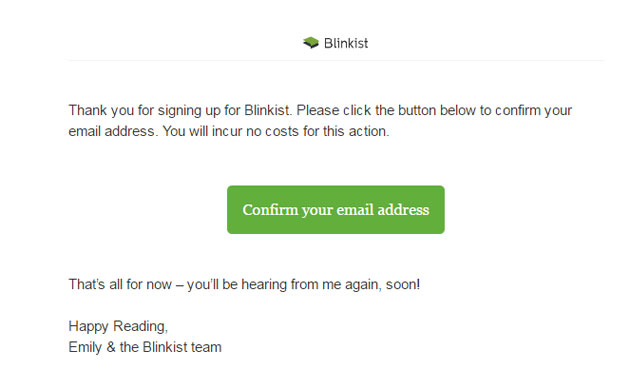
Email marketing tools such as Mailrelay work only with double opt-in because of the following advantages it offers:
- It prevents incorrect emails from being added to the list, which can affect sending reputation (bounces)
- It prevents malicious actions, such as signing up other people without verification
- It prevents sign-ups originating from internet bots
In general, double opt-in helps us build subscriber lists with fewer errors and with subscribers who are genuinely interested in being subscribed.
· How are we going to attract subscribers to our list?
For this we have endless options for growing our subscriber list, from offline options, such as collecting contacts at trade shows, to the different online promotions we can create.
In the online world, it’s common to use some kind of subscription form. It can be the typical subscription bar or form, which is almost hidden somewhere on the website.
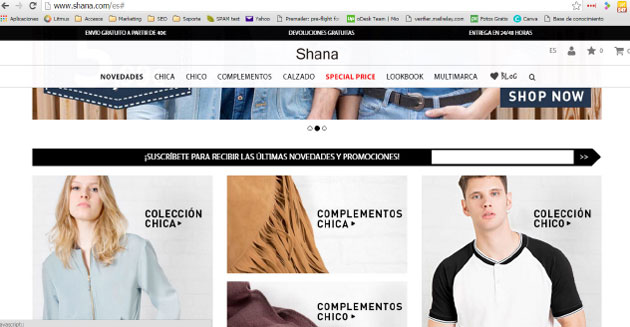
If we set up the subscription bar like this, we have several problems:
- It isn’t very visible, and goes somewhat unnoticed
- It doesn’t present a particularly interesting offer
But in any case, this is always better than having no subscription method on our website.
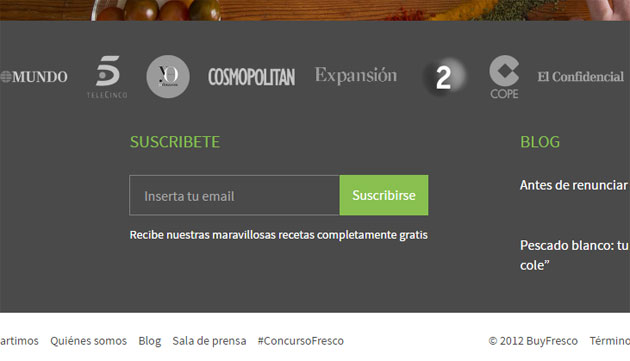
Anyway, it can easily be improved, for example: by offering trend tips in exchange for subscribing.
Like in this other case, where in exchange for subscribing they offer us cooking recipes.
► What would be more effective for capturing the visitor’s email?
Offering the subscriber something as tangible as possible, such as a discount on their first purchase.
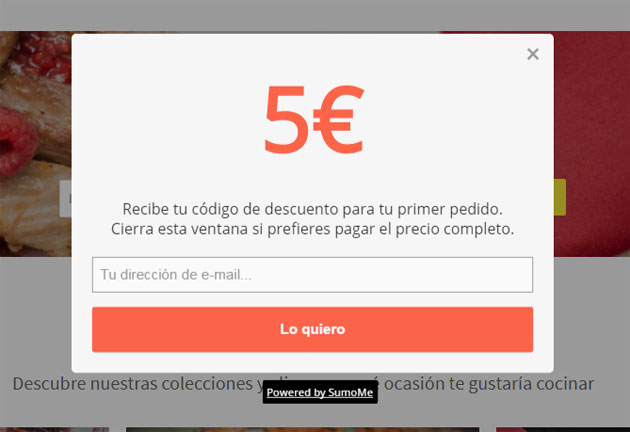
This is one of the most effective ways to get the subscription, because the user receives something tangible in exchange for giving their email.
We also need to keep in mind that we can simply capture emails, or capture them segmented — take a look at the following example.
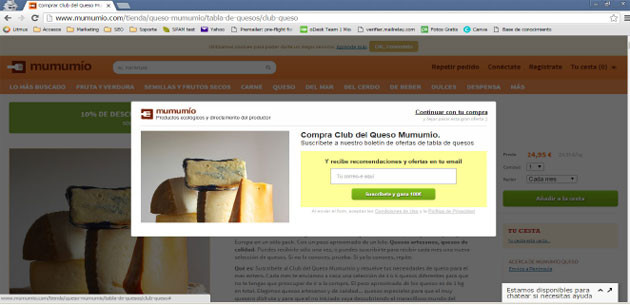
Here the visitor is shown a popup specific to the section they’ve accessed. So, if they subscribe, we’ll have their preferences in addition to their email.
Creating different subscription forms for each section of the website may mean more work, but it will also make our email campaigns more effective.
· Some tricks to make your popups more effective
A) Mental shortcuts
We humans tend to take shortcuts in our reasoning, for example we usually think that more expensive products are better, or that what most people do or use is best for us too.
These mental shortcuts let us make quick decisions, and in our day-to-day lives they’re very useful so we don’t have to stop and think about every small decision we make.
We can use this trait to our advantage in the popups we create, taking advantage, for example, of the reasoning that what’s good for most people will also be good for us.
For example
You can show in your popup the number of customers or subscribers you have. If it’s a high number, it will increase social proof
B) Returning favors
Another very human trait is returning the favors that are done for us. It’s something we need, since living in society often means helping each other.
And whoever doesn’t return favors may end up excluded from society. That’s why when someone does us a favor, we feel compelled to return it.
And this is something we can take advantage of in our popups.
On one hand, we can set the popup so that it isn’t instant, but appears a little while later, so that the visitor has already found what they were looking for on our website (information, tips, a tutorial, etc.), and once we’ve already “offered something” we ask for their email in return.
If we also give them something extra, like an ebook or a course related to what they were looking for, so much the better.
C) Rejection and retreat
This trick builds on the previous one, reciprocity, complements it, and works very well with any discounts we can offer.
The popups we’ll use to take advantage of this strategy will be set to appear when the user is about to leave the website, moving the mouse pointer toward the top of the page.
The tactic is based on us making an offer, which would be the usual prices of our products or services, that the user “rejects” by trying to leave the website.
Then we carry out the “retreat” by offering a lower price, a discount or some extra, right at the moment the user is about to leave our website.
If we’ve done things right, and the user was interested in what we offer, they’ll be much more likely to give us their email.
D) Scarcity of products or services
This is a very common technique and you’ve surely seen it used more than once, in online stores, emails, popups, everywhere.
Basically it’s used so much because it works and gives good results.
Even online stores that couldn’t possibly have stock problems, like Amazon, use this technique.
In our subscription popups we can use this technique by stating that the offer will only be available for a limited time, or only for a certain number of units or, in the case of an online training, a limited number of spots.
You might also be interested in
But it’s not all about popups!
We can also have landing pages to capture emails:
- For an event we’re going to hold
- A webinar
- Offering an ebook
- A contest
It would be a page whose goal is for the visitor to be able to subscribe, like the one you can see in the following image.
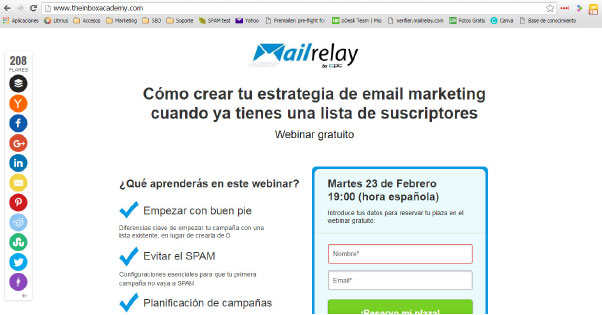
Important
The rule is that, if we’re driving traffic to our website, we have to be able to obtain the email addresses of the people who visit it. Otherwise, we’d be wasting the investment we’re making.
· What do we do about inactive subscribers?
Over time, as we work on our email campaigns and send mailings, it’s very likely that some subscribers will gradually lose interest.
That’s normal, but it can negatively affect the development and results of our sends.
Nobody stays interested forever!
This is perhaps more common when we work B2C (business to consumer), because industrial customers usually stay loyal for longer.
► What types of inactive subscribers might we come across?
In my opinion there are at least two types of inactive subscribers:
- The subscriber who never opens emails and simply deletes them. They select a group of emails and delete them all at once.
- The subscriber who goes through the emails one by one, deleting them with barely a glance.
I’m sure you’ve done one or the other at some point. That’s normal, we receive a lot of emails and can’t pay attention to all of them, but from our perspective as managers of a company’s email campaigns, we need to be careful with these subscribers.
The first case would be worse for our email campaigns, because they don’t even open the emails we send. And that’s very bad for engagement.
But in the second case, although they open the emails, they don’t show much interest either in what we send them, or in our products or services. Because they don’t click on the links we include.
We shouldn’t confuse this with active subscribers who don’t buy
Sometimes we’ll have subscribers who don’t buy — yet! — but in the meantime they open our emails, share our articles, comment, and are generally active.
These subscribers are very useful:
- Because they share our content, increasing brand reach
- They can become advocates, recommending our products
Going back to the two previous cases, what we’ll notice is a lack of clicks.
And this is what we need to be careful about, using the features our email marketing tool gives us to keep our list healthy, and above all effective.
The first thing may be to understand the process a subscriber goes through.
· Common stages a subscriber goes through
Without trying to be exhaustive, the general stages a subscriber would go through are:
1) Discovery/acquisition
This is the stage when the subscriber is captured, whether at a trade show or event, or through our website or a landing page.
If we’ve done things right, the subscriber is usually very active at this stage.
2) Subscriber
During this stage the subscriber will behave like a normal subscriber, opening emails, replying, commenting. In this case the progression would be to customer.
3) Customer
At this stage the subscriber has already purchased our products or services, and has become a customer.
It’s also common for a recent customer to open our emails regularly.
4) Loss of interest
After becoming a customer, we’ll have to work to keep the customer’s interest by providing value, otherwise they’ll gradually lose interest in our products or services.
5) Unsubscribe
Once they have no interest left in our mailings, the subscriber will unsubscribe.
Important
If we don’t allow them to unsubscribe, by including unsubscribe links in our design, we’ll keep an uninterested subscriber on our list, and their lack of engagement will gradually affect our results.
One won’t be a problem, but as the volume grows, it does have an effect.
► And what about subscribers who could unsubscribe but don’t?
This is also very common, and these are subscribers who behave the way we’ve seen, deleting the emails.
But they don’t unsubscribe from our contact list.
In this case we’ll need to use a feature of our email marketing tool that lets us “detect” these subscribers.
For example, Mailrelay has a star filter that scores subscribers’ engagement and lets us filter for those who don’t respond much to our sends.
This way we can segment inactive subscribers and separate them, moving them to other groups.
► And once that’s done, what do we do?
The most important thing in this case would be to stop sending them the same things. Although we don’t necessarily have to delete them straight away either. We can separate them into another group, as we were saying before.
And in that case we’ll have more options for working with these subscribers in our email marketing campaigns:
- Sending them different mailings, perhaps with a promotion, or less usual content.
- Keeping them separate so we contact them only on specific occasions, such as the launch of a new product or feature, or a big offer.
- Sending them a mailing asking them to confirm whether they’re still interested in our emails, and if not, to unsubscribe.
We can use any strategy we like, but the important thing is not to keep doing the same thing, because that would mean ignoring a problem that won’t solve itself.
► How often should we review inactive subscribers?
That varies, but at least once a month wouldn’t be a bad idea, so that too many don’t pile up.
► How long does a subscriber have to be inactive for us to consider them inactive and take them off our mailings?
There are many opinions on this: some consider three months, others six, or even a year.
For me three months is enough; if in three months nothing we’ve sent has interested them, it’s unlikely things will suddenly change. Always bearing in mind that there may be holiday periods in between, etc.
Features like Mailrelay’s automate this process, but it can be done by hand with different filters.
Analytics and performance tracking of email marketing campaigns
Evaluating and analyzing the performance of your email marketing campaigns is essential to understand what works and what doesn’t, so you can improve and optimize your future strategies.
Key metrics for evaluating the success of your campaigns
There are several key metrics you can use to evaluate the success of your email marketing campaigns:
- Open rate: The percentage of recipients who open your emails. A high open rate indicates that your subject lines and senders are appealing and relevant.
- Click-through rate (CTR): The percentage of recipients who click on at least one of the links in your emails. A high CTR shows that the content is interesting and useful to subscribers.
- Conversion rate: The percentage of recipients who take a desired action (purchase, sign-up, download, etc.) after clicking a link in your emails.
- Bounce rate: The percentage of emails that are not delivered to recipients. There can be soft bounces (temporary problems) and hard bounces (permanent problems, such as invalid email addresses). It’s crucial to keep this rate low to ensure good deliverability.
- Unsubscribe rate: The percentage of recipients who unsubscribe from your mailing list after receiving an email. A high unsubscribe rate may indicate that the content isn’t relevant or that emails are being sent too frequently.
Analytics and tracking tools
There are several tools and services available to help you analyze and track the performance of your email marketing campaigns. Some of the most popular include:
- Mailrelay
- Mailchimp
- Brevo
- ActiveCampaign
- Constant Contact
- GetResponse
These tools offer features to analyze and track the key metrics mentioned above, as well as other useful features, such as list segmentation and campaign automation.
How to use data to improve future campaigns
Using the data gathered from key metrics and performance tracking will allow you to improve and optimize your future email marketing campaigns. Here are some ways to use this data:
- Identify patterns and trends: Review the key metrics and look for patterns or trends that may point to areas for improvement. For example, if you notice that certain types of subject lines have higher open rates, you can use that information to write more appealing subject lines in the future.
- Segment your subscriber list: Use the information gathered to segment your subscriber list based on their interests, behavior, geographic location, etc. This will let you send more relevant, personalized content, which can improve open rate and CTR.
- Adjust the frequency and timing of your sends: Analyze the metrics to determine when your subscribers are most receptive to your emails and adjust the frequency and timing of your sends accordingly.
- Run A/B tests: Use the data gathered to run A/B tests on different elements of your emails, such as subject lines, design, content and calls to action. This will help you identify which elements work best and optimize your emails
Conclusion
As you’ve seen throughout this post, creating a good mailing involves a whole series of necessary steps, requirements and actions that will be decisive in the success or failure of your campaigns.
By following the advice I’ve given you and using tools like Mailrelay, the whole process becomes much simpler and, above all, we have a better chance of getting better results.
This extensive guide on how to create a mailing has come to an end.
Let me know your questions in the comments so I can help you resolve them; at Mailrelay we have the best email marketing experts.