DKIM: what it is, how it works and how to set it up
The digital signature that proves your emails are really yours and arrive intact
DKIM (DomainKeys Identified Mail) is a digital signature added to every email to prove that it was sent by your domain. It also proves that nobody has modified it along the way. The receiving server checks that signature against a value you publish in your DNS.
Think of the wax seal on an old letter. If it arrives intact, you know who sent it and that nobody has opened it.
This signature does the same for your emails. And today it is practically mandatory: without it, many of your emails will end up in spam.
What is DKIM?
It is an email authentication standard defined in RFC 6376 (2011). It was born from the merger of two earlier proposals: Yahoo’s DomainKeys and Cisco’s Identified Internet Mail.
Its goal is to answer two questions: was this message really sent by the domain it claims? Has it arrived exactly as it was sent?
To do this, it uses public-key cryptography. Your server signs each message with a private key, and anyone can verify the result with the public key, which is in your DNS.
How does the DKIM signature work?
The process has four steps and takes milliseconds, without the recipient noticing.
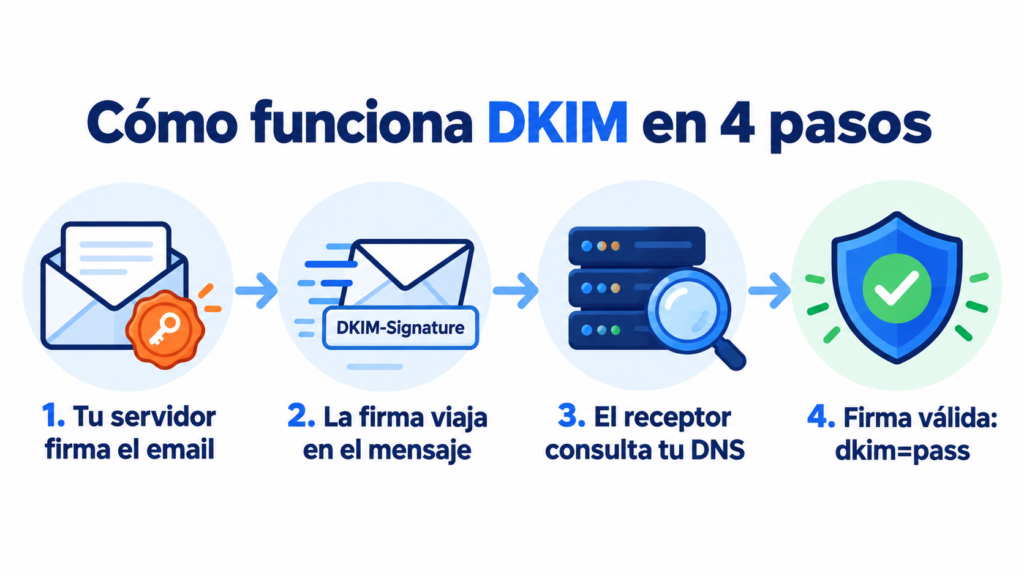
1. The server signs the message
When sending, the server calculates a summary (hash) of the email’s headers and body and encrypts it with the private key. The result is added to the message in a header called DKIM-Signature.
2. The signature travels with the email
This header includes the signing domain (d= tag), the selector (s=) and the signature itself (b=). The selector indicates where the public key is located in the DNS.
3. The receiver looks up the public key
The receiving server queries the DNS at selector._domainkey.yourdomain.com and retrieves that value.
4. The receiver verifies the signature
With it, it decrypts the signature and compares it with its own calculation of the message. If they match, the result is dkim=pass. If someone has changed anything, the signature doesn’t match and the result is fail.
What a DKIM record contains
It is a TXT record (or a CNAME pointing to one) with a few tags:
| Tag | What it indicates | Example |
|---|---|---|
| v | Protocol version | v=DKIM1 |
| k | Key type | k=rsa |
| p | Public key | p=MIIBIjANBgkqh… |
| Record name | Selector + _domainkey + domain | ipz._domainkey.yourdomain.com |
Use 2048-bit keys if your provider allows it. 1024-bit keys still work, but they are less secure.
Why is this so important?
Because Gmail, Yahoo and Microsoft now require it. Since February 2024, Gmail and Yahoo have required all three authentication protocols from anyone sending more than 5,000 emails a day. Microsoft has applied similar requirements in Outlook since May 2025.
It also protects your brand. Without a signature, it is easier for someone to spoof your domain to send phishing.
And it improves your deliverability. A domain that always signs its emails builds a reputation with mailbox providers.
DKIM, SPF and DMARC: the differences
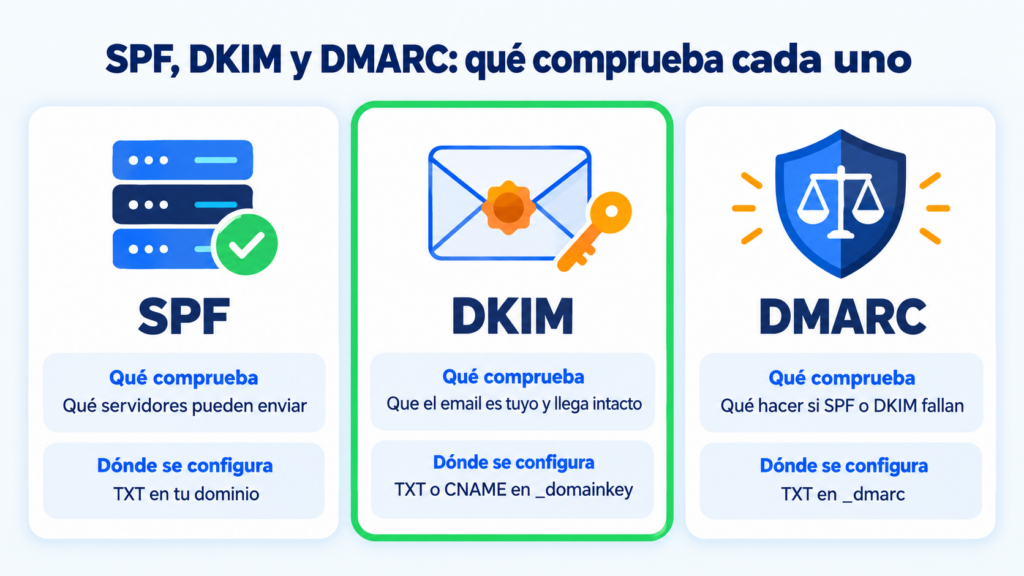
All three work together, but each one checks something different:
| Protocol | What it checks | Where it is set up |
|---|---|---|
| SPF | Which servers can send on behalf of your domain | A TXT record in your domain’s DNS |
| DKIM | That the message was signed by your domain and has not been altered | A TXT or CNAME record at selector._domainkey |
| DMARC | What to do if SPF or DKIM fail and who receives the reports | A TXT record at _dmarc |
The signature has one advantage over SPF: it usually survives forwarding, because the signature travels inside the message. SPF, on the other hand, fails when another server forwards the email.
For DMARC to give its approval, the signing domain has to match the sender’s domain. This is what is known as alignment. You’ll find the details in email authentication.
Send authenticated emails with your domain
Set up DKIM, SPF and DMARC in Mailrelay and send up to 80,000 emails a month for free to 20,000 contacts.
How to set up DKIM step by step
The setup is done in your domain’s DNS and takes four steps. You don’t need to touch your mail server.
1. Get the details from your sending provider
Each platform gives you the selector and the record value, or a CNAME pointing to it. Always use your own provider’s details: don’t copy someone else’s.
2. Create the record in your DNS
Go to your domain’s control panel and add the TXT or CNAME record with the exact name. If you use Cloudflare, leave the CNAME in “DNS only” mode, with the proxy turned off.
3. Wait for it to propagate
DNS changes can take anywhere from a few minutes to 48 hours.
4. Check that it works
Send yourself an email to Gmail and open the “Show original” menu. You should see DKIM: PASS with your domain. You can also use tools such as MXToolbox or mail-tester.
Common mistakes when setting it up
The most common mistake is a misspelled selector. If the record name doesn’t match the one the signature uses, the receiver can’t find it.
Other common mistakes:
- the record value cut off when pasting it into the DNS;
- the Cloudflare proxy turned on for the CNAME;
- signing with the provider’s domain instead of your own, which breaks DMARC alignment;
- modifying the message after signing it, for example with a footer added by another server.
How to set up DKIM in Mailrelay
In Mailrelay, the signature is set up with a CNAME record. Create a record named ipz._domainkey.yourdomain.com pointing to dkim.ipzmarketing.com, replacing yourdomain.com with your actual domain.
Then add SPF and DMARC, and check that everything is correct under Settings → Email authentication. You’ll find all the records together in the sending domain guide.
If you have questions, our support team helps you by chat, ticket or phone on every plan, including the free account.
Improve the deliverability of your campaigns
Authenticate your domain in minutes and, if you get stuck, our support team will help you by chat, ticket or phone.
DKIM frequently asked questions
These are the most common questions about this signature.
What does DKIM stand for?
DomainKeys Identified Mail: email identified by means of domain keys. It is a digital signature that authenticates your emails.
Is DKIM mandatory?
No law requires it, but Gmail, Yahoo and Microsoft require it from bulk senders. Without this signature, your emails are much more likely to end up in spam or be rejected.
What is a DKIM selector?
It is the name that identifies a specific record in your DNS. It lets you have several at the same time, for example one for each sending provider.
How do I know if my domain has DKIM?
Send yourself an email to Gmail and open “Show original”. If DKIM: PASS appears with your domain, it is set up correctly.
Can I have several DKIM records?
Yes. Each provider uses its own selector, so you can have one for Mailrelay, another for your corporate email and another for your online store.