Email lists: what they are, types and how to create and manage yours
How to build a list of contacts who want to read you and organize it to send each of them what interests them
An email list (or mailing list) is the set of email addresses of people who have agreed to receive your messages, stored in a tool so you can send them campaigns.
It is the foundation of any newsletter or email marketing campaign. Without a list, you have no one to write to. And with a poorly built list, your emails end up in the spam folder.
Let’s look at the types that exist and how to create and look after yours.
What is an email list?
An email list is your own email audience. Each contact has an address and often some extra data: name, country, interests or purchases.
It is also known as a mailing list, list of emails or subscriber list. All these names describe the same thing: people who have given you permission to write to them.
That permission sets it apart from an email database, which may store contacts without consent. An email list only includes those who said “yes”.
Here we are talking about marketing lists: you send and the subscriber receives.
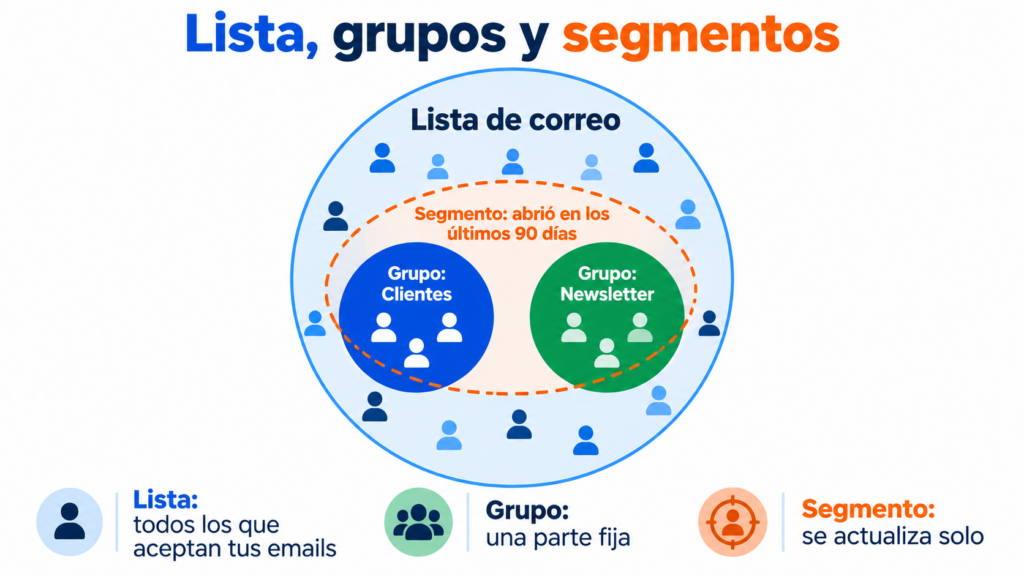
How is a list different from a group or a segment?
The three terms are often mixed up. The difference lies in how they are created and what they are for.
| Concept | What it is | How it is built | Example |
|---|---|---|---|
| Email list | All the contacts who accept your emails | Forms, imports or API | The subscribers of your online store |
| Group | A fixed part of the list | On subscribing, on import or manually | “Customers” or “Weekly newsletter” |
| Segment | A dynamic part that updates itself | Conditions based on data or behavior | “Opened in the last 90 days and lives in Madrid” |
The same contact can be in several groups and segments at once. You will find more detail in subscriber groups and segmentation in email marketing.
What types of email lists are there?
The usual approach is to separate contacts according to the type of message each person expects to receive. That way you respect what they agreed to and reduce unsubscribes and spam complaints.
| List type | What they receive | Example |
|---|---|---|
| Newsletter | Regular content | Blog updates every Tuesday |
| Promotions | Offers and discounts | Sales or Black Friday |
| Customers | Post-purchase and loyalty messages | Points program |
| Leads | Sequences for those who haven’t bought yet | People who downloaded a guide |
| Events | Notices about a specific event | Webinar registrants |
| Internal | Communication with the team | Employee newsletter |
Order, invoice or password notifications are kept separate. They are transactional emails: the user needs them and they don’t depend on their marketing consent.
What do you need before creating an email list?
Before adding your first contact, it’s worth being clear about three things.
First, an email marketing tool. Gmail or Outlook are fine for writing to a few people, but they don’t manage unsubscribes, bounces or consent.
Second, a good reason to subscribe. Few people leave their email address “to receive news”. A guide, a discount or useful content works much better: this is what’s known as a lead magnet.
Third, the legal text. In Spain, the GDPR and the LSSI require clear consent, information on who processes the data and an option to unsubscribe. We summarize it in legal email marketing.
How do you create an email list step by step?
Let’s go through the whole process, from scratch to your first send.
1. Decide what the list will be for
Think about what you are going to send and how often. That promise will go on the form and will tell you which contacts you’re after.
2. Create a subscription form
Place it on your website, blog or a landing page. Ask for the email address and, at most, the name: every extra field costs you sign-ups.
You’ll find ideas in subscription form and in formulas to grow your list.
3. Turn on double opt-in
Double opt-in sends a confirmation email before the contact is added. That way you filter out fake addresses and keep proof of permission.
4. Import the contacts you already have
If you have customers who gave permission in an Excel file or a CRM, upload them in CSV format. First, remove duplicates and misspelled addresses. We explain how in import contacts.
5. Organize contacts into groups
Separate customers, leads or subscribers by topic from the start. And store useful data in custom fields to personalize your emails.
6. Send a welcome email
The welcome email is the most opened email in a subscriber’s entire lifetime. Introduce yourself, explain what they will receive and deliver what you promised.
One thing, though: never buy lists. Those contacts don’t know you and never gave permission, and they fill your list with bounces and spam traps. We explain it in buying email databases.
Create your email list for free
Forms with double opt-in, contact import and groups included in the free account.
One list or several? How to manage your email lists
For most businesses, the practical approach is to have a single main list and organize it with groups and segments. That way each contact exists only once, their data is in a single place and an unsubscribe is applied correctly.
Separate lists make sense for audiences that don’t overlap: two brands, a B2B and a B2C business, or internal communication.
Whatever your case, day-to-day management is very similar:
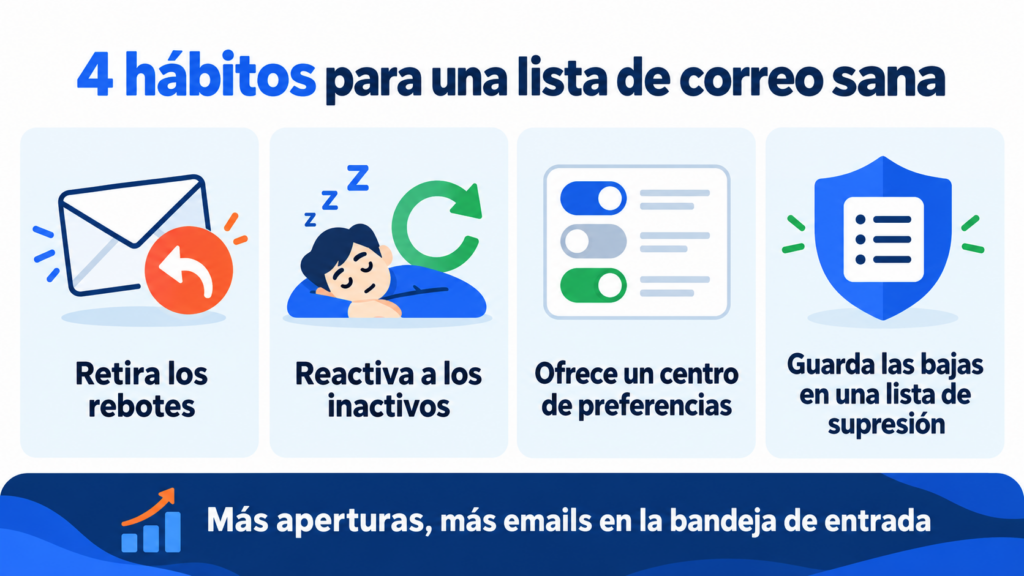
- Remove hard bounces and invalid addresses after every send.
- Tell active subscribers apart from inactive ones and run a campaign to revive forgotten contacts every 3 to 6 months.
- Offer a preference center so they can choose topics and frequency instead of unsubscribing.
- Keep unsubscribes in a suppression list so you don’t write to them again by mistake.
This is called list hygiene. A well-kept list gets more opens, reaches the inbox more often and costs less.
What mistakes should you avoid with your email list?
These are the mistakes that do the most damage to a list:
- Buying or renting databases.
- Adding customers without their permission to receive advertising.
- Only writing when there is an offer and disappearing for the rest of the year.
- Sending the same message to everyone without segmenting.
- Never removing inactive subscribers, who drag down your open rate.
- Hiding the unsubscribe link.
The result? More complaints, a worse reputation and fewer emails in the inbox.
How do you manage your email list in Mailrelay?
In Mailrelay, your email list lives in the subscribers section and is organized with groups.
You can show groups on your forms so each contact chooses what to receive, and use them in segments and automations.
Sign-ups come in through forms and landing pages with double opt-in, through CSV file imports or through the API. Automatic list cleaning removes bounces and problematic addresses to protect your deliverability.
And it’s all included in the free plan: up to 20,000 contacts and 80,000 emails a month, with human support on every plan. You can compare plans on our pricing page.
Manage up to 20,000 contacts without paying
Organize your list into groups, segment it and send up to 80,000 emails a month with human support.
Frequently asked questions about email lists
These are the most common questions when creating an email list.
What is a mailing list?
It’s another name for an email list: the set of email addresses of people who agree to receive your messages. In marketing, both terms are used in the same way.
How do I make an email list in Gmail?
You can create a label in Google Contacts and write to the whole group at once, with a limit of around 500 recipients a day. For campaigns, an email marketing tool is a better choice: we explain why in sending limits.
How many contacts do I need to get started?
None. You can send from your very first subscriber. What matters is that every contact has asked for your emails.
Can I use my customers’ emails?
In Spain, the LSSI allows you to write to your customers about products similar to those they bought, provided you gave them the option to refuse when you collected their email address. For everything else, you need their consent.
How often should I clean my email list?
Bounces, after every send. Inactive subscribers, every 3 to 6 months, depending on how often you send.