Landing page: what it is, what it's for and how to create one
What a landing page means, types, elements and how to create your own
A landing page is a web page designed with a single goal: getting the visitor to take a specific action, such as subscribing, downloading a guide, requesting information or making a purchase.
It’s called a landing page because it’s the page where someone “lands” after clicking on an ad, an email or a link on social media.
Unlike the rest of your website, a landing page doesn’t invite visitors to explore. Everything on it is there to get the visitor to take one single step.
What does landing page mean?
Landing refers to touching down, as a plane does, and page to a web page. That’s why it’s sometimes also called a destination page.
In everyday use, people often just say “landing” or “lander”. If someone asks you for “a landing for the campaign”, they mean a page created just for that campaign, with its own message, offer and form.
What’s the difference between a landing page and a website?
Both are web pages. What changes is their purpose and what they contain.
| Website | Landing page | |
|---|---|---|
| Goal | Inform about the company and its products | Get a specific action |
| Navigation | Menu, links to many sections | No menu or very few links |
| Content | Broad and varied | A single message and one offer |
| Call to action | Several, spread across the site | Just one, repeated if needed |
| Where traffic comes from | Search engines, direct visits, links | Ads, emails, social media or campaign links |
| How it’s measured | Visits, time on page, page views | Conversion rate |
Your homepage is like a shop window. A landing page is the counter where a specific sale is closed.
What is a landing page for?
It turns visits into results. By removing distractions, more people do what you expect them to do. These are its most common uses:
- Capturing subscribers for your newsletter.
- Offering a lead magnet, such as an ebook or a template, in exchange for an email address.
- Getting registrations for a webinar or an event.
- Selling a product or launching an offer.
- Collecting quote or demo requests.
- Building a waiting list before a launch.
It also helps you measure better. If each campaign leads to its own landing page, you know exactly how many contacts or sales each one brings in.
What types of landing pages are there?
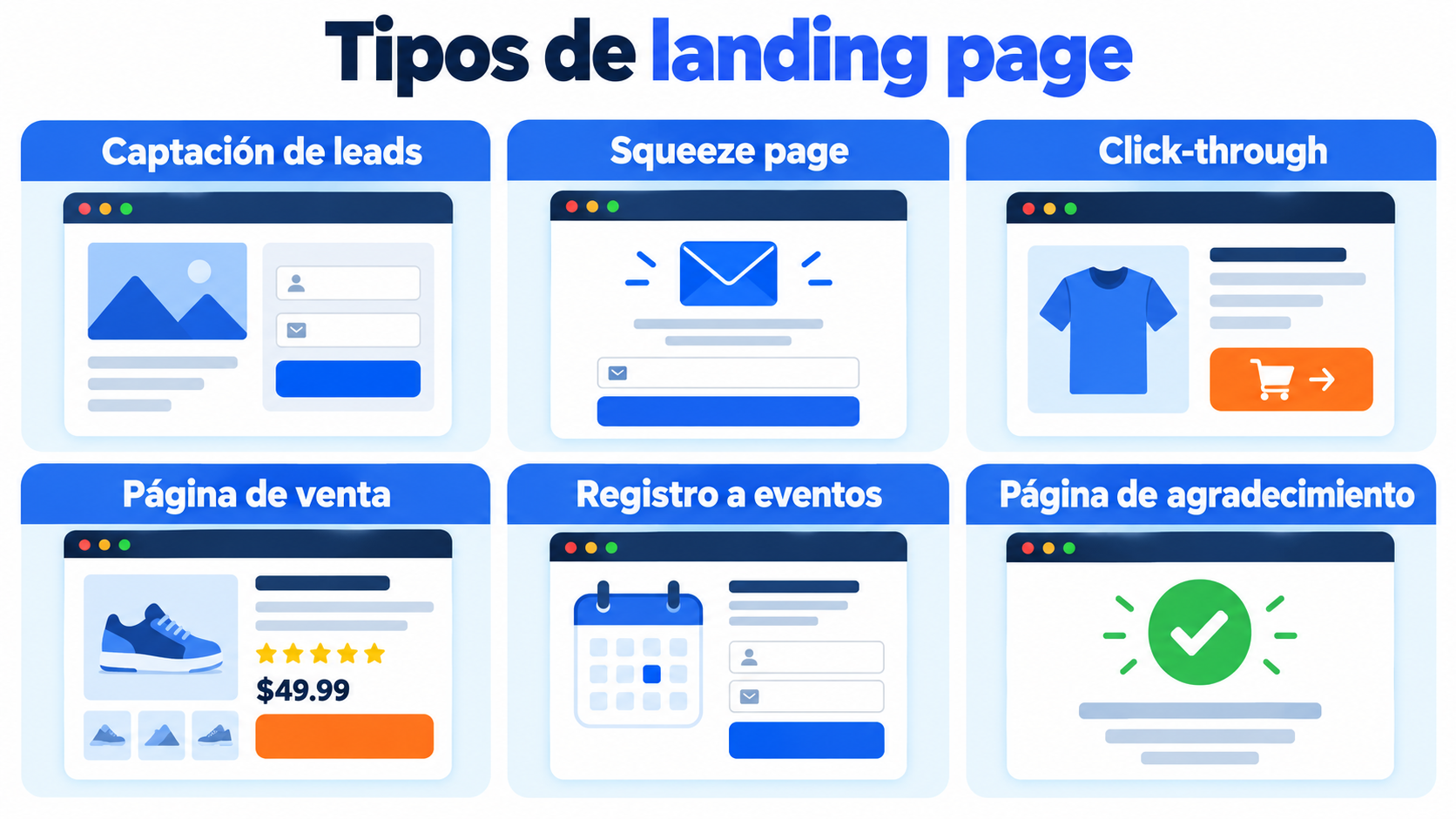
Depending on the goal, you’ll come across these types:
| Type | Goal | Example |
|---|---|---|
| Lead capture | Get contact details | Free guide in exchange for an email address |
| Squeeze page | Capture the email address with the bare minimum | Headline, one sentence and an email field |
| Click-through | Warm up the sale before moving on to the cart | Offer page with a “Buy” button |
| Sales page | Selling a product or service | Online course with syllabus, price and reviews |
| Event registration | Get registrations | Sign-up form for a live webinar |
| Thank you page | Confirm the action and suggest the next step | “Thank you, check your inbox to download the guide” |
The thank you page is often forgotten. It’s a good place to ask people to confirm their subscription or to offer them something more.
What elements should a landing page have?
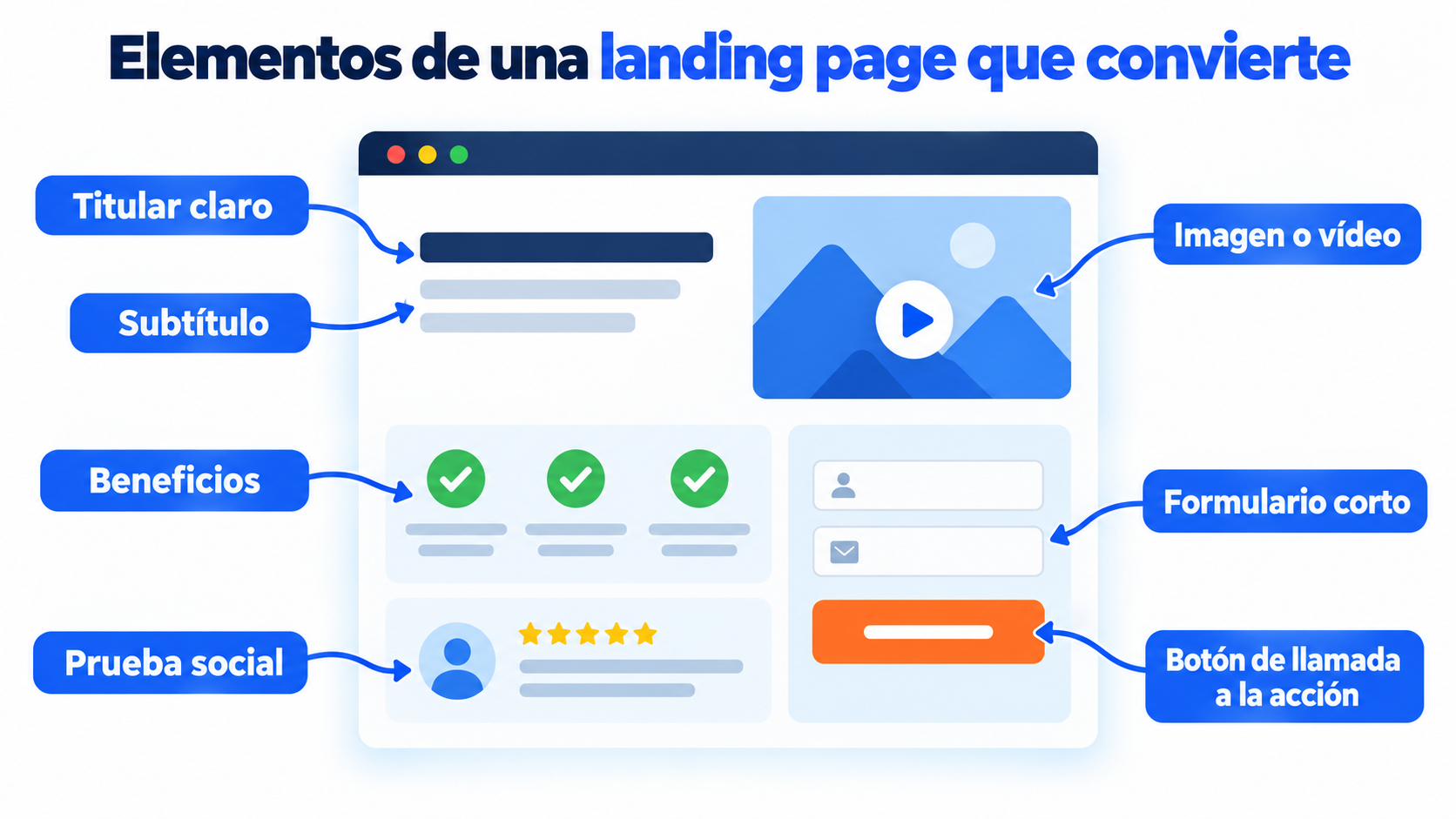
A good landing page can be understood in a few seconds. These are the elements no landing page should be without:
- Clear headline: says what you offer and what the visitor gets out of it.
- Subheading: expands on the headline in one or two sentences.
- Image or video: shows the product or the result.
- Benefits: three or four short points work better than a long paragraph.
- Social proof: reviews, client logos or figures.
- Form: ask only for the data you’re going to use.
- Call to action (CTA): a button with a specific verb, such as “Download the guide”.
The copy matters as much as the design. Good copywriting talks about what the visitor gains, not about what your company does.
And think mobile. A large share of your visits will come from a smartphone, so the page must be responsive and load quickly.
If you want to see how these blocks are arranged on a real page, you’ll find the full structure in the perfect landing page.
Need a landing page for your next campaign?
Create your landing page from templates and connect the form to your contact list.
How do you create a landing page step by step?
Imagine a language school that wants to attract students for an intensive summer English course. Here’s how it would go:
- Define the goal: get sign-ups for a free trial class.
- Choose who you’re targeting: adults who need English for work.
- Write the offer: “Try a free Business English class”.
- Design the page: start from a template, remove the menu and leave a single button.
- Add the form: name, email and English level. Nothing else.
- Connect the form to your contact list and set up a welcome email that arrives instantly.
- Drive traffic: ads, an email campaign to former students and social media posts.
- Measure and improve: compare the conversion rate of each channel.
To find out where each sign-up comes from, add UTM parameters to your links and check the data in Google Analytics.
If you collect email addresses, ask for consent clearly. The GDPR requires it, and double opt-in helps you keep a clean list.
How do you improve a landing page’s conversion rate?
Few landing pages work on the first try. Improving them is a process of trial and error, known as CRO. These are the levers that have the biggest impact:
- Consistency with the ad or email: if you promise a 20% discount, make it the first thing people see.
- Short forms: every extra field costs you conversions.
- A single goal: two buttons leading to different places cause confusion.
- Speed: a slow page loses visitors before it loads. You’ll see it in your bounce rate.
- A/B testing: change one element at a time, such as the headline or the button, and compare the results with an A/B test.
A landing page can also rank in search engines, but it almost always lives off campaigns. That’s why it’s measured more by conversions than by SEO.
How does a landing page fit into your strategy?
A landing page is one piece of the sales funnel. Traffic comes in from advertising campaigns, social media or emails, the landing page converts it, and then email marketing does the rest.
Let’s take an example. Someone downloads your guide from the landing page. They receive a welcome email, then a series of tips and, later on, an offer. That’s how lead generation works from start to finish.
On your website, the subscription form and the pop-up play a similar role. A landing page is the option that works best when you have a specific offer to promote.
If you’re looking for ideas to capture contacts, our blog has formulas to grow your list with forms and landing pages.
How does Mailrelay help you?
With Mailrelay’s landing page editor you can create your landing page without coding. You choose a template or start from scratch, and customize the design however you like.
You add a subscription form, with custom fields if you need them, and new contacts go straight into your subscriber groups.
Then you publish the page, send traffic to it and track in real time how many contacts you get. From the same dashboard you can send them your welcome email, your newsletters and your campaigns.
Landing pages, their templates, sign-up forms and conversion tracking are included in all plans, including the free account, according to the pricing page.
If you’d rather compare options, here’s what to look for in a landing page creator.
Create your landing page for free with Mailrelay
Templates, subscription forms and conversion tracking included in the free account.
Frequently Asked Questions
These are the most common questions about landing pages.
What is a landing page?
It’s the page a visitor lands on from an ad, an email or a link, created to get them to take a specific action.
Is a landing page the same as a website?
Not exactly. A landing page is a type of web page, but with a single goal and no menu or content to distract visitors. A full website has many pages and goals.
Can you create a landing page for free?
Yes. There are tools with a free plan, such as Mailrelay, that include the editor, templates and forms connected to your contact list.
Do I need a website to create a landing page?
No. You can create and publish the landing page with a dedicated tool and link to it from your ads, emails or social media.
What is a squeeze page?
It’s a very short landing page whose only goal is to get the visitor’s email address, usually in exchange for a free resource.