Inbox
The place every email wants to reach (and how to get there)
The inbox is the folder in your email account where the messages you receive arrive. It’s the first thing you see when you open Gmail, Outlook or any other email client. And it’s also where every company that sends campaigns wants to land.
Because an email that doesn’t show up there, in practice, doesn’t exist for the person receiving it.
What is the inbox?
The word inbox comes from in and box: the box where your mail comes in. In Spanish it’s called “bandeja de entrada”, and it works just like a mailbox. Each new message appears at the top. You’ll usually see the sender‘s name, the subject line and the first lines of the text.
However, not everything sent to you ends up there. Email providers filter every message before showing it to you. The ones that look suspicious go to the spam or junk folder.
Outside of email, inbox is also used to refer to private messages on social media. When someone says “I’ll inbox you” or “send me an inbox”, they mean a direct message. It can be on Instagram, Facebook Messenger, LinkedIn or TikTok, and only the recipient sees it.
The idea is the same: a private space where you receive what people write to you. But here we focus on the email inbox, which is the one that matters most in email marketing.
How Gmail, Outlook and Apple Mail organize it
Today it’s no longer a single list. The big providers split it up so you see what matters first:
- Gmail: sorts email into the Primary, Promotions, Social, Updates and Forums tabs. Newsletters and offers usually go to Promotions.
- Outlook: its Focused Inbox splits messages into two tabs, Focused and Other, based on what you usually read.
- Apple Mail: since iOS 18.2, it sorts email into the Primary, Transactions, Updates and Promotions categories.
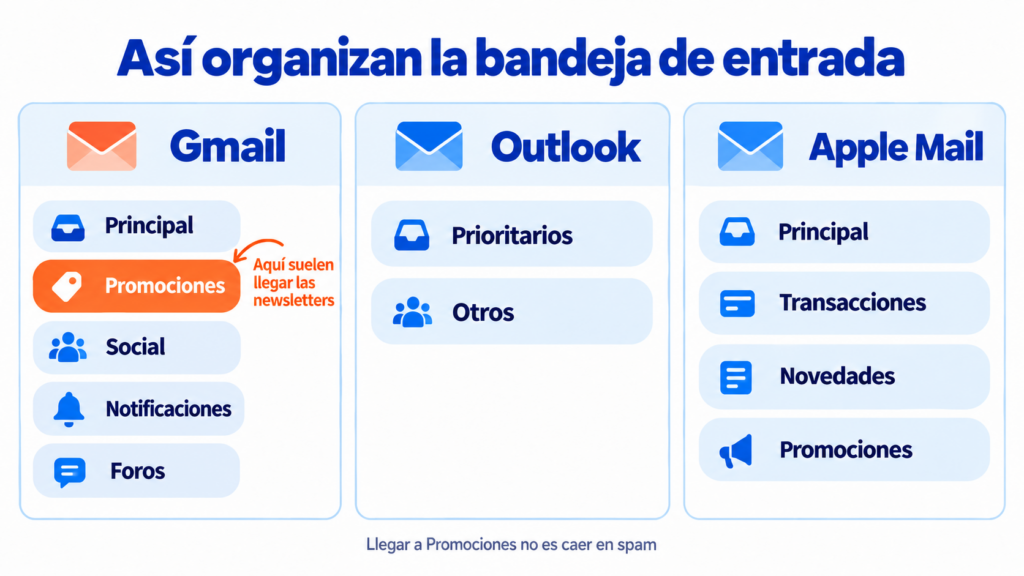
Landing in Promotions isn’t the same as going to spam. Your email has arrived and the user can see it, although it competes with more commercial messages.
The other folders in your email account
Your email client has more folders, and it’s best not to confuse them:
| Folder | What it stores |
|---|---|
| Inbox | Received messages the provider considers legitimate |
| Spam or junk | Suspicious messages or ones users have marked as spam |
| Sent | The emails you’ve sent |
| Drafts | Messages you started and haven’t sent yet |
| Trash | What you’ve deleted, until it’s emptied |
Why reaching the inbox is key in email marketing
An email being delivered doesn’t mean it reaches the inbox. The server can accept it and still send it to spam. That’s why there are two different metrics. Deliverability measures how many emails the server accepts. The inbox placement rate measures how many actually show up in it.
The difference isn’t small. According to studies by Validity, an industry benchmark, around one in six legitimate emails doesn’t reach its destination. And if your email isn’t there, nobody opens it. Your open rate, your clicks and your sales drop along with it.
On top of that, each provider decides where to place it based on your sender reputation. If your subscribers open and reply, your next sends will have an easier time. If they ignore them or mark them as spam, the opposite happens.
How can you tell where your campaigns end up? A simple way is to send test emails to your own Gmail, Outlook and Yahoo accounts and check which folder they land in. It’s also worth monitoring opens by provider. If they suddenly drop for one of them, your emails are most likely going to spam.
Get your campaigns into the inbox
At Mailrelay, we help you authenticate your domain and keep your list clean to protect your deliverability from your very first send.
How to get your emails into the inbox
There’s no single trick. But these practices make a difference:
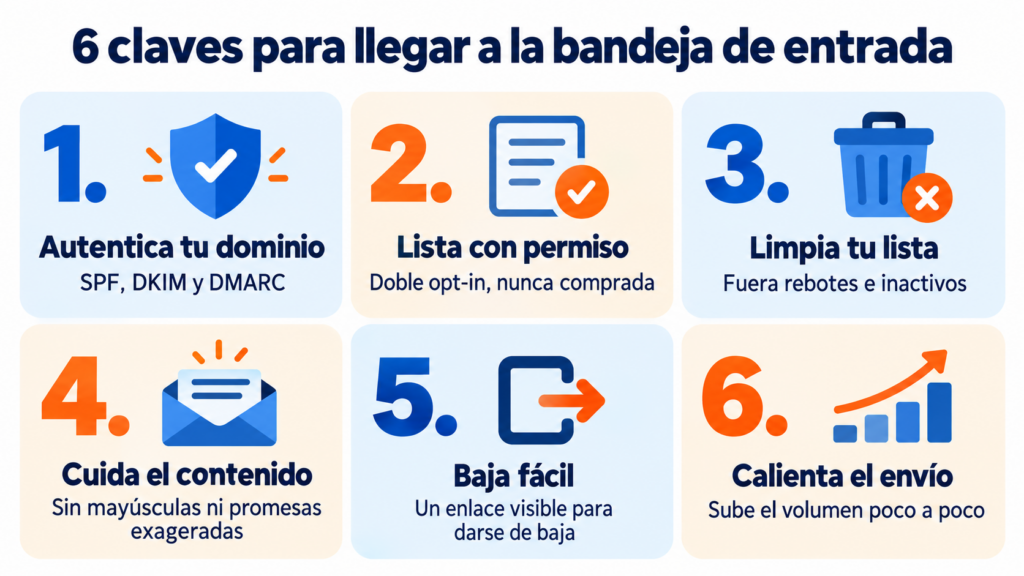
- Authenticate your domain: set up SPF, DKIM and DMARC. Since 2024, Gmail and Yahoo require it, as we explain in the bulk sender requirements.
- Build a permission-based list: use double opt-in and never buy databases.
- Clean your list: remove addresses that bounce and people who haven’t opened in months.
- Take care of the subject line and content: avoid capital letters, excessive exclamation marks and exaggerated promises, which trigger antispam filters.
- Make unsubscribing easy: a visible unsubscribe link keeps people from marking you as spam.
- Warm up a new domain or IP: start with small volumes and increase them gradually with IP warming.
If you want to dig deeper, check out what Outlook, Gmail and Yahoo require to keep your emails out of spam.
If you want to reach the inbox, one thing is non-negotiable: the subscriber must have signed up voluntarily. The technical setup is also mandatory, but without permission it’s useless. That’s the foundation. From there, work on your content: the more personalized it is, the better your chances of landing in the Primary tab and not in the others. If the content is very generic and talks about discounts or savings, it will probably end up in Promotions. That isn’t spam, your email has arrived, but it’s competing with many others. Always ask yourself this question: if I received it, would it look like a promotion to me?
Jose Argudo, CMO at Mailrelay
How Mailrelay helps you avoid the spam folder
At Mailrelay, deliverability is a priority. We guide you through authenticating your sending domain and automatically clean out addresses that bounce. You also see real-time delivery, bounce and unsubscribe statistics for every campaign.
And if something doesn’t work as you expect, our support team reviews the case with you, on the free account too. That account lets you send up to 80,000 emails a month to 20,000 contacts.
We explain it in more detail in how Mailrelay protects deliverability.
Send more and get better delivery, for free
Up to 80,000 emails a month and 20,000 contacts for free, with real-time delivery statistics and human support.
Frequently asked questions about the inbox
What does inbox mean? It’s the folder where you receive your emails (“bandeja de entrada” in Spanish). On social media, it’s also used to refer to private messages.
Why isn’t an email reaching my inbox? Most often, the filter has sent it to spam. It can also happen that the sender hasn’t authenticated their domain or that your mailbox is full. Check your spam folder first.
Is it bad if my emails go to the Gmail Promotions tab? No. The email has arrived and the user can see it. What you need to avoid is the spam folder.
What’s the difference between the inbox and spam? The first holds the messages the provider considers legitimate. Spam collects suspicious messages or ones users have marked as unwanted.