Corporate email: what it is, what it's for and how to create one
The address with your company's domain that builds trust with customers and suppliers
A corporate email (also called a business or professional email) is an email address that uses a company’s, professional’s or project’s own domain, for example [email protected]. It is used for work communications and helps identify the sender, strengthen the brand and manage the team’s accounts from an environment controlled by the organization.
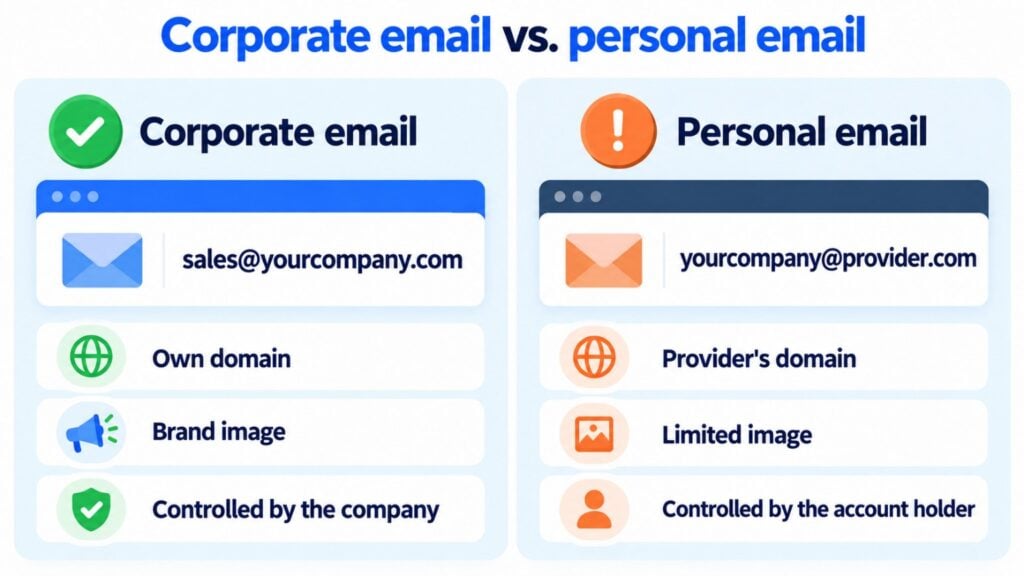
The most visible difference compared to a free personal account is the domain: [email protected] represents the organization, while [email protected] or [email protected] depend on the provider’s domain. And addresses from a telecom operator, such as Movistar email, stop working if you switch providers.
Quick answer: to create a corporate email you need to register a domain, sign up for an email service, verify the domain, configure its DNS records —including MX, SPF, DKIM and DMARC— and create the accounts or aliases your team will use.
What is a corporate email?
Corporate email, also called business email, company email or professional email, is an email account linked to an organization’s domain. Its usual structure is:
Examples:
- [email protected], for a specific person.
- [email protected], for a department.
- [email protected], for customer service.
- [email protected], for a specific function.
The company retains administrative control of these addresses. It can create or close accounts, apply security measures, set permissions and maintain operational continuity when the team’s makeup changes.
Project a professional image with your corporate email
Set up your domain and send your email marketing campaigns with your company’s image thanks to Mailrelay.
What is a corporate email used for?
A corporate email is used to centralize and professionalize an organization’s communication. Its most common uses are:
- External communication: contacting customers, suppliers, partners and the media.
- Internal communication: coordinating teams, meetings, documents and tasks.
- Sales: handling inquiries, proposals, quotes and sales follow-up.
- Customer service: receiving issues and replying from a recognizable address.
- Administration: sending contracts, invoices, notices and documentation.
- Brand identity: making the company’s domain visible in every conversation.
- Access to work tools: identifying users in calendars, storage and corporate applications.
Advantages of corporate email
1. It strengthens identity and trust
An address ending in the official domain lets people link the message to the company immediately. It also keeps a consistent identity across signatures, business cards, forms and sales communications.
Your own domain helps with identification, but it does not guarantee on its own that a message is legitimate. Technical authentication and good sending practices are also necessary.
2. It gives the company control over the accounts
The administrator can add or remove users, reset access, set up groups and aliases, require multi-factor authentication and apply common policies. This way, a work address is not tied to an employee’s personal account.
3. It improves security and traceability
Professional services usually offer administrative controls, spam and malware filters, activity logs, account recovery and retention options. The exact level depends on the provider and the plan you choose.
4. It makes it easier for the team to grow
You can create a consistent naming convention —for example, [email protected]— and role-based addresses such as sales@, support@ or press@. This makes onboarding new people easier and avoids publishing personal addresses.
5. It can improve deliverability if it is set up properly
Sending from a domain authenticated with SPF, DKIM and DMARC helps receiving servers check where the message comes from and reduces the risk of spoofing. Deliverability also depends on the domain’s reputation, list quality, consent, content and recipient behavior.
Corporate email vs. personal email
| Feature | Corporate email | Free personal email |
|---|---|---|
| Typical address | [email protected] | [email protected] |
| Domain | Owned or controlled by the organization | Owned by the provider |
| Brand identity | High | Limited |
| User management | Centralized | Individual |
| Security policies | Configurable by the company | Mainly set by the provider |
| Continuity when the team changes | The company can keep or reassign the address | Depends on the account holder |
| Cost | Domain and, usually, a subscription service | Usually has a free option |
| Recommended use | Professional and business activity | Personal communications |
Corporate email is an essential tool in the day-to-day running of every company, large or small. If you want your company to stand out, be easy to remember and look professional, don’t use free email accounts to communicate with customers. Use a corporate email instead.
Jose Argudo, CMO at Mailrelay
What do you need to create a corporate email?
The basic elements are:
- Your own domain, such as company.com.
- An email provider that hosts the mailboxes and handles sending and receiving.
- Access to the domain’s DNS settings.
- Accounts, groups or aliases for the organization’s people and roles.
You don’t need to have a published website. The domain can be used for email only. Nor do you need to get the domain, website and email from the same company.
How to create a corporate email step by step
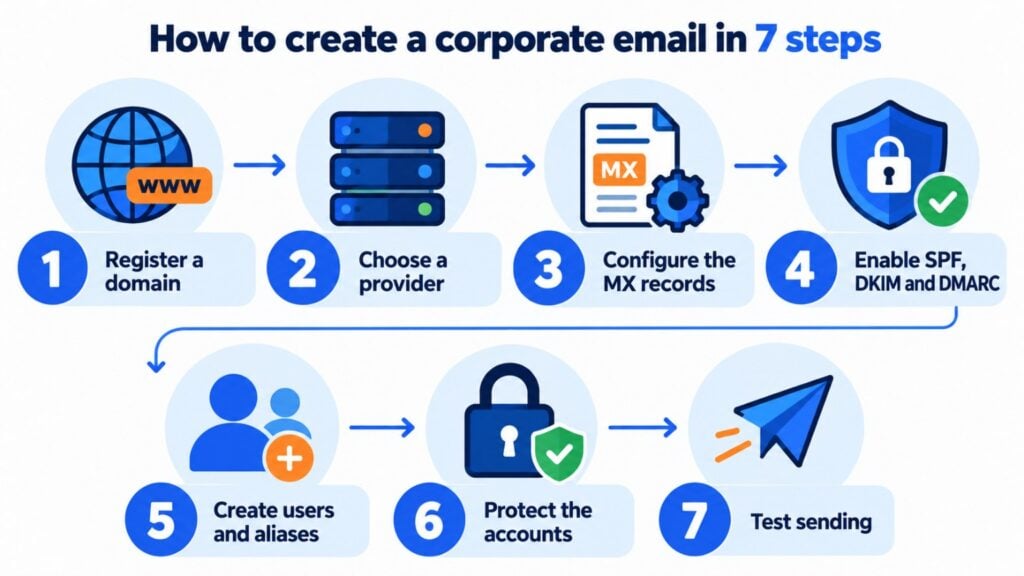
1. Register or use your own domain
Choose a short, recognizable domain that is consistent with the company name. If you already have one, check that you can manage its DNS zone.
2. Choose a business email provider
Compare, among other things:
- price per user;
- mailbox storage;
- uptime and support;
- multi-factor authentication;
- admin controls;
- backups and retention;
- compatibility with devices and email clients;
- legal requirements and data location.
Common options include business suites, specialized email services and the email plans included with some web hosting packages.
Some companies also use an external SMTP service to send email for their entire staff. Tata Motors España, for example, sends the email from its more than 300 corporate addresses through Mailrelay’s SMTP, without needing a dedicated server.
3. Verify the domain and configure the MX records
The provider will tell you which records you need to add to the DNS. MX records specify which servers receive the domain’s email. Copy the values provided exactly and wait for the stated propagation time.
4. Configure SPF, DKIM and DMARC
These technologies have complementary functions:
- SPF declares which servers are authorized to send email on behalf of the domain.
- DKIM adds a cryptographic signature that makes it possible to check that the authorized message was not altered in transit.
- DMARC defines what to do when a message fails the checks and lets you receive reports on how the domain is being used.
The configuration must include every service that sends on behalf of the company, such as the mailbox provider, an email marketing platform or a transactional system. Don’t copy generic records: use each provider’s values and validate the result.
5. Create users, groups and aliases
Create an individual account for each person who needs their own mailbox, calendar or access. Use groups or aliases for role-based addresses when several members need to receive the messages.
Example structure:
- People: [email protected]
- General information: [email protected]
- Sales: [email protected]
- Support: [email protected]
- Privacy: [email protected]
Strengthen your brand with every email
With Mailrelay, your campaigns are always sent from your corporate email, strengthening your subscribers’ trust.
6. Protect the accounts
Turn on multi-factor authentication, use unique passwords and apply the principle of least privilege. Also define a procedure for onboarding, role changes, offboarding and account recovery.
7. Test sending and receiving
Send test messages to different providers and check:
- that the email arrives and receives replies;
- that the sender name and signature are correct;
- that SPF, DKIM and DMARC show as valid in the headers;
- that links and attachments work;
- that replies reach the expected mailbox.
Can you create a corporate email with Google Workspace?
Yes. Google Workspace lets you use Gmail with your company’s domain. The general process is to sign up for a plan, verify ownership of the domain, configure the MX records specified by Google and create the users from the admin console.
The service formerly known as G Suite is now called Google Workspace. Google Domains is no longer the management flow described in older versions of this guide, so the current setup must be done from the domain registrar and the chosen provider’s console.
Which corporate email option is right for you?
If you’re a small team and only need email, the one included with your web hosting is usually enough. If your team works together with shared documents and video calls, a suite like Google Workspace or Microsoft 365 is worth it. Choose the one closest to what you already use.
| Option | Right for you if… | Keep in mind |
|---|---|---|
| Web hosting email | You already have hosting for your website, you’re a team of 1-3 people and you only need email | Smaller mailboxes and fewer tools. If you change hosting, you have to migrate your email |
| Google Workspace | You already use Gmail, Drive or Meet | Monthly price per user. Email works just like Gmail, with your domain |
| Microsoft 365 | You work with Outlook, Word, Excel or Teams | Monthly price per user. Some plans include the desktop apps |
| Specialized email provider | You only need mailboxes and want your data in the European Union | Fewer collaboration tools. Check the support and backups |
To decide, think about four things:
- How many people need a mailbox now and a year from now.
- Which tools you already use, so you don’t have to change the way you work.
- Where the data is stored, if you work with sensitive customer information.
- Who will manage it: adding and removing users, passwords and DNS.
And whatever you choose, don’t send your campaigns from that mailbox. For your newsletter and promotions, use an email marketing platform, as we explain in the next section.
Corporate email and email marketing are not the same thing
Corporate email is mainly intended for individual or team conversations. An email marketing platform is designed to send campaigns to a subscriber list and manage features such as:
- consent and unsubscribes;
- contact segmentation;
- templates and personalization;
- automations;
- bounce and complaint handling;
- campaign metrics.
That’s why it’s not a good idea to send newsletters or mass campaigns from the corporate mailbox as if they were individual messages. For those sends, use an email marketing platform and authenticate it properly with your domain.
Corporate mailboxes are not designed for bulk sending. According to the Google help center, each Google Workspace account can send around 2,000 messages a day. That’s why campaigns are sent from an email marketing platform like Mailrelay, which signs the emails with the company’s domain (DKIM), even on the free plan. This way, subscribers still see the corporate email as the sender.
Good practices for using corporate email
Write clear subject lines
Sum up the reason for the message and avoid vague wording. A useful subject line makes it easier to prioritize and to search for later.
Keep a consistent signature
Include your name, job title, company and the necessary contact details. Avoid overly heavy images and elements that make reading on mobile difficult.
Protect sensitive information
Check the recipient before sending, limit the data included and use the protection mechanisms approved by the organization. Email is not always the right channel for credentials or particularly sensitive information.
Use CC and BCC wisely
Only CC the people who need the context. Use BCC when you need to hide addresses from other recipients, but not as a substitute for an email marketing platform.
Be careful with links and attachments
Don’t open suspicious files or links. For large documents, use a corporate storage system with permissions and expiration dates whenever possible.
Reply within a set timeframe
Set response times according to the type of mailbox. Shared addresses, such as support@ or sales@, should have owners, assignment rules and coverage during absences.
Respect consent and privacy
Don’t add contacts to marketing communications without a valid legal basis. Make it easy to unsubscribe when appropriate and process personal data in accordance with applicable regulations.
Common mistakes when setting up a corporate email
- Creating the mailbox but not configuring SPF, DKIM and DMARC.
- Publishing several separate SPF records instead of maintaining a single valid policy.
- Forgetting external services that also send from the domain.
- Sharing the same password among several people.
- Keeping accounts active for people who are no longer on the team.
- Using the regular mailbox for mass campaigns.
- Confusing an alias with a separate mailbox.
- Assuming that having your own domain guarantees reaching the inbox.
Frequently asked questions about corporate email
What does having a corporate email mean?
It means using an email address associated with a company’s or organization’s domain, such as [email protected], managed for professional purposes.
What is an example of a corporate email?
[email protected] is an example of a role-based corporate address. [email protected] is an example of an individual account.
Can I have a corporate email without a website?
Yes. All you need is a domain and an email service. You may not have a website at all, or it may be hosted with another provider.
Is corporate email free?
The domain has a registration and renewal cost. Some providers include mailboxes in other plans, while others charge per user or by storage. That’s why the total cost depends on the service you choose.
What’s the difference between an account, an alias and a group?
An account has credentials and usually its own mailbox. An alias is an additional address that delivers the message to another account. A group distributes messages among several members and can apply participation rules.
What should a corporate email address be called?
For people, use a consistent format such as [email protected]. For roles, use easy-to-remember names such as sales@, support@ or billing@.
Does a corporate email keep messages out of spam?
No. Your own domain improves identification, but reaching the inbox also depends on authentication, reputation, consent, list quality, content and recipient engagement.
Technically, you can send messages to several recipients, but for campaigns and newsletters a specialized tool is recommended. That way you can properly manage unsubscribes, bounces, segmentation, metrics and sending limits.
In summary
Corporate email is a professional address with your own domain and administrative control by the organization. Its value goes beyond appearance: it helps organize communications, protect accounts, maintain business continuity and connect the domain with work and marketing services.
To implement it properly, register a domain, choose a reliable provider, configure MX, SPF, DKIM and DMARC, protect every account and save mass campaigns for an email marketing platform like Mailrelay.
Make your emails more professional with Mailrelay
Set up your corporate email and start sending email marketing campaigns professionally.