Sender
Who sends the message and why it matters so much in your emails
The sender is the person, company or organization that sends a message: a letter, a package or an email. Its opposite is the recipient, the person who receives it.
It sounds like a simple idea. But in email marketing it decides much more than it seems. It affects whether people open your email, whether they trust it and even whether it reaches the inbox.
What is a sender?
In plain terms, it’s someone who sends something to someone else. The word comes from the verb to send, and common synonyms include dispatcher, shipper and, in communication theory, transmitter.
So the concept always answers the same question: who is sending this? It doesn’t matter whether we’re talking about a postcard, a courier parcel or a newsletter.
Who is the sender of a letter or a package?
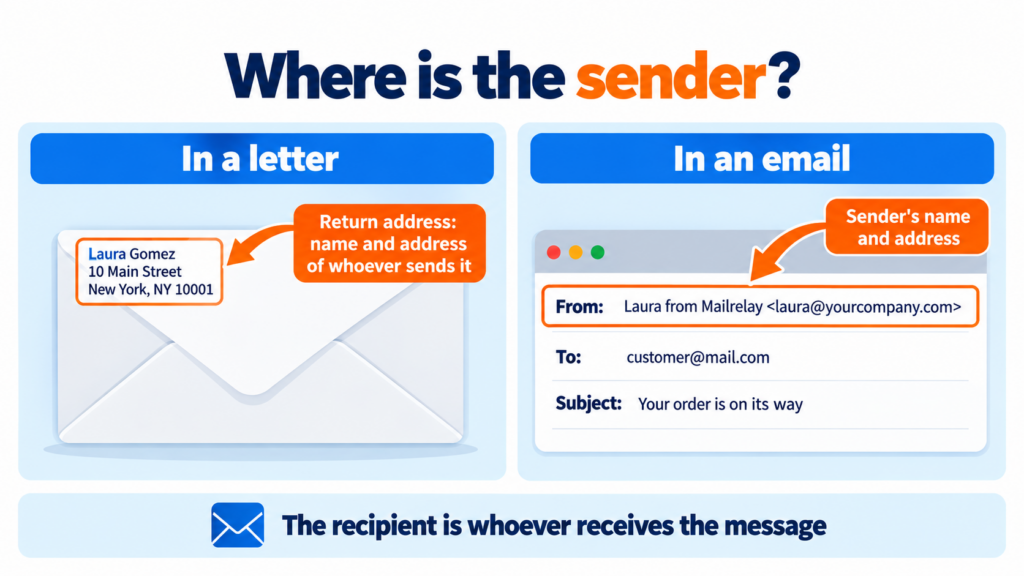
In postal mail, it’s the person who ships the item, and their details appear in the return address. That includes their name, street address, city, postal code and, when needed, the country.
In the United States and the United Kingdom, the return address usually goes in the top-left corner of the front of the envelope, although some people write it on the back. On parcels it appears on the shipping label, next to the recipient’s details. Its purpose is practical: if the item can’t be delivered, it goes back to that address.
The sender of an email
In an email, it’s the first thing you see in your inbox, in the “From” field. It has two parts: a display name (for example, “Laura from Mailrelay”) and the email address the message comes from.
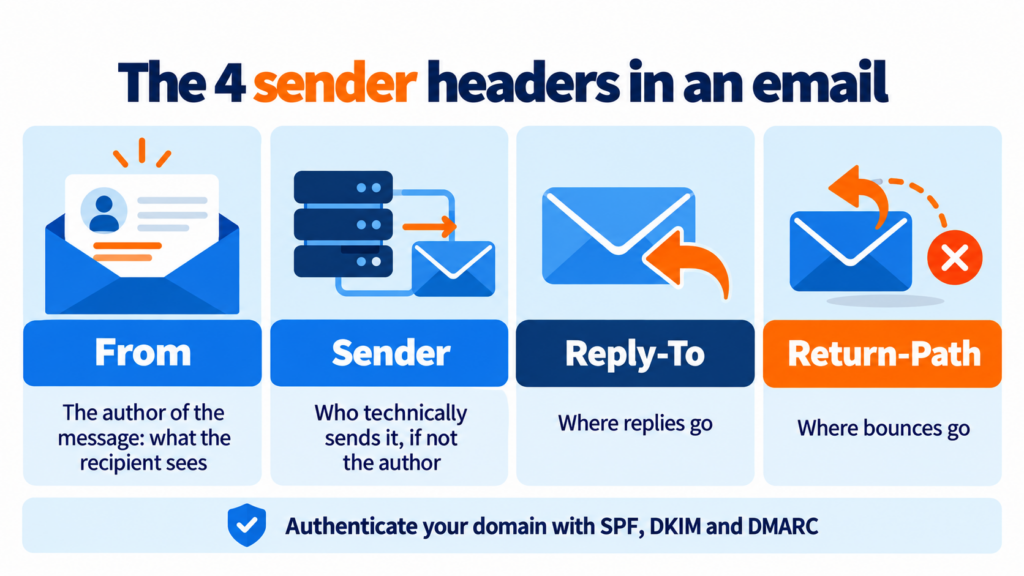
Behind the scenes, though, an email carries several headers related to who sent it. They are defined by the Internet Message Format standard, and it’s worth knowing them:
| Header | What it shows | Example |
|---|---|---|
| From | The author of the message; what the recipient sees | Laura from Mailrelay |
| Sender | Who technically sends it, if different from the author | mailings@mailrelay.com |
| Reply-To | The address that receives replies | support@yourcompany.com |
| Return-Path | The address that receives bounces | bounces@yourcompany.com |
The Return-Path is usually hidden, although mailbox providers use it to check authentication. And Reply-To is handy when you want to send from one address and receive replies at another.
Sender vs. recipient: what’s the difference?
The sender sends and the recipient receives, as simple as that.
An email has only one author, but it can have many recipients: those in the “To” field and those in CC and BCC. In an email marketing campaign, every subscriber on your list is a recipient, while your brand signs every send.
Why the sender matters so much in email marketing
Before reading the subject line, many people check who is writing to them. If they recognize the name, they open. If they don’t, they ignore it or mark it as spam. That’s why the “From” name affects your open rate as much as the email subject line itself.
On top of that, Gmail, Outlook and Yahoo judge every send based on sender reputation. That reputation depends on complaints, bounces, volume and, above all, on whether the domain is properly authenticated.
Since February 2024, Gmail and Yahoo require every company that sends email to authenticate it with SPF or DKIM. If you send more than 5,000 emails a day to their users, you also need DMARC. Add to that a one-click unsubscribe link and a spam rate below 0.3%. Microsoft has applied similar rules to Outlook.com since May 2025. You’ll find the details in our guide to bulk sender requirements.
Authentication also protects your customers. Without it, anyone could impersonate your brand through spoofing and launch phishing campaigns in your name.
Send from your own domain and reach the inbox
Mailrelay guides you through authenticating your domain with SPF, DKIM and DMARC and confirming your senders in minutes.
Create a free accountHow to choose and set up a good sender
A good sender is recognizable at a glance and gets past mailbox provider filters. These are the keys:
- Use a recognizable name: your brand’s, or a team member’s followed by the brand, such as “Laura from Mailrelay”.
- Send from your own domain: Gmail and Yahoo apply strict DMARC policies to their domains, so a campaign sent with an @gmail.com address from another platform usually ends up in spam or gets rejected. A corporate email address builds more trust.
- Avoid noreply addresses: they tell people not to answer and feel cold. Here we explain why you shouldn’t use noreply emails.
- Don’t change the name with every campaign: if you do, your subscribers stop recognizing you, and so do the filters.
- Authenticate your sending domain: set up SPF, DKIM and DMARC. Once that’s done, you can add BIMI so your logo appears next to the name.
Not sure what each provider demands? Check what you need to meet Outlook, Gmail and Yahoo requirements and keep your emails out of spam.
Senders in Mailrelay
In Mailrelay you can create several senders: one for your newsletter and another for promotions, for example. Then you choose which one to use in each campaign. Every new address is confirmed before it can be used. That way we prevent sends from addresses that don’t belong to you, which protects your reputation and that of the whole platform.
We also guide you step by step through authenticating your domain. And if something doesn’t work, our support team helps you by chat, ticket or phone —on the free account too—. That account lets you send up to 80,000 emails a month to 20,000 contacts at no cost.
Make sure your subscribers recognize who is writing
Create your senders, send up to 80,000 emails a month for free and get human support whenever you need it.
Try Mailrelay for freeFrequently asked questions about the sender
What goes in the sender section of a letter? The full name of the person sending it, their address, postal code, city and the country for international mail.
Who is the sender of an email? The person or company shown in the “From” field. Technically, it’s the address in the From header, although the message may leave from another server.
Can I send campaigns from my Gmail address? It’s not a good idea. It occassionally works for small sends, but in bulk campaigns DMARC authentication usually fails. It’s better to use an address on your own domain.
What’s the difference between the sender and Reply-To? The first is who sends the email; Reply-To shows which address receives the replies. They can be the same or different.