Custom fields
The contact data that turns a bulk send into a tailor-made message
You have a list of 5,000 contacts. For each one, you know their email address and, with luck, their name. But you don’t know what city they live in, what product they bought or when their birthday is. Without that data, everyone gets the same message. Custom fields are how you store that information so you can use it later in your campaigns.
What are custom fields?
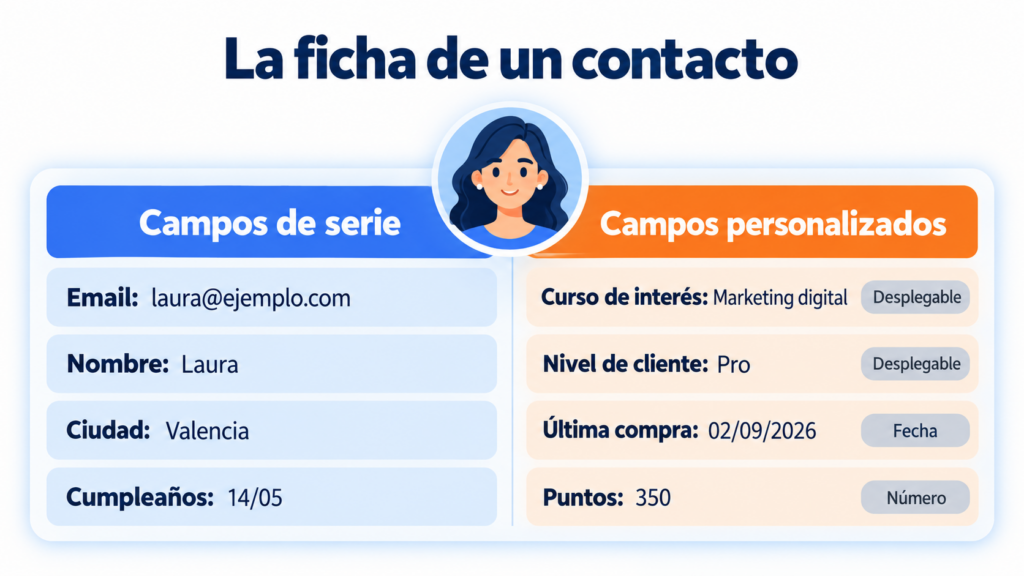
Custom fields are additional data you add to each contact’s record, beyond their email address. They work like extra columns in your email database: “city”, “last product purchased”, “sign-up date” or “customer tier”, for example.
In Spanish, they are called campos personalizados. Each field has a name, a data type and a merge tag that the tool uses to insert it into emails.
Don’t confuse them with WordPress custom fields, which add metadata to a website’s posts and pages. Here we’re talking about data on your subscribers.
Default fields and custom fields
Every email marketing platform comes with a set of built-in fields. In Mailrelay, for example, each contact can already have an email address, name, address, city, state/province, country, language, birthday and website.
Custom fields cover everything else. A training academy will need “course of interest”; a sports store, “favorite activity”; a software company, “subscribed plan”. You decide which data is useful to you.
Types of custom fields
The field type defines what data it accepts and how you can use it later. Choosing it well prevents errors when importing and segmenting.
| Field type | What it stores | Example | Typical use |
|---|---|---|---|
| Text | Free-form words or phrases | Company: “Talleres López” | Personalizing the greeting or signature |
| Number | Figures | Loyalty points: 350 | Segmenting by ranges |
| Date | Day, month and year | Sign-up date: 03/12/2026 | Anniversaries and reminders |
| Drop-down | One option from a fixed list | Tier: basic, pro, business | Clean segments, no variants |
| Checkbox | Yes or no | Accepts partner offers | Filtering consents or preferences |
| Multiple choice | Several options at once | Interests: running, yoga | Content based on interests |
A practical tip: whenever you can, use drop-downs instead of free text. If you let people type their city by hand, you’ll end up with “Madrid”, “madrid” and “Mdrid” in the same list.
And segmenting like that is a headache.
What custom fields are for
Storing data has no value in itself. Its value lies in what you do with it in each send:
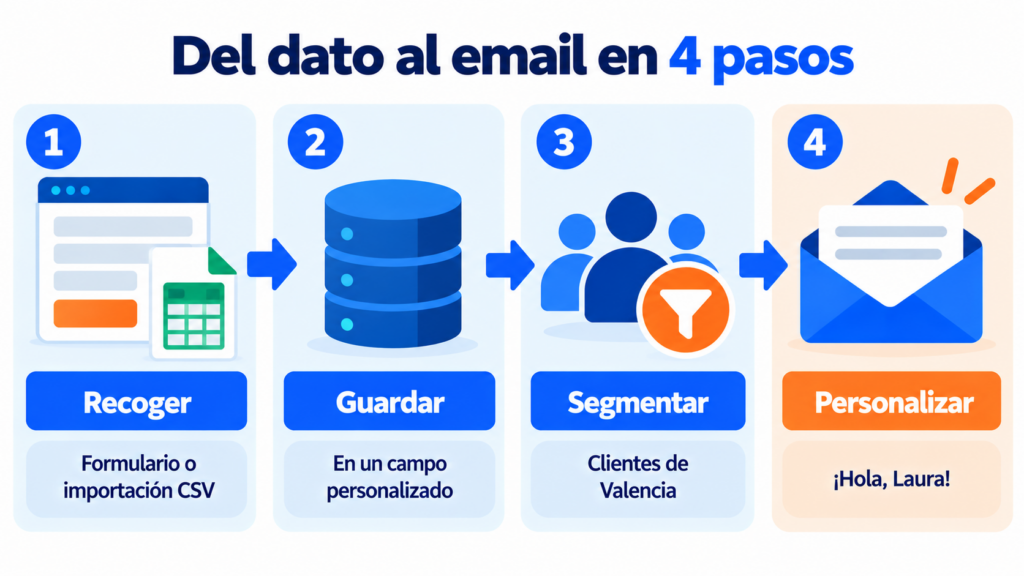
- Personalize content: insert the name, company or last product purchased into the subject line or body of the email, just like in a mail merge.
- Segment: create groups based on a value, such as “customers in Valencia” or “pro plan”, and send them different campaigns. We cover it in our entry on segmentation in email marketing.
- Automate: trigger a birthday email or a reminder based on a stored date.
- Show or hide blocks: display a running image only to those who selected that interest, with dynamic content.
- Score contacts: add points based on industry or job title in a lead scoring system.
Is it worth the effort? According to McKinsey, 71% of consumers expect companies to deliver personalized interactions, and 76% get frustrated when that doesn’t happen. Personalization also typically drives 10% to 15% more revenue.
Store the data you actually use
In Mailrelay you can create custom fields on every plan, including the free one, and use them to personalize and segment your campaigns.
Examples of custom fields by type of business
An online store can store size, favorite category and last purchase date. With that, it can send new arrivals in each customer’s size, win back those who haven’t bought in 90 days and celebrate the anniversary of their first order. If it also connects the store, it can trigger the abandoned cart email with the exact product.
A training academy or education center usually needs the course of interest, the format (in-person or online) and the start date. That way, it only sends each person information about the course they care about.
In B2B, the most useful ones are industry, company size and job title. Because a CFO and a technician don’t respond to the same message, even if they work at the same company.
How to collect your contacts’ data
The most common source is the subscription form. Each form field is saved to its custom field. But every extra question reduces sign-ups, so only ask for what you’ll use soon.
Another option is importing. If you already have the data in an Excel file or in your CRM, export it to a CSV file and map each column to its field when importing. You can also sync them with other tools through an API.
And don’t forget the data subscribers share with you because they want to: preferences, interests or preferred frequency. This is known as zero-party data, and it’s usually the most reliable information.
That said, keep the GDPR in mind. Its data minimization principle (Article 5(1)(c)) requires you to collect only the data that is adequate and necessary for the purpose you’ve explained. Avoid asking for sensitive data, such as health or political beliefs, unless you have a clear legal basis.
Best practices for custom fields
First, define what you’ll use each piece of data for. If you can’t think of a campaign for it, don’t create it.
Use clear names and short merge tags, without spaces or special characters: “course_interest” works better than “Student’s course of interest”. That makes them easier to insert without mistakes.
Always set a default value. If a contact has no name, the greeting should say “Hi” (or “Hi, friend”) and not “Hi ,”. It seems like a minor detail, but it’s the most noticeable mistake.
Review the data from time to time. Good list hygiene includes correcting misspelled values and deleting fields nobody uses.
And test before sending. Send yourself one test version with a contact whose fields are empty and another with the fields filled in. We explain why in our entry on A/B testing: small changes in personalization can significantly shift open rates.
How Mailrelay helps you with custom fields
In Mailrelay, custom fields are included in every plan, including the free one. You create them from the Subscribers → Custom fields → Add menu. You choose the field type (text, number, drop-down, checkbox…), the display name, the merge tag, whether it’s required and its default value.
Then you can ask for them in your forms and landing pages, fill them in when importing contacts and use them to create segments. When editing an email, the “Variables” drop-down inserts them for you. A default field appears as {{ subscriber.name }} and a custom one as {{ subscriber.custom_fields.deporte }}.
With conditions like {% if subscriber.custom_fields.deporte == “Karate” %} you can show a block only to those who match that value. You’ll find the step-by-step process, with screenshots, in our guide on how to use dynamic variables to personalize your emails.
All this with up to 80,000 emails a month and 20,000 contacts for free, automations with birthday and date triggers, and chat, ticket and phone support on every account.
Personalize every send without the hassle
Custom fields, segments, variables and automations with up to 80,000 free emails a month and chat, ticket and phone support.
Frequently asked questions about custom fields
What is a custom field in email marketing? It’s an additional piece of data you store in each contact’s record, such as their city or the product they bought, to personalize and segment your campaigns.
What’s the difference between a custom field and a tag? A field stores a value (for example, “Valencia”). A contact tag, on the other hand, only marks them as part of something (for example, “attended the webinar”). Fields are for personalizing text; tags are mainly for classifying.
How many custom fields should I create? As many as you’ll use in the coming months. It’s better to start with three or four well-filled fields than with twenty empty ones.
What happens if a contact’s field is empty? The default value you’ve set is shown. If you don’t set one, the gap is left blank, so it’s best to always define it.
Can I use custom fields in the subject line? Yes. A subject line with the contact’s name or city often stands out in the inbox, but use it sparingly so it doesn’t lose its impact.