Lead Scoring
What it is, how to calculate it and how to use it in your email campaigns
Lead scoring means giving each contact points based on their profile and their interest. That way you know who to email first, who to make an offer to and who to stop chasing.
In summary: in email marketing, the simplest way to do lead scoring is to score engagement, that is, each contact’s opens and clicks. Mailrelay does it for you: it calculates each subscriber’s score, from 1 to 5 stars, based on their opens and clicks, and you can use it to create segments on the free account and on Enterprise, the plans that track opens and clicks. Tools like ActiveCampaign or HubSpot let you build custom points models, but only on their paid plans.
Find out who is really interested
Create your free account and see each contact’s score, from 1 to 5 stars, from your very first send.
What is lead scoring?
It is a system for ranking your contacts by how likely they are to buy. Every piece of data and every action adds or subtracts points. When a contact reaches a certain score, they move up a level: from cold to warm or from warm to hot.
It is used mainly for two things:
- Marketing: deciding which message each contact receives and how often.
- Sales: passing only the contacts who are ready to buy to the sales team and its sales pipeline.
How do you calculate lead scoring?
A scoring model combines two types of criteria:
- Profile: who the contact is. For example, their job title, their industry or the size of their company. It tells you whether they fit your ideal customer.
- Behavior: what they do. For example, whether they open your emails, click, visit your website or download a resource. It tells you how interested they are right now.
Here is an example model for a company that sells software to SMBs:
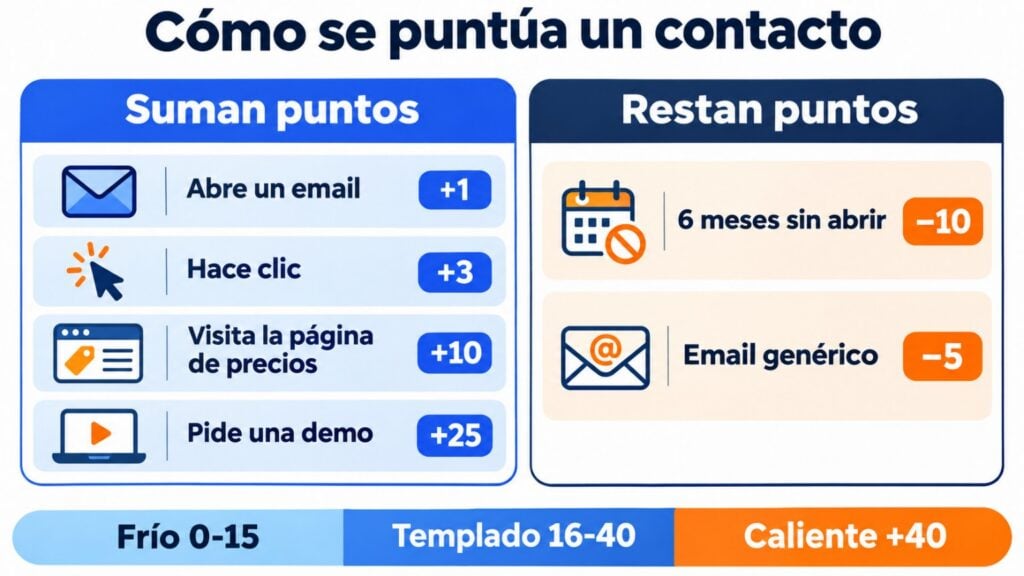
| Action or data | Points | Expires |
|---|---|---|
| Opens an email | +1 | After 3 months |
| Clicks in an email | +3 | After 3 months |
| Visits the pricing page | +10 | After a month |
| Downloads a guide | +5 | After 6 months |
| Requests a demo | +25 | No |
| Works at a company with 10 to 200 employees | +10 | No |
| Uses a generic email address (gmail, hotmail…) | −5 | No |
| Hasn’t opened in 6 months | −10 | No |
| Unsubscribes | Leaves the model | — |
You set the levels based on those points. For example:
- Cold (0-15): receives the newsletter.
- Warm (16-40): receives product content and customer stories.
- Hot (over 40): receives an offer or is passed to sales.
Behavior points should expire: a click from a year ago says nothing about interest today.
How do you apply lead scoring in email marketing?
Email is the best source of signals for scoring contacts: every send tells you who opens, who clicks and on what. To apply it:
- Define what a good contact is. Look at what your customers did before they bought.
- Choose a few signals. Opens, clicks and one or two profile details are enough to get started.
- Set the levels and what each one receives.
- Segment your list by score.
- Send a different message to each level. An offer to the most interested and useful content to everyone else.
- Review the model every three to six months, comparing the scores with who ended up buying.
You don’t need a complex model. If your tool already calculates each contact’s engagement, start there and add criteria when you need them.
How do you segment by engagement level?
Group your contacts by how much they interact with your emails and treat each group differently:
- Highly engaged: they open and click often. They are the first ones to send an offer or a launch to.
- Occasional: they open from time to time. They need more relevant content or a different sending frequency.
- Inactive: they haven’t opened in months. Try a win-back campaign and, if they don’t respond, remove them from your regular sends.
How to do it in Mailrelay
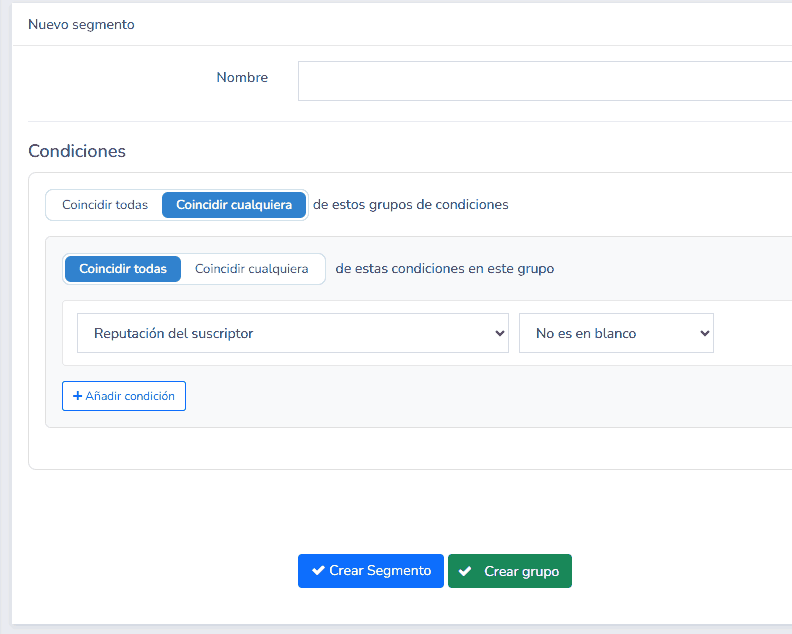
- Go to the subscribers section and create a new segment.
- Give it a name, for example “Most engaged contacts”.
- In the conditions, choose “Subscriber score”, the operator and the number of stars. For example, “Greater than or equal to” 4 for the most engaged contacts or “Less than or equal to” 2 for the ones you should set aside.
- If you need to, add more conditions, such as the group or a custom field.
- Click “Create segment” to send campaigns to that segment or “Create group” to move those contacts to a separate group.
When a contact’s score drops to two stars or fewer, it’s time to take them off your main list. Move them to a separate group and try a few re-engagement sends. If they still don’t respond, it’s probably not worth emailing them any more: contacts who don’t open or click hurt your sender reputation. Keep only the ones who are really interested.
Jose Argudo, CMO at Mailrelay
How do you set up automations based on engagement scores?
Scores can be used in two ways in an automation:
- To trigger it. For example, creating a sales task when a contact reaches 75 points. ActiveCampaign and HubSpot allow this on their paid plans.
- As a condition within the workflow. For example, after the welcome email and a one-week wait, sending an offer to those with a high score and useful content to everyone else.
In Mailrelay, the subscriber score works as a condition within automations, but it doesn’t trigger them. That is enough for most email marketing cases: the workflow starts when someone joins a group or with another trigger, and the score decides which branch each contact follows. To send a campaign only to the most engaged contacts, use a segment.
What email tools offer (November 2026)
| Tool | Contact scoring | How it works | Plan |
|---|---|---|---|
| Mailrelay | Yes: “Subscriber score”, from 1 to 5 stars | Automatic, based on opens and clicks. Used in segments and as a condition in automations | Free and Enterprise (Standard doesn’t track opens or clicks) |
| Mailchimp | Yes: “Contact rating”, from 1 to 5 stars | Automatic, based on the contact’s activity. Can be used in segments | Not specified |
| ActiveCampaign | Yes: contact and lead scoring | Custom points rules, with expiry. Can trigger automations | From the Plus plan |
| HubSpot | Yes: lead scoring tool | Points for profile and engagement | Marketing Hub or Sales Hub Professional and Enterprise |
| Brevo | No built-in feature | Set up manually with a numeric attribute and an automation that adds points | The one with automations |
| Mailjet | No | Segments by opens, clicks or activity over a period | Segmentation from the Essential plan |
Common mistakes
- Scoring everything. Too many rules make the model impossible to review. Start with just a few.
- Not subtracting points. Without expiry or negative points, a contact who stopped reading you a year ago still looks interested.
- Relying only on opens. Some email clients inflate them with automatic opens. Give more weight to clicks.
- Not using the score. A model that doesn’t change what you send is useless.
- Continuing to send to inactive contacts. They hurt your sender reputation. There’s more on this in list hygiene.
How Mailrelay helps you
- A score for every subscriber, from 1 to 5 stars, calculated automatically from their opens and clicks.
- Segments by score, which you can combine with groups, custom fields and other conditions.
- The score as a condition in automations.
- A group in one click from any segment, to set inactive contacts aside.
- Up to 80,000 emails a month and 20,000 contacts for free, with all these features and human support on every plan.
Send to the people who want to read you
Up to 80,000 emails a month and 20,000 contacts for free, with each subscriber’s score and human support on every plan.
Frequently asked questions
What is lead scoring in marketing?
It is a system that gives each contact points based on their profile and behavior to find out who is closest to buying. It helps you prioritize your sends and your sales team’s work.
What is the difference between lead scoring and lead nurturing?
Lead scoring measures each contact’s interest. Lead nurturing is the emails that make it grow. They work together: the score decides which nurturing message each contact receives.
How often should you review the scoring model?
Every three to six months, or when you change your product or audience. Compare your contacts’ scores with who ended up buying and adjust the points.
Does Mailrelay have lead scoring?
Yes. Mailrelay calculates each subscriber’s score, from 1 to 5 stars, based on their opens and clicks. You can use it to create segments and as a condition in automations, on every plan.
Can I do lead scoring without a CRM?
Yes. If your email tool scores each contact’s engagement, you already have a starting point. To add sales or website data, you’ll need a CRM or an integration.