CRM (Customer Relationship Management): what it is, what it's used for and types
Features, types and how to choose the CRM that fits your business
Quick answer: a CRM (Customer Relationship Management) is a strategy and, usually, a piece of software that lets you centralize and manage information and interactions with customers and prospects. It helps you organize contacts, track sales opportunities, automate tasks, coordinate teams and better understand the journey of each person or company.
If your customer data is currently scattered across spreadsheets, inboxes, forms, notes and different apps, a CRM can become the place where that information gains context.
And that raises an important question: what role should email marketing play in all of this?
What does CRM stand for?
CRM stands for Customer Relationship Management, in other words, managing your relationships with customers.
The term can refer to a working methodology, a business strategy or the software used to carry it out. In practice, when someone says a company “needs a CRM”, they are usually talking about a platform that centralizes contact data and helps manage sales and customer service interactions.
A CRM can bring together information such as contact details, conversations, opportunities, sales activities, purchases, issues and other interactions. This way, teams work from a shared view of the customer and don’t depend on one person remembering what happened in the last conversation.
What is a CRM used for?
A CRM is used to organize the relationship with customers and prospects throughout the different stages of their journey.
For example, a sales team can record a new lead, assign it to someone, move it through the different stages of the funnel and schedule follow-up tasks. Marketing, for its part, can use the available information to segment audiences and coordinate campaigns. Customer service can check the history before replying.
The real value comes when all that data stops being siloed.
How does a CRM work?
Although each platform has its own features, a CRM usually works on the same idea: collecting information, organizing it and turning it into action.
Imagine someone fills out a form to request information about one of your services. Their details can go into the CRM and be linked to a company, a sales opportunity or a specific acquisition source.
From there, the team can log calls, meetings, emails, status changes and pending tasks. If the system is connected to other tools, part of that process can be automated.
The result is a customer record that tells a story, not just an email address.
What information can a CRM store?
It will depend on the tool and how you’ve set up your processes, but you can usually work with contact details, companies, opportunities, activities, communications, purchases, issues and custom fields.
It’s also common to record the lead source, the sales rep in charge, the funnel stage or the planned date for the next action.
The key is to define which information helps you make decisions. Piling up fields nobody checks only adds work.
Main features of a CRM
CRM features vary quite a bit from platform to platform. A simple system may focus on contacts and opportunities, while an enterprise solution may include sales, marketing, customer service, analytics, automations and artificial intelligence.
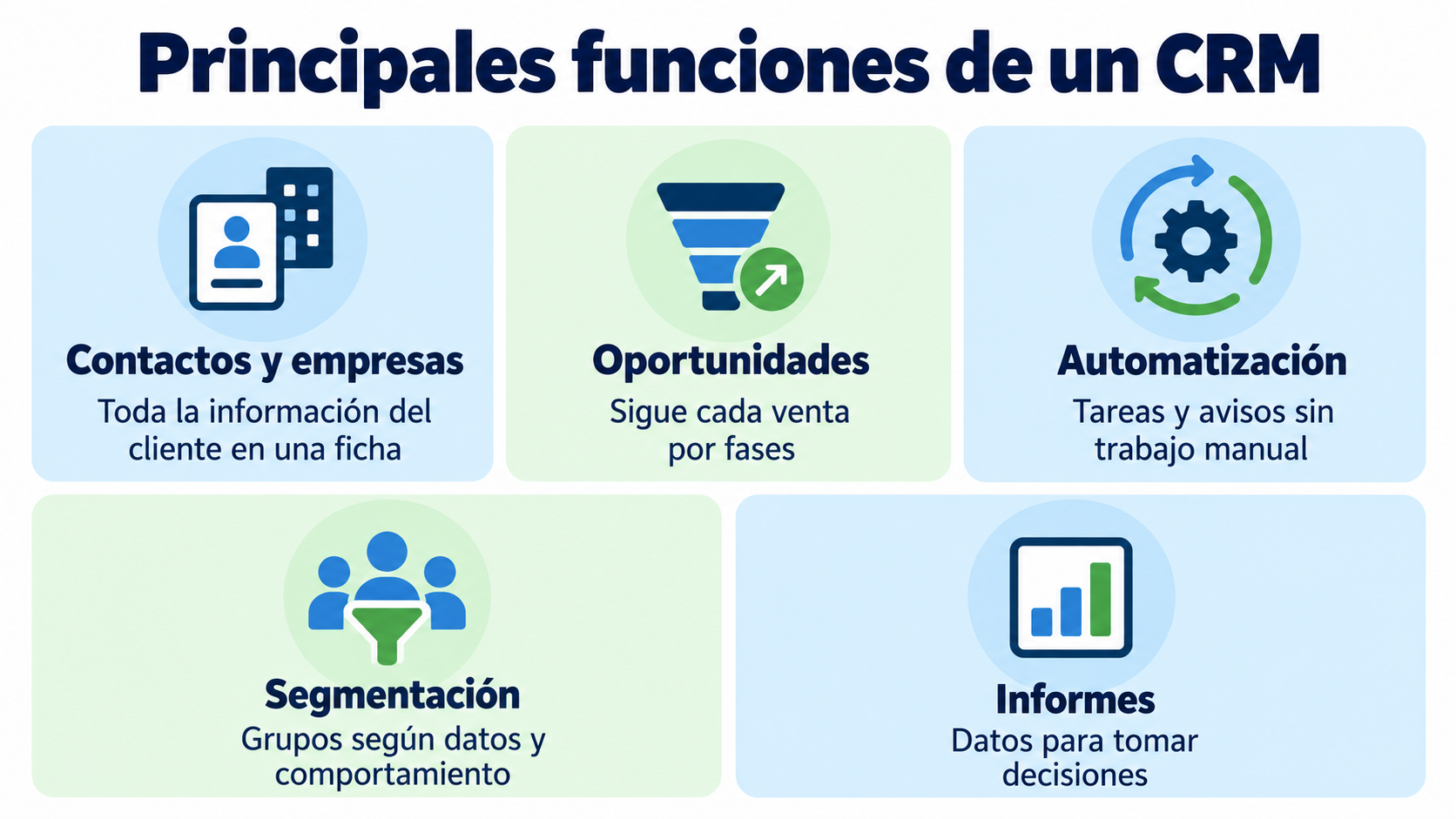
The most common capabilities include contact management, sales pipeline tracking, task automation, segmentation, reporting and integrations with other applications.
Contact and company management
A CRM lets you keep a structured database of people and organizations.
This is especially useful when several people work with the same customers. Instead of keeping information in individual files, the team can check a shared record with the available data and activities.
Opportunity and pipeline management
In sales, the CRM can represent the different stages an opportunity goes through: from first contact to proposal, negotiation and closing.
That way you can see which opportunities are active, which ones need follow-up and where you’re losing deals.
For a B2B company with long sales cycles, this feature can be much more important than a simple contact list.
Task automation
Modern CRMs can automate repetitive actions: assigning leads, creating tasks, sending alerts, updating statuses or starting certain processes when an event occurs.
But automation makes sense when it responds to a well-defined process. Automating a messy process only makes the mess move faster.
Segmentation and insights for marketing
CRM data can also help create segments based on characteristics, behavior, sales stage, interests or other variables.
This information is especially useful when combined with an email marketing platform, because it lets you send communications that are more relevant to each group’s context.
Connect your CRM to your email marketing
Send campaigns and automations using your customer data. Get started for free with Mailrelay.
Types of CRM
A common classification distinguishes between operational, analytical and collaborative CRM. You won’t always find these categories strictly separated in commercial products, since many platforms combine several capabilities.
Operational CRM
It’s designed to streamline and automate sales, marketing and customer service processes.
For example, it can help you record leads, assign them to sales reps, automate follow-ups or manage certain interactions.
Analytical CRM
Its main function is to turn stored data into useful information for analyzing the behavior of customers and opportunities.
Reports can help you spot trends, compare channels, analyze conversions or understand which segments deliver the best results.
Collaborative CRM
It aims to make it easier for different departments to share customer information.
This is useful when sales, marketing and customer service need to access shared data and maintain a consistent experience.
CRM and email marketing: are they the same thing?
Not exactly.
A CRM is designed to manage the overall relationship with customers and opportunities. An email marketing platform specializes in creating, sending, automating and measuring email communications.
| CRM | Email marketing platform | |
|---|---|---|
| What it’s for | Manage the relationship with customers and opportunities | Create, send, automate and measure emails |
| Who uses it | Sales, marketing and customer service | Mainly marketing |
| Key data | Contacts, companies, opportunities, calls and meetings | Subscribers, groups, fields and email engagement |
| Automation | Internal team tasks and alerts | Email and SMS sequences |
| Metrics | Pipeline, forecasts and closed deals | Opens, clicks, bounces and unsubscribes |
The two tools can work together.
For example, your CRM may show that a contact is at a certain sales stage. That information can be used to select a segment and send a specific content sequence from your email platform.
This is where integration stops being a technical matter and becomes an operational advantage: the CRM provides sales context and email marketing provides a measurable, automatable communication channel.
When do you need a CRM?
The answer depends on how you work and how complex your sales process is.
If you manage few contacts, have a simple sales cycle and most of the relationship happens by email, an email marketing platform with good contact management may cover a large part of your needs.
However, things change when several people work with the same leads, there are many sales stages, or you need to assign tasks, log calls and meetings, forecast sales or analyze each rep’s performance.
In that scenario, a dedicated CRM can provide a structure that an email marketing tool isn’t meant to replace.
Because the goal isn’t to pile up software, but to have the right information when the team needs it.
How to connect a CRM with email marketing
One of the most useful setups is to use the CRM as the source of sales information and the email marketing platform as the communication engine.
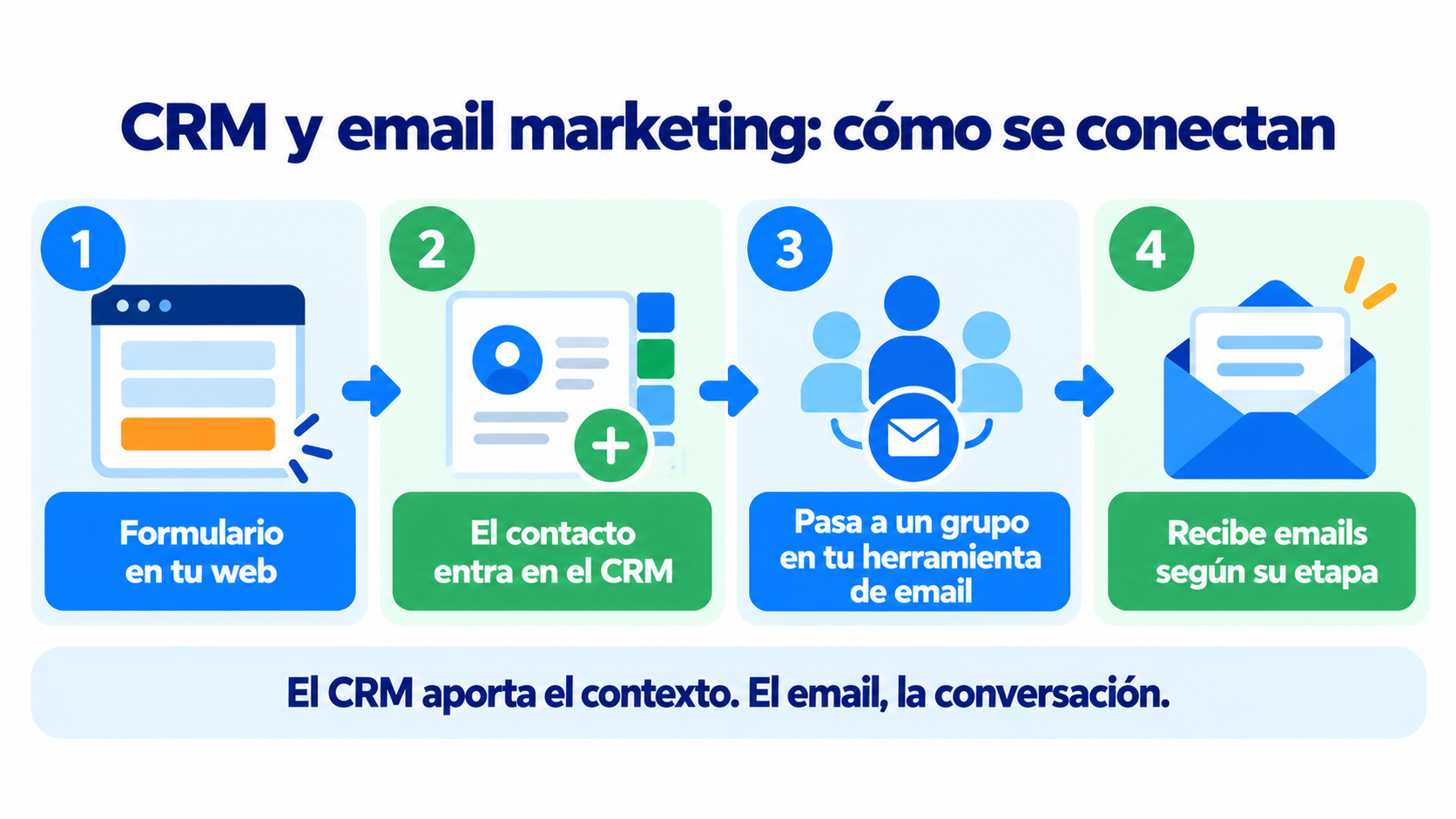
Let’s say a new contact requests information through your website. The CRM records their details and where they came from. Then, an integration can add that contact to a specific group in your email marketing tool.
From there, you can trigger a welcome email, a nurturing sequence or specific content based on their interests. If the contact moves to another stage, you can also change the type of communication they receive.
With Mailrelay you can connect your ecosystem through REST API, SMTP, webhooks and other integrations, so the platform can work alongside your CRM and the rest of your tools. You can also use integration services like Make when you need to connect applications without building the whole integration from scratch. Get the step-by-step guide, with 6 ready-to-copy workflows, in our article on how to integrate your CRM with email marketing.
What does Mailrelay add when you already use a CRM?
If you already have a CRM, you don’t need to abandon that system to take your email marketing to a professional level.
Mailrelay isn’t a CRM, but it connects to the one you already use (HubSpot, for example) through Make or the API, so you can send your email and SMS campaigns using your customer data. You’ll find it in the Mailrelay integrations table.
Mailrelay can handle the specialized side of email campaigns, automations and measurement. Its free account lets you manage up to 20,000 contacts and send up to 80,000 emails a month, and every plan includes human technical support: by ticket on the free plan, by ticket and chat on Standard, and by ticket, chat and phone on Enterprise.
You can also work with segmentation, groups and custom fields to tailor your sends to the information you have about your contacts.
Automation lets you create welcome journeys, nurturing sequences and other workflows. A/B tests help you compare variants, and reports give you data on opens, clicks, bounces, unsubscribes and link performance (opens and clicks on the free account and on Enterprise).
And if your CRM needs to exchange data with Mailrelay, the REST API lets you work with contacts, campaigns and account management, while webhooks enable certain real-time communications between systems.
Can Mailrelay replace a CRM?
It depends on what you mean by “CRM” and how complex your process is.
If you use that word to describe a contact database with segmentation, automations and tracking of email interactions, Mailrelay can cover many of your contact management and communication needs.
However, if you need a complex sales pipeline, opportunity assignment across salespeople, detailed logging of meetings and calls, sales forecasting or advanced customer service management, you’ll usually use a specialized CRM.
The good news is that you don’t necessarily have to choose between them.
What to look for when choosing a CRM
Before signing up for a CRM, think about the process you want to solve. A long list of features can be impressive, but a platform your team doesn’t use properly won’t add much value.
Pay attention to ease of use, contact management, field customization, opportunity tracking, automations, reporting, user permissions and integration options.
It’s also worth checking how data migration works, what support the provider offers and what costs come up as the number of users or contacts grows. If you’re just getting started, first compare these free CRMs and what each plan limits.
Finally, check how it connects with the tools you already use. If your CRM can’t communicate with your website, your billing system, your email platform or your internal apps, you may end up creating more silos instead of reducing them.
CRM for small businesses: is it worth it?
A CRM can be useful for a small business, but not every business needs to start with a complex platform.
If you have a small team and a simple sales process, start by identifying what information you need to keep and which tasks you want to stop doing manually. Sometimes a basic system used well solves more problems than an enterprise suite full of features nobody knows about.
When lead volume grows, you bring on several sales reps or follow-up starts to depend too much on spreadsheets and people’s memory, the role of a CRM becomes clearer.
The same logic applies to email marketing: first define the process, then choose the tools that support it.
CRM and automation: a practical example
Imagine a training academy that receives information requests for different courses.
The CRM can record the contact, the course they’re interested in, the person responsible for handling them and the stage they’re at. When that contact moves into a specific segment, Mailrelay can start an email sequence related to that course.
The first email can expand on the information requested. A second message can answer common questions, and another can present dates, available places or enrollment terms. If the contact engages with the messages, that information can be used to adjust the following communications.
This creates a coordinated journey between sales data and communication.
How Mailrelay helps you
A CRM makes sense when it turns scattered information into a more organized way of working with customers and opportunities.
For many companies, the CRM and email marketing are part of the same sales operating system: one provides context and follow-up, and the other lets you hold scalable, segmented and measurable conversations.
If you already use a CRM, you can connect Mailrelay to strengthen your email communication. And if you don’t need a full CRM yet, you can start by organizing your contacts, segmenting your audiences and automating your communications with a platform like Mailrelay.
What matters is that technology supports your sales process, not that the process ends up adapting to a tool nobody uses.
The free account includes 80,000 emails a month and up to 20,000 contacts.
Make sure every contact gets the right message
Segment, automate and measure your emails with Mailrelay. Up to 80,000 emails a month for free.
Frequently asked questions about CRM
What is a CRM in simple terms?
A CRM is a system for organizing a company’s information and interactions with its customers and prospects. It can be a strategy, a process or, most commonly, the software used to manage them.
What is a CRM used for?
It’s used to centralize data, organize contacts, track sales opportunities, coordinate teams, automate tasks and analyze the relationship with customers and prospects.
What does CRM stand for?
CRM stands for Customer Relationship Management, that is, the management of a company’s relationships with its customers.
Is a CRM only for sales?
No. Although sales is a common use, a CRM can also play a role in marketing, customer service, support and analyzing customer relationships.
What’s the difference between a CRM and email marketing?
A CRM manages the relationship with customers and opportunities more broadly. Email marketing focuses on creating, sending, automating and measuring email communications. In many companies, the two tools complement each other.
Can I connect my CRM to Mailrelay?
Yes. Mailrelay offers a REST API, SMTP, webhooks and integrations that let you connect it to other systems. You can also use tools like Make to build certain workflows without coding the whole connection.
Do I need a CRM if I have few customers?
Not necessarily. If your process is simple, good contact management and an email marketing platform may be enough at first. The need for a CRM usually grows as your sales process becomes more complex.