
Personalizing your mailings is one of the most effective ways to boost the effectiveness of your email marketing campaigns and get better results.
These dynamic variables make even more sense once you already know how to create a free newsletter and want to personalize it as much as possible.
You’ve probably seen this already, since it’s very likely you’ve received an email with your name or other personal details, preferences, or information related to previous actions.
That data, that personalization, has very likely helped build a greater sense of trust, or made the rest of the process easier for you, saving you time, for example.
How does this data appear in the email?
Well, this is done with what are known as custom fields or tags.
They’re variables, “words,” that the email marketing system can read and replace with certain values.
In other words, when you send your mailing, the mailing system looks for these variables and replaces them with the content that should appear, preparing the final email that will be sent.
In short: every email marketing tool has variables, although each one uses its own syntax (in Mailchimp they’re called merge tags and in HubSpot, personalization tokens). In Mailrelay, you add them from the editor. In the subject line, with the “Add variables” dropdown. In the content, with the “Variables” dropdown: {{ subscriber.name }} for the name or {{ subscriber.custom_fields.etiqueta }} for your own fields, with a default value in case the data is missing. And with {% if %} blocks you can show or hide parts of the newsletter for each contact. All of this also works on the free account.
What Are Dynamic Variables in Email Marketing?
The simplest way to understand dynamic or custom variables is as placeholders.
They’re words that represent a code telling the email marketing system to replace that tag or code with another piece of data.
For example, you could have something like this:
- Hi, “name”!
Here, “name” should be replaced with the name of the contact the email is sent to.
Easy, right?
That said, for this substitution to work, you first need to load the data into the system.
This way, instead of sending a generic mass email, you can include a personalized greeting that creates a greater sense of closeness with the recipient (something necessary to create persuasive emails).
And much more, as we’ll see throughout the article.
Variables are the first level of personalization in email marketing. We cover the other levels, from segments to hyper-personalization, in the glossary.
All of it, of course, automatically.
· And What About Segmentation?
Although segmentation is actually a different feature, the truth is it works together with custom fields or variables.
With this information available in custom fields, you can segment — that is, group or separate — the contacts on your list based on that information.
Imagine you have a custom field called “city” — you could segment the contacts on your list based on that data.
Segmentation, combined with custom fields, can help you create highly personalized email campaigns.

Why Personalize Your Emails with Dynamic Variables?
Now that we know what dynamic variables in emails are, it would be helpful to talk about their benefits.
Even though most of them will probably sound familiar, it’s worth highlighting them:
· Higher open rate:
You have to keep in mind that most of your contacts will have inboxes fairly full of emails.
So it’s essential that your email stands out.
Including a custom field, like the contact’s name, can make your email stand out from the rest.
After all, most emails won’t include the contact’s name, so the odds of it being seen and opened are higher.
· Improved Clicks and Engagement:
Just like with the subject line, showing personalized content to the customer will help improve results — more clicks, more engagement.
The content can show information personalized for the contact.
Like their location, for example.
Imagine a newsletter with a button that reads:
- Special offers in Madrid
If the contact is from Madrid, their interest will grow, because they can clearly see that the content is relevant to them.
This relevance is what helps improve the click-through rate (CTR).
Further down, we’ll look at some examples of how to do it.
· Increased Conversions:
As a result of improving the two previous points — higher open rates and more engagement — conversions also tend to improve.
The more emails opened, the greater the chances of conversion.
If engagement also improves, the chances of conversion increase too.
So, investing effort in email personalization pays off.
· Better Relationship with Your Audience:
Can personalized emails improve your relationship with your contacts?
Yes — as we’ve been discussing, contacts see that the content is more aligned with their interests; it’s not just another mass email that wastes their time.
This greater potential usefulness improves how your emails are perceived and sets them apart from the rest of the emails your contacts receive.
It sparks and keeps their interest.

How to Use Dynamic Variables to Personalize Subject Lines and Content
In Mailrelay there are two places to insert variables: the subject line and the content of the newsletter. This cheat sheet sums up what you can do in each one:
| What you want to do | How to do it in Mailrelay | Example |
|---|---|---|
| Put the name in the subject line | “Add variables” dropdown, next to the subject field | “Ana, your order is on its way” |
| Greet by name in the content | {{ subscriber.name }}, from the “Variables” dropdown | “Hi, Ana!” |
| Use your own field | {{ subscriber.custom_fields.etiqueta }} | “Padel news for you” |
| Avoid gaps if the data is missing | Click the variable and type a default value | “Hi, subscriber!” if there’s no name |
| Show a block only to some contacts | {% if subscriber.custom_fields.etiqueta == "valor" %} … {% endif %} | An offer only for people who play padel |
| Personalize the preview text | Doesn’t support variables | Write a text that works for everyone |
Be careful with the subject line: if the contact has no name, the subject line starts with a comma. Only use the name if almost all of your contacts have one; otherwise, test both subject lines with an A/B test.
Personalize your next newsletter
Create your free account and try variables, default values and conditional blocks with your own list.
How to Use Dynamic Variables to Personalize Your Emails
The next step is to look at how you can use dynamic variables and custom fields with your Mailrelay account.
We’ll go through it step by step.
· Collect and Organize Your Subscribers’ Data:
The first step is to have the contact data you want to use.
For example, first name, last name, city, etc.
You can request this data through subscription forms, or, if you already have it, prepare it in a CSV file to import it, for example.
Keep in mind that this data needs to be genuinely useful for your strategy — don’t ask for data just for the sake of it in your forms, since you’ll get fewer sign-ups, as the forms will be more tedious to fill out.
Well, once you know what data you’ll need, keep in mind that some fields already exist in Mailrelay:
- Name
- Address
- City
- State/Province
- Country
- Language
- Birthday
- Website
What happens if you have a piece of data that isn’t any of these?
In that case, you’d need to create a custom field.
You can go to the Subscribers – Custom fields menu and add one.
You’ll see a screen like this:
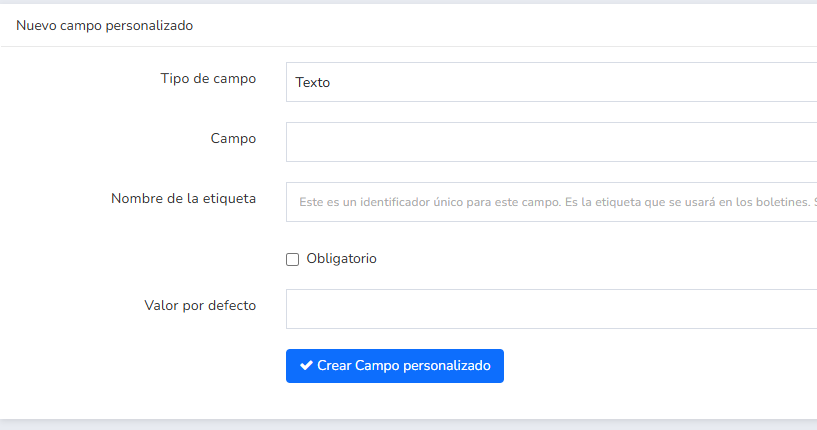
On this screen you can set the following values:
- Field type: text, number, dropdown, checkbox, etc.
- Field: here you’d enter the name of the field, for example “Sports activity”
- Tag name: for example “sport” (this must be a single word, with no spaces)
- Whether it’s required or not
- And its default value
This way you can create all the fields you need.
· Import Contacts with Custom Data:
During the contact import process, you’ll be able to choose which data goes into which fields:
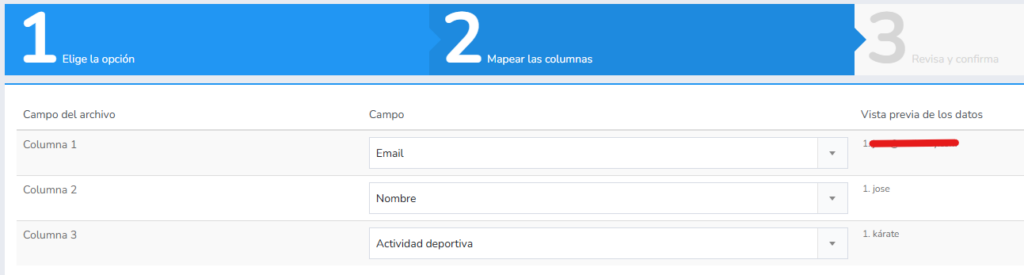
This way, you can import contacts with their custom fields fully filled in.
· Add Custom Fields to Your Newsletters:
Let’s look at some examples of how to add custom fields.
For example, the name.
In Mailrelay, custom fields can have two structures; for fields the system already includes, it would look something like this:
- Hi {{ subscriber.name }}!
You can place {{ subscriber.name }}, in brackets, wherever you want it to be replaced with the contact’s name.
You don’t need to memorize this — when you’re editing your email’s text, you’ll see a dropdown called “Variables”:
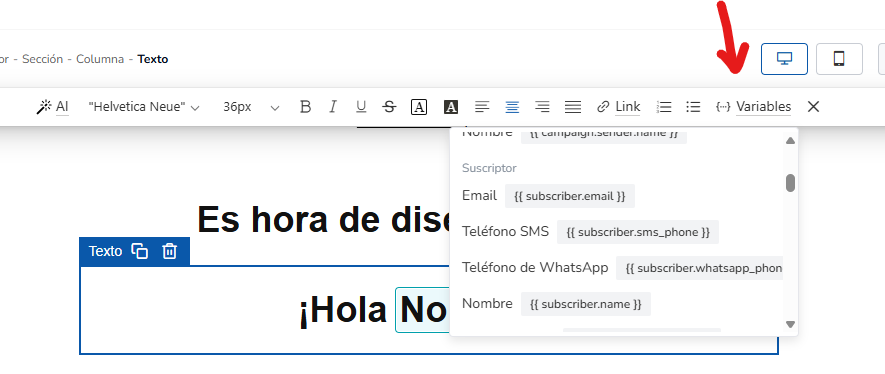
Just click on the variable you want to insert, and it will be placed in the email.
For example, in the previous case, for sports activity:
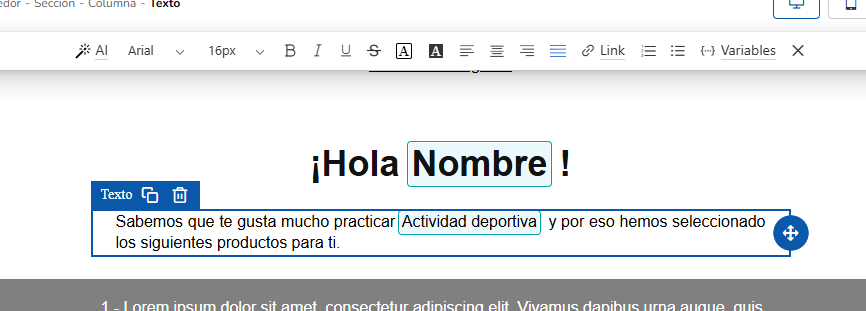
When you send, the system will replace that custom field with the contact’s value.
And what if the contact doesn’t have that value?
We can set a default one by clicking on that variable:
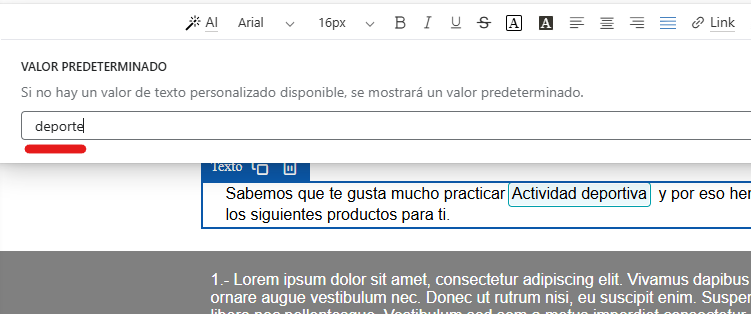
That way, if the contact doesn’t have that value, the default value will be used, so the text of your newsletter still makes sense.
For custom fields, you can insert them like this:
- {{ subscriber.custom_fields.deporte }}
Notice that in this case “sport” is the tag name we saw above.
Usually it’ll be easier for you to use the variables dropdown, which also lets you set a default value.
· Use Variables to Show Content Blocks:
Besides displaying content, you can use variables to show or hide parts of the email.
Let’s look at an example:
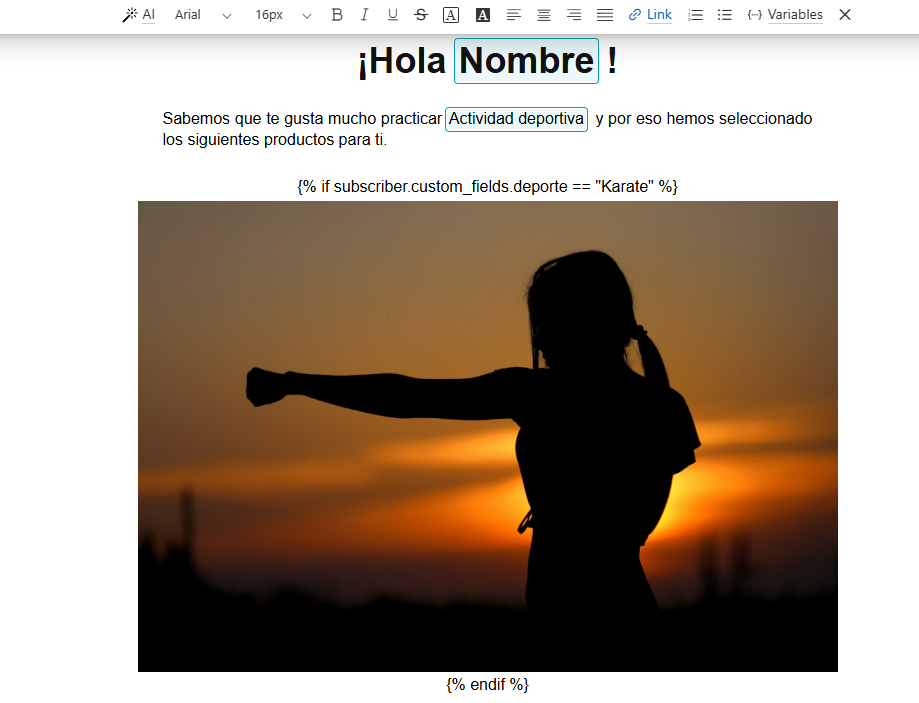
Here we have three parts:
- Text block with the check: {% if subscriber.custom_fields.sport == “Karate” %}
- Content block: in this case an image, but there could be several
- Block ending the check: {% endif %}
Remember that in the check, the text must exactly match the variable’s content.
With custom variables, you can show or hide entire sections of a newsletter, so each segment of your contacts sees exactly what you want them to see. They can be specific blocks or more tailored personalization: it’s up to you! My advice: start with a single conditional block, for example a different offer depending on the city, and check in the preview how each segment sees it before you send.
Jose Argudo, CMO at Mailrelay
· Preview and Test Your Personalized Emails:
Keep in mind that using variables, custom fields, blocks, and conditionals affects how your newsletter displays.
So it’s important to run some display tests before the actual send, to make sure everything looks right.
Also, be sure to check what happens when there’s no data — how it displays in that case.

Best Practices for Personalizing Emails
Using custom variables is very useful; however, there are a few things to keep in mind for proper use. Let’s take a look:
· Ensure Data Quality and Keep It Up to Date:
It’s important that the data is up to date and standardized.
What should you look out for?
For example, avoid using different formats — imagine a piece of data that’s sometimes in uppercase and sometimes in lowercase; even though it might display fine, it wouldn’t be useful for segmenting your contacts.
To avoid these errors, try to make sure the data follows a consistent format.
· Don’t Overuse Personalization:
Using a couple of custom variables can create a very specific email for the recipient.
However, overusing variables can significantly increase complexity and make display errors more likely.
The more variables you use, the more testing you’ll need to do to make sure everything displays correctly in every case.
· Take Advantage of Segmentation Along with Variables:
Remember that besides using variables to personalize your emails, you can use the segmentation tool to target a precise audience based on the data you have.
By targeting the right segment, your open and click results will improve.
· Run A/B Tests to Optimize Results:
Although personalizing the subject lines of your mass email campaigns tends to be very effective, you can make sure of it!
In Mailrelay you have an A/B testing tool that lets you test personalized and non-personalized subject lines, so you can confirm which one works better.
You can test the subject line and the sender on every plan, including the free account.
· Analyze the Metrics and Adjust Your Strategy:
Once you’ve run your campaigns, be sure to review the statistics to check the results.
See whether personalization helps or not, and what level of personalization works best.

Why Use Mailrelay for Your Personalized Mailing Campaigns?
Not all email marketing platforms include the features needed to send personalized campaigns, especially on their free accounts.
Mailrelay does.
· Unbeatable Free Plan:
Mailrelay offers the largest free account of any email marketing tool.
It lets you send up to 80,000 emails a month for free to up to 20,000 contacts.
Unlike other services such as Mailchimp, Acumbamail, or Brevo (Sendinblue), whose free plans are very limited in contacts or daily sends, with Mailrelay you can implement personalization at scale from day one.
And send real mass mailing campaigns, not just small tests.
· All Features Available from the Start:
Unlike many platforms where advanced features (such as automation, A/B testing or advanced segmentation) are only available on paid plans, Mailrelay includes almost all of its features on the free plan too.
This lets you get the most out of the system, not just run small tests.
You’ll have access to:
- Custom fields
- Complex segmentation
- Automation workflows
- A/B tests for subject line and sender
- Landing pages and forms
- Development API
- SMTP server (with a 30-day trial on the free account)
- Etc.
You’ll have almost all of these features as soon as you create your free account.
· Dedicated Technical Support (Even on Free Accounts):
Whenever you have a question, you can reach out to our support team, even if you have a free account.
This way, you can get the most out of your Mailrelay account.
· High Deliverability:
There’s no point preparing a personalized email if it doesn’t reach the inbox.
At Mailrelay, deliverability is a priority.
It uses its own optimized infrastructure to improve the results of your email campaigns.
This includes everything from its own IPs and servers to algorithms and an expert team of people.
· Ease of Use and a Powerful Editor:
Mailrelay lets you design an email in minutes thanks to its simple visual editor.
In the editor, you’ll find the variables dropdown we saw earlier, which lets you easily create personalized emails.
· Integrations and Large-Scale Contact Management:
Mailrelay lets you integrate and upload contacts in several ways:
- Importing a CSV file with the data
- Using the development API
- Through tools like Make.com that let you integrate different platforms
This way, you’ll be able to upload whatever data you need.
Send your first personalized email today
Up to 80,000 emails a month to 20,000 contacts, with custom fields and subject line A/B testing included.
In short
Email personalization can improve your results, and email marketing tools like Mailrelay make it easy to personalize your emails.
You can even try these features with the free account — there’s no excuse.
Try sending a personalized mailing today.
Frequently Asked Questions About Dynamic Variables
Can You Put Variables in the Subject Line?
Yes. In Mailrelay, the subject field has an “Add variables” dropdown with the subscriber’s first name, last name, email and other details. The preview text doesn’t support variables.
What Happens If the Contact Doesn’t Have That Data?
The variable is left empty, unless you give it a default value. In the content, click the variable you inserted and type that value. That way, if the name is missing, the email will say “Hi, subscriber!” instead of “Hi, !”.
What’s the Difference Between a Variable and a Segment?
The segment decides who you send the email to. The variable changes the content within the same email based on each contact’s data. They work well together: you segment by interest and personalize with the name or the city.
Do I Need a Paid Plan to Use Dynamic Variables?
No. Custom fields, variables, default values and conditional blocks are all on the free account, which lets you send up to 80,000 emails a month to 20,000 contacts. A/B testing of the subject line and sender is also available on every plan.

Jose Argudo
CMO at Mailrelay. Writes about email marketing, copywriting and conversion for SMEs and entrepreneurs.