Email marketing metrics: the most important ones, formulas and how to improve them
What to measure in every send and what to do when a number drops
Email marketing metrics are the data points that let you measure the performance of an email campaign.
These figures let you track the effectiveness of your email campaigns.
Thanks to this data, you can see how many messages are delivered and how many people open them.
They also show which links get the most clicks.
Likewise, they help you spot unsubscribes, bounces, complaints, and areas for improvement.
Metrics shouldn’t be reviewed in isolation. They’re most useful when you compare them with previous results and look at the trend.

Measure every send in real time
Opens, clicks per link and click map in the Mailrelay free account.
What are email marketing metrics and what are they used for?
Email marketing metrics measure recipient behavior and the outcome of every send.
They also let you assess the health of your list, the quality of your content and the profitability of your strategy.
Some metrics describe delivery, while others reflect engagement.
For example, the delivery rate shows whether the emails reached the recipient’s server.
The click-through rate shows whether the content sparked interest. ROI, on the other hand, tells you whether the campaign was profitable.
With these metrics, you can compare subject lines, senders, designs, offers, and calls to action.
They also let you study how different segments behave, so you can tailor the content to each group of subscribers.
They also help you adjust your sending frequency. A rise in unsubscribes may mean you’re sending too often.
However, it can also signal that the content no longer meets the expectations set at signup.
Analyzing this data allows you to answer specific questions.
You can find out whether the email arrived, whether the subject line sparked interest and whether the content got clicks.
Not knowing this leaves you in the dark.
You can also discover which link was the most effective and if the campaign generated sales, registrations, or downloads.
The analysis is even more useful when the data is available in real time, as it is in Mailrelay.
This way, you can spot issues during the send and act before they affect the entire campaign.
What’s the difference between a metric and a KPI?
A metric is any measurable data point from a campaign.
A KPI is a metric tied to a goal.
For example, the open rate might just be another data point.
However, it becomes a KPI if your goal is to increase the visibility of your email campaigns.
Not every email marketing metric has to be a KPI for you.
Focus on a few KPIs and set a clear objective.
What are the main email marketing metrics?
The most important email marketing metrics depend on the campaign’s goal.
However, there are several indicators you should check for every send.
Delivery rate
The delivery rate shows the percentage of emails accepted by the receiving servers.
It lets you check if the message reached the contact’s email system.
A low rate may point to invalid addresses (bounces), blocks or reputation problems.
That’s why you should check the quality of your database and where your contacts come from.
Delivery doesn’t guarantee the message will appear in the main inbox.
An accepted email can still end up in the spam folder.
Bounce rate
The bounce rate indicates the percentage of messages that couldn’t be delivered.
Bounces can be hard or soft.
A hard bounce usually means the address doesn’t exist or is invalid for some reason.
A soft bounce, on the other hand, is caused by a temporary problem. For example, the mailbox may be full.
Open rate
The open rate estimates the percentage of recipients who opened the email.
It’s best to analyze it as a trend.
Click-through rate or CTR
CTR measures the percentage of recipients who clicked on a link.
This is a direct sign of engagement with your content.
A low CTR might indicate a lack of interest.
It can also point to weak calls to action, a confusing design, or too many links competing for attention.
To improve this metric, use clear and visible links.
And, if possible, have a single goal for every email you send.
Click-to-open rate or CTOR
CTOR compares unique clicks with unique opens.
It helps you assess how well the content drives action.
This metric separates the performance of the email body from the subject line’s initial effect in getting opens.
That’s why it’s useful when testing designs, copy, and calls to action.
A high CTOR usually means the message lives up to the expectations set before the open.
However, it should always be compared with the final conversion.
Clicks per link
The total number of clicks doesn’t explain which elements performed best.
To find out, you need to analyze each link individually.
Clicks per URL show which destination attracted the most interest.
Mailrelay lets you track every link you have, wherever it is: buttons, images, menus and links within the text.
These email marketing metrics will help you see which parts of the email to prioritize, what your contacts notice most easily and which calls to action need strengthening.
With this information, you’ll also know which links never get clicked, or get very few and should be improved, or removed if they don’t add value.
Heatmap or click map
A heatmap visually displays the most clicked areas of the email.
This lets you identify the buttons, images, and text that draw the most interaction.
For instance, a button might get few clicks because it’s placed too low.
Or it might go unnoticed due to its size, copy, or position.
The heatmap provides highly visual context that numbers alone can’t offer.
This helps you decide where to place calls to action in your next sends.
Conversion rate
The conversion rate measures the percentage of recipients who completed the desired action.
This action could be a purchase, registration, request, or download.
To calculate it accurately, you must first define what counts as a conversion.
Additionally, you need to connect the email clicks with the final outcome.
This metric aligns your data analysis with your broader business goals.
That’s why it’s usually more relevant than an isolated open.
Unsubscribe rate
The unsubscribe rate reflects the percentage of people who opt out after a send.
An occasional unsubscribe, or a few of them, usually isn’t a problem.
It’s normal for people to unsubscribe over time.
In fact, a clean list can perform better than a list full of unengaged contacts.
However, a steady increase might signal you’re sending too often or your content lacks relevance.
Analyze this metric alongside spam complaints.
If there’s a sharp spike in unsubscribes, it might be due to a specific issue.
Spam complaint rate
This rate measures how many recipients mark the email as spam.
It should be kept as low as possible.
An increase can damage your domain reputation and future deliverability.
Above all, remember to offer a clear unsubscribe option.
List growth rate
The growth rate compares new signups with unsubscribes and lost contacts.
It shows if your audience is growing sustainably.
A large list isn’t always useful.
Quality, engagement and consent matter more than quantity.
That’s why you should combine this metric with clicks, conversions, and engagement levels.
ROI
ROI compares the profit generated with the cost of the strategy.
It lets you assess the profitability of the channel.
You should include the cost of the platform, the team, design, and other resources.
Then, link them to the revenue attributed to your email marketing.
Among all email marketing metrics, ROI best connects your activity to financial results.
How are email marketing metrics calculated?
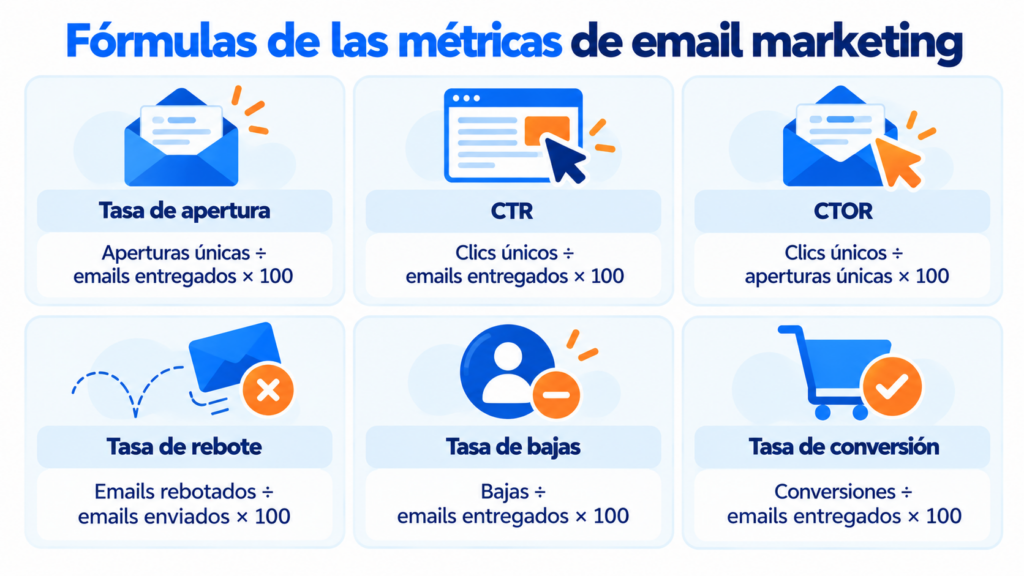
These are the basic formulas:
| Metric | Formula |
|---|---|
| Delivery rate | Delivered emails ÷ sent emails × 100 |
| Bounce rate | Bounced emails ÷ sent emails × 100 |
| Open rate | Unique opens ÷ delivered emails × 100 |
| CTR | Unique clicks ÷ delivered emails × 100 |
| CTOR | Unique clicks ÷ unique opens × 100 |
| Conversion rate | Conversions ÷ delivered emails × 100 |
| Unsubscribe rate | Unsubscribes ÷ delivered emails × 100 |
| Spam rate | Spam complaints ÷ delivered emails × 100 |
| ROI | Net profit ÷ total cost × 100 |
How to interpret and improve email marketing metrics
Interpreting email marketing metrics requires tracking them over time and analyzing their evolution.
A good initial result doesn’t guarantee a profitable campaign.
By campaign, we mean a series of mailings, not a single one.
For example, a high open rate with few clicks may mean that, although the subject line generated a lot of interest, the email copy wasn’t convincing enough.
Or the calls to action weren’t clear.
On the other hand, lots of clicks without conversions may point to a problem with the landing page.
Above all, remember to analyze trends: trends are what reveal real improvements.
However, a small drop in a specific send isn’t always due to a problem.
It could be due to external factors, like the holiday season.
Compare equivalent campaigns
It doesn’t make sense to compare an educational newsletter with an urgent promotion.
They have different goals.
A newsletter might generate few immediate clicks, but it strengthens the relationship with your audience.
A promotion, on the other hand, usually aims for a specific conversion within a limited time.
Define the goal before sending
Then, select the email marketing metrics that best reflect that goal.
Don’t forget your segments
General statistics don’t tell the whole story; try sending to specific segments to spot the differences.
This will help you discover which contact groups respond best.
You can then adapt your content and frequency to each audience.
Use real-time data
Mailrelay’s real-time statistics show how your send unfolds from the very first minutes.
They are useful for spotting errors, broken links, or unusual behavior.
Just remember to give your mailing time to show consolidated results: not all your contacts will open your email right away.
Check the heatmap
The heatmap provides visual context.
It shows where attention is focused within the newsletter.
If an image gets a lot of clicks, users might expect it to link to a page.
If an important button goes unnoticed, you can change its placement or copy.
Study your most effective links
A link list sorted by clicks makes accurate comparison easy.
It lets you know which product, content, or call to action sparked the most interest.
You can use this information to create segments.
For instance, you can group together people who clicked on a specific category.
Then, you can send them related, more relevant content.
Improve each metric separately
If delivery fails, check your list, authentication and reputation.
If opens are low, test different subject lines, senders, and send times.
When clicks are low, simplify the message and make your calls to action more visible.
Use one primary call to action and eliminate distractions.
If you get clicks but no conversions, review your landing page.
Use a tool with clear reports
An email marketing tool should offer clear, easy-to-understand reports.
Look for a tool that provides statistics on opens, clicks, bounces, unsubscribes, and complaints.
Likewise, it’s helpful to have specific data for each link.
Heatmaps make visual interpretation much easier.
Meanwhile, real-time data lets you monitor the campaign as it runs.
Mailrelay brings these features together in one reporting dashboard.
You can review opens, clicks, bounces, unsubscribes, and the most effective links.
In addition, the click map shows the interaction on the newsletter itself.
This helps you optimize buttons, images, and calls to action.
Avoid the most common mistakes
The most common mistake is judging a campaign by a single number, metric, or statistic.
No single metric can explain an entire campaign or send on its own.
Another common error is comparing your results to industry averages.
Industry data provides context, but it doesn’t replace your own historical data.
It’s also problematic to compare campaigns with different goals.
Every send needs its own KPIs.
How Mailrelay helps you
With Mailrelay, you get the metrics for every send in real time: deliveries, bounces, unsubscribes and complaints on all plans, and opens and clicks on the free account and Enterprise.
For each campaign, you can see the clicks on each link, the click map on the newsletter itself and where opens come from. On the main dashboard, the heatmap of the best times of day shows when your list opens the most.
With that data, you can create segments of the people who clicked and test two subject lines with an A/B test before sending to the rest.
The free account lets you send up to 80,000 emails a month to 20,000 contacts, with human support on every plan.
Improve your metrics with every send
Segment by clicks and run A/B tests for free with Mailrelay.
Frequently asked questions about email marketing metrics
What are the most important email marketing metrics?
The main ones are delivery, bounce, open, CTR, CTOR, conversion, unsubscribe, spam complaints, and ROI.
The priority depends on the goal of each campaign.
What’s the difference between a metric and a KPI?
A metric is any measurable data point.
A KPI is a metric chosen to evaluate a strategic goal.
Therefore, all KPIs are metrics, but not all metrics are KPIs.
How often should you check email marketing metrics?
You can check the data in real time right after sending.
However, it’s best to run consolidated analyses weekly, monthly, or per campaign.
You should also wait long enough for the results to consolidate.
Is the open rate still reliable?
It still provides context, but it shouldn’t be used alone.
Some privacy protections can register automatic opens.
That’s why you should analyze it alongside clicks, CTOR, and conversions.
Which metric indicates if the email content is working?
CTOR helps assess content performance after the open.
The heatmap shows which elements received the most interaction.
You should also check the unique clicks for each link.
How do you know which link was the most effective?
Check the unique clicks per URL and the heatmap.
This lets you compare buttons, images, and text links.
The most clicked link can reveal your audience’s main interest.
Which email marketing metrics help measure sales?
The conversion rate, attributed revenue, and ROI connect the campaign to your financial results.
Clicks are important, but they don’t prove a sale happened on their own.
How can Mailrelay help measure a campaign?
Mailrelay offers real-time statistics on opens, clicks, bounces, unsubscribes and complaints (opens and clicks on the free account and Enterprise).
It also includes heatmaps and a ranking of the most effective links.