Email marketing sending frequency: how often to send your newsletter and when to change it
How many emails to send a month, when to send more or fewer, and how to check it with your own data
How many emails to send a month, when to send more or fewer, and how to check it with your own data
How often should you send your newsletter? Start with at least one send a month, and move up to one every two weeks or one a week only if you have something useful to say and your data can take it.
Your content decides your sending frequency, not an industry average.
Sending frequency is the number of emails a subscriber receives over a period of time, usually a week or a month. It includes everything your brand sends them: newsletters, promotions and automated emails.
There’s no ideal frequency that works for everyone. An online store with weekly deals and a consultancy that sends a monthly newsletter can both be getting it right.
What does exist is a way to find yours. Here’s a starting point by type of business, the questions that fine-tune it, the signs that tell you you’re sending too much, and how to test a new pace without burning out your list.
This table isn’t a rule. It’s the pace worth starting with, and what tells you when to change it:
| Type of email | Starting frequency | Increase it if… | Decrease it if… |
|---|---|---|---|
| Content newsletter (tips, articles, news) | Every two weeks | You have useful content for every week and clicks per send hold steady | You struggle to fill each send or unsubscribes go up |
| Online store with deals | Weekly | Sales per send hold steady when you send more | Unsubscribes or complaints go up, or clicks per send drop |
| B2B company or professional services | Monthly | You have news, case studies or guides to share | Nobody clicks or replies |
| Date-driven campaign (Black Friday, Christmas, a launch) | Several sends over a few days, only while it lasts | — | Go back to your usual pace as soon as it ends |
| Automated emails (welcome, cart, birthday) | Set by what each contact does | — | Make sure they don’t land on the same day as the newsletter |
Notice that no row drops below one send a month. If you leave it any longer, your subscribers forget who you are, and a sender they don’t recognize ends up in the spam folder.
Schedule your newsletter with no daily limit
With Mailrelay’s free account you can send up to 80,000 emails a month, whenever you decide.
The starting point gives you a baseline. These five questions tailor it to your business.
This is the question that matters most. If sending every week means padding the email with filler, send every two weeks. A weak email wears people out more than one that never arrives. Think about your resources too. If you’re short on time, one carefully crafted send a month beats four rushed ones.
If your form says “one email a month with practical tips”, stick to it. Switching to three emails a week without warning is the fastest way to pile up unsubscribes. If you’re going to change the pace, say so in the next send and explain what your subscribers will get out of it.
A swimwear business sells mostly from June to August. It makes sense for it to send little the rest of the year and increase its frequency in summer, when customers are ready to buy.
The same goes for promotions. A three-week Christmas campaign can handle a couple of emails a week. To find out which dates are coming up and when to start each campaign, check our 2027 marketing calendar.
A World Book Day promotion that lasts a few days can handle one email a day during that week. When it’s over, you go back to your usual pace.
In B2B, your emails compete with work email. A lower pace with content that helps people make decisions usually works better. In B2C, especially in ecommerce, audiences accept more offers, as long as they’re varied and don’t repeat the same thing every week.
Also check whether your list is mostly business or personal addresses. It will help you choose the day and time, which we cover in a separate article.
The four previous questions give you a hypothesis. Your statistics tell you whether you got it right. That’s what we look at in the next section.
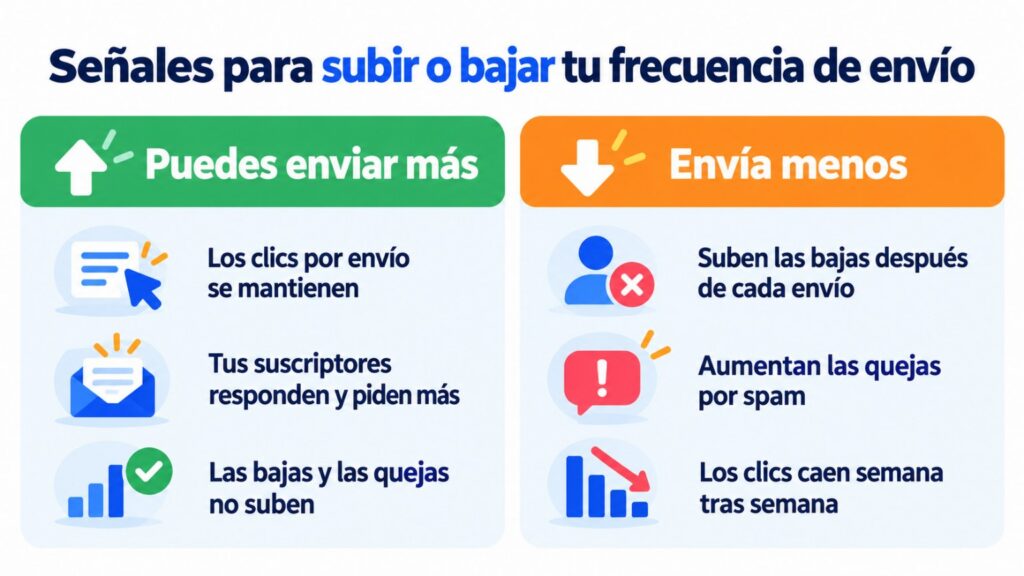
There’s no need to guess. After each send, your numbers let you know:
| Sign | What it usually means | What to do |
|---|---|---|
| Unsubscribes go up after each send | You’re sending more than your list wants to receive | Slow down, or let people choose the frequency in your preference center |
| Spam complaints increase | You’re sending too much, or writing to people who no longer remember you | Review your frequency and clean out inactive contacts. Gmail asks you to keep your complaint rate below 0.3% |
| Clicks per send drop week after week | Your subscribers are getting tired | Go back to your previous pace and compare for a few weeks |
| They reply and ask for more | You have room to send more | Increase gradually and keep an eye on unsubscribes |
| Many contacts haven’t opened or clicked in months | You’re sending too little or your list has gone stale | Send a re-engagement campaign and stop writing to those who don’t respond |
Only use opens as supporting data. Since 2021, Apple Mail can mark emails nobody has read as opened, so clicks, unsubscribes and complaints give you a more accurate picture.
When several of these signs keep showing up send after send, your list is suffering from list fatigue. That glossary entry explains how to spot it early and how to win back your subscribers.
What’s the ideal frequency? It’s one of the most common questions in email marketing, and the truth is there’s no single answer: what works for one business may not work for another. My recommendation is to let your own tests and analysis guide you. Make small, gradual changes and check whether your results improve. Then adapt your strategy based on that information. My advice: write down every change with its date. In a few months, you’ll know what you tried and what happened.
Jose Argudo, CMO at Mailrelay
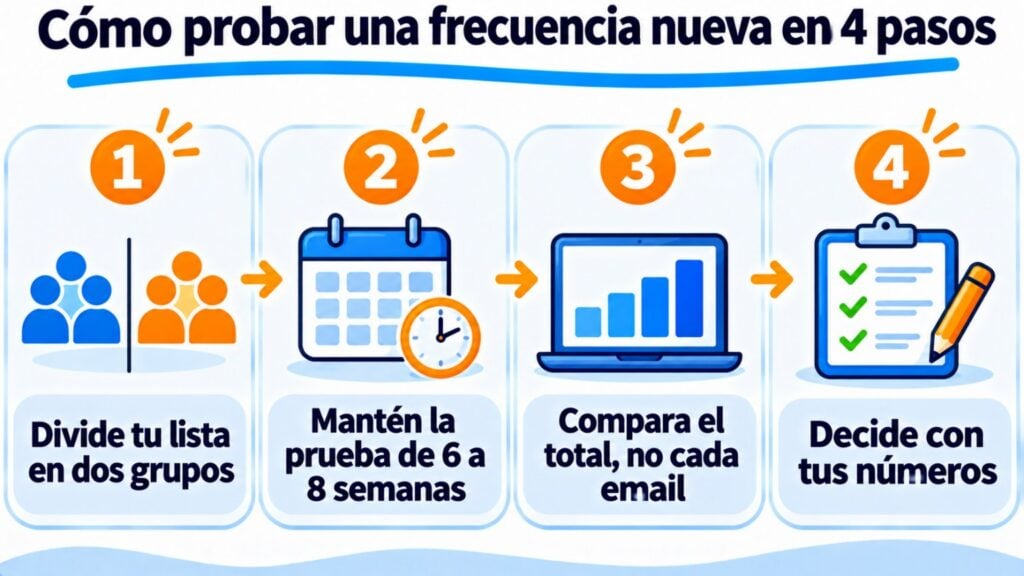
If you want to send more often, don’t change it for everyone at once. Run a test:
1. Split your list into two random groups. One keeps your current pace and the other gets the new frequency. You can do this with two segments.
2. Run the test for six to eight weeks. A couple of sends won’t show you anything: the effects of sending more, such as unsubscribes, take time to appear.
3. Compare the totals, not each email. When you send more, clicks per email usually drop. What matters is whether the group that gets more emails clicks and buys more overall, without a spike in unsubscribes or complaints.
4. Decide based on your numbers. If the new group wins on total clicks or sales and unsubscribes hold steady, switch everyone to the new pace. If not, go back to the previous one.
Imagine you go from a fortnightly newsletter to a weekly one. With made-up figures for the example, the weekly group gets 30% fewer clicks per email, but because it receives twice as many emails, it adds up to more clicks over the month. If its unsubscribes don’t go up, you’ve found a better pace.
Test a new frequency with two segments
Split your list, schedule each send and compare clicks and unsubscribes in your statistics.
Gmail and Outlook look at how your subscribers react. If you send more and more emails to people who don’t open them or click, they conclude your emails aren’t wanted. And your sender reputation drops. From then on, your emails are also less likely to reach the people who do read them.
So if you increase your frequency, do it with the people who engage. Separate your active contacts from your inactive ones. Send more to the former and prepare a re-engagement campaign for the latter. We explain how in deliverability in email marketing.
Sending too often, or too rarely, is one of the common mistakes in bulk emailing.
That’s a different question, and the answer also depends on your audience. You’ll find the data and how to test it with your list in the best time and day to send email marketing campaigns.
With Mailrelay, you decide the frequency, not a limit set by the tool. The free account lets you send up to 80,000 emails a month to 20,000 contacts, with no daily limit.
You can schedule each send for the day and time you choose, split your contacts into groups and segments, and run A/B tests. The free account gives you open, click, bounce and unsubscribe statistics for every campaign.
And if you’re ever unsure about your sending pace or your deliverability, our support team will help you, on the free account too. If you want to start from scratch, you’ll find the steps in how to create a mailing and how to send a mass email.
Find your sending pace
Create your account and send your next newsletter today.
These are the most common questions about how often to send.
It depends on what you send. For a content newsletter, more than one a week is usually too many. An online store with deals can send two or three if its unsubscribes and complaints don’t go up. Your data sets the limit, not a fixed number.
Your subscribers forget about you. If months go by without them receiving anything and suddenly an email arrives, many won’t recognize you and will mark it as spam. Send at least one a month.
For the subscriber, yes: they all land in their inbox. Make sure your welcome email or your reminders don’t land on the same day as the newsletter.
No. You can send more to those who open and click, and less to those who haven’t engaged in a while. You can also let each subscriber choose how many emails they want to receive.
Once a quarter, or whenever you notice unsubscribes going up or clicks dropping. If your business is seasonal, review it before each season.
If you want to fine-tune your sends further, these articles build on what you’ve read here.