What are the best tools to automate email campaigns?
Almost all of them promise automations, but not all of them let you use them for free or with your whole list. We explain what each tool offers and which one fits your business.

Almost all of them promise automations, but not all of them let you use them for free or with your whole list. We explain what each tool offers and which one fits your business.
The short answer: the most widely used tools to automate email campaigns are ActiveCampaign, Brevo, Klaviyo, MailerLite, Mailchimp and Mailrelay. The best one depends on your case. If you want to automate for free with a large list, Mailrelay is the only one that includes full workflows for 20,000 contacts without paying. If you have an online store, Klaviyo and Omnisend are designed for it. And if you need a sales CRM, HubSpot and ActiveCampaign, which are paid.
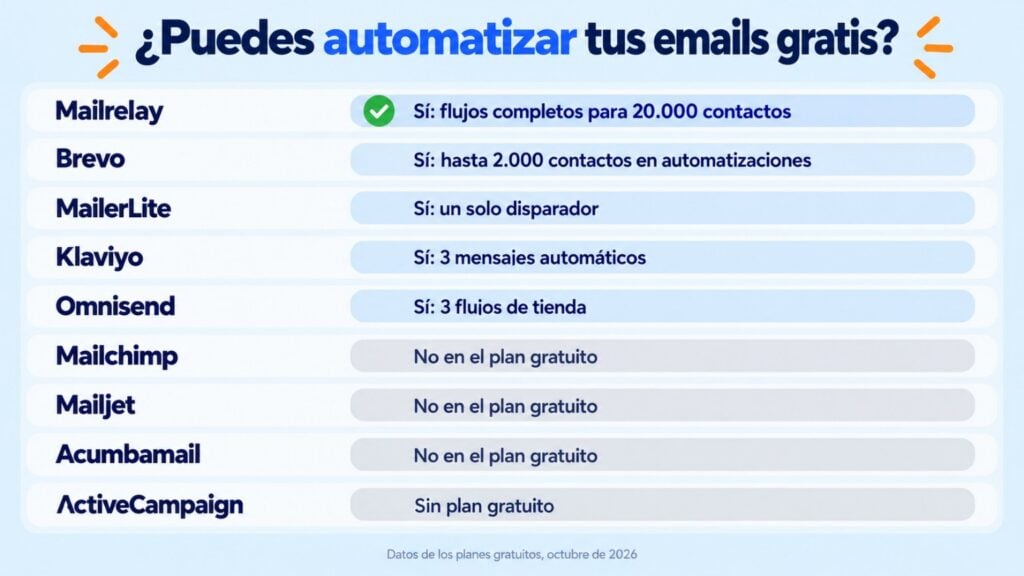
In this comparison you’ll find what each one lets you automate on its free plan, with data from their official websites as of October 2026, and how to choose.
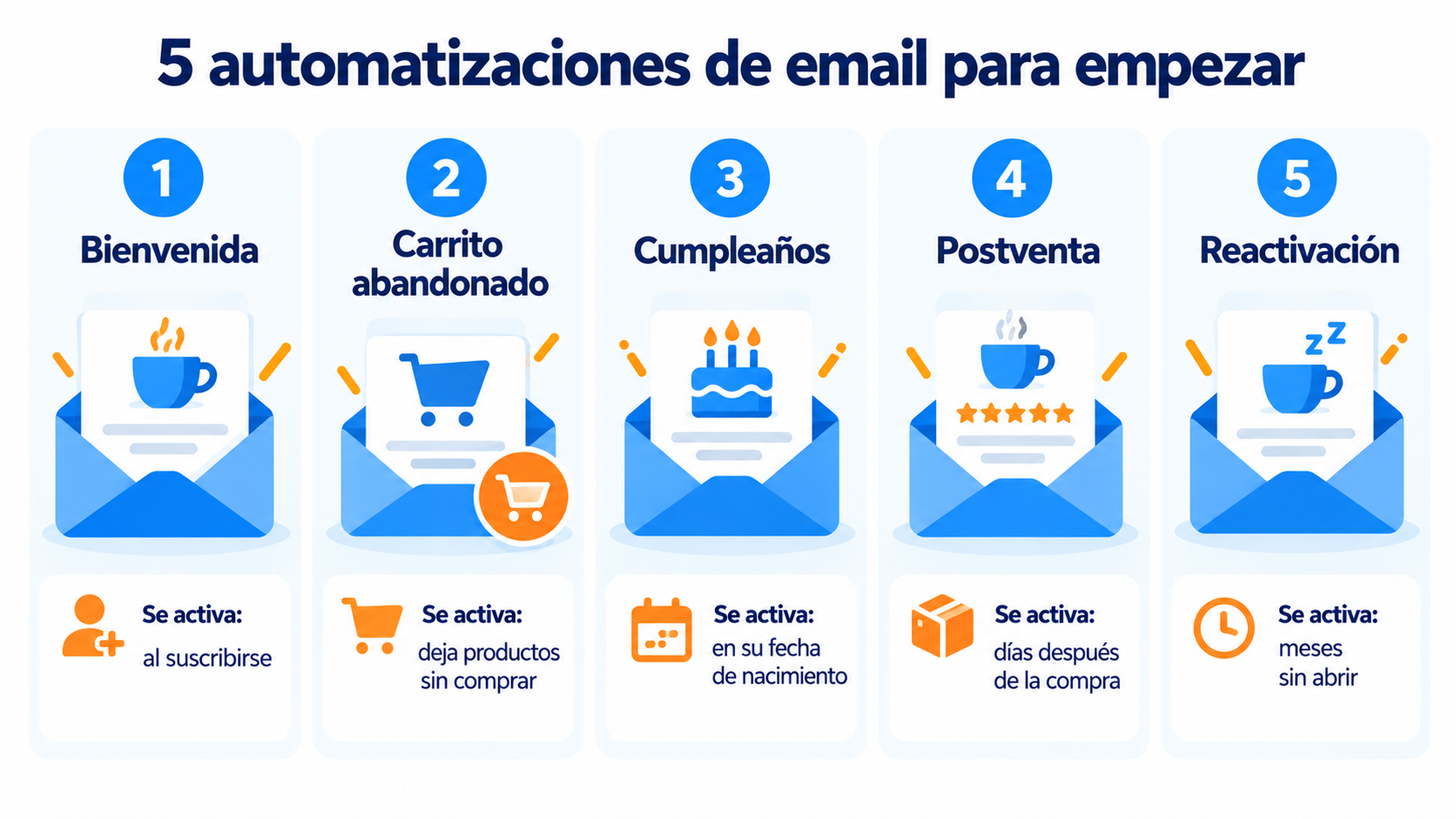
“Automation is important, but you probably don’t need complex automations. Most small businesses get by with three or four workflows: welcome, abandoned cart, birthday and re-engagement. Before signing up for software that does everything but is expensive, take a good look at what you need. What are you really going to use, and which features do you just like on a whim? That difference matters and will affect your budget. My advice: write down the workflows you’re going to create this year and choose the tool that lets you build them with your whole list, not the one with the longest feature list.”
Jose Argudo, CMO at Mailrelay
| Tool | Automations on the free plan? | Free plan limit | To automate without limits |
|---|---|---|---|
| Mailrelay | Yes, workflows with conditions, waits and branches | 20,000 contacts and 80,000 emails a month | Included in the free account |
| Brevo | Yes, up to 2,000 contacts in active automations | 300 emails a day | Paid plans |
| MailerLite | Yes, with a single trigger | 250 subscribers and 2,500 emails a month | Paid plans |
| Klaviyo | Yes, up to 3 active automated messages | 250 profiles and 500 emails a month | Paid plans |
| Omnisend | Yes: welcome, abandoned cart and post-purchase | 500 contacts and 500 emails a month | Paid plans |
| Mailchimp | No: no multi-step journeys | 250 contacts and 500 emails a month | Standard plan |
| Mailjet | No | 1,000 contacts and 6,000 emails a month | Premium plan |
| Acumbamail | No | 250 subscribers and 2,000 emails a month | Paid plans |
| ActiveCampaign | No free plan (14-day trial) | — | Starter plan, from $19 a month for 1,000 contacts |
Data from each tool’s official pricing and help pages (updated: October 2026). Plans change often, so check them before choosing.
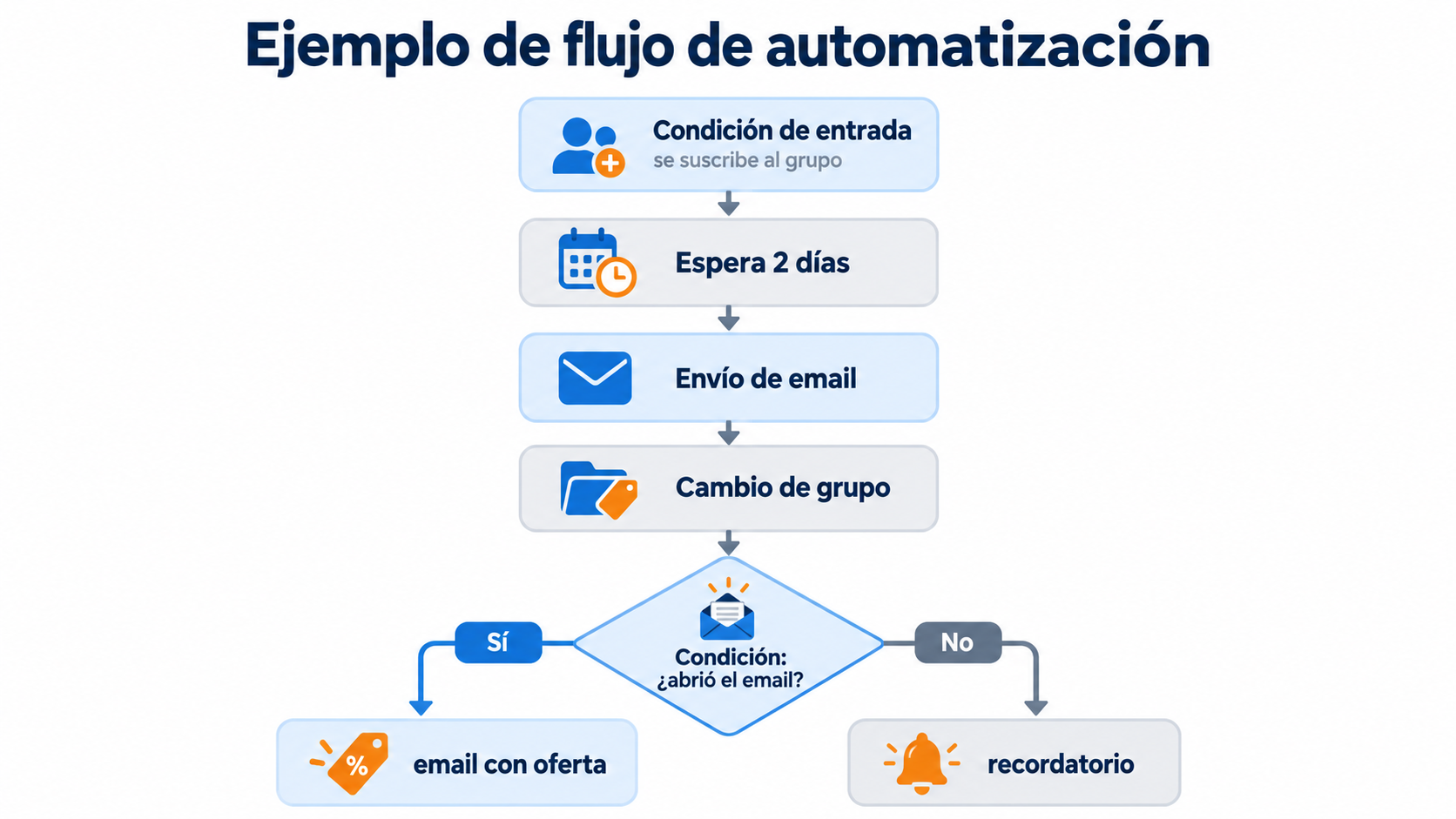
Spanish email marketing tool. Its free account includes full automations: workflows with entry conditions, waits, email and SMS sending, group changes and branches based on what each contact does. All for up to 20,000 contacts and 80,000 emails a month, without paying.
It fits you if you want to automate with a large list without paying, with human support.
French multichannel platform (email, SMS, WhatsApp and chat) with a visual automation editor. On the free plan, up to 2,000 contacts can enter active automations, and sending is limited to 300 emails a day.
It fits you if you want to combine several channels and your sending volume is low.
A simple tool with a good editor and landing pages. Its free plan allows automations with a single trigger, for 250 subscribers and 2,500 emails a month.
It fits you if you’re starting with a small list and want a very simple interface.
A platform built for ecommerce, with automations based on purchase behavior. The free plan supports 250 profiles, 500 emails a month and 3 active automated messages.
It fits you if you have an online store, especially on Shopify, and you’ll pay as soon as you grow.
Also geared toward online stores. Its free plan includes welcome, abandoned cart and post-purchase workflows, for 500 contacts and 500 emails a month.
It fits you if you have a small store and want the basic ecommerce workflows ready to go.
One of the tools with the most advanced automations, with a sales CRM and contact scoring. It has no free plan: it offers a 14-day trial, and its Starter plan costs from $19 a month for 1,000 contacts.
It fits you if you need complex automations tied to a sales team and can pay from the start. HubSpot is in a similar situation: it’s a full CRM, and its advanced automations are on the paid plans.
The best-known tool, with lots of integrations. Since February 2026, its free plan supports 250 contacts and 500 sends a month, without multi-step automated journeys. For that you need the Standard plan.
It fits you if you already use its integration ecosystem and don’t mind paying to automate.
Spanish tool with email and SMS. Its free plan (250 subscribers and 2,000 sends) doesn’t include automations or A/B tests.
It fits you if you want a Spanish-language tool and will pay for a plan from the start.
Create your first automation for free
Workflows with conditions, waits and group changes, from Mailrelay’s free account.
If it’s your first time, you don’t need to build a complex workflow. These five automations are simple and deliver results from the first month:
An online store needs purchase and cart triggers. A service business needs welcome sequences, lead nurturing and reminders. Choose the tool that already has the workflows you’re going to use ready-made.
It’s the biggest difference between free plans. Some only let you automate a few hundred contacts, or limit how many workflows you can have active. Check the table and work out how many contacts will enter your workflows.
Dates, clicks, opens, group changes, purchases. And for actions: waits, conditions, branches and SMS sending. Check that the tool covers yours before importing your list.
If your data lives in a store or a CRM, you need the tool to connect to them, directly or through services like Make.
When a workflow doesn’t behave as you expected, it helps a lot to get a reply from a person. Check whether you’ll have support on the plan you’re going to use.
Welcome, cart and birthday emails on autopilot
Set up your automations once and let them work for you.
With Mailrelay you can create your automations from the free account, with a workflow editor where you add steps one by one. Here’s an example with:
| What you need | How Mailrelay solves it |
|---|---|
| Automate without paying | Full workflows in the free account, for up to 20,000 contacts |
| Workflows with logic | Conditions, waits, branches and group changes |
| Combine channels | SMS within the same workflow |
| Segment | Dynamic segments that update themselves |
| Measure | Statistics for each step of the workflow |
| Capture contacts | Landing pages and forms that start the workflow |
| Connect other tools | API, WordPress plugin and integrations with Make, Bitapps and ApiX Drive |
| Help | Human support by ticket on the free account, chat from Standard and phone on Enterprise |
If you want to see how it’s done step by step, check out the tutorial on automating emails in Mailrelay. And if you’re looking for the concepts, see the guide to email marketing automation and the types of automated emails.
Try Mailrelay’s automations
Up to 80,000 free emails a month, with human support on every plan.
The most widely used are ActiveCampaign, Brevo, Klaviyo, MailerLite, Mailchimp and Mailrelay. To automate for free with a large list, the best option is Mailrelay. For online stores, Klaviyo or Omnisend. And for automations tied to a sales CRM, ActiveCampaign or HubSpot, which are paid.
Mailrelay, Brevo, MailerLite, Klaviyo and Omnisend include automations on their free plan, with different limits. Mailrelay is the one that lets you automate the most contacts without paying: up to 20,000, with full workflows. Mailchimp, Mailjet and Acumbamail reserve them for paid plans.
Almost all current email marketing tools have a visual workflow editor: Mailrelay, Brevo, ActiveCampaign, Klaviyo, MailerLite and Omnisend, among others. The difference lies in the conditions and branches they allow and whether you can use them on the free plan.
Create a workflow that’s triggered when the contact signs up and send 3 to 5 emails in the first two weeks: welcome, first steps, a use case and an invitation to ask for help. We explain it in customer onboarding.
Save the date in a contact field (birthday, sign-up or renewal) and create a workflow that’s triggered on that day or a few days before. That’s how the birthday email or a subscription renewal reminder works.

Jose Argudo
CMO at Mailrelay. Writes about email marketing, copywriting and conversion for SMEs and entrepreneurs.