Email marketing automation: what it is, examples and how to set it up
How to send the right email at the right time without doing it by hand
Quick answer: Email marketing automation (or mailing automation) means sending emails based on rules, dates, or each contact’s actions. For example, a subscription can trigger a welcome email. A purchase can start a follow-up. This way you respond on time, personalize the experience, and reduce manual tasks.
Mailing automation helps you keep communications relevant with hundreds or thousands of people.
Each subscriber receives the intended message when they meet a specific condition.
You decide the goal, the content, and the frequency. The platform runs the flow and records the results.
This guide explains how to design an email marketing automation from scratch. It also includes examples, metrics, and a simple template for your first flow.
With Mailrelay you can create campaigns, manage contacts, and set up automations from a simple dashboard. You also have human support to help with any questions during setup.
What is email marketing automation?
Mailing automation is a sending system that responds to predefined events. These events can be actions, dates, contact data, or periods of inactivity.
Imagine someone downloads a PDF guide you’ve prepared.
The system adds them to the right group and sends the resource. Two days later, it shares a related tip. If they click, they can receive a case study.
All of this happens through an automation flow. You set up the logic once and then review its performance.
The five pieces of an automated email marketing flow
| Piece | Role | Example |
|---|---|---|
| Trigger | Starts the journey | The contact fills out a form |
| Segment | Defines who enters | New leads interested in training |
| Wait | Controls the timing | Send the next email after two days |
| Action | Executes a task | Send an email or update a field |
| Exit | Avoids unnecessary messages | The contact exits when they make a purchase |
This structure turns a business idea into a controllable sequence. It also makes it easier to spot errors before activating the sends.
Mailing automation vs. bulk sending: what’s the difference?
A bulk campaign goes out on a date chosen by your team. It can announce a promotion, a piece of news, or new content.
An automated email goes out when a person meets a rule. That’s why two contacts can receive the same message on different days.
| Aspect | Mailing campaign | Email automation |
|---|---|---|
| Start | Scheduled date and time | Individual action, condition, or date |
| Recipients | Selected list or segment | Contacts that meet a rule |
| Typical use | Newsletter, promotion, or announcement | Welcome, follow-up, or reactivation |
| Recurring work | Requires preparing each campaign | The flow stays active once set up |
| Personalization | Data and segments | Data, behavior, and position in the flow |
Both formats complement each other. You can send regular newsletters and use mailing automation for individual moments.
What benefits does email marketing automation offer?
The most visible advantage is time savings. But its value grows when you tie each flow to a measurable goal.
You respond while interest is active
An immediate welcome takes advantage of the attention a subscription generates. A reminder can also revive a conversation before it goes cold.
You personalize without writing every email from scratch
Custom fields let you adapt names, interests, or other data. Segments also help you send more relevant content.
You keep a consistent experience
Every new contact receives the journey you’ve defined. This reduces oversights and keeps follow-up from depending on manual tasks.
You scale your communication
The same flow can serve ten people or thousands. Even so, you need to watch the frequency, list quality, and results.
You learn from real data
Opens, clicks, unsubscribes, and conversions show what’s happening. Then you can improve subject lines, messages, timing, and calls to action.
Mailing automations you can apply in your business
Start with a repetitive moment that’s close to revenue. Later, you can expand the system with more journeys.
| Automation | Trigger | Main message | Priority metric |
|---|---|---|---|
| Welcome | Confirmed sign-up | Delivery and next step | First click or activation |
| Lead nurturing | Download or joining a group | Education and proof of value | Qualified leads |
| Abandoned cart | Purchase started and not completed | Product reminder | Recovered purchases |
| Post-purchase | Order confirmed | Usage, help, and recommendation | Repeat purchase |
| Appointment or renewal | Upcoming date | Reminder and action | Appointments or renewals |
| Re-engagement | Extended inactivity | Preferences or return | Reactivated contacts |
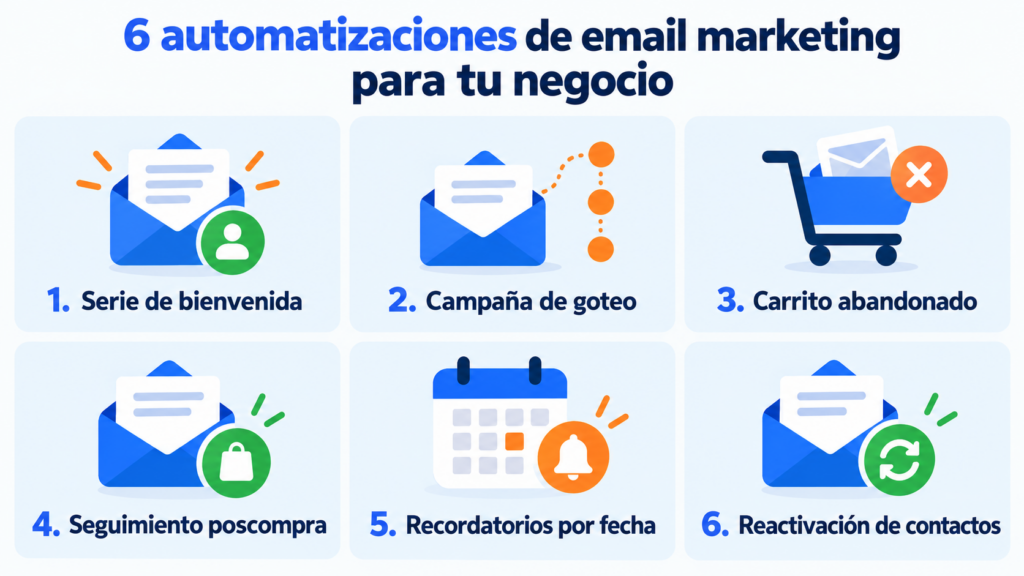
Welcome series for new subscribers
The welcome series confirms that the subscription worked. It also introduces your offer and guides them toward a first action.
You can send a promised resource, explain what the person will get, and recommend some content. Then, add a clear invitation to reply, visit, or try something.
Drip campaign to educate a lead
A drip campaign spreads information over several days. Each email answers a question and moves the contact closer to a decision.
This format fits services, training, software, and B2B sales. It also avoids cramming too much information into a single message.
Mailing automation for an ecommerce store
A store can trigger emails after an abandoned cart, a purchase, or a period without orders. It can also segment by categories or history.
The content should reflect the customer’s actual action. Include the product, resolve friction points, and offer a direct path to the next step.
Post-purchase follow-up
The payment doesn’t close the relationship. You can send instructions, answer common questions, and ask for feedback at the right time.
Later on, a related recommendation can drive another purchase. To do this, use relevant data and avoid disconnected promotions.
Reminders and date-based campaigns
A date can trigger renewals, appointments, birthdays, or expirations. This type of automated email marketing works well when timing adds value.
Always check the time zone and the stored date. A late reminder loses its usefulness and can damage trust.
Reactivation and contact cleanup
You can identify subscribers who haven’t opened or clicked in months. Then send a short sequence to confirm their interest.
If the person stays inactive, consider excluding them from regular campaigns. A healthier list protects your metrics and improves deliverability.
How to create a mailing automation step by step
It’s best to start with a short flow that’s easy to measure.
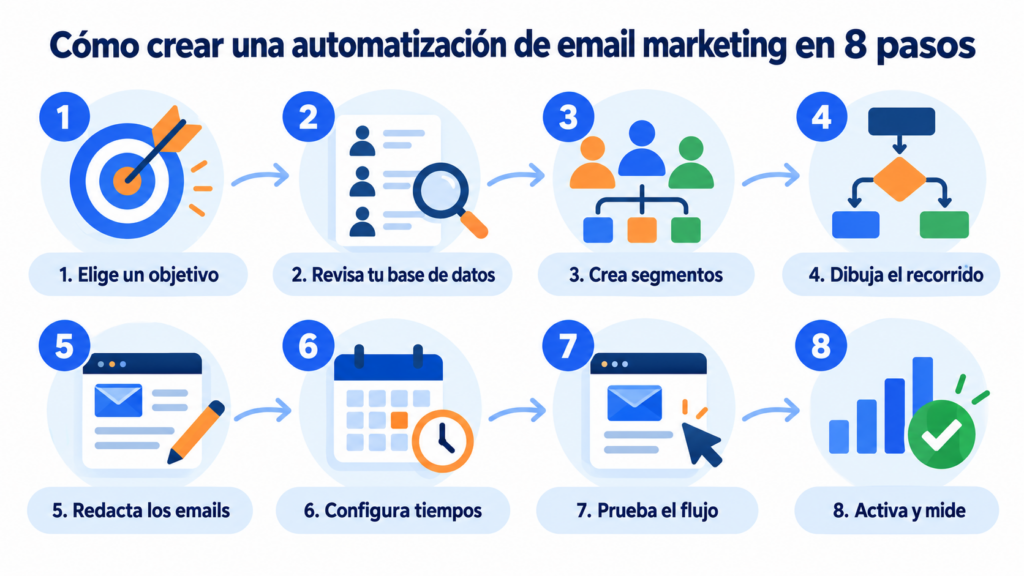
1. Choose a goal and a single main action
Define what change you expect after the sequence. It can be a purchase, a booking, a reply, or an account activation.
Then choose a related indicator. If you’re after sales, the goal shouldn’t be limited to getting opens.
2. Review your database and consent
Use contacts obtained with a valid basis for sending communications. Inform clearly and offer an easy unsubscribe in every commercial email.
It’s also a good idea to remove invalid addresses and duplicates. Also, only store the data you need to personalize the journey.
3. Create useful segments
Group contacts by a difference that changes the message. Interest, purchase stage, or recent activity usually add value.
Avoid segmenting just to pile up filters. Each segment should respond to a specific decision within the email automation.
4. Map out the minimum journey
Write down the trigger, the waits, the messages, and the exit. You can start by doing this on a simple sheet.
Include a rule for those who already completed the goal. This way they won’t receive reminders that are no longer relevant.
5. Write short, connected emails
Every email needs a purpose. Keep one main idea, a clear context, and a visible call to action.
Also, link each message to the previous one. The sequence should move forward, even if the reader only remembers the central idea.
6. Set up fields, timing, and conditions
Bring the journey into your mailing automation tool. Check for empty values, schedules, and possible duplicate entries.
If you don’t have a tool yet, compare what each one offers on its free plan in our guide to the best tools for automating email campaigns.
If you use a personalized name, prepare a fallback. “Hi there” works better than showing a broken field.
7. Test the entire flow
Use test contacts to go through every path. Check links, variables, mobile design, sender, and landing page.
You should also check the exit. A converted contact needs to leave the planned sequence.
8. Launch, measure, and improve
Let the flow build up a useful sample. Then change one variable per test and record the result.
A/B tests can compare subject lines, calls to action, or content. But avoid changing everything at once.
You can see how to create automations with Mailrelay here.
Create your first automation for free
Design welcome, drip or reactivation flows with the free account: up to 80,000 emails a month to 20,000 contacts.
Example of mailing automation: a four-email welcome series
This flow works for a small service business. Its goal is to get a first request for information.
Email 1: instant delivery
Trigger: confirmed sign-up on the form.
Content: welcomes them, delivers the resource, and explains what comes next.
Action: visit a related guide.
Email 2: problem and solution
Wait: two days.
Content: solves a common difficulty with an actionable tip.
Action: answer a short question or check out an example.
Email 3: proof of value
Wait: three days.
Condition: the contact hasn’t requested information yet.
Content: shares a case, process, or result that removes a doubt.
Action: learn about the right service.
Email 4: next step
Wait: four days.
Content: sums up the benefit and makes deciding easier, without pressure.
Action: book a call or request a proposal.
If the contact converts, they exit the sales flow. They can then enter an onboarding or follow-up automation.
How to choose a mailing automation tool
The best platform is the one that covers your journey with reasonable room to grow. A complex solution can add cost and a learning curve you don’t need.
Before deciding, review these criteria:
- Triggers, waits, and conditions your flow needs.
- Segmentation through groups, activity, and custom fields.
- An easy newsletter editor for your team.
- A/B testing and easy-to-understand statistics.
- Sending capacity and database growth.
- Integrations with WordPress, your store, or your systems.
- Management of unsubscribes, bounces, and duplicate contacts.
- Domain authentication and deliverability features.
- Accessible support whenever a question comes up.
- Total price based on contacts, sends, and features.
Mailing automation with Mailrelay
At Mailrelay, we’ve designed a simple solution for businesses that want to automate without adding unnecessary complexity.
You can create flows for welcomes, drip campaigns, abandoned carts, and other journeys. You also have segmentation and personalization through fields.
Our editor makes it easy to create newsletters. It also includes AI writing features to prepare a content base more quickly.
After sending, you can review real-time statistics. The click map shows which areas get the most interaction.
You can also work with our WordPress plugin and the REST API. These options help you connect forms, lists, and your own systems.
The free account lets you send up to 80,000 emails a month and store up to 20,000 contacts. Always check the current plans and terms before choosing.
Our human technical support is also available on every plan, even the free account. We help you with any questions so you’re never left on your own with the dashboard.
If you run an SME and want to know which flows to activate first, check out the guide to email marketing automation for SMEs.
If you want to see it inside the tool, here’s how to do it in Mailrelay step by step.
Create your free Mailrelay account and start with a small, measurable flow that’s useful for your audience.
Metrics to evaluate automated email marketing
An isolated rate doesn’t tell you much. Connect each metric to the flow’s purpose and its position in the journey.
| Goal | Main metric | Diagnostic signal |
|---|---|---|
| Deliver content | Click on the download | Bounces and link errors |
| Nurture leads | Conversion to qualified lead | Clicks per email and replies |
| Recover carts | Recovered purchases | Conversion per message |
| Reactivate contacts | Reactivation rate | Unsubscribes and complaints |
| Generate sales | Revenue or conversions | Clicks and average value |
The open rate can be a useful guide, but it has technical limitations. Combine it with clicks, conversions, replies, and unsubscribes.
Also check bounces and spam complaints. A profitable email marketing automation needs a quality list.
To understand visual behavior, check Mailrelay reports and heatmaps.
Common mistakes when automating email campaigns
Creating a flow without a goal
A sequence can generate activity and still fail to bring in business. Define a conversion before you start writing.
Sending the same journey to everyone
A customer, a new lead, and an inactive contact all need different messages. Use segments that change the conversation.
Forgetting exit rules
If someone buys, books, or replies, check what should happen next. Keeping them in the sequence can result in inconsistent messages.
Overloading with too many emails
Check whether a person can enter several flows at the same time. Set priorities and frequency limits.
Relying only on opens
An open doesn’t confirm interest or revenue. Watch clicks, replies, conversions, unsubscribes, and value generated.
Ignoring deliverability
Authenticate your domain, clean your list, and avoid purchased databases. You should also maintain a recognizable sender identity.
Here’s a guide to improving deliverability in high-volume campaigns.
Launching without testing
A broken link repeats itself in every automated send. Go through every branch before publishing the mailing automation.
Checklist before launching your email automation
- The flow has a goal and a main metric.
- The trigger only adds the right contacts.
- The list has a valid basis for sending.
- Custom fields include a fallback value.
- Each email contains one clear main action.
- The waits respect the context and overall frequency.
- Buyers or converted contacts exit when they should.
- Links include consistent tracking.
- The unsubscribe link is visible and works.
- The journey has been tested on desktop and mobile.
Automate your email marketing with Mailrelay
A visual editor to build flows without coding, real-time statistics, and human support on every plan.
Frequently asked questions about mailing automation
What is mailing automation and how does it work?
It’s the automatic sending of emails based on rules, dates, or contact actions. A trigger starts the flow, conditions organize the journey, and actions carry out the sends.
What’s the difference between an autoresponder and an email automation?
An autoresponder usually sends one or several messages after a simple action. An automation can add waits, conditions, segments, multiple actions, and exit rules.
Which email marketing automation should I create first?
Start with the welcome series if you’re gaining subscribers. It’s easy to check and acts at a moment of high interest. If you have an ecommerce store, also consider the abandoned cart.
How many emails should an automated sequence have?
It depends on the goal and the decision cycle. An initial sequence can include between two and four emails. Expand it only once each message serves a clear purpose.
Can I automate mailing from Gmail or Outlook?
You can schedule individual messages, but a professional campaign needs more control. A dedicated platform manages lists, unsubscribes, bounces, segmentation, statistics, and sending volume.
Does mailing automation comply with GDPR?
The tool alone doesn’t guarantee compliance. You need a valid legal basis, transparent information, security, and an unsubscribe mechanism. Also review the regulations that apply to your communications.
How do I keep automated emails out of spam?
Use legitimate contacts, authenticate your domain, and clean up invalid addresses. Keep a reasonable frequency, expected content, and a visible unsubscribe link. Also check our anti-spam policy.
How much does a mailing automation tool cost?
The price can depend on contacts, sends, and features. Mailrelay offers a free account with up to 80,000 emails a month and 20,000 contacts, subject to current terms.
No. Newsletters cover news and campaigns shared with a segment. Flows respond to individual moments. A complete strategy combines both formats.
How often should I review an automated flow?
Review it once you’ve gathered enough data, and whenever your offer, links, or sales process change. Also check metrics, content, timing, and exit rules regularly.