The digital message used by 4.48 billion people, explained step by step
An email is a message sent over the internet from one email address to another. In Spanish it is the same as “correo electrónico”: the word comes from the English electronic mail. It can include text, images, links and attachments, and it reaches any part of the world in seconds.
Despite chat apps and social media, it is still the most universal digital channel. According to The Radicati Group, there were about 4.48 billion email users worldwide in 2024, and around 361.6 billion messages were sent every day.
What does email mean?
Email is the short form of electronic mail, which in Spanish is called “correo electrónico”. It is used for three different things: the messaging system, each message you send and the address people write to you at. When someone says “I’ll send you an email” or “can I have your email?”, they mean the message in the first case and the address in the second.
In Spanish, several forms coexist:
| Form | What it is | Is it recommended? |
|---|---|---|
| Correo electrónico | The Spanish equivalent | Yes, it is the option recommended by the RAE |
| Email / e-mail | Anglicism, very widespread | It is understood, but the RAE considers it unnecessary |
| Colloquial shortening of email | Only in informal contexts | |
| Correo-e | Calque from English | No, the RAE advises against it |
The Diccionario panhispánico de dudas recommends using “correo electrónico”, which works for the system, the message and the address. For the address, “dirección de correo electrónico” also works. Even so, “email” is used every day at work and in marketing. In this entry we use both forms as synonyms.
Parts of an email, with an example
All emails have the same structure, whether you write them in Gmail, Outlook or from a bulk email platform. Take a simple example: an online store confirms an order to its customer.
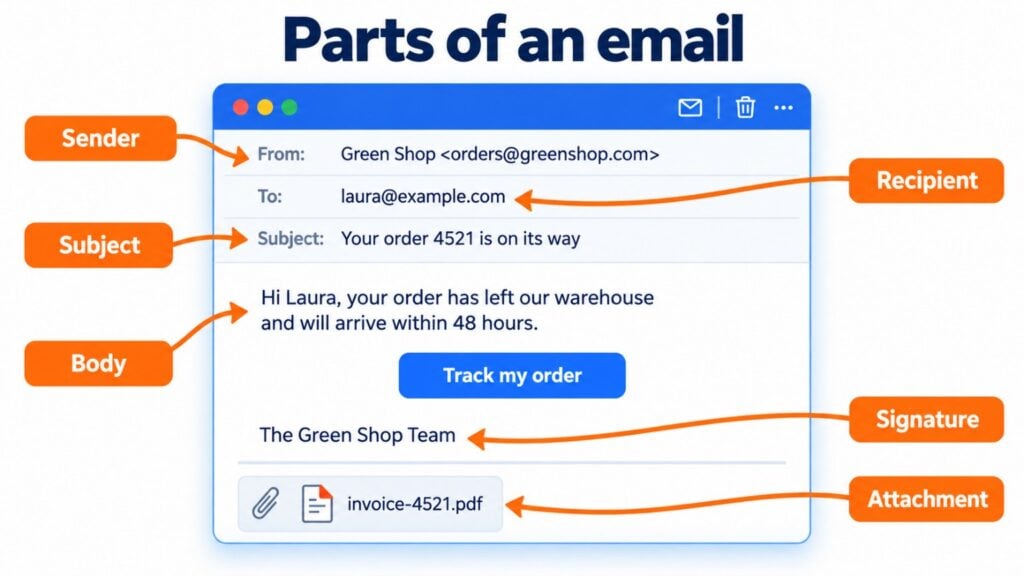
These are the parts you will see:
- Sender (From): who sends the message, with their name and address. For example, “Green Store”. Learn more about what a sender is.
- Recipient (To): the email address of the person receiving it. You can add more people in CC and BCC.
- Subject: the line that sums up the message, such as “Your order 4521 is on its way”. It is the first thing people read, which is why the subject line often decides whether the email gets opened.
- Body: the text, images and links of the message. It is the email body.
- Signature: the name, job title and contact details at the end. Here is how to create a good email signature.
- Attachments: the files that travel with the message, such as a PDF invoice. More information about attachments.
In addition, every message carries technical headers that the reader does not see. They store the date, the servers it has passed through and the authentication results.
How email works: a message’s journey
Sending an email seems instant. But behind the scenes, the message goes through several steps:
- You write the message in your email client or webmail and click “send”.
- Your provider hands it to its outgoing email server using the SMTP protocol.
- That server looks up the MX record of the recipient’s domain in the DNS, that is, which server receives their email.
- The receiving server checks authentication and applies its spam filters.
- If the message passes the filters, it stores it in the inbox. If not, it sends it to spam or rejects it.
- The recipient downloads it or reads it with IMAP or POP3.
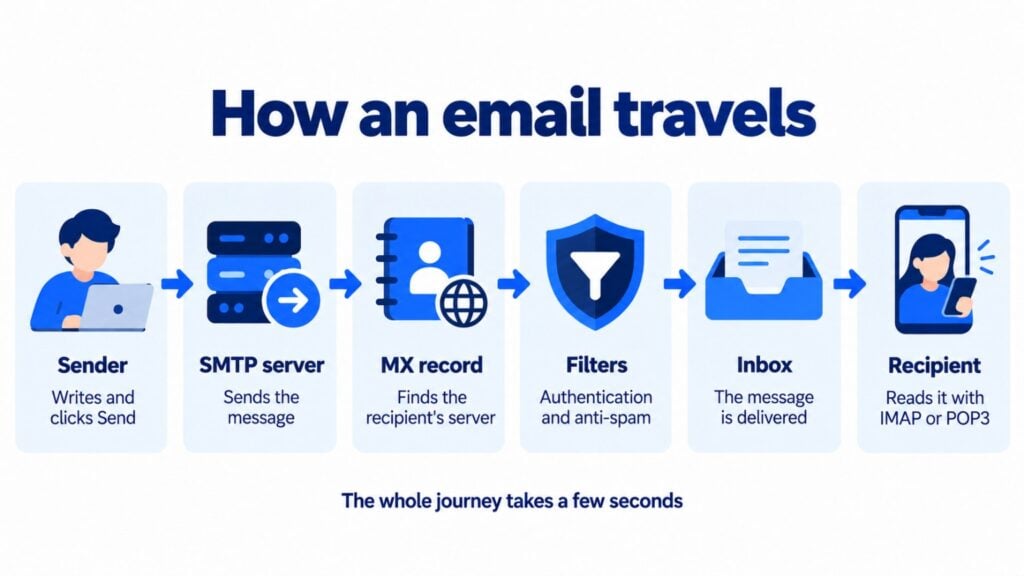
All of this usually takes a few seconds. And although the programs change, the route has been the same for decades.
A brief history of email
It was born before the web itself. In 1971, engineer Ray Tomlinson sent the first message between two computers on ARPANET, the forerunner of the internet. He was the one who chose the at sign to separate the user’s name from the machine’s name.
In the nineties came free webmail services, such as Hotmail in 1996 and Yahoo Mail in 1997. In 2004 Gmail arrived, with much more storage space. Since then, the email address has become each person’s digital identity: almost every online service asks for an address to sign up.
Is email secure?
Email is secure if it is set up properly, although it is not risk-free. Today most providers encrypt the journey between servers with TLS. That stops anyone from reading the message along the way, but it does not encrypt it end to end.
The biggest danger lies in deception. Phishing uses fake messages to steal passwords or bank details, and spoofing forges the sender to look like a well-known company. To stop it, domains are protected with SPF, DKIM and DMARC. Always be wary of messages that urgently ask for your details, especially if they contain unexpected links or attachments.
Personal, professional and marketing email
Not all emails serve the same purpose. Personal ones are for talking to friends and family. Professional ones are used to coordinate work with clients, suppliers and colleagues, almost always from a corporate email account.
Companies also use it to sell and build loyalty. That is email marketing: newsletters, promotions, welcome messages or automations. They also send transactional emails, such as order confirmations or password resets. If you want to see all the types with examples, check out our guide to electronic mail.
When a company sends the same email to hundreds or thousands of people, such as a newsletter, it doesn’t do it from its own mailbox but from an email marketing platform like Mailrelay. These platforms authenticate sends with SPF and DKIM, handle bounces and unsubscribes, and control the sending rate so that messages reach the inbox.
For example, the Ecuadorian Consulate in Rome had to split its list into small groups to avoid ending up in spam. With Mailrelay, it sends to its entire contact base without splitting the send.
From personal email to email marketing
With Mailrelay you create newsletters and automations without knowing how to code, and you see in real time who opens and clicks.
Why email is still relevant
Every few years its end is announced, and every year there are more users.
The first reason is that it is universal: anyone with an address can write to anyone else, regardless of the provider. It is yours: your contact list does not depend on a social network’s algorithm. And it leaves a record, something companies and public authorities value.
For brands, it is also an inexpensive and measurable channel. With an email platform you can segment your subscribers, personalize each send and see who opens and clicks.
We keep hearing that email is going to die, and yet it’s still here. One of the keys to its success? It doesn’t depend on a single provider, and it isn’t tied to a single app. It’s an open standard: from Gmail you can write to someone who uses Outlook or their company’s email, without either of you having to install anything. Hardly any messaging app lets you do that. It also still allows immediate, private communication. Almost everyone has one, and it’s universal and easy to use. Why would we stop using it?
Jose Argudo, CMO at Mailrelay
How to start sending emails to your customers
To write to a few people, Gmail or Outlook is enough. But if you want to send a newsletter to hundreds or thousands of contacts, you need a professional tool. That way you look after your deliverability, manage unsubscribes and comply with the GDPR.
With Mailrelay you can start with a free account of up to 80,000 emails a month and 20,000 contacts. It includes a visual editor, automations, real-time statistics and human support on every plan, including the free one.
Send your first campaigns for free
Up to 80,000 emails a month and 20,000 contacts, with a visual editor and human support on every plan.
Frequently asked questions about email
Are “email” and “correo electrónico” the same thing? Yes. “Email” is the English term and “correo electrónico” is its Spanish equivalent. Both are used for the system, the message and the address.
Is it written email, e-mail or mail? All three forms are used. In Spanish, the RAE recommends “correo electrónico”; “email” and “e-mail” are anglicisms that are italicized in careful writing. “Mail” is a colloquial shortening.
What is the plural of email? Emails. In Spanish you can also say “correos” or “correos electrónicos”.
What is an example of an email? Any message with a sender, recipient, subject and body. For example, an order confirmation or a weekly newsletter.
How many emails are sent per day? According to The Radicati Group, about 361.6 billion in 2024. And the figure will keep growing to over 420 billion in 2028.
Can you send bulk emails from Gmail? It is not recommended. According to Google’s help center, each Google Workspace account can send about 2,000 messages a day (500 for trial accounts), and bulk sends from a regular mailbox often end up in spam. For that, you use an email marketing platform like Mailrelay, whose free account allows 80,000 emails a month. We explain it in how to send a bulk email.