Email address
Your digital identity in three parts, with examples and rules to get it right
To receive an email you need a mailbox, and for someone to write to you, they need to know what that mailbox is called. That’s your address. You’re asked for it when you open a bank account, shop online or sign up for a newsletter.
It’s something you use every day without thinking about it. But it has a precise structure, a set of rules and far more importance than it seems.
What is an email address?
An email address is the unique identifier of a mailbox on the internet. It’s used to send and receive messages: like a postal address, but digital. For example, [email protected].
No two are the same anywhere in the world.
That’s why the system always knows which mailbox to deliver each message to, even if the sender uses Gmail and the recipient has a company email. It’s what makes email a universal channel.
It has also become your digital identity. Almost every online service asks for an email address to sign up, confirm purchases or reset your password. That’s also why it’s the favorite target of phishing: whoever controls your email can get into almost everything else.
Parts of an email address
Every email address has three parts, always in the same order. It’s clearer with the previous example:
| Part | In the example | What it indicates |
|---|---|---|
| Username (local part) | laura.gomez | The specific mailbox within that domain. Chosen by you or your company |
| At sign (@) | @ | Separates the username from the domain. Read as “at”, as in “located at” this domain |
| Domain | tiendaverde.es | The provider or organization that manages the mailbox |
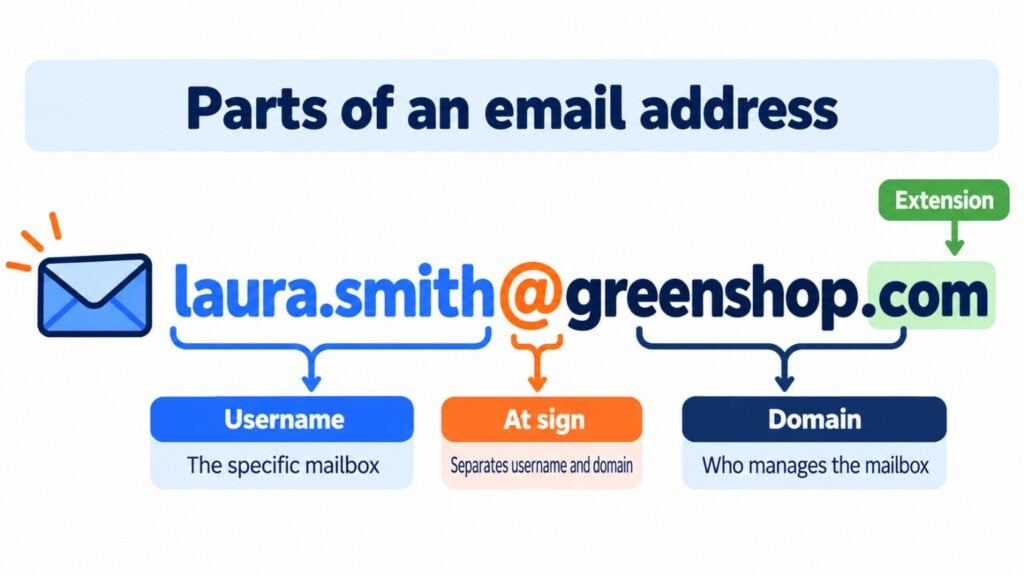
The domain, in turn, has two pieces. “tiendaverde” is the name and “.es” is the extension or top-level domain, which can be generic (.com, .org) or country-specific (.es, .mx, .ar).
The at sign isn’t there by chance. In 1971, Ray Tomlinson chose it to separate the user’s name from the machine’s name, because it didn’t appear in any proper name. More than fifty years later, it’s still the symbol of email.
Email address examples
Depending on who creates it and what for, an email address can be one of several types:
| Type | Example | What it’s used for |
|---|---|---|
| Free personal | [email protected] | Private use, with providers such as Gmail, Outlook or Yahoo Mail |
| Corporate | [email protected] | Work, with the company’s domain. This is corporate email |
| Generic or role-based | [email protected] | A department, not a person: sales@, support@, billing@ |
| Alias with “+” | [email protected] | Filtering what comes in from each website. Messages land in the same mailbox |
| Temporary or disposable | [email protected] | Signing up without giving your real address. Expires in minutes or hours: this is temporary email |
Una dirección corporativa transmite más confianza que una gratuita. Si tienes un negocio, conviene que tus clientes te escriban a tu propio dominio. Y evita las de tu operador de internet, como el correo Movistar: se pierden si cambias de compañía.
Rules for writing a valid email address
Internet standards (RFC 5321 and RFC 5322) set out what is and isn’t allowed. These are the rules worth knowing:
- Only one at sign. Everything before it is the username and everything after it is the domain.
- Sin espacios ni tildes. La «ñ» y las vocales acentuadas no están admitidas en la mayoría de proveedores.
- Characters allowed in the username: letters, numbers, periods, hyphens and underscores. The standard allows other symbols, such as + or !, although many forms reject them.
- Careful with periods. They can’t go at the beginning or end of the username, or two in a row.
- Maximum length. 64 characters for the username and 254 for the full address.
- Case doesn’t matter in practice. [email protected] and [email protected] reach the same mailbox.
A Gmail detail: it ignores periods in the username. So [email protected] and [email protected] are the same mailbox, although other providers do tell them apart.
How to find out your email address
If you don’t remember it, it’s right there in your own email program or webmail. In Gmail, tap your profile picture in the top right: the address appears under your name. In Outlook, the same happens when you click your initials or your picture.
On your phone, open the email app and go to Settings or Accounts. On Android you’ll also see it in Settings > Accounts, and on iPhone in Settings > Apps > Mail > Mail Accounts. And if you email yourself from another account, you’ll see it in the sender field.
Email address, email account and mailing address
They’re often confused, but they’re not the same thing. The email account is the whole service: the mailbox, the password, the folders and the storage. The address is just the name that identifies that mailbox. A single account can receive email at several addresses thanks to aliases.
The mailing address, on the other hand, is your postal address: street, number, postal code and city. Official forms often ask for both, so it’s best not to mix them up.
Take care of every email address on your list
With Mailrelay you create forms with double opt-in, and automatic cleaning removes bounces and unsubscribes for you.
The email address in email marketing
For a company, every email address is a contact it can talk to without intermediaries. It doesn’t depend on an algorithm, and it belongs to the company. That’s why email lists are one of the most valuable assets in digital marketing. It’s the foundation of any email marketing strategy.
It’s also personal data. In the European Union, the GDPR requires consent to send commercial communications, and you should never buy databases or use an email extractor. The right way is a subscription form with double opt-in: the subscriber confirms from their inbox that the address is theirs.
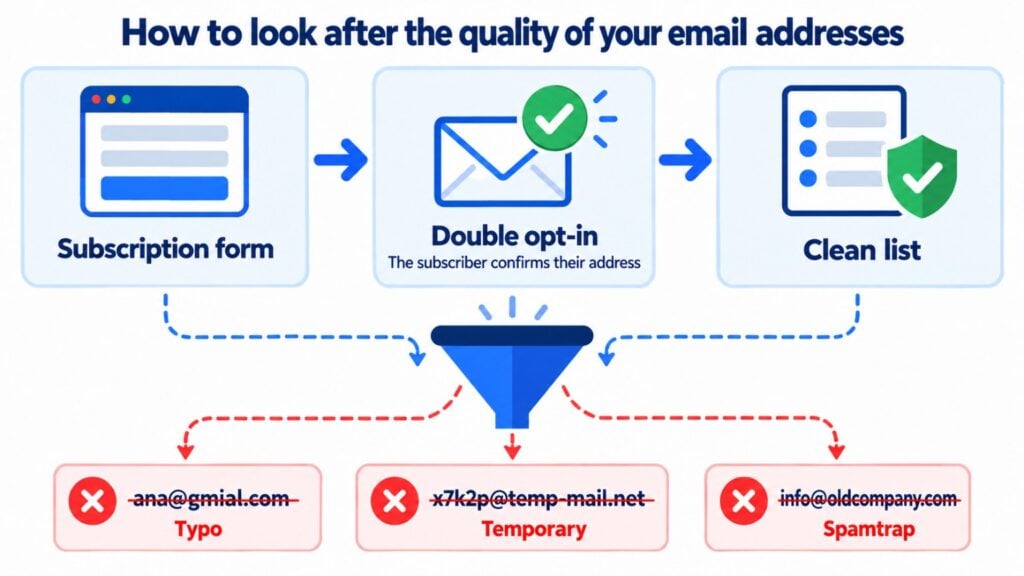
The quality of each address affects your deliverability. These are the most common problems:
Addresses with typos, such as “gmial.com” or “hotmial.com”, cause a hard bounce. Temporary ones disappear shortly after and bloat the list without adding anything. Generic ones, such as info@, are read by several people and tend to have less engagement. And old or abandoned ones may have become spamtraps, traps that providers use to catch senders who don’t look after their lists.
When an address doesn’t exist, the recipient’s server returns a hard bounce (5.x.x codes). If the mailbox is full or doesn’t respond, it returns a soft bounce (4.x.x). In Mailrelay, automatic cleaning removes hard bounces and unsubscribes from the list on every plan, including the free one. Soft bounces aren’t deleted on the first attempt.
That’s why it’s a good idea to practice list hygiene regularly: remove bounces, unsubscribes and contacts who haven’t opened in months. Those who no longer want to receive your emails should go on a suppression list.
Looking after your addresses shows in the results. Oxford University Press improved its deliverability by more than 30% with Mailrelay after finding and removing the spamtraps on its list and optimizing its DNS records. And the Government of Tierra del Fuego (Argentina) gets open rates above 50% with a 100% verified database.
Para tus campañas de email masivo, lo mejor es utilizar un remitente reconocible, con nombre de persona, que genere confianza en tus lectores poco a poco, email a email. De esta forma, cuando tus lectores reciban tu email, solo con ver el remitente ya van a tener intención de abrirlo. Para conseguir buenos resultados, evita direcciones impersonales como noreply@. Estas direcciones impiden la comunicación bidireccional, que es clave para generar un buen engagement y para que, poco a poco, mejoren tus cifras de aperturas.
Jose Argudo, CMO de Mailrelay
How Mailrelay helps you look after your email addresses
With Mailrelay you can create subscription forms with double opt-in, segment your subscribers and send them personalized campaigns. Automatic list cleaning removes bounces and unsubscribes on every plan, including the free one. That way you protect your sender reputation without checking the list by hand.
The free account includes up to 80,000 emails a month and 20,000 contacts, with human support, and it never expires.
Send to the right addresses with Mailrelay
Up to 80,000 emails a month and 20,000 contacts, with human support on every plan.
Frequently asked questions about email addresses
What is an example of an email address? For example, [email protected]. “laura.gomez” is the username, “@” is the at sign and “tiendaverde.es” is the domain.
What does email address mean? It’s the unique identifier of an email mailbox on the internet. It’s the equivalent of a postal address, but for receiving digital messages.
What are the parts of an email address? Three: the username, the at sign and the domain. The domain also includes an extension, such as .com or .es.
Does an email address have to contain @? Yes, always, and only one. If the at sign is missing or there are two, the address isn’t valid and forms reject it.
What’s the difference between an email address and a mailing address? The first identifies your email inbox. The second is your postal address, the one used to send you letters or packages.