Movistar email: how to sign in, set up IMAP and SMTP and recover your account
Everything you need to sign in to, set up and keep your Movistar or Telefónica email
Movistar email (Correo Movistar) is Telefónica’s email service for its customers, with @movistar.es and @telefonica.net addresses, which you access at correo.movistar.es.
Here’s how to sign in, the settings to set it up on your phone or in Outlook and what to do if you can’t get in. You’ll also see what happens to your account if you leave Movistar.
What is Movistar email?
It’s the email service that Movistar gave its ADSL, fiber and mobile customers, like other internet service providers.
Older accounts end in @telefonica.net and newer ones in @movistar.es. But it’s the same service: you sign in on the same website and set them up the same way.
It works as a webmail: you read and write from your browser, without installing anything. You can also connect it to an email client such as Outlook, Thunderbird or your phone’s mail app.
Watch out for a common mix-up: Movistar email is not Mi Movistar. Mi Movistar is the customer area for checking bills and plans, with its own username. Your email opens with your full address and your mailbox password.
How do you sign in to Movistar email?
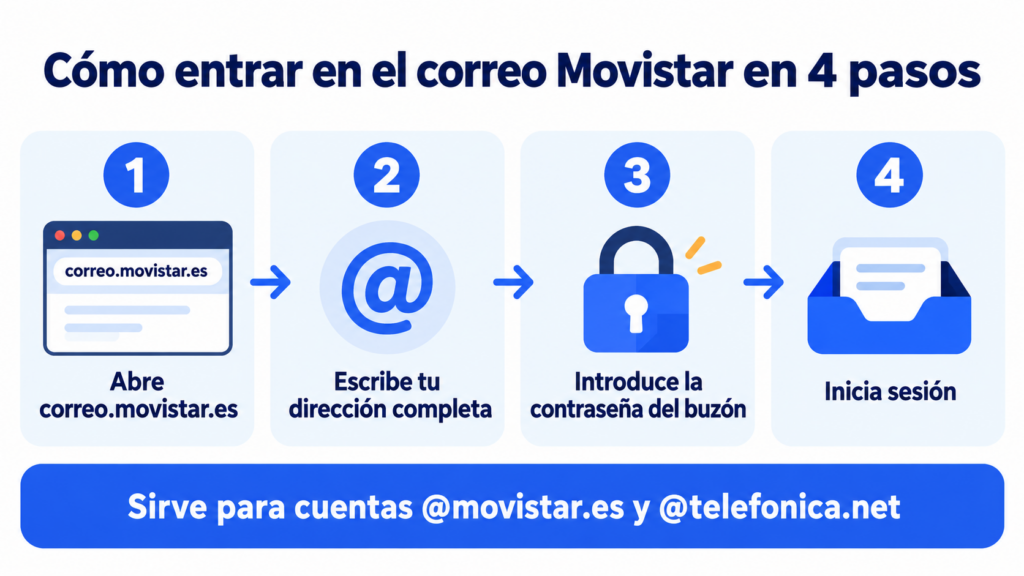
Signing in to Movistar email from your computer or phone takes less than a minute:
- Open your browser and go to correo.movistar.es.
- Enter your full address, with @movistar.es or @telefonica.net.
- Enter your mailbox password, not your Mi Movistar one.
- Sign in and you’ll land in your inbox.
Under Settings > Mail you’ll find your signature, the out-of-office reply, automatic forwarding to another address and filter rules.
Do you email your customers from Movistar email?
With Mailrelay you send your newsletters from your own address, with statistics and automatic unsubscribes. Free account with up to 80,000 emails a month.
Movistar email IMAP and SMTP settings
To read your Movistar email in Outlook, Thunderbird or on your phone, add the account manually with these settings. Choose IMAP if you want to see the same thing on all your devices. POP3 downloads messages to a single device.
| Setting | Incoming (IMAP) | Outgoing (SMTP) |
|---|---|---|
| Server | imap.movistar.es | smtp.movistar.es |
| Username | Your full address | Your full address |
| Password | Your mailbox password | Your mailbox password |
| Authentication | Normal password | Yes, same as incoming |
On some older @telefonica.net accounts, the outgoing server is smtp.telefonica.net. Always tick the option saying the SMTP server requires authentication.
Your email client won’t connect? The most common cause is a port and encryption type that don’t match: if you choose an encrypted port, also select SSL or TLS.
Common problems signing in to Movistar email
Almost all of them can be fixed from the sign-in screen itself.
I’ve forgotten my password
Click “No puedo acceder a mi cuenta” (I can’t access my account) on the sign-in screen. You’ll receive the steps at your alternative email address or by text message to the phone number you registered.
The new password must be at least 8 characters long, with uppercase letters, lowercase letters and numbers. If you never set up that recovery information, you’ll have to contact Movistar support.
The account is blocked or deactivated
If you go a long time without using it, the account is deactivated (several guides mention 90 days). It usually starts working again when you sign in. If what’s blocked is sending, change your password in Settings.
The mailbox is full
The mailbox holds 2 GB and can’t be expanded. When it’s full, messages stop coming in.
Empty the trash and the spam folder, and delete emails with large attachments. Keep in mind there are no backups: anything you delete can’t be recovered.
I can’t send from abroad
For security reasons, Movistar sometimes blocks emails sent with an email client from outside the European Union. You can still send from the webmail.
I’ve received a notice asking me to “confirm” my account
Be suspicious. Fake emails are going around that give you 72 hours to click a link and validate your mailbox. It’s phishing.
Don’t click anything; go there yourself by typing correo.movistar.es in your browser.
Can you create a new Movistar email account?
No. Movistar stopped creating @movistar.es and @telefonica.net addresses in 2013. Signing up for fiber or mobile today doesn’t get you a new one.
If you need an email address, you have two options. A free one, such as Gmail, Outlook (formerly Hotmail) or Yahoo Mail. Or a corporate email with your business’s domain.
What happens to your Movistar email if you cancel your service?
You lose access, along with your emails, contacts and attachments. So, before switching providers:
- Save or forward the messages you want to keep.
- Export your contacts.
- Change your email address with banks, online stores, social networks and newsletters.
- Turn on automatic forwarding to your new address while the account is still active.
An address tied to your provider is yours as long as you pay them. One with your own domain stays with you even if you change providers.
Should you keep using Movistar email?
For personal use, yes, as long as you stay with Movistar. For your business, no: it depends on your provider, it only has 2 GB and it doesn’t convey the trust of an address with your own domain.
| Your situation | What suits you |
|---|---|
| You use it for your personal email and will stay with Movistar | Keep it, with your recovery information up to date |
| You’re planning to switch providers | Move to another address now and let your contacts know |
| You use it to talk to customers | A corporate email with your domain |
| You want to send a newsletter or promotions | An email marketing tool |
| Your mailbox often fills up | Download your attachments and consider a service with more space |
It’s not a good idea. A personal email account is designed for one-to-one messages, not for hundreds of recipients at once.
If you CC everyone, each contact sees everyone else’s address, which can breach the GDPR. BCC avoids that, but it doesn’t solve the rest.
Large sends from a personal account look like spam and can end up blocked. You won’t have statistics or automatic unsubscribes. And without authenticating your domain, your emails are less likely to reach the inbox.
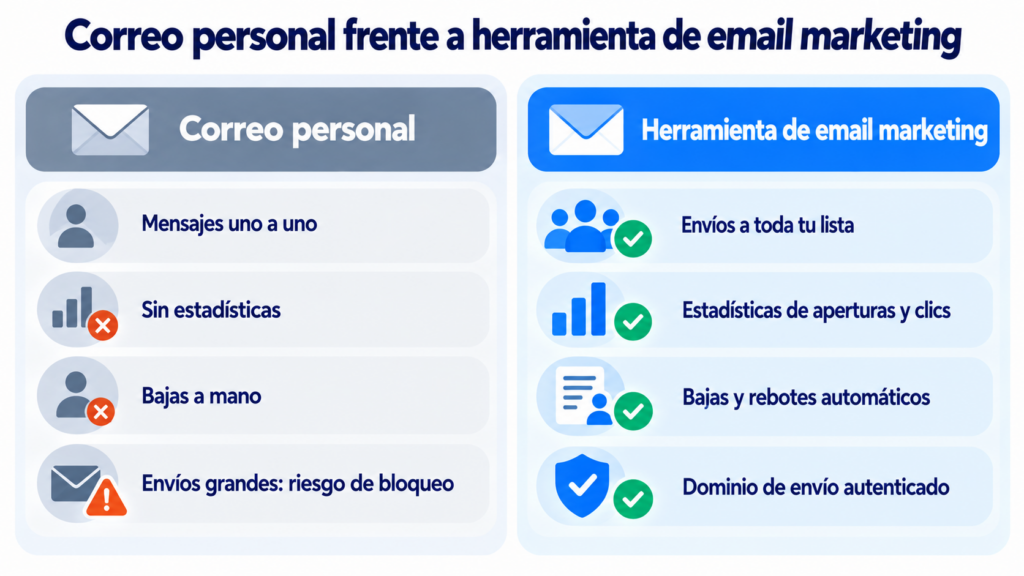
That’s what bulk email tools are for. If you send from Outlook today, see how to send a mass email in Outlook and when it’s worth making the switch.
How Mailrelay helps you
With Mailrelay you send your newsletters and promotions with your own sender address and an authenticated sending domain. Your lists, templates and statistics don’t depend on your provider.
The free account includes up to 80,000 emails a month and 20,000 contacts.
You get a visual editor, automations, open and click statistics and automatic handling of unsubscribes and bounces, with human support on every plan. Details on our pricing page.
Your contact list, independent of your provider
Templates, automations and statistics, with human support on every plan.
Frequently asked questions about Movistar email
These are the most common questions.
What’s the Movistar email website?
It’s correo.movistar.es. It works for both @movistar.es and @telefonica.net accounts.
Does telefonica.net email still work?
Yes, if you’re a Movistar customer. It uses the same website and the same servers as @movistar.es accounts.
How much space does Movistar email have?
Each mailbox has 2 GB, with no option to expand it. An email can be up to 145 MB, although many servers reject messages that large.
Can I keep my Movistar email if I switch providers?
No. When you cancel your services, you lose access. Save what you want to keep beforehand and let your contacts know.
How do I set up Movistar email on my phone?
In your phone’s mail app, or in the Gmail app, add another account, choose manual setup and use the IMAP and SMTP settings from the table.