SMTP port: what it is and which one to use (25, 465, 587 and 2525)
Which port to choose to send email securely, plus the settings for Gmail, Outlook and Mailrelay
An SMTP port is the connection number a program uses to send email to a server with the SMTP protocol. The most common ones are 25, 465, 587 and 2525.
Think of an office building. The server address is the street and number; the port is the specific door you walk through. If you pick a locked door, the email doesn’t go out.
To send email from a website, an app or an email client, use 587 or 465. Port 25 is reserved for communication between servers.
What is an SMTP port?
SMTP is the protocol email uses to travel across the internet. Each server listens on one or more ports, and your app has to connect to the right one.
The port also determines how the connection is protected. Some encrypt from the start, others encrypt after greeting the server, and some can work without encryption.
That’s why, when you set up a WordPress plugin, a CRM or an email client, you’ll always be asked for four details: server, port, username and password.
What are the SMTP ports and what is each one for?
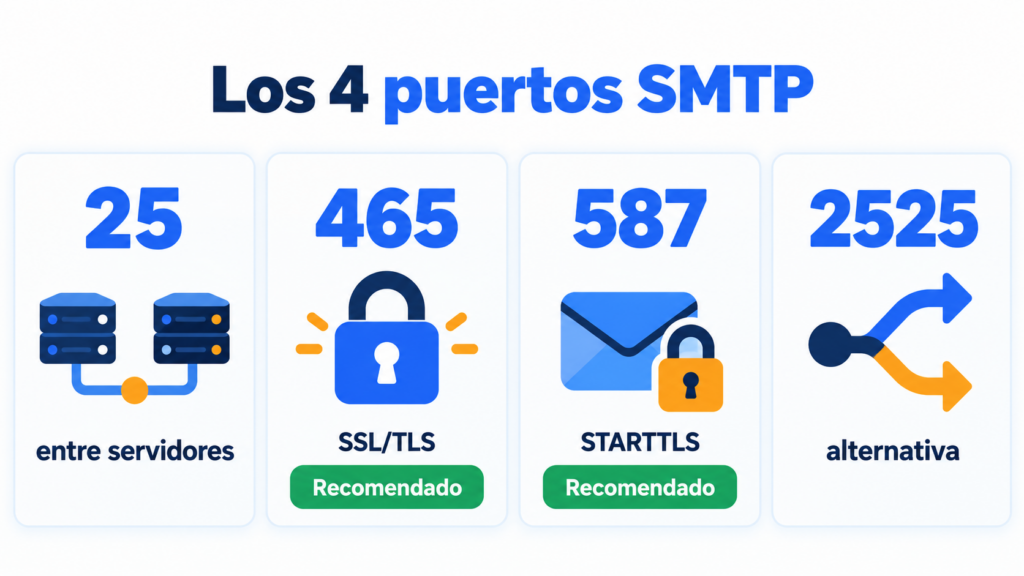
These are the four you’ll come across:
| Port | Encryption | What it’s used for | Is it usually blocked? |
|---|---|---|---|
| 25 | Optional (STARTTLS) | Sending between mail servers | Yes, on many home networks and in the cloud |
| 465 | TLS from the start (SMTPS) | Sending from apps and email clients | No |
| 587 | STARTTLS | Sending from apps and email clients | No |
| 2525 | STARTTLS or TLS | Alternative when 587 is blocked | No, but not every provider offers it |
Port 25
It’s the original SMTP port, from 1982. Today servers use it to deliver email to each other.
Many internet and cloud providers block it to curb spam sent from infected machines. If your app can’t send through port 25, this is almost always why.
Port 465
It encrypts the connection with TLS from the very first moment. It was deprecated in 1998, but RFC 8314 (2018) brought it back as a recommended option for sending email.
It’s a good choice if your provider supports it and your program lets you choose “SSL/TLS”.
Port 587
It has been the standard submission port since 1998. The connection starts unencrypted and switches to encrypted with the STARTTLS command.
It’s the one almost every provider supports, so it’s the safest bet if you don’t want to get it wrong.
Port 2525
It isn’t an official port, but many SMTP services offer it as an alternative. It comes in handy when your network or your hosting blocks 25 and 587.
Which SMTP port should I use?
Use 587 with STARTTLS or 465 with SSL/TLS. Both encrypt the sending and require a username and password.
Choose based on what your provider asks for:
| Situation | Recommended port |
|---|---|
| You’re setting up a website, a CRM or an app | 587 (or 465) |
| Your program only offers “SSL/TLS” | 465 |
| Your network blocks 587 | 2525, if the provider offers it |
| You run your own mail server that delivers to other servers | 25 |
Avoid sending without encryption. Besides exposing your password, many providers no longer accept connections without TLS.
SMTP server and port for Gmail, Outlook and other providers
These are the settings for the most common providers:
| Provider | SMTP server | Port | Encryption |
|---|---|---|---|
| Gmail | smtp.gmail.com | 465 or 587 | SSL/TLS or STARTTLS |
| Outlook.com and Hotmail | smtp-mail.outlook.com | 587 | STARTTLS |
| Microsoft 365 | smtp.office365.com | 587 | STARTTLS |
| Yahoo Mail | smtp.mail.yahoo.com | 465 or 587 | SSL/TLS or STARTTLS |
| Mailrelay | smtp1.s.ipzmarketing.com | 587 | STARTTLS |
Watch out for passwords. Gmail and Microsoft are phasing out regular passwords in third-party apps: they’ll ask you for an app password or for signing in with your account (OAuth).
These servers have daily limits for sending in volume. A professional SMTP service is built for that.
Send your website and store emails with Mailrelay
Connect your website via SMTP or API and track deliveries, opens, clicks and bounces in real time. Try it free for 30 days.
SMTP, IMAP and POP3 ports
SMTP is only for sending. To receive email in your program, IMAP or POP3 are used, each with its own ports:
| Protocol | What it’s for | Encrypted port | Unencrypted port |
|---|---|---|---|
| SMTP | Send | 465 or 587 | 25 |
| IMAP | Read and sync the mailbox | 993 | 143 |
| POP3 | Download email | 995 | 110 |
If your program receives but doesn’t send, the problem is almost never IMAP or POP3: check the SMTP server and port.
How to tell if an SMTP port is blocked
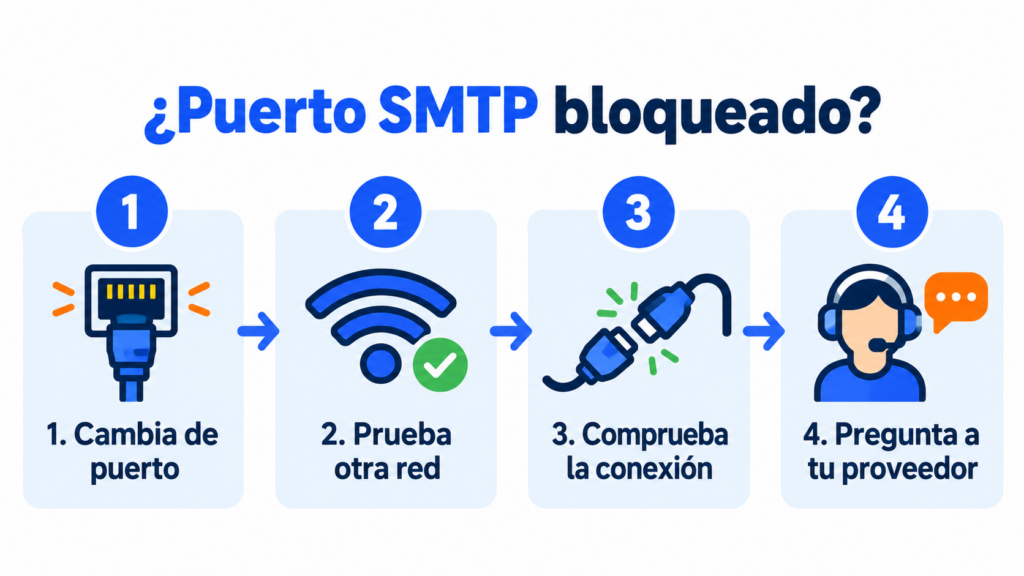
If the app gets stuck “connecting” and ends with a timeout error, try this:
- Switch ports. If 587 fails, try 465 or 2525.
- Try from another network. If it works on mobile data, the block is on your network or your hosting.
- Check the connection. In the terminal, telnet server 587 should reply with a greeting that starts with 220.
- Ask your provider. Some hosting and cloud services only open 25 or 587 if you ask.
Common mistakes when setting up the SMTP port
The most common one is mixing up port and encryption: 465 with STARTTLS or 587 with SSL. The connection fails even though the details are correct.
Other common mistakes are using port 25 from a website or an app and mistyping the server. It also often happens that people use their email password when the provider asks for an app password.
And remember that the port alone isn’t enough to reach the inbox. Deliverability also depends on authenticating your domain with SPF, DKIM and DMARC.
Mailrelay’s SMTP port
If you use Mailrelay for your transactional emails, connect your app to the server smtp1.s.ipzmarketing.com on port 587. You’ll find the username and password in your account.
Also set up authentication with the sending domain guide. That way your emails go out signed with your domain and you’ll see deliveries, opens, clicks and bounces in real time.
SMTP is included in the Standard and Enterprise plans. On the free account you can try it for 30 days and then add it for €14.95 a month. And if something won’t connect, support will help you via chat, ticket or phone.
An SMTP service with real support
SMTP and API included in Standard and Enterprise, with chat, ticket and phone support on every plan.
Frequently asked questions about the SMTP port
These are the most common questions.
What is port 587?
It’s the standard port for sending email from an app or an email client. It uses STARTTLS to encrypt the connection and requires a username and password.
Is port 465 or 587 better?
Both are secure. Port 465 encrypts from the start and 587 encrypts with STARTTLS. Use the one your provider tells you to; if it supports both, either will do.
What is port 25 used for?
For mail servers to deliver messages to each other. Don’t use it to send from a website or an app: it’s usually blocked.
Which SMTP port uses SSL?
Port 465. It’s the SMTP over SSL/TLS port, also called SMTPS, and it encrypts the connection from the very first moment.
What is Gmail’s SMTP port?
The server is smtp.gmail.com, with port 465 (SSL/TLS) or 587 (STARTTLS). You’ll need an app password if your account has 2-Step Verification turned on.