Relay mail (SMTP relay): what it is, how it works and when to use it
The server that delivers emails from your website, store or app without them ending up in spam
A mail relay, or SMTP relay, is a server that receives emails from your website or app and delivers them to their recipients.
You hand it the message and it does the rest: it authenticates it, queues it, delivers it and handles bounces.
To relay means to receive something and pass it on. That’s why you’ll also see it called email relaying, a relay server or simply a mail relay.
What is a mail relay?
In a broad sense, any server that receives an email and sends it on to another server is acting as a relay.
That’s what every MTA does along an email’s path to the inbox.
But today, when people talk about an SMTP relay, they almost always mean a service that specializes in sending email on behalf of others.
For example, the server an online store uses to send its order confirmations, or the one a contact form uses to notify you of a new message.
The name comes from the SMTP protocol, which all mail servers use to communicate with each other.
How does an SMTP relay work?
This is the journey of an email sent through a relay service:
- Your app connects to the relay server, usually on port 587 or 465, and identifies itself with a username and password, an API key or its IP address.
- The relay checks that you’re allowed to send with that sender and signs the message with DKIM.
- It puts the message in a queue and looks up the MX record of the recipient’s domain.
- It delivers it to the destination server on port 25, encrypted with TLS if the other server supports it.
- If it can’t deliver it, it retries or records the bounce. And it shows you delivery, open and click statistics.
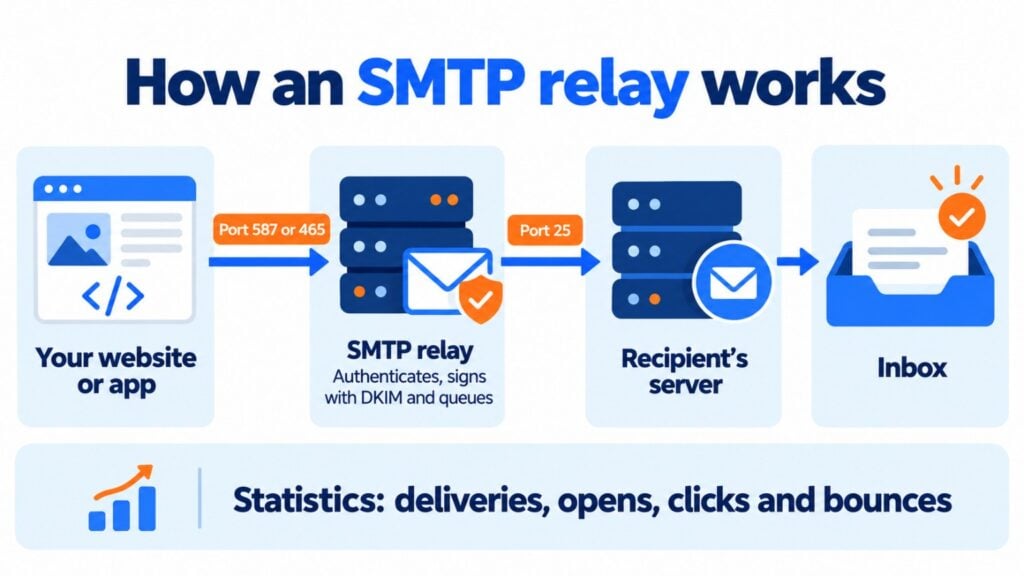
The advantage is that your app doesn’t need to know anything about queues, retries or reputation. All it has to do is hand the message over to the relay.
Relay server, relay host and open relay: the differences
There are several terms around mail relays that are often confused. Here’s how they differ:
| Term | What it is | Example |
|---|---|---|
| Relay server | Any server that receives email and forwards it to another server | Your email provider’s outgoing server |
| Relay host or smarthost | The server your own server sends all outgoing email to, instead of delivering it directly | A Postfix server configured to send through an external service |
| SMTP relay (service) | A provider that makes its sending infrastructure available to you | Mailrelay, SendGrid or Amazon SES |
| Open relay | A server that accepts and forwards email from anyone, without authentication | A misconfigured server that ends up sending spam |
| Relay domain | A domain for which a server accepts email and passes it on to another server | A company’s domain whose email goes through a filter before reaching its mailboxes |
The relay host deserves a closer look.
If your company has its own mail server, you can point it to a relay host so it doesn’t deliver the messages itself.
That way it takes advantage of a specialized provider’s reputation and infrastructure. In Postfix, for example, it’s set with the relayhost parameter.
You’ll find more details on the last term in our entry on relay domains.
What is an open relay and why is it dangerous?
An open relay is a server that forwards email from anyone, without asking for a username or password. In the early years of the internet, this was the norm.
But spammers started using them to send millions of messages without leaving a trace.
Today an open relay lands on blacklists within a few hours, and all email from that server gets blocked.
That’s why any serious relay requires authentication. We explain it in detail in our entry on open mail relays.
When do you need an SMTP relay service?
You need a relay whenever one of your systems sends emails automatically. These are the most common cases:
| Situation | Problem without a relay | What the relay provides |
|---|---|---|
| Forms on a WordPress website | The hosting’s mail function doesn’t authenticate properly and notifications end up in spam | Authenticated sending with SPF and DKIM (how to set it up in WordPress) |
| WooCommerce or PrestaShop online store | Order and shipping confirmations that never arrive | Fast delivery and statistics for every transactional email |
| CRM, ERP or your own app | You have to set up and maintain a mail server | Connection via SMTP or API in minutes |
| Cloud servers | Google Cloud blocks outbound port 25 and AWS restricts it by default | Sending through port 587 or 465 |
| Printers and scanners that send by email | Older devices don’t support modern authentication methods | A relay that accepts their connection securely |
| High volumes | Gmail limits personal accounts to 500 emails a day | Thousands or millions of emails a day |
Are the emails from your website or store not arriving?
Connect your website, store or app to Mailrelay’s SMTP and check the statistics for every email you send.
How to set up an SMTP relay
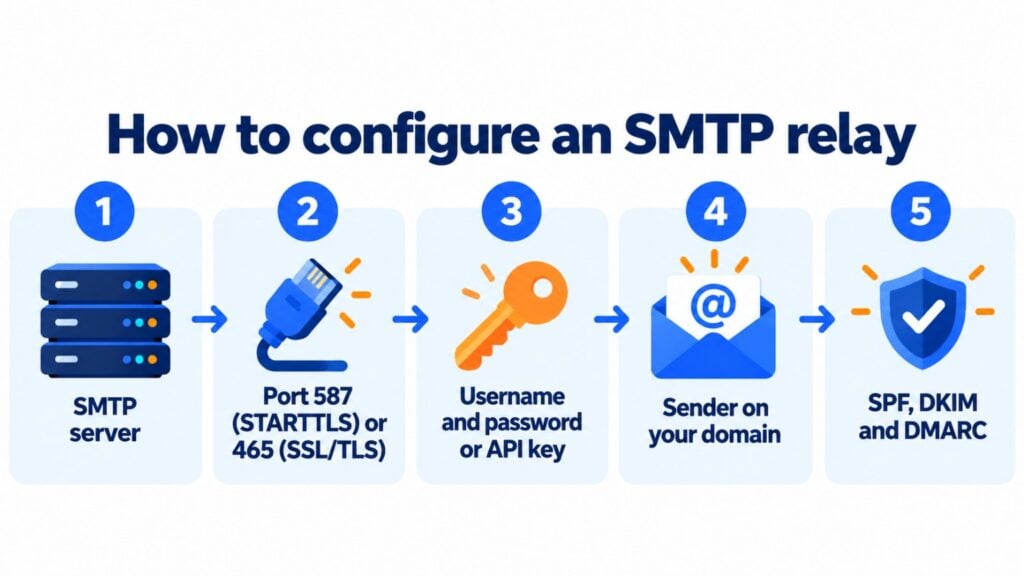
Almost all programs and plugins ask for the same details to connect to a relay:
| Setting | What to enter |
|---|---|
| SMTP server | The address your provider gives you, for example smtp.provider.com |
| Port | 587 with STARTTLS, which is recommended, or 465 with SSL/TLS. Some providers also offer 2525 |
| Authentication | Username and password, or an API key |
| Sender | An address on your own domain, never Gmail or Yahoo |
| DNS records | The SPF and DKIM records your provider gives you, plus a DMARC policy |
If you’re not sure which port to use, our entry on the SMTP port explains the differences between 25, 465, 587 and 2525.
SMTP relay options in 2026
These are some of the most widely used services, with data as of September 2026:
| Service | Best for | Free offering | Paid pricing |
|---|---|---|---|
| Mailrelay | Websites, stores and apps that also send campaigns | 30-day trial on the free account | Included in the Standard and Enterprise plans, or €14.95 a month on the free account |
| Google Workspace | Companies already using Google Workspace | Included in the subscription | Up to 10,000 recipients a day per user |
| Amazon SES | Technical teams with high volumes | No free tier for new accounts since July 2025 | $0.10 per 1,000 emails |
| SendGrid | High-traffic apps | 60-day trial with 100 emails a day | From $19.95 a month |
| Mailgun | Developers | 100 emails a day | From $15 a month for 10,000 emails |
| Brevo | Small volumes | 300 emails a day | From $9 a month |
| Postmark | Very fast transactional emails | 100 emails a month | From $15 a month for 10,000 emails |
Before choosing, check three things: whether the service keeps your transactional emails separate from your marketing ones, whether it gives you statistics and whether it offers support in your language.
You’ll find more criteria in our entry on SMTP services.
SMTP relay or your own mail server?
You can set up your own sending server with Postfix or Exim. But for most companies it isn’t worth it:
| Aspect | Your own server | SMTP relay service |
|---|---|---|
| Setup | Install, configure and secure the server | Create an account and copy the connection details |
| Reputation | You start from scratch with a new IP | You use IPs with a good reputation or an already warmed-up dedicated IP |
| Maintenance | Updates, queues, blacklists and bounces are all on you | The provider takes care of it |
| Statistics | You have to build them yourself | Deliveries, opens, clicks and bounces from day one |
| Cost | A server plus a technician’s time | A monthly fee based on volume |
Your own server only makes sense if you have a dedicated technical team and very specific privacy or volume requirements. In all other cases, a relay saves you time and delivery problems.
SMTP relay and deliverability
A relay alone doesn’t guarantee that your emails reach the inbox.
But it makes it much easier to meet what mailbox providers require. These guidelines will help you improve your deliverability:
- Authenticate your domain with SPF, DKIM and DMARC, as the Gmail and Yahoo requirements demand.
- Separate your sends: transactional emails and newsletters shouldn’t go out under the same reputation. Ideally, use different subdomains or, if you send high volumes, a dedicated IP.
- Monitor bounces and stop sending to addresses that return a hard bounce.
How Mailrelay helps you
Despite what its name suggests, Mailrelay isn’t just a mail relay.
It’s an email marketing tool for sending newsletters, automations and SMS that also offers an SMTP and API service for your transactional emails.
With Mailrelay’s SMTP you can connect your website, store or app in minutes and see delivery, open and click statistics for every message.
It’s included in the Standard and Enterprise plans. On the free account you can try it for 30 days and then add it for €14.95 a month.
And for your campaigns, the free account lets you send up to 80,000 emails a month to 20,000 contacts, with human support on every plan.
Send your transactional emails with Mailrelay
SMTP and API for your website or app, with a 30-day trial on the free account and human support on every plan.
Frequently asked questions about mail relays
What is a mail relay? It’s a server that receives emails from another system and takes care of delivering them to their recipients. It’s also called an SMTP relay, relay server or mail relay.
What is an SMTP relay service? It’s a provider that makes its sending infrastructure available to you. Your website or app passes it the emails via SMTP or API, and the service takes care of delivering them, authenticating them and handling bounces.
What’s the difference between a relay host and a smarthost? None: they’re two names for the same thing. It’s the server your mail server sends all outgoing messages to so that it delivers them.
What port does an SMTP relay use? To connect to the relay, 587 with STARTTLS or 465 with SSL/TLS. The relay then uses port 25 to deliver the email to the destination servers.
Can I use Gmail as an SMTP relay? Yes, with limits. A personal Gmail account allows about 500 emails a day. Google Workspace offers a relay service with up to 10,000 recipients a day per user, designed for company devices and applications.
Is Mailrelay an SMTP relay? Mailrelay is an email marketing tool with newsletters, automations and SMS. It also offers an SMTP and API service for sending transactional emails from your website or app.