SMTP: what it is, how it works and what an SMTP server is
What it is, how it works, ports and security
SMTP (Simple Mail Transfer Protocol) is the standard protocol for sending emails from a client or application to a mail server and transferring them between servers until they reach their destination.
In short: SMTP handles sending email, not reading it or storing it in the inbox. Protocols such as IMAP or POP3 are used to check and sync received messages.
SMTP at a glance
| Question | Short answer |
|---|---|
| What does SMTP stand for? | Simple Mail Transfer Protocol. |
| What is it used for? | To send and relay emails. |
| Does it receive emails? | Not directly. Email is usually retrieved using IMAP or POP3. |
| Which port does it use? | Port 25 for server-to-server transfer; ports 587 or 465 are usually used for authenticated sending from clients and applications. Port 2525 can be used as an alternative, depending on the provider. |
| Does SMTP encrypt messages? | Not on its own. The connection can be secured with TLS, either via STARTTLS or implicit TLS. |
| Does SMTP prevent spam? | Not on its own. It must be complemented by authentication, sending policies and technologies such as SPF, DKIM and DMARC. |
How does SMTP work?
SMTP works through a dialogue between a client and one or more servers. The usual process is as follows:
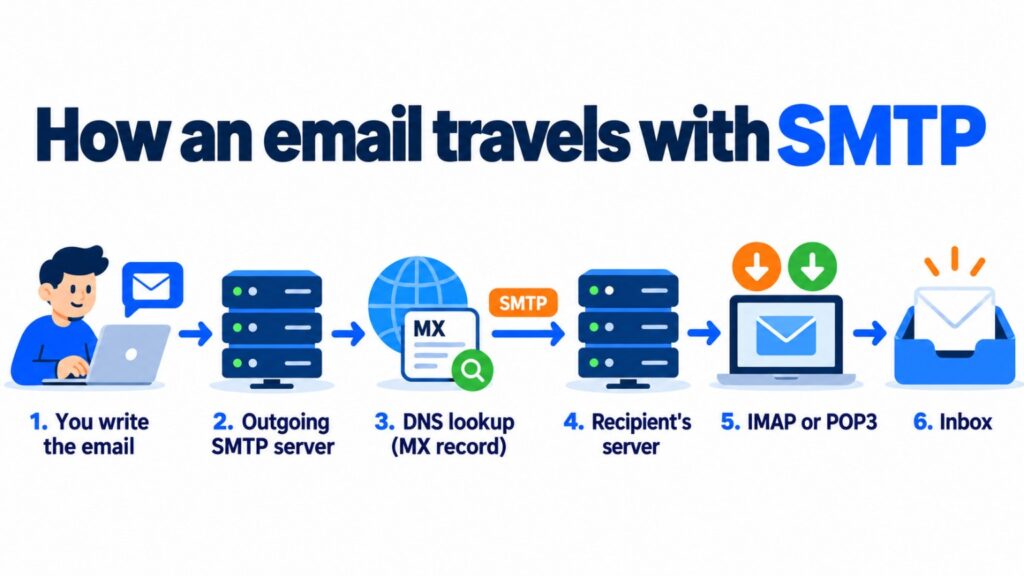
- Creating the message. The user, an online store, a CRM or an application generates the email.
- Connecting to the SMTP server. The client connects to the outgoing server using a specific host and SMTP port.
- Authentication and encryption. When the service requires it, the sender identifies themselves with their credentials and the connection is secured with TLS.
- Identifying the recipient. The server looks up the recipient’s domain and finds the server responsible for receiving its email.
- Transferring the message. The email may pass through one or more SMTP servers or relay hosts before reaching the destination server.
- Checks by the receiving server. The receiving server checks the domain authentication, the sender’s reputation and its spam filters.
- Delivery and retrieval. If the message is accepted, it becomes available in the mailbox. The recipient reads it via webmail, IMAP or POP3.
SMTP uses a model based on storing and forwarding messages (store and forward). If the destination server is unavailable, the sending server can temporarily keep the message in a queue and retry delivery. The final outcome will depend on the cause of the failure and the provider’s retry policy.
A simple example of an SMTP send
Imagine an online store sends a purchase confirmation:
- The store generates the message for [email protected].
- The application hands the email over to its authenticated SMTP service.
- The SMTP service finds the server that handles email for example.com.
- Both servers negotiate the transfer.
- The receiving server runs its checks and accepts or rejects the message.
- If it is accepted, the email appears in the user’s corresponding inbox.
This flow is used both for personal communications and for transactional emails, such as order confirmations, shipping notifications or password resets.
Main SMTP commands
During the connection, the client and the server exchange commands and response codes. These are some of the most common:
| Command | Function |
|---|---|
| EHLO | Starts the communication and announces that the client supports extended SMTP (ESMTP). |
| HELO | Starts a basic SMTP session when ESMTP is not used. |
| STARTTLS | Requests upgrading the existing connection to one secured with TLS. |
| AUTH | Starts client authentication when the server requires it. |
| MAIL FROM | Specifies the sender’s return address in the SMTP envelope. |
| RCPT TO | Specifies one of the message’s recipients. |
| DATA | Starts the transfer of the email’s headers and body. |
| QUIT | Closes the SMTP session. |
The SMTP envelope data does not always match the visible From and To fields of the message. This difference matters when investigating bounces, forwarding or possible spoofing attempts.
SMTP ports: 25, 587, 465 and 2525
The right port depends on whether the message is being transferred between servers or sent from a client or application.
| Port | Typical use | Security and recommendation |
|---|---|---|
| 25 | Transfer or relay between mail servers. | It is the standard port for server-to-server communication. Some internet service providers block outgoing traffic on it from clients to reduce spam. |
| 587 | Sending or submission from clients and applications. | It is the standard port for authenticated sending. It normally uses STARTTLS when the provider supports it. |
| 465 | Authenticated sending with implicit TLS. | The encrypted connection is established from the start. Use it when your SMTP provider says so. |
| 2525 | Alternative sending port offered by some providers. | It is not the standard submission port, but it can be useful when other ports are blocked. |
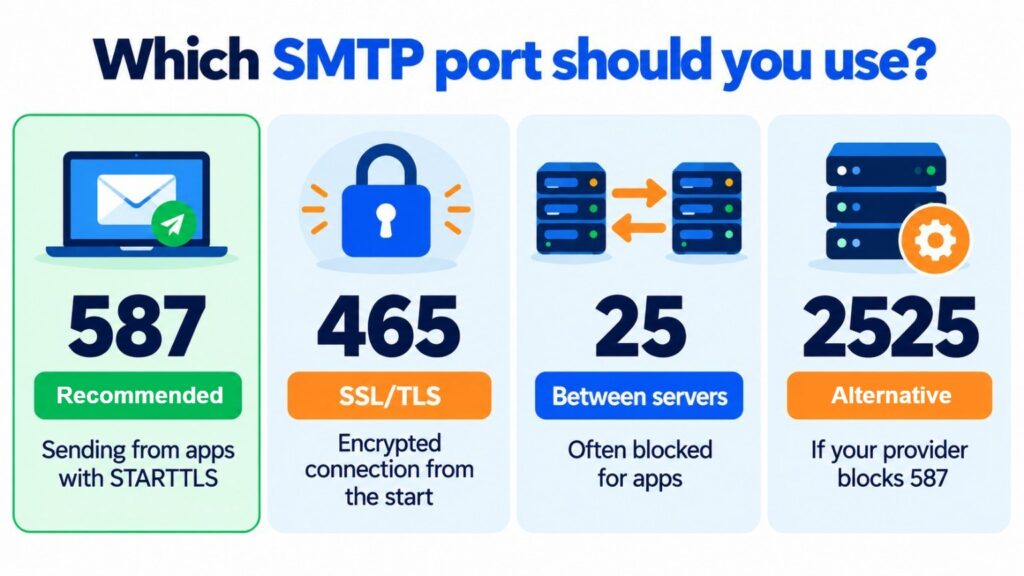
Don’t pick a port at random. Always check your provider’s connection details and confirm three things: port, encryption method and authentication requirement.
SMTP, IMAP and POP3: the differences
SMTP, IMAP and POP3 are all involved in email, but they don’t do the same job.
| Protocol | Main function | Direction | Typical behavior |
|---|---|---|---|
| SMTP | Send and relay emails. | Outgoing. | Delivers the message to the next server along the route. |
| IMAP | Retrieve and sync email from the server. | Incoming. | Keeps messages on the server and syncs changes across devices. |
| POP3 | Download messages from the server. | Incoming. | Downloads email to the device and may delete the copy on the server, depending on the settings. |
So an account can use SMTP to send and, at the same time, IMAP to read and sync received messages.
What is an SMTP server?
An SMTP server is the system that accepts, processes, queues and relays outgoing messages. It may belong to an email provider, a company or a specialized SMTP service.
A professional service usually adds capabilities that the basic protocol doesn’t provide on its own:
- User and domain authentication.
- Connection encryption.
- Queue, retry and bounce management.
- Rate and volume control.
- Sender reputation monitoring.
- Delivery, open and click statistics, where applicable.
- Support for campaigns and automated notifications.
When a server acts as an intermediary to forward messages, this is known as SMTP relay or mail relay.
Most popular SMTP services
If you need an SMTP service for your website, your store or your application, these are some of the most popular options (October 2026):
| Service | Best for | Free plan? |
|---|---|---|
| Mailrelay | Email marketing and transactional email (SMTP and API) in the same account, with EU-based servers and customer support | 30-day trial on the free account; included in the Standard and Enterprise plans |
| Brevo | Multichannel platform: email, SMS and WhatsApp | Yes, 300 emails a day |
| Mailjet | Transactional sending and campaigns | Yes, 6,000 emails a month (200 a day) |
| SendGrid (Twilio) | API for developers and high volumes | No, since 2025 |
| Amazon SES | Pay-as-you-go infrastructure for technical teams | Pay as you go |
| MailerSend | Transactional emails via API and SMTP | Yes, 500 emails a month |
Gmail and Outlook also have an SMTP server, but their daily limits are designed for personal email, not for bulk or transactional sending.
Send your transactional emails via SMTP
Connect your website, store or application to Mailrelay’s SMTP server and track every send with statistics. Try it for 30 days with the free account.
SMTP security: authentication, TLS, SPF, DKIM and DMARC
The original SMTP wasn’t designed with the security controls that today’s email requires. That’s why modern sending combines several layers:
SMTP authentication
It lets the server check whether the client is allowed to send. It is usually done with a username and password or another credential mechanism. Its purpose is to prevent third parties from using the server as an open relay.
TLS and STARTTLS
TLS encrypts the connection between two points along the route. STARTTLS lets you start the session and then upgrade it to an encrypted connection; port 465, on the other hand, uses implicit TLS from the start.
Encryption in transit protects a specific connection, but it is no substitute for end-to-end encryption of the content. In addition, an email may go through several hops, each with its own connection.
SPF
SPF lets you publish which servers are authorized to send on behalf of a domain.
DKIM
DKIM adds a cryptographic signature to the message. The receiving server can verify it using a public key published in the domain’s DNS.
DMARC
DMARC combines the SPF and DKIM results with the alignment of the sender’s visible domain. It also lets you specify what to do with messages that fail the checks and receive reports.
These measures help limit spoofing and contribute to email deliverability, but on their own they don’t guarantee that a message will reach the inbox. Reputation, list quality, consent, content and recipient behavior also play a part.
How do you set up an SMTP account?
To connect an email client, CRM, website or application, you need the details provided by the service:
- SMTP server or host: for example, the name of the outgoing server.
- Port: usually 587 or 465 for submission, depending on the provider’s configuration.
- Encryption: STARTTLS or implicit TLS.
- Authentication: username and password or the credentials provided.
- Authorized sender: the address or domain you are allowed to send from.
General process:
- Go to the tool’s outgoing mail settings.
- Enter the SMTP host and port.
- Select the encryption type specified by the provider.
- Enable authentication and enter the credentials.
- Set up an authorized sender.
- Send a test message and check both the delivery and the error logs.
If your website runs on WordPress, our guide to setting up SMTP in WordPress walks you through it step by step and covers the most popular plugins.
Don’t publish SMTP credentials in source code or share them over insecure channels. Use secrets or environment variables, apply least-privilege permissions and rotate the keys if you suspect they have been exposed.
Most common SMTP codes and errors
SMTP responses contain three digits. The first one indicates the overall result:
- 2xx: the operation completed successfully.
- 3xx: the server needs more information to continue.
- 4xx: temporary failure; the sending server can try again.
- 5xx: permanent failure; you usually need to fix the address, configuration or policy that caused the rejection.
Common examples:
| Code | Usual meaning | What to check |
|---|---|---|
| 250 | Action accepted. | No fix needed. |
| 421 | Service temporarily unavailable. | Wait and check the server’s availability or limits. |
| 450 / 451 | Mailbox or processing temporarily unavailable. | Retries, server load or temporary policies. |
| 550 | Recipient doesn’t exist or message rejected. | Address, permissions, reputation and the exact text of the response. |
| 552 | A limit has been exceeded, often size or storage. | Email size, attachments or mailbox quota. |
| 554 | Transaction rejected. | Anti-spam policies, authentication and sender reputation. |
The text that accompanies the code provides the key context. Two servers may use the same general code for different reasons.
Mailrelay and SMTP in email marketing and transactional emails
SMTP is a basic building block of email marketing infrastructure, but the protocol on its own doesn’t manage audiences, consent, segmentation, templates or reports.
For bulk sending, a specialized platform adds subscriber management, unsubscribe handling, bounces, statistics and mechanisms to protect your reputation. For transactional emails, SMTP lets you connect a store, website, CRM or application without having to build a specific API integration.
In general:
- Choose SMTP if you need a connection that works with existing clients and applications or want a quick integration using server credentials.
- Choose an API if you need a deeper programmatic integration, structured responses and fine-grained control from your application.
- Combine both if different parts of the business have different needs.
Mailrelay lets you manage transactional emails via both API and SMTP. Choose the option that suits you best. SMTP is included in the Standard and Enterprise plans, and you can try it for 30 days with the free account.
Plus, every email you send via SMTP or API is logged in Reports > SMTP emails, with its status, bounces, spam complaints, unsubscribes, rejected messages and the reasons for them, and opens and clicks. We explain it in SMTP and API with statistics.
Mailrelay’s SMTP server
Included in the Standard and Enterprise plans, with ticket and chat support (plus phone support on Enterprise). The free account gives you a 30-day trial.
Advantages and limitations of SMTP
Pros
- It is an open and widely supported standard.
- It connects clients, servers, websites and applications.
- It can scale through specialized SMTP services.
- It supports authentication, encryption and modern extensions.
- It works for both individual messages and automated flows.
Limitations
- It can’t be used to retrieve received email.
- It doesn’t guarantee that the message will reach the inbox.
- It requires correct authentication, DNS and security configuration.
- Providers may impose volume, size or rate limits.
- Poor list and reputation management can lead to blocks or spam complaints.
Frequently asked questions about SMTP
What does SMTP stand for?
SMTP stands for Simple Mail Transfer Protocol. It is the standard used to send and transfer emails.
Is SMTP used to send or receive emails?
SMTP is used to send and relay emails. IMAP or POP3 are usually used to read or sync received messages.
What is my email’s SMTP server?
It depends on your provider. Check its dashboard or documentation and look for the outgoing mail server name, the port, the encryption method and the required credentials.
What is the best SMTP port?
There is no single port that works in every case. Port 587 is the usual standard for authenticated sending, 465 is used with implicit TLS and 25 is mainly reserved for server-to-server transfer. Always use the port your provider specifies.
Is SMTP secure?
It can be secure if it is configured with authentication, TLS and the right controls. You should also authenticate your domain with SPF, DKIM and DMARC. SMTP without these protections is more vulnerable to abuse and spoofing.
What is the difference between SMTP and an SMTP server?
SMTP is the protocol, that is, the set of communication rules. An SMTP server is the system that applies those rules to accept, process and relay messages.
What is SMTP relay?
SMTP relay is the forwarding of an email from one server to another. A relay service receives the message from an authorized sender and routes it to the recipient’s server.
Does SMTP guarantee that email reaches the inbox?
No. SMTP carries the message, but inbox delivery also depends on authentication, reputation, consent, content, contact engagement and the receiving server’s filters.
Conclusion
SMTP is the protocol that makes it possible to send email between clients, applications and servers. Its compatibility makes it an essential foundation for both everyday email and campaigns and automated notifications.
To use it properly, you need to distinguish between sending and receiving, choose the right port, secure the connection with TLS, authenticate the sender and set up SPF, DKIM and DMARC. If you are going to send large volumes or critical messages, a specialized service makes it easier to manage queues, bounces, reputation and statistics.
Mailrelay lets you connect websites, stores, CRMs and applications to send via SMTP or API. Check out its transactional email solutions or create an account from the email marketing page.
Related posts
You may also be interested in: SendGrid: What is it? Advantages, disadvantages and alternative and Amazon SES.