IMAP: what it is, how it works and which ports it uses
The protocol that keeps your emails on the server so you see the same mail on your phone, laptop and webmail
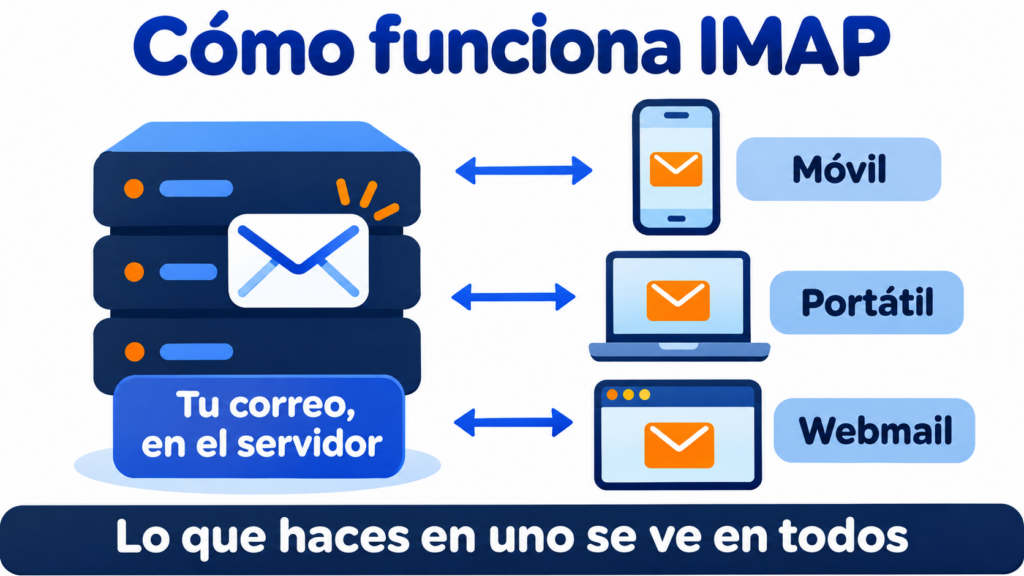
IMAP (Internet Message Access Protocol) is the protocol your email program or app uses to read the emails stored on the server. Messages aren’t downloaded and deleted: they stay on the server, so you see the same inbox on your phone, your laptop and in webmail.
What is IMAP and what is it used for?
IMAP is used to receive and manage email, not to send it. When you send an email, your program uses another protocol, SMTP. When you read it, mark it as read or move it to a folder, it uses IMAP.
The main advantage of IMAP is that email is managed directly on the server itself. Every change you make on one device shows up on all the others.
The current version is IMAP4rev2, defined in 2021 in RFC 9051. The previous one, IMAP4rev1, is still the one many servers use.
How does IMAP work?
Your email client (Outlook, Thunderbird, the iPhone Mail app…) connects to the email server and asks it for the list of folders and messages. It downloads the headers and, when you open an email, its content.
Everything you do is saved on the server: marking as read, moving to a folder, archiving, deleting or saving a draft. That’s why, if you delete an email on your phone, it also disappears from your laptop.
Read with IMAP, send with Mailrelay
For your newsletters and campaigns, Mailrelay sends from its own servers, with double opt-in and human support on every plan.
1. Differences between IMAP and POP3
IMAP and POP3 are the two most widely used protocols for setting up an email account, and both are supported by today’s email clients.
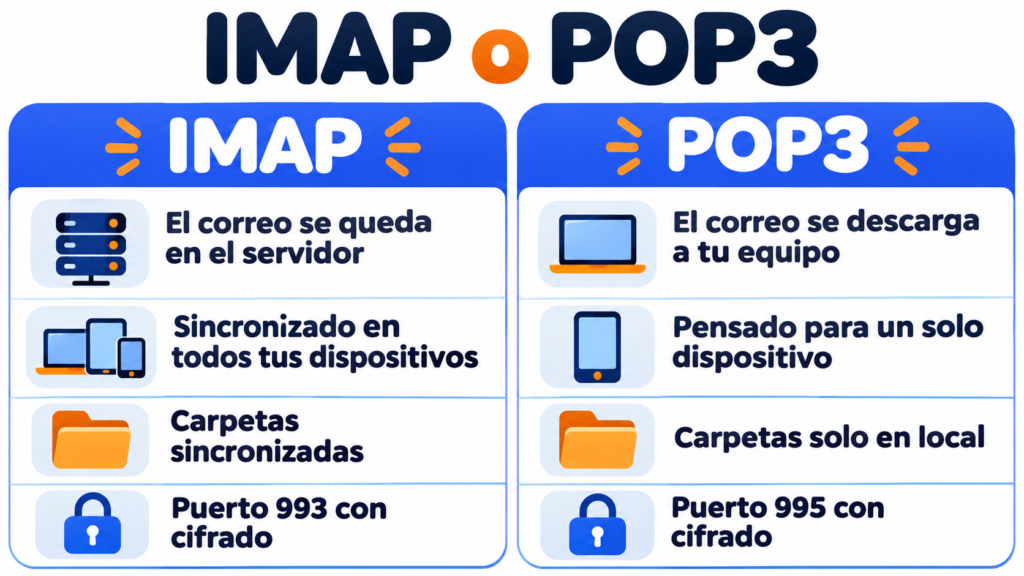
With IMAP, email is managed on the server, because the messages stay there. It’s the best choice if you read your email on several devices or if several people use the same mailbox.
POP3, on the other hand, downloads emails to your computer and usually deletes them from the server. This lets you read them offline, but it isn’t a good option if you check your email from several places.
| IMAP | POP3 | |
|---|---|---|
| Where email is stored | On the server | On your computer |
| Multiple devices | Yes, synced | No |
| Folders | Synced | Local only |
| Offline | Only what’s already downloaded | Everything |
| Space on the server | The whole mailbox | Very little |
| Ports | 143 and 993 | 110 and 995 |
Which ports does IMAP use?
By default, IMAP works with ports 143 and 993. Port 993 encrypts the connection with SSL/TLS from the start. It’s the recommended one and the one used by Gmail, Outlook.com, Yahoo and iCloud.
Port 143 is the standard port: the connection starts unencrypted and is encrypted afterwards with STARTTLS.
POP3 uses 110 (unencrypted) and 995 (encrypted). Sending uses SMTP, with its own SMTP ports.
IMAP servers for Gmail, Outlook and others
An IMAP server is the email server address you enter in your program to receive mail. These are the most common:
| Provider | IMAP server | Port |
|---|---|---|
| Gmail | imap.gmail.com | 993 |
| Outlook.com and Hotmail | outlook.office365.com | 993 |
| Yahoo Mail | imap.mail.yahoo.com | 993 |
| iCloud Mail | imap.mail.me.com | 993 |
If you use email on your own domain or from your hosting provider, the server is usually something like imap.yourdomain.com or mail.yourdomain.com. Your provider shows it in their control panel.
On many accounts, a password is also no longer enough: you have to sign in with your Google or Microsoft account from the program (OAuth) or create an app password.
2. Advantages and disadvantages
These are the advantages and disadvantages of IMAP and POP3.
IMAP
- Advantage: your email can be accessed from any device connected to the internet.
- Advantage: you work directly on the server, and every change shows up on all devices with access to the mailbox.
- Advantage: if a device fails, your emails aren’t lost, because they’re on the server.
- Disadvantage: since all email is stored on the server, it’s easier to run out of storage space.
- Disadvantage: folders created with IMAP can’t be accessed from a POP3 setup.
POP3
- Advantage: the server has free space, because email is downloaded to your computer and deleted from the server.
- Advantage: you have your email history on your device even when you’re not connected to the internet.
- Disadvantage: email can’t be accessed from different devices.
- Disadvantage: it takes up space on the device it’s downloaded to.
- Disadvantage: if your computer breaks down, you can lose your emails.
How Mailrelay helps you
IMAP is for reading email. To send campaigns to thousands of contacts you need something else: a sending service like Mailrelay, which sends your newsletters from its own servers, with authentication and reputation monitoring.
Your subscribers’ replies arrive at the reply-to address you choose, and you read them in your usual email program via IMAP. The free account lets you send up to 80,000 emails a month to 20,000 contacts, with human support on every plan.
Your campaigns, outside your mailbox
Send up to 80,000 emails a month for free to 20,000 contacts, and read the replies in your usual email program.
Key things to remember about IMAP
IMAP is the protocol for reading email that stays on the server. That’s why your inbox is the same on all your devices. Use port 993 with encryption. POP3 is only worth it if you read your email on a single computer and want to keep it locally. And for sending, whether it’s a single email or a campaign, SMTP comes into play.
IMAP FAQs
Can IMAP be used to send emails?
No. IMAP is only used to read and organize the email you receive. Sending uses SMTP, which is set up separately in the same email program.
What is the IMAP path prefix?
It’s an optional setting in some programs, such as Apple’s Mail app, that tells them which server folder your mailboxes start in. It’s almost always left blank. You only need it if your provider asks for it, and it’s usually “INBOX”.