Ionos Webmail (formerly 1&1): how to log in, IMAP/SMTP settings and login problems
Your domain's email at IONOS, from your browser or on any device
Ionos Webmail is the webmail service of IONOS, the hosting and domain provider formerly known as 1&1. It lets you read, write and organize your domain’s email from any browser, without installing any software.
In this guide you’ll learn what it is, how to log in step by step, which IMAP, POP3 and SMTP server settings you need to set up your email on other devices, and how to fix the most common login problems.
Do you use Ionos Webmail to send newsletters?
Webmail is designed for everyday email. For campaigns to your whole list, use an email marketing tool: Mailrelay is free for up to 20,000 contacts.
What is Ionos Webmail?
Ionos Webmail is the web interface IONOS customers use to manage their corporate email mailboxes. It’s a webmail service: your email is stored on IONOS servers and you access it from your browser with your email address and its password.
IONOS nació como la marca de hosting de 1&1 Internet, que en 2018 unificó sus servicios bajo el nombre IONOS. Por eso muchos usuarios siguen buscándolo como «webmail 1&1» o «1and1 mail». Además de la bandeja de entrada, el webmail incluye calendario, contactos, filtros y protección contra spam. Algo parecido pasa con el correo Movistar, que muchos siguen buscando como correo de Telefónica.
How to log in to Ionos Webmail step by step
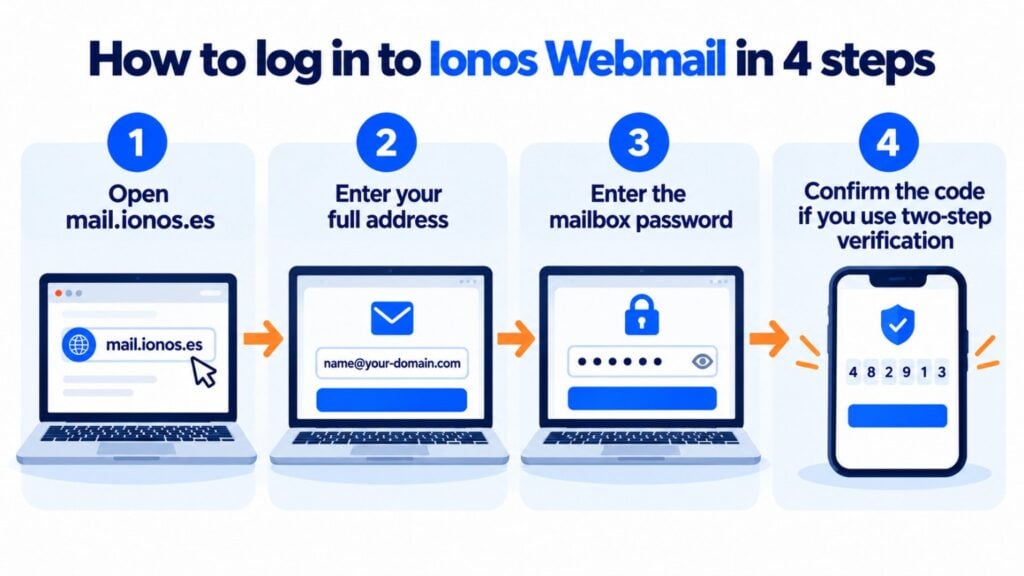
- Open your country’s IONOS webmail login page in your browser (in Spain, mail.ionos.es).
- Enter your full email address (for example, [email protected]), not just the username.
- Enter the mailbox password. Each email address has its own password, different from the one you use to log in to the IONOS customer panel.
- If you’ve turned on two-step verification, confirm the code you receive.
- Once you’re in, you can read and send emails, manage folders, contacts and your calendar, and set up automatic replies.
IONOS IMAP, POP3 and SMTP server settings
If you’d rather read your email in Outlook, Apple Mail, Thunderbird or on your phone, you’ll need these settings. In Spain the servers end in .es; in other countries the domain ending changes (for example, imap.ionos.com).
| Protocol | Server | Port | Encryption |
|---|---|---|---|
| IMAP (incoming, recommended) | imap.ionos.es | 993 | SSL/TLS |
| POP3 (incoming) | pop.ionos.es | 995 | SSL/TLS |
| SMTP (outgoing) | smtp.ionos.es | 465 | SSL/TLS |
| SMTP (alternative) | smtp.ionos.es | 587 | STARTTLS |
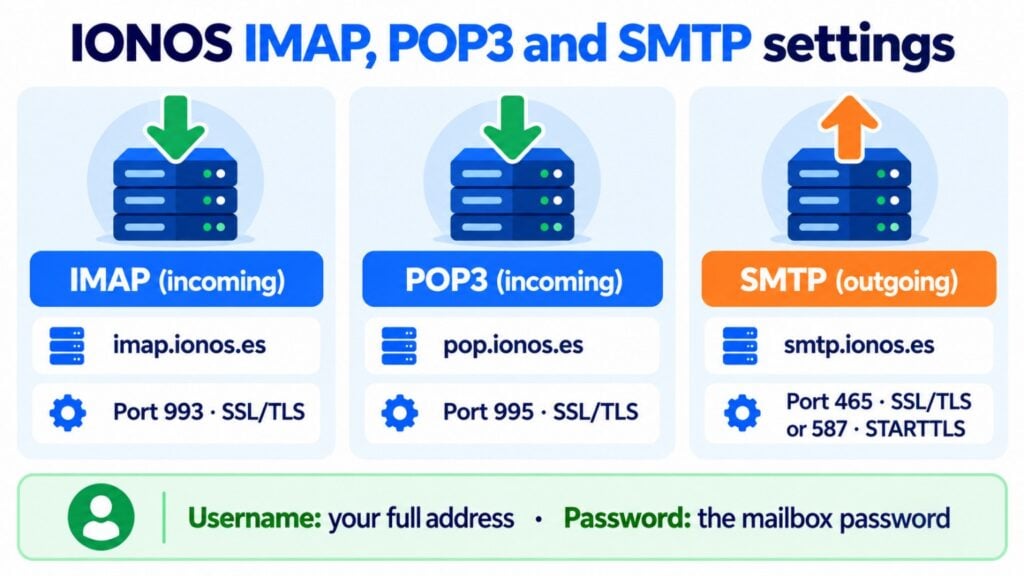
In every case, the username is your full email address and the password is the mailbox password. IMAP is the recommended option because it syncs the status of your messages (read, deleted, folders) across all your devices; POP3 downloads your email to the device.
Common problems logging in to Ionos Webmail
- The password doesn’t work: make sure you’re using the mailbox password, not the customer panel password. You can change it from the IONOS panel, in the email section.
- Wrong username: you need to log in with your full email address, including the domain.
- Emails won’t send from your phone or email client: if port 465 is blocked on your network, try 587 with STARTTLS.
- The page doesn’t load properly: clear your browser cache or try a private window or another browser.
- Account locked after several attempts: wait a few minutes before trying again or reset your password.
Main features of Ionos Webmail
- Access from anywhere: all you need is a browser and an internet connection.
- Built-in calendar and contacts: to coordinate meetings and keep your schedule in the same place as your email.
- Security: encrypted connection, spam and virus filters, and two-step verification.
- Organization: folders, automatic filters, signatures and out-of-office replies.
Your IONOS email, plus your campaigns with Mailrelay
Keep Ionos Webmail for everyday email and send your newsletters with Mailrelay, with better deliverability and open and click statistics.
Can you use Ionos Webmail for email marketing?
For individual emails, yes. For campaigns to hundreds or thousands of contacts, it’s not the right tool. Email providers like IONOS limit the number of emails you can send per hour and per day to prevent abuse, and bulk sending from a regular mailbox can damage your domain’s sender reputation.
On top of that, webmail doesn’t offer what a campaign needs: unsubscribe management, segmentation, mobile-friendly templates and open and click statistics. That’s what email marketing tools like Mailrelay are for: they take care of deliverability and let you keep using your IONOS domain as the sender.
Tips to get the most out of Ionos Webmail
- Create filters and folders to automatically sort invoices, notifications or customer emails.
- Turn on two-step verification and use a different password for each mailbox.
- Set up a professional signature with your name, job title and contact details.
- Use IMAP on your devices so you have the same email on your computer and your phone.
Ionos Webmail FAQ
What’s the address to log in to Ionos Webmail? In Spain, mail.ionos.es. Enter your full email address and the mailbox password. In other countries the domain ending changes.
Are 1&1 Webmail and Ionos Webmail the same thing? Yes. 1&1 brought its services together under the IONOS brand in 2018, and its webmail was renamed Ionos Webmail. Accounts and email addresses stay the same.
What do I do if I forget my email password? Log in to the IONOS customer panel, open the email section and change the mailbox password. If your company manages the account, ask whoever administers the domain for the password.
Which SMTP server do I use to send from IONOS? smtp.ionos.es, with port 465 and SSL/TLS, or with port 587 and STARTTLS. The username is your full address and the password is the mailbox password.
Can I send newsletters from Ionos Webmail? For a few emails, yes. But IONOS limits how many emails you can send per hour and per day, and webmail doesn’t handle unsubscribes or statistics. For campaigns to your whole list, you need an email marketing tool like Mailrelay.
Send your campaigns with Mailrelay
Create your free account and send up to 80,000 emails a month to 20,000 contacts, no credit card required.
Related entries
Discover how Mailrelay can help you with your email marketing strategy.