Sender reputation: what it is, how it's measured and how to improve it
Why Gmail and Outlook decide whether your email reaches the inbox before reading it, and how to earn their trust
You send a carefully crafted campaign and, even so, a good part of it ends up in spam. Often the problem isn’t that email, but what mailbox providers think of you as a sender. That opinion has a name: sender reputation.
What is sender reputation?
Sender reputation is the trust score that Gmail, Outlook, Yahoo and other email service providers assign to whoever sends emails. They use it to decide whether your message reaches the inbox, another tab or the spam folder.
Nobody publishes it as a single score. Each provider calculates it in its own way, with its own data, and updates it with every send. That’s why people also talk about email reputation or email marketing reputation: it’s the same idea.
Sender reputation rests on two components:
| Component | What it tracks | What happens if you switch |
|---|---|---|
| IP reputation | The address of the server your emails are sent from | If you change IP or provider, it starts over |
| Domain reputation | Your sending domain (for example, yourstore.com) | It stays with you even if you change IP or provider |
Within sender reputation, the domain carries more and more weight today, because it’s what really identifies you.
How does sender reputation affect deliverability?
Sender reputation is the first filter of deliverability. Before looking at the content of your email, the receiving server checks who you are and how you’ve behaved so far.
With a good reputation, your emails reach the inbox and antispam filters are more tolerant of a questionable subject line. With an average reputation, some of your sends end up in spam or are delayed. With a bad one, the provider rejects your emails or slows them down with temporary errors.
And the effect builds up. If your emails go to spam, fewer people open them, and that lack of interest makes your reputation even worse.
Take care of your reputation from the very first send
With Mailrelay you check SPF, DKIM and DMARC from the dashboard, and list cleaning is automatic. Start for free.
Key considerations
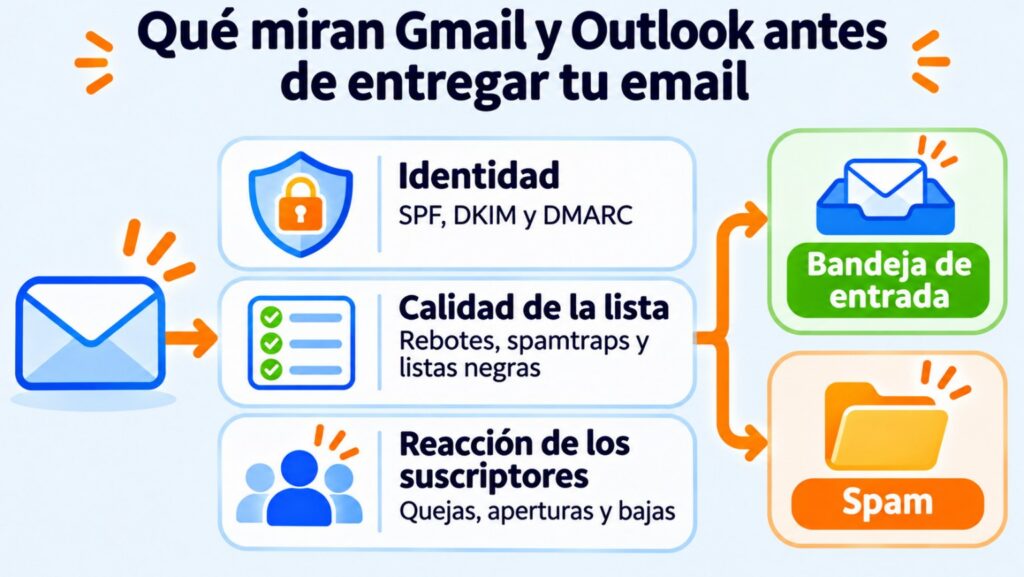
To calculate sender reputation, mailbox providers look at three groups of signals:
- Identity. Your domain is authenticated with SPF, DKIM and DMARC and the sender is always the same.
- List quality. Bounces from addresses that don’t exist, spamtraps and appearing on a blacklist.
- Subscriber reaction. Spam complaints, emails that are opened or deleted unread, replies and unsubscribes.
Consistency also counts. A sender who sends a similar volume every week inspires more trust than one who goes from zero to 50,000 emails overnight.
Spam complaints and their effects
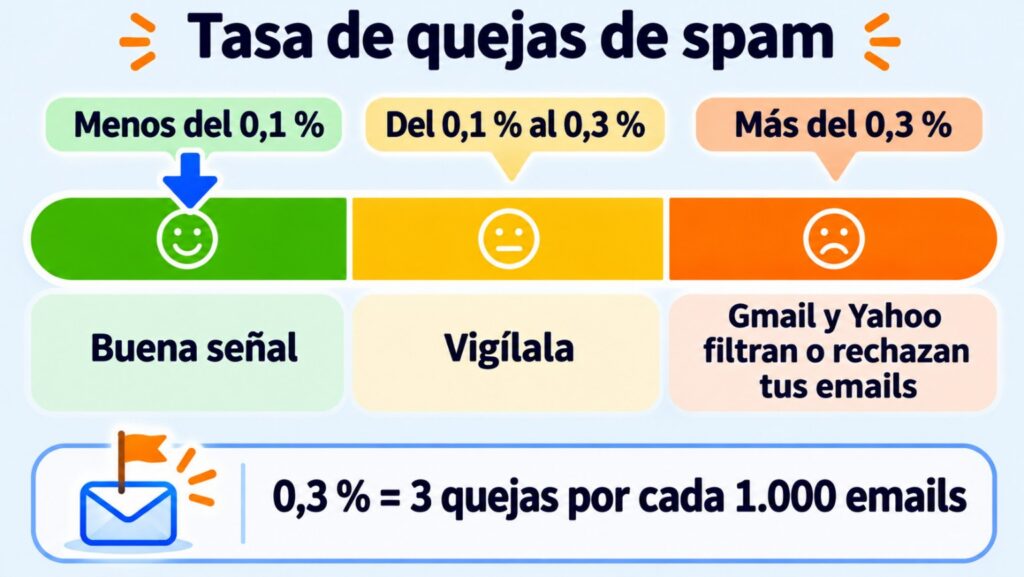
A spam complaint happens when a recipient clicks “Mark as spam”. It’s the signal that damages sender reputation the most, because it’s a subscriber saying directly that they don’t want your email.
The big providers already set limits.
According to Gmail’s sender guidelines, the spam rate should stay below 0.1% and never reach 0.3%, which equals 3 complaints per 1,000 delivered emails. Yahoo sets the same 0.3% cap, and since May 2025 Microsoft has required anyone sending more than 5,000 emails a day to Outlook to have their domain authenticated.
The most effective way to avoid complaints is to make unsubscribing easier than marking as spam. That’s why it’s a good idea to include the List-Unsubscribe header, which shows an unsubscribe button next to the sender.
How do you check your sender reputation?
There’s no single official number, but there are several reliable clues:
| Tool | What it shows you | Cost |
|---|---|---|
| Google Postmaster Tools | Your spam rate in Gmail and whether you meet its requirements | Free, once you verify your domain |
| Microsoft SNDS | Data on your IPs in Outlook and Hotmail | Free, only for your own IPs |
| Sender Score | A score from 0 to 100 for your IP | Free |
| Blacklist lookup | Whether your IP or domain appears on an RBL | Free |
Your own statistics also give warnings. A sharp drop in open rate at a specific provider, more bounces than usual or a rise in complaints are signs that something is changing.
How to look after your sender reputation
Looking after your reputation as an email sender comes down to a few habits:
- Authenticate your domain. Set up SPF, DKIM and DMARC before your first send and always send from a custom domain.
- Get permission. Use double opt-in and don’t buy or rent databases.
- Clean your list. Remove hard bounces right away and practice good list hygiene.
- Look after inactive subscribers. Try to win them back with a winback campaign and, if they don’t respond, stop emailing them.
- Be consistent. Keep a similar frequency and volume. If you’re starting with a new IP or domain, increase volume gradually with a warm up.
- Send what you promised. If someone signed up for a monthly recipe newsletter, don’t send them daily offers.
How does Mailrelay help you take care of your sender reputation?
Your reputation depends mostly on you: your list, your content and your domain authentication. But the provider’s infrastructure matters too.
AeroMéxico, for example, improved the deliverability of its newsletters by sending from high-reputation IPs and with advice from an email marketing consultant (see the AeroMéxico case study).
By default, Mailrelay accounts send from our own shared IPs, already warmed up. The platform monitors them automatically: blacklists, spam complaints and load balancing.
Mailrelay always works with double opt-in and adds the List-Unsubscribe header with one-click unsubscribe to every campaign. It also detects bounces and handles unsubscribes and complaints automatically, and automatic list cleaning is included in every plan.
From the dashboard you can check SPF, DKIM and DMARC. And the editor includes a spam report before you send.
If you want your reputation to depend only on your own sending, you can get a dedicated IP. We cover this in our article on how Mailrelay protects deliverability.
Send from monitored IPs, at no cost
Up to 80,000 emails a month and 20,000 contacts for free, with monitored shared IPs and human support.
Key takeaways on sender reputation
Sender reputation decides whether your emails reach the inbox. It’s earned slowly, with a clean list, an authenticated domain and emails people want to receive. And it’s lost quickly with a few campaigns to contacts who weren’t expecting you.
Frequently asked questions about sender reputation
What is the difference between IP reputation and domain reputation?
IP reputation reflects the behavior of the IP address your emails are sent from. Domain reputation follows your sending domain, even if you change IP or provider.
Can you recover from a bad sender reputation?
Yes, but it takes time, usually several weeks. Clean your list, stop sending to inactive contacts and go back to a moderate, regular volume, starting with your most engaged subscribers.
It can, if the provider doesn’t monitor it. That’s why it’s worth choosing one that monitors blacklists, complaints and compliance with its anti-spam policy.