CC and BCC
The difference between "carbon copy" and "blind carbon copy", with examples
CC stands for “carbon copy” and BCC for “blind carbon copy”. They are two email fields for sending the same message to more people besides the main recipient.
The difference is simple: everyone sees the addresses in CC, and nobody sees the ones in BCC.
What do CC and BCC mean in an email?
The abbreviations date back to the days of the typewriter. To copy a letter, you placed a sheet of carbon paper underneath it, producing a “carbon copy”.
That is where the names carbon copy (CC) and blind carbon copy (BCC) come from. In Spanish, they were adapted as “con copia” and “con copia oculta”.
An email has three recipient fields:
| Field | What it means | Who sees the address |
|---|---|---|
| To | Main recipient | All recipients |
| CC | Carbon copy | All recipients |
| BCC | Blind carbon copy | Nobody but the sender |
Everyone receives the same message. What changes is each person’s role and the privacy of their address.
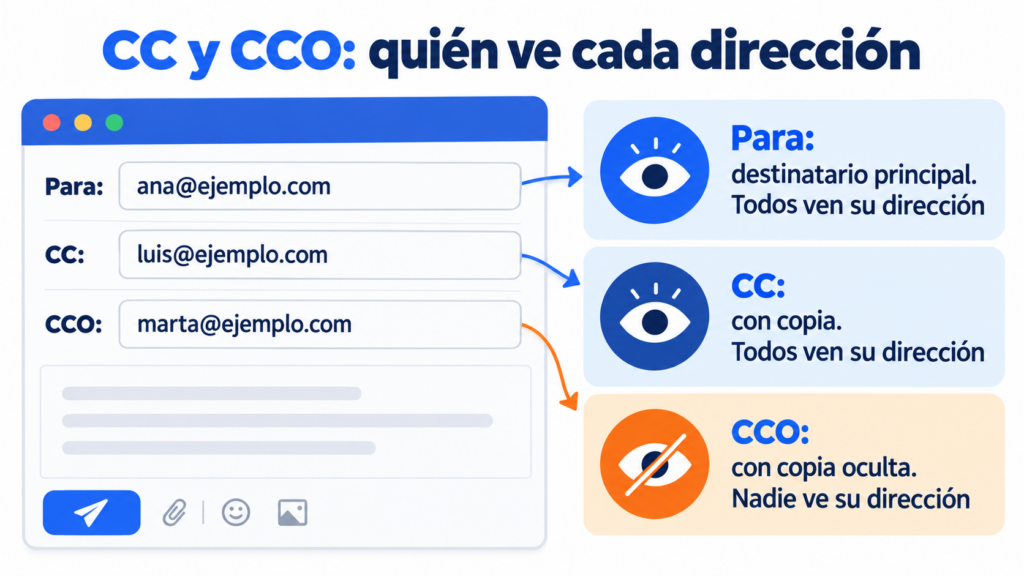
What is the difference between CC and BCC?
With CC, everyone can see who else received the email. If someone clicks “Reply all”, their reply also goes to the copied addresses.
With BCC, the addresses stay hidden. Anyone who is blind-copied sees the message, but the others don’t know they received it. And if they reply all, their reply doesn’t reach the other BCC recipients.
There’s a detail many people don’t know. People in BCC do see the To and CC addresses. The only things hidden are their own address and those of the other blind-copied recipients.
When should you use CC?
Use CC when you want someone to stay informed, even if they don’t need to do anything with the email. It’s transparent: everyone knows who is involved.
Some common examples:
- You write to a supplier and copy your manager.
- You confirm a meeting with a client and add your teammate.
- You send a quote and copy the accounting department.
A rule of thumb: the “To” field is for whoever has to reply or take action. CC is for anyone who just needs to know, like an “FYI“.
When should you use BCC?
Use BCC when the recipients don’t know each other or haven’t given you permission to share their address. That way you protect their privacy.
For example, to let several clients know about a change in opening hours or to invite people from different companies.
It also works for sending someone a copy discreetly, although you should use it with care.
How to add CC and BCC in Gmail and Outlook
In Gmail, when you compose an email you’ll see the “Cc” and “Bcc” links to the right of the “To” field. Click the one you need and type the addresses.
In Outlook, the CC field appears below “To”. If you don’t see BCC, turn it on with the “Bcc” button on the new message’s “Options” tab. In Outlook on the web, the “Bcc” link is next to “To”.
On mobile, you usually have to tap the “To” field or the arrow next to it to show both options.
Common mistakes with CC and BCC
The most serious mistake is putting people who don’t know each other in CC. Each recipient sees everyone else’s addresses, and that is a personal data breach.
It’s no minor detail. The Spanish Data Protection Agency (AEPD) has fined companies for sending commercial emails without using BCC.
In 2022, it fined a real estate agency €9,000 for exposing its clients’ addresses this way. It was in breach of Articles 5(1)(f) and 32 of the GDPR.
Other common mistakes:
- Using “Reply all” when you only need to answer the sender.
- Putting too many people in CC “just in case”, until nobody reads the email.
- Putting someone in BCC who then replies all and reveals they were copied.
Famous “reply all” disasters
A single click on “Reply all” can bring down an entire company’s email. Here are some of the best-known cases:
| Year and company | What happened | Emails sent |
|---|---|---|
| 1997, Microsoft | A message to the “Bedlam DL3” list, with around 13,000 addresses, set off a chain of replies from people asking to be removed from the list | About 15 million |
| 2015, Reuters | An employee asked for their phone to be reactivated, and the message reached more than 33,000 colleagues | Almost 23 million in 7 hours |
| 2016, NHS (England’s public health service) | Because of a configuration error, a test email reached about 840,000 accounts | About 500 million in 75 minutes |
In 2020, Microsoft ended up building a safeguard into Exchange Online. If an email with more than 5,000 recipients gets 10 reply-all responses within an hour, it blocks replies for 4 hours.
The most serious case wasn’t a meltdown but a privacy problem. In September 2015, a sexual health clinic in London sent a newsletter to almost 800 patients with every address in plain view. The UK data protection authority fined it £180,000. With BCC, or better still with a bulk email tool, it wouldn’t have happened.
Can you use BCC to send mass emails?
Technically yes, but it’s not a good idea. An email with hundreds of addresses in BCC has several problems:
Gmail, Outlook and other providers set sending limits per message and per day. If you exceed them, your account gets blocked for a while.
Also, emails with many hidden recipients look like spam and often end up in that folder. You also can’t personalize the message or know who opened it.
And most importantly: if the email is commercial, the law requires an easy way to unsubscribe. BCC doesn’t offer one.
To send to a list, the right way is to use an email marketing tool. Each subscriber gets their own email, with their name and their unsubscribe link, and nobody sees anyone else’s address.
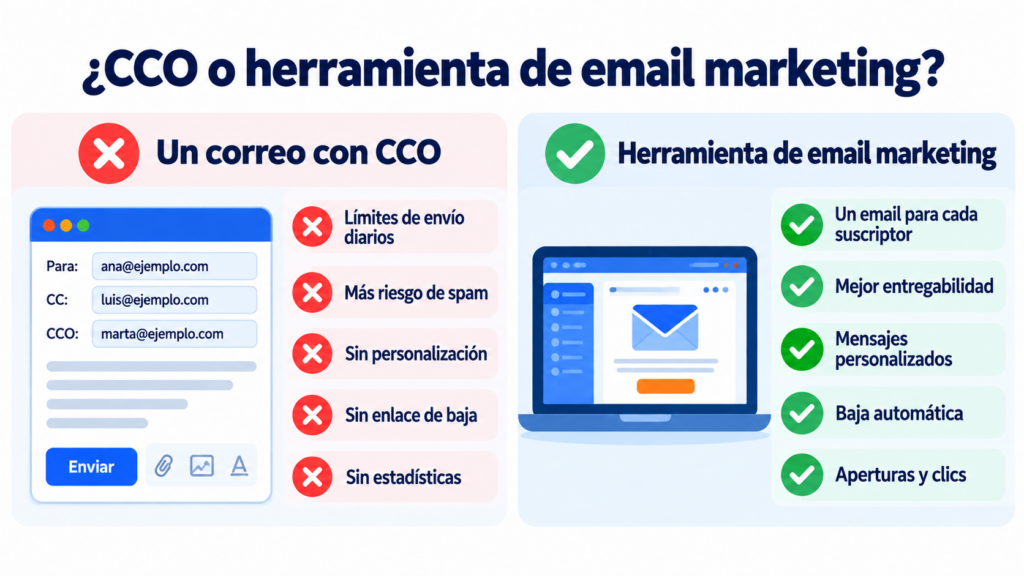
Writing to lots of recipients?
To send to a list, there’s a better option than BCC: with Mailrelay, each subscriber gets their own email and can unsubscribe with one click.
How Mailrelay helps you
With Mailrelay, you don’t need CC or BCC to write to your list. You can import your contacts, organize them into groups and send each campaign individually.
Each recipient gets the message addressed to them, with an unsubscribe link that is managed automatically. And you can see the opens and clicks of every send.
The free account includes 80,000 emails a month and up to 20,000 contacts.
Send your campaigns for free with Mailrelay
Up to 80,000 emails per month and 20,000 contacts, with human support on all plans.
Frequently asked questions about CC and BCC
These are the most searched questions about these two fields.
What does CC mean in an email?
CC stands for “carbon copy”. The people you add to this field receive the message, and all recipients can see their address.
What does BCC mean in an email?
BCC stands for “blind carbon copy”. The addresses in this field receive the message, but the other recipients don’t see them. In Spanish, it’s called CCO.
Who sees the addresses in BCC?
Only the sender. Each person in BCC sees their own address and those in To and CC, but not those of the other hidden recipients.
What happens if someone in BCC replies all?
Their reply goes to the sender and to the To and CC addresses, who then find out they were blind-copied. People in BCC, on the other hand, never receive the others’ replies.
Is CC or BCC better for an email to many clients?
BCC, if there are only a few and they don’t know each other. For large lists or commercial emails, use an email marketing tool like Mailrelay.