Reply
How to reply to your customers on time and turn every message into an opportunity
A customer writes to you with a question about their order. If you reply within an hour with a clear solution, they’ll probably buy from you again. If you take three days to send them a generic message, they’ll most likely look for another store. That difference lies in how you reply.
What does replying mean in marketing?
In marketing, replying is the process of answering customers, subscribers or prospects when they get in touch with your brand. It could be a question by email, a comment on social media, a review or a reply to your newsletter.
The reply can be personal, written by someone on your team, or automatic, sent by a system. What matters is that it arrives on time, solves what the person needs and reflects your brand’s tone.
Replying well is part of the customer experience. It’s one of the moments when it’s most obvious whether a company truly cares about the people who buy from it.
Why it matters so much
Because your customers expect speed. According to a HubSpot study, 90% of consumers consider it important or very important to get an immediate response when they have a customer service question. And 60% define “immediate” as ten minutes or less.
A good reply has a direct impact on your business. It clears up doubts that hold back a purchase, keeps a small problem from turning into a public complaint and strengthens customer loyalty.
It also says a lot about your brand to anyone watching from the outside. A well-handled negative review can build more trust than ten positive comments left unanswered.
Where you need to reply
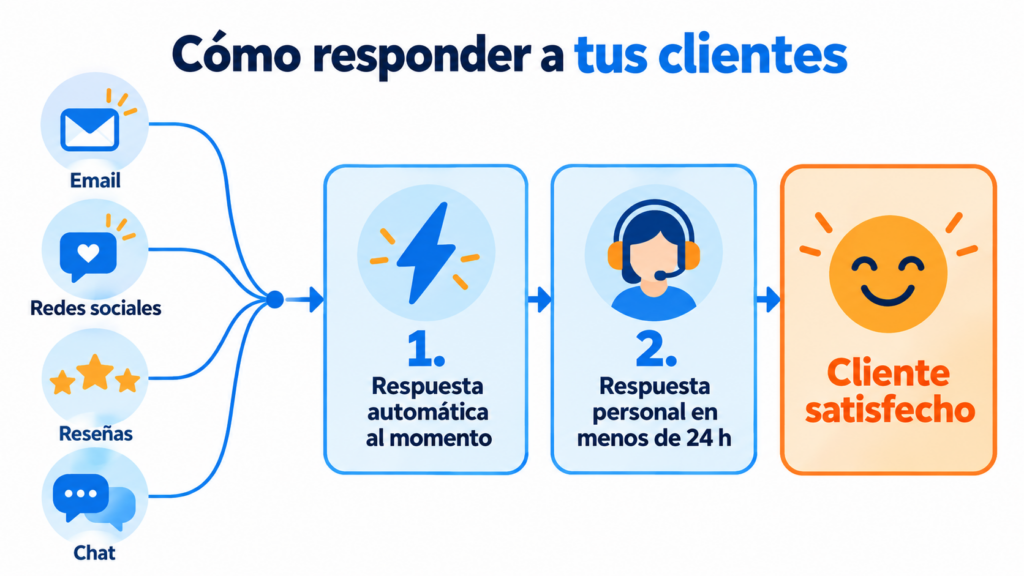
By email. It’s the most common channel for questions, complaints and order inquiries. It includes the replies your subscribers send to your campaigns.
On social media. Comments, mentions and private messages. Here, expectations of speed are even higher, and the conversation is usually public. A community manager is usually in charge of handling it.
In reviews and ratings. Google, marketplaces or industry platforms. Replying to both the good and the bad ones shows that you listen.
In chat and messaging apps. A chatbot can handle frequently asked questions at any time and pass the more complex cases on to a person. WhatsApp marketing has also turned messaging into a widely used customer service channel.
Replying in email marketing
Email marketing is often seen as a one-way channel.
But your subscribers also reply to your emails, and that’s a great opportunity.
When someone replies to your newsletter, they’re giving you valuable information: a question, an opinion or a sign of interest. What’s more, mailbox providers interpret replies as a positive engagement signal, which helps your deliverability.
That’s why it’s best to avoid “noreply” addresses. They send the message that you don’t want to hear from your readers, and they shut down the conversation. We explain their drawbacks in our article on noreply emails.
Instead, use a real sender and a mailbox that someone checks. You can even encourage replies with a simple question at the end of the email. It also works really well in the welcome email: “Tell us what you’d like to receive.”
Automatic replies and personal replies
Automatic replies are very useful for confirming that you’ve received a message, sending basic information or replying outside business hours. An autoresponder lets you do this effortlessly.
However, they shouldn’t completely replace people. A complaint, a complex question or an upset customer needs a reply tailored to that specific case.
The ideal combination is simple. An instant automatic message that confirms receipt and states the response time. And then, a personal reply within that time frame.
How to reply well
Here are some key tips that work on any channel:
- Reply quickly: even if you don’t have the solution yet, confirm that you’ve received the message and say when you’ll get back to them.
- Personalize: use the person’s name and show that you’ve read their message. A CRM helps you keep their history at hand.
- Solve the problem: offer a specific solution or clearly state the next step.
- Keep your brand’s tone: friendly or formal, but always respectful, even when facing criticism.
- Follow up: check that the problem was solved. A short follow-up email closes the loop.
- Measure: track average response time and satisfaction, for example with NPS.
How we help you at Mailrelay
At Mailrelay, we make it easy for you to have a real conversation with your subscribers. You can send your campaigns from your own address that receives replies, and create automations that instantly confirm sign-ups or welcome new subscribers.
All of this on a free plan of up to 80,000 emails a month and 20,000 contacts. If you want to try it, you can create your email marketing account at Mailrelay today.
Frequently asked questions about replying to customers
How long is acceptable to reply to an email? It depends on the industry, but it’s best not to exceed 24 hours on business days. If it’s going to take you longer, send a confirmation message first.
Should you reply to negative reviews? Yes. Do it calmly, acknowledge the problem and offer a solution. Other customers will read your reply.
What’s the difference between replying and an autoresponder? Replying is the act of answering a customer, whether manually or automatically. An autoresponder is the tool that sends those automatic replies.
In conclusion
Replying to your customers is one of the simplest ways to show them you care. A fast, personal and helpful reply turns a question into a sale and a complaint into an opportunity.
Check which channels your customers use to write to you, set your response times and combine automation with a human touch. That way, every conversation will strengthen their relationship with your brand.