Email structure
Header, body, signature and attachments: the order that makes an email easy to understand
Email structure is the order in which the parts of an email are organized: the header, the message body, the signature and the attachments.
Every email shares it, from a note to a coworker to a newsletter. Knowing the structure of an email helps you write clearer messages and makes your campaigns easier to read.
Let’s look at each part with examples.
What are the parts of an email?
An email has two main blocks. The header contains the sending details. The body contains the message itself.
On top of these come the signature and, when needed, the attachments. This table sums up each part:
| Part | What it contains | Example |
|---|---|---|
| Sender (From) | Name and address of the person sending it | Laura Gómez, Tienda Verde |
| Recipient (To) | Address of the person receiving the message | The customer or the coworker |
| CC and BCC | People copied, visibly or hidden | Your manager, in CC |
| Subject line | The topic summed up in one line | “Website quote” |
| Greeting | Opening of the message | “Hi Marta,” |
| Body | Explanation and request | The quote and its timelines |
| Sign-off | Friendly closing | “Best regards” |
| Signature | Name, job title and contact details | Laura Gómez · Design |
| Attachments | Files sent with the message | Quote as a PDF |
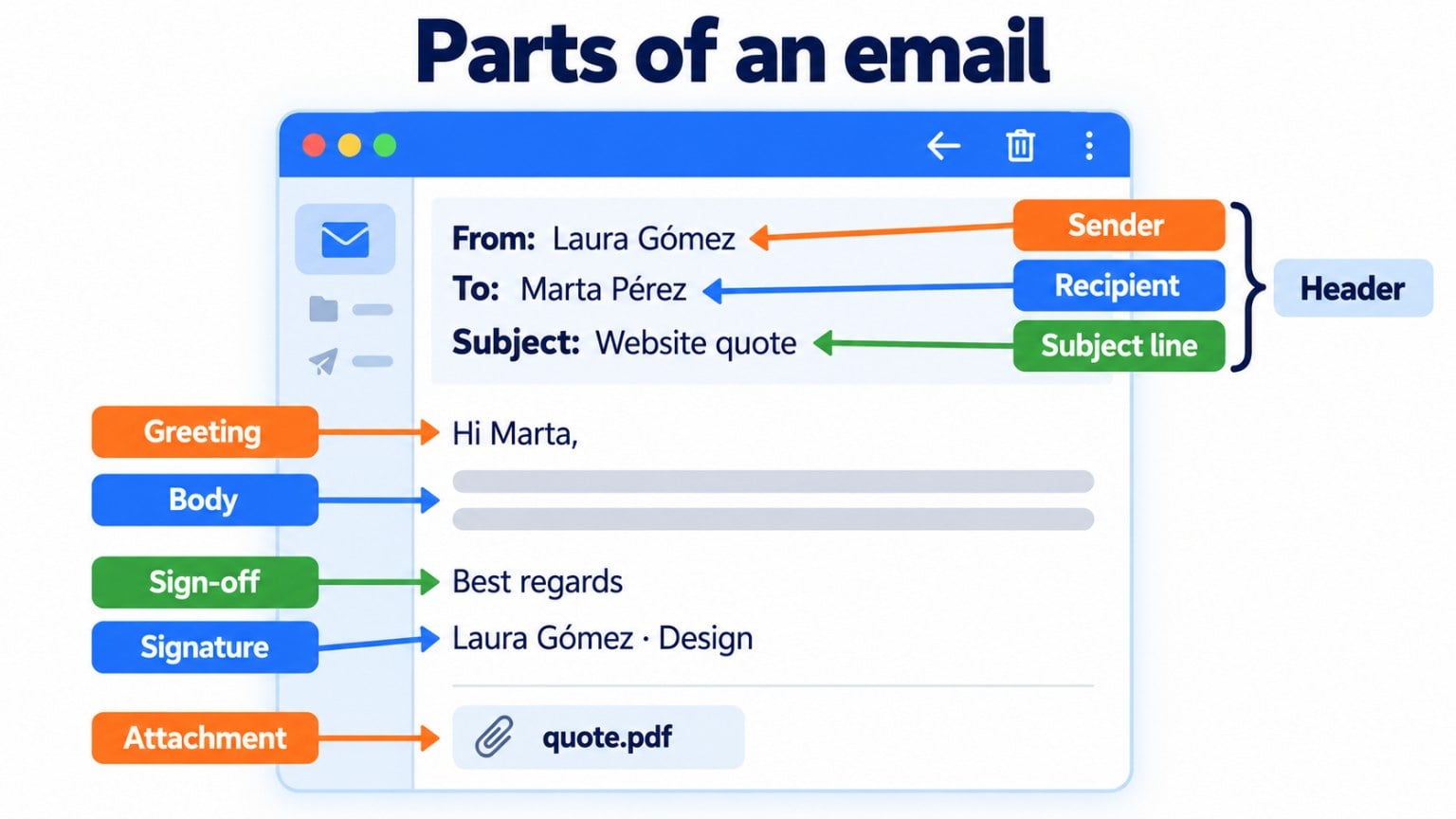
As you can see, each part of an email has a specific purpose. If one is missing, the message becomes less clear.
What goes in an email header?
The header is the top part of the email. It shows who sent it, who it’s addressed to, the date and the subject line.
What the reader sees is only part of it. Underneath, there are technical headers listing the servers the message has passed through and the authentication results.
Every address in the header follows the same format. The username goes before the at sign, and the domain goes after it. We explain it in detail in email address.
How is the body of an email structured?
The body is where the message is. To make it easy to read, it’s best to organize it in five steps:
- Greeting, with the person’s name if you know it.
- Introduction: one or two sentences explaining why you’re writing.
- Main content, with the details in short paragraphs.
- Closing: what you expect from the reader, such as replying, confirming or clicking.
- Sign-off and signature.
The most important information should go at the top. Many people only read the first few lines, especially on mobile.
What about length? It depends on the case. But an email that can be read at a glance usually gets more replies than a long one.
Design well-structured emails without coding
With Mailrelay’s visual editor, you can lay out the header, text, images, buttons and footer in a few minutes.
Example of a formal email structure
Imagine you run an online store and want to ask a supplier for their fall catalog. This is what a well-structured formal email would look like:
Subject: Request for the fall 2026 catalog
Greeting: Dear Mr. Pérez,
Introduction: I’m writing from Tienda Verde to request your fall catalog.
Main content: We’d like to add new products in November. We’re particularly interested in volume pricing and delivery times.
Closing: Could you send it to us before Friday the 10th?
Sign-off: Thank you very much. Kind regards,
Signature: Laura Gómez · Purchasing · Tienda Verde · 910 000 000
If you want more examples, there’s a complete guide to writing a formal email and another one with introduction email examples.
What is the structure of a marketing email?
A newsletter shares the same foundation, but adds elements designed to sell or inform. From top to bottom, it usually follows this order:
- Preheader: the preview text that complements the subject line.
- Visual header, with the logo and sometimes a menu.
- Main image or headline that sums up the offer.
- Body, in short blocks with images.
- Call to action: a visible button, such as “See what’s new”.
- Email footer, with the company details, social media and the unsubscribe link.
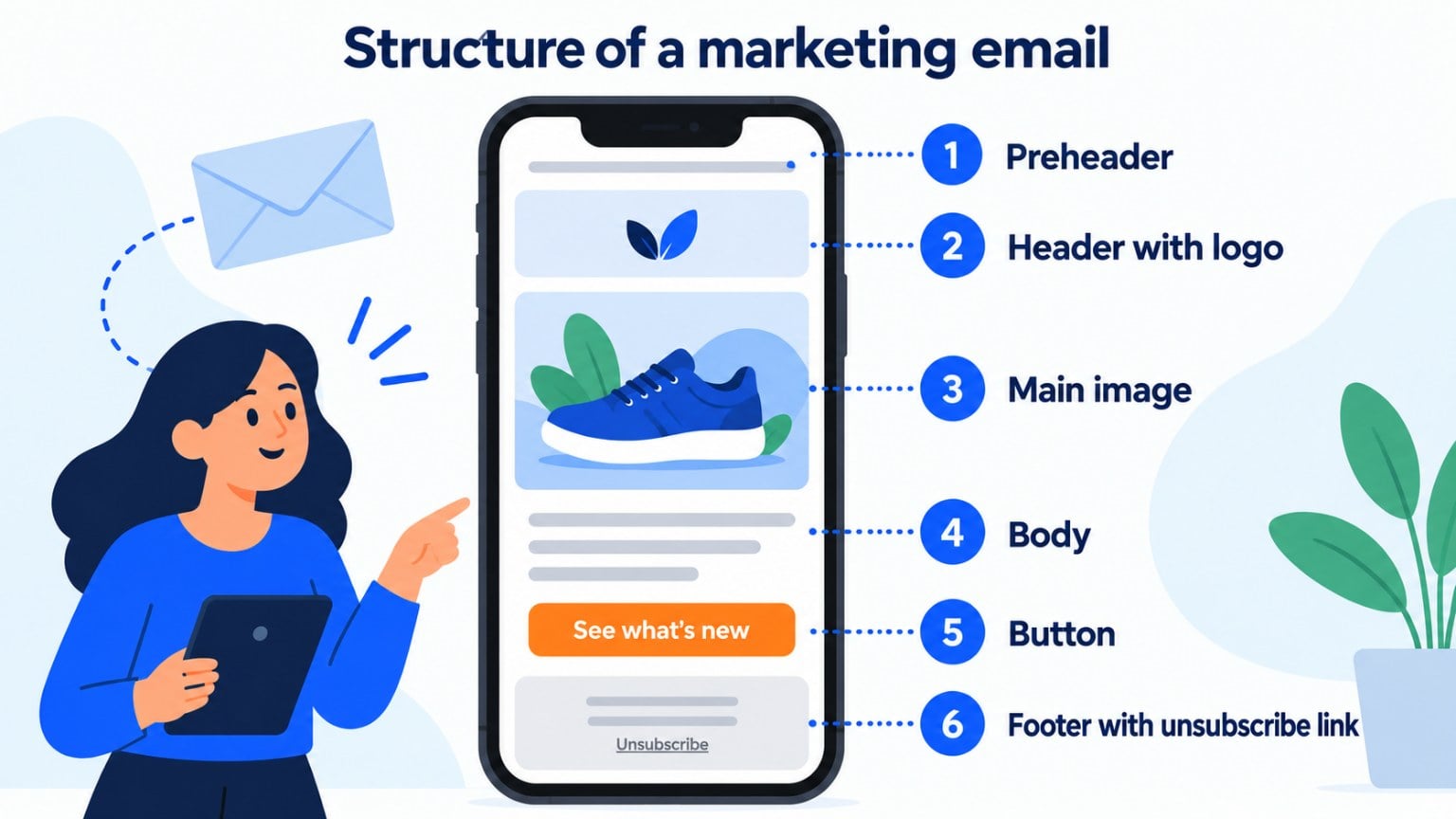
The unsubscribe link isn’t optional. The GDPR and commercial communications regulations require that subscribers can unsubscribe easily.
That said, watch the file size. Gmail clips messages larger than 102 KB and hides the end, including the footer: this is Gmail clipping.
What’s the difference between an email’s structure and its design?
Structure is the order of the parts. Design is how they look: colors, fonts, images and spacing.
A well-structured email makes sense even if the images don’t load. That’s why it’s best to define the email structure first and the design afterwards.
For the design, work with a single column of about 600 pixels and a responsive design that adapts to mobile. Modular design and email templates save you time with every send.
How Mailrelay helps you
In Mailrelay, you build the structure of each email with a block-based visual editor: header, text, images, buttons and footer. Designs adapt to mobile without you having to code.
You can personalize the greeting with each subscriber’s name and test two versions with an A/B test.
The free account includes up to 80,000 emails a month and 20,000 contacts. Human support by chat, ticket or phone is included on every plan.
Send your campaigns for free with Mailrelay
Up to 80,000 emails a month and 20,000 contacts, with human support on every plan.
Frequently asked questions about email structure
What are the parts of an email? Sender, recipient, copies, subject line, greeting, body, sign-off, signature and, if there are any, attachments.
What is an email header? It’s the top part of the message. It includes the sender, the recipient, the copies, the date and the subject line.
What is the part after the @ in an email address called? It’s the domain. It indicates the provider or company that manages the mailbox, such as gmail.com or yourcompany.com.
What is the structure of a formal email? A clear subject line, a formal greeting, an introduction stating the purpose, a brief main section, a closing with the request, a sign-off and a full signature.
What should the footer of a marketing email include? The company details, a visible unsubscribe link and, if you like, your social media.