Email clients: the 10 best programs for PC, Mac and mobile
A comparison of the best free email clients for Windows, Mac, Android and iPhone, and how to choose yours

A comparison of the best free email clients for Windows, Mac, Android and iPhone, and how to choose yours
An email client is a program that brings together the emails from one or more accounts in one place so you can read, reply to and organize them without logging in to each provider’s website. It is also known as an email program or mail client.
If you have a personal Gmail account, a work email and an Outlook account, a good email client saves you from opening three tabs. In this guide we compare the 10 most widely used email clients in 2026, almost all of them free, with their pros and limitations, and we explain which one suits each device best.
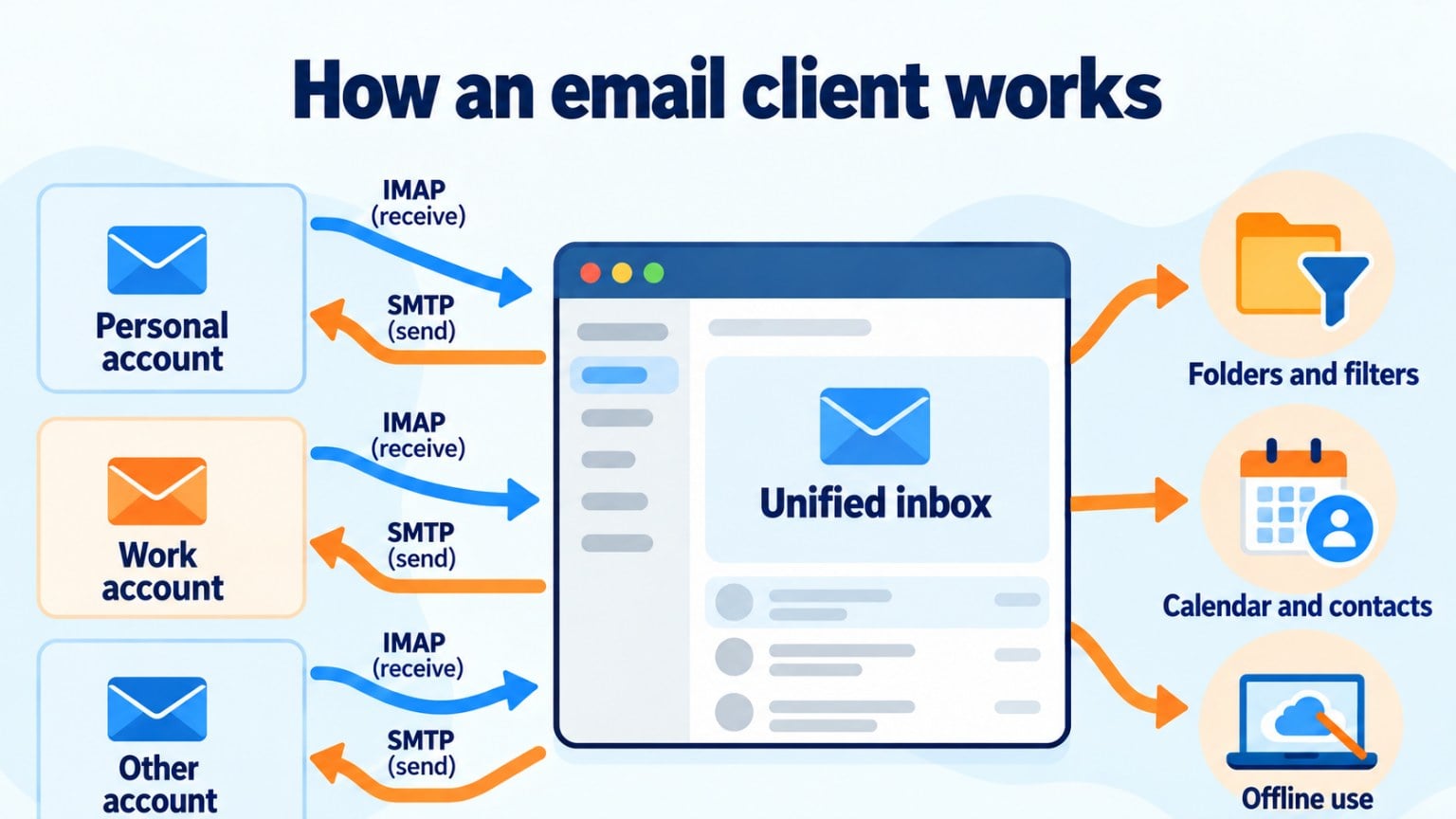
An email client connects to your account using the IMAP or POP3 protocols to receive messages and SMTP to send them. Your emails stay stored on your provider’s server; the program just displays them and helps you work with them.
Above all, an email client lets you combine several accounts in a single inbox. It also lets you read and write offline and sends your messages as soon as you’re back online.
It also helps you organize your email with folders, labels, filters and quick searches, and integrates your calendar, contacts and tasks in the same app. The most complete ones add extra security, such as message encryption or blocking remote images that track whether you open an email.
The difference from webmail is that webmail is used in the browser (gmail.com, outlook.com) and each provider has its own. An email client, on the other hand, is installed on your computer or phone and works with accounts from any provider.
| Email client | Devices | Price | Best for |
|---|---|---|---|
| Mozilla Thunderbird | Windows, Mac, Linux, Android | Free | People who want a free, open-source and highly customizable program |
| Outlook | Windows, Mac, Android, iPhone, web | Free; extra features with Microsoft 365 | Working with a calendar and Microsoft 365 |
| Apple Mail | Mac, iPhone, iPad | Free (built in) | Apple users |
| Gmail (app) | Android, iPhone, web | Free | People who already use a Google account |
| Spark | Mac, Windows, Android, iPhone, web | Free; Premium plan | Smart inbox and teamwork |
| eM Client | Windows, Mac | Free for personal use with limits; Pro version | Windows users looking for an alternative to Outlook |
| Mailbird | Windows, Mac | Paid, with a free trial | People who integrate lots of apps into their email |
| Proton Mail | Windows, Mac, Linux, Android, iPhone, web | Free; paid plans | Privacy and encryption |
| BlueMail | Windows, Mac, Linux, Android, iPhone | Free | Lots of accounts on every device |
| Aqua Mail | Android | Free with ads; Pro version | Android users who want full control |
These are the most widely used email clients today, ordered from the most complete to the most specialized. For each one, we tell you which devices it works on, what makes it stand out and what you should know before installing it.
Thunderbird is the free, open-source email client from the Mozilla Foundation, the same organization behind Firefox. It works on Windows, Mac and Linux and, since October 2024, on Android too.
It supports unlimited accounts, advanced filters, a calendar, contacts, an RSS reader and built-in OpenPGP encryption. You can also extend it with add-ons.
Keep in mind: its interface takes a bit more setting up than commercial alternatives, and there is still no stable version for iPhone.
Outlook is Microsoft’s email client. The new Outlook for Windows is free and replaced the Windows Mail and Calendar apps, which stopped being supported on December 31, 2024. It is also available for Mac, Android and iPhone.
It manages accounts from Outlook.com, Hotmail, Gmail, Yahoo Mail and other IMAP providers. Its strong point is the calendar and its integration with Teams, OneDrive and the rest of Microsoft 365.
Keep in mind: the “classic” desktop Outlook is included in Microsoft 365, which is a paid service. The free version shows ads in personal accounts.
Mail is the email app that comes preinstalled on Mac, iPhone and iPad. It is free, simple and syncs with iCloud.
It includes Mail Privacy Protection, which hides your IP address and loads images privately, as well as features such as scheduling or undoing a send.
Keep in mind: it only works on Apple devices and has fewer organization options than other email clients.
The Gmail app for Android and iPhone isn’t just for Google accounts: you can also add accounts from Outlook, Yahoo or any IMAP provider.
It stands out for its search, its automatic sorting into tabs (Primary, Promotions, Social) and its spam filter.
Keep in mind: there is no dedicated desktop program; on a computer you use it in the browser, at gmail.com.
Spark, from the company Readdle, organizes your email with a smart inbox that separates messages from people, notifications and newsletters. It has apps for Mac, Windows, Android and iPhone, plus a web version.
Its free plan includes multiple accounts, snoozing emails and scheduling sends. The Premium plan adds team features and more use of its AI assistant.
Keep in mind: to sync, your emails go through Spark’s servers, something worth considering for business accounts.
eM Client is one of the most complete alternatives to Outlook for Windows and Mac. It brings together email, a calendar, contacts, tasks and chat in an interface very similar to Outlook’s.
It has a free version for personal use, with a limited number of accounts, and a paid Pro version with no limits and with support.
Keep in mind: it has no mobile app.
Mailbird is a productivity-focused email client for Windows and Mac. As well as combining accounts, it integrates apps such as WhatsApp, Google Calendar, Slack or Trello in the same window.
Keep in mind: it is a paid program, although it offers a free trial so you can see whether it suits you.
Proton Mail is a Swiss email service with end-to-end encryption. It has apps for Windows, Mac, Linux, Android and iPhone.
It is the best option if privacy is your priority. The free plan includes one email address with limited storage.
Keep in mind: it is designed mainly for Proton accounts. To use other providers, you need a paid plan and its Proton Mail Bridge app.
BlueMail is a free email client available on almost any device: Windows, Mac, Linux, Android and iPhone. It supports unlimited accounts from different providers.
It groups messages by sender, lets you share emails with colleagues and has a dark mode in all its versions.
Keep in mind: some collaboration features require you to sign up for its service.
Aqua Mail is a highly configurable email client for Android. It works with Gmail, Outlook, Yahoo, Exchange accounts and any IMAP or POP3 server.
You can customize almost everything: per-account notifications, signatures, themes and widgets. The free version has ads and an account limit; the Pro version removes them.
Keep in mind: it is only available for Android. If you also want the same email client on your computer, Thunderbird or BlueMail are better options.
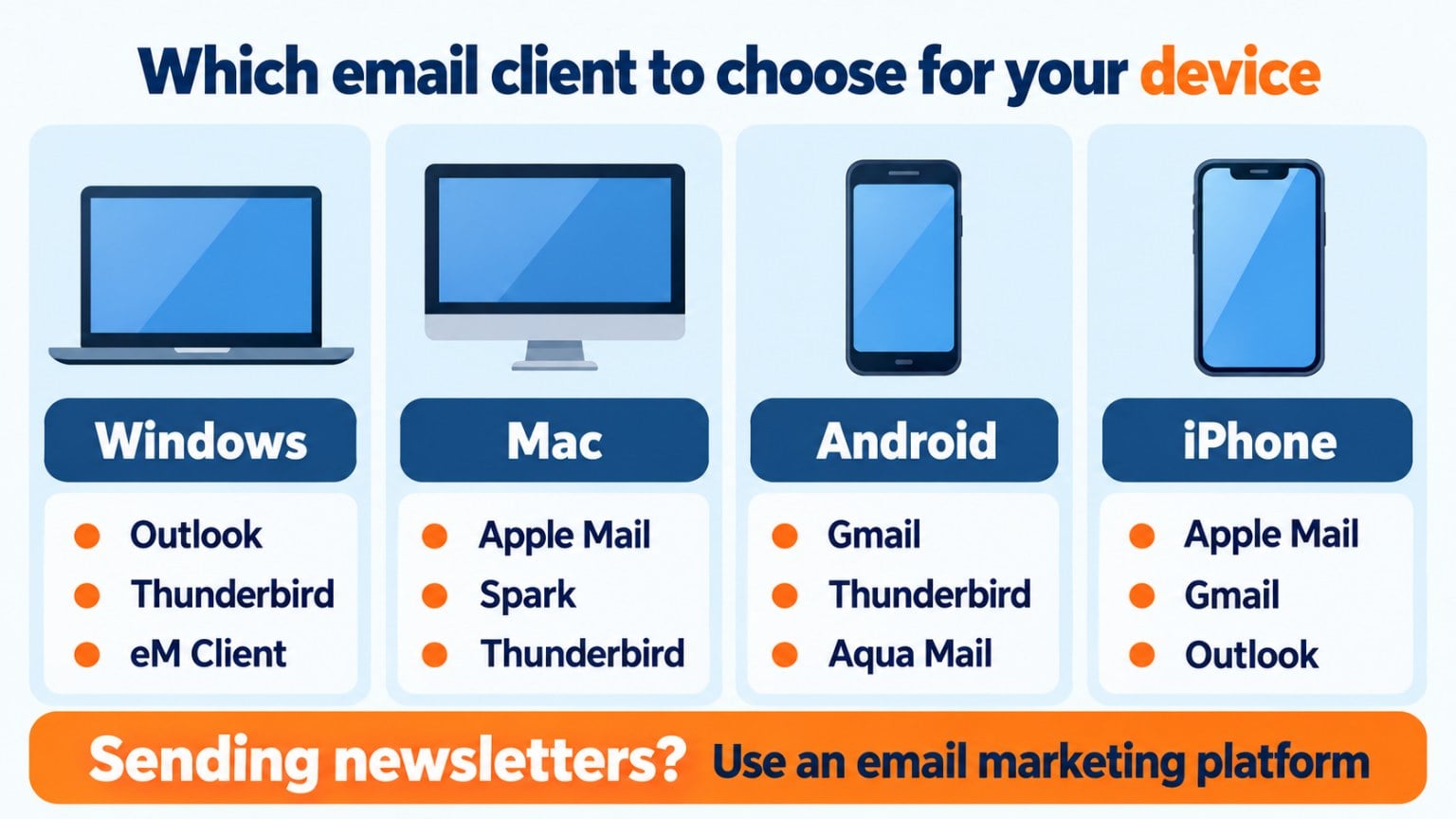
For Windows: the new Outlook if you work with Microsoft 365; Thunderbird if you want a free, open-source program with no ads; eM Client if you’re looking for something similar to classic Outlook without paying.
For Mac: Apple Mail if you only need the basics; Spark for a tidier inbox; Thunderbird if you also use it on Windows or Linux.
For Android: Gmail to get started; Thunderbird or Aqua Mail if you want more control; Outlook if you use Microsoft 365.
For iPhone: Apple Mail, Gmail or Outlook, depending on your main account; Spark if you manage lots of accounts.
For businesses: Outlook or Thunderbird with your corporate email, and Proton Mail if you handle sensitive information.
Most email clients set up Gmail, Outlook or Yahoo accounts automatically. With other providers, follow these steps:
If your company has its own email server, ask the IT department for these details.
An email client is designed for your day-to-day messages: writing to a customer, replying to a supplier or sending a quote.
To send a newsletter or a promotion to hundreds of people, you need a different tool. Email clients and free providers limit daily sending: a personal Gmail account, for example, allows about 500 recipients a day. If you go over that limit, your account is blocked for a few hours and your messages may end up in spam.
An email marketing platform like Mailrelay is built for that: it manages your subscriber lists, includes the unsubscribe link, sends from properly configured servers and tells you who opened each email. We explain it in detail in how to send bulk emails.
Are you going to write to hundreds of customers at once?
Your email client isn’t designed for that. With Mailrelay, you can send your newsletters for free: up to 80,000 emails a month and 20,000 contacts.
Before installing an email client, first think about which devices you’ll use it on. If you often switch between your phone and your computer, choose one that’s available on both, such as Outlook, Spark, Thunderbird or BlueMail.
Next, count how many accounts you have: some free versions, such as eM Client’s or Aqua Mail’s, limit the number. If you need a calendar and contacts, Outlook, Thunderbird and eM Client integrate them better than the rest.
If privacy matters to you, Thunderbird and Proton Mail don’t rely on intermediate servers to read your email. And if you don’t want to pay, Thunderbird, Apple Mail, Gmail and BlueMail are free with no catches.
One last tip: try two or three for a few days before settling on one. They all connect to your account without deleting anything, so you can switch email clients whenever you want.
Your email client for everyday messages; Mailrelay for your campaigns
Lists, templates, open and click statistics and automatic unsubscribe management, with human support in Spanish.
These are the most common questions.
Mozilla Thunderbird is the most complete of the free, ad-free options. On mobile, the Gmail and Outlook apps are the most widely used free options.
Webmail is used in the browser and belongs to a single provider. An email client is installed on your device and brings together accounts from different providers.
Microsoft stopped supporting Windows Mail and Calendar on December 31, 2024. It has been replaced by the new Outlook for Windows, which is free.
You can, but it isn’t recommended: providers limit daily sending, and you won’t have statistics or unsubscribe management. For that, you’re better off with an email marketing platform.
IMAP, in most cases. It keeps your emails synced across all your devices, while POP3 downloads them to just one.
Your newsletters, free from Gmail or Outlook limits
Create your free account and launch your first campaign with the drag-and-drop editor.

Many of these tools are easier to compare if you know the available email marketing tools well, something we also cover in our guide to choosing email marketing platforms.
If you’d rather manage your email directly from your phone, there are also apps like Mail With Relay to take your campaigns with you wherever you go.