Webmail client: what it is, examples and differences
Gmail, Outlook.com or your hosting provider's webmail: what they have in common and how they differ from an email program
A webmail client is an application you open in your browser to read, write and organize your email without installing any software. Gmail, Outlook.com and Yahoo Mail are the best-known examples.
Email is still a cornerstone of communication today, in both personal and business relationships. And a large share of that email is read in a browser.
What is a webmail client?
A webmail client is a web-based interface that allows users to send, receive and manage their emails directly from a web browser.
It doesn’t require installing any additional software on your device, and you can access your emails from anywhere with an internet connection.
Webmail examples
There are webmail services from free providers, such as Gmail, Outlook.com, Yahoo Mail and iCloud Mail. There are also those from your internet provider or hosting company, such as Movistar email or Ionos Webmail.
Many hosting providers also include an open-source webmail, such as Roundcube, for checking your domain’s corporate email.
Features of a webmail client
- Accessibility: access from any device with an internet connection and a web browser.
- Cloud storage: all emails and attachments are stored online, freeing up space on your device.
- Built-in features: options such as calendars, reminders and contacts, all on a single platform.
- Customization: lets you organize emails with labels, folders and more.
Webmail client and webmail service
The importance of webmail clients is especially clear when we talk about webmail services, which are basically email services you access over the web.
These clients act as a bridge between the user and their email server, providing an efficient and organized way to manage many aspects of email in one place.
In everyday use, “webmail” refers to both things: the email service and the page you use to check it.
How is it different from a desktop email program?
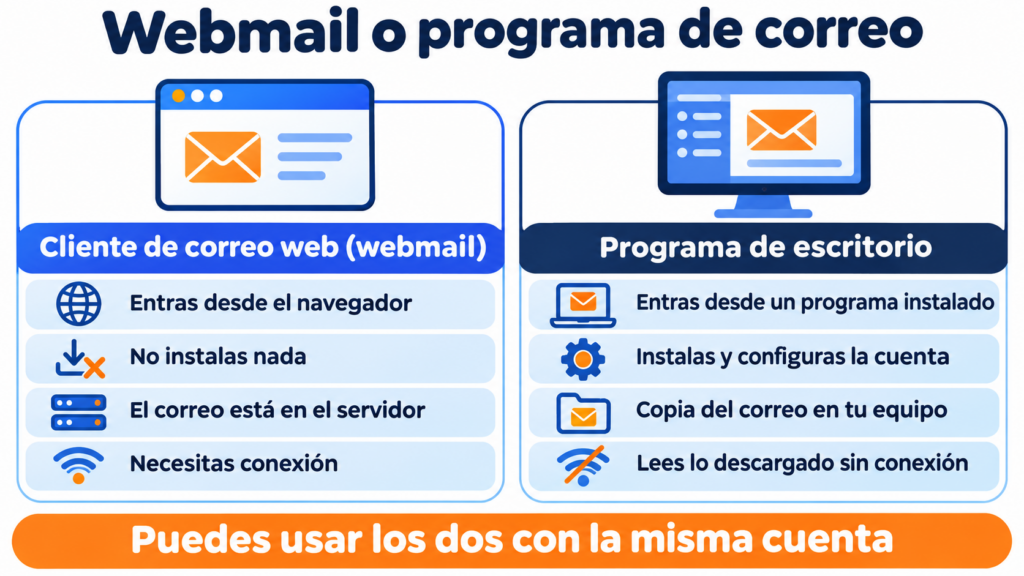
A desktop email client is a program you install, such as Outlook, Thunderbird or Apple Mail. It downloads your email from the server using IMAP or POP3. You can use both at the same time with the same account.
| Webmail client | Desktop program | |
|---|---|---|
| How you access it | From the browser | From an installed program |
| Installation | Not needed | You have to install it and set up the account |
| Where your email is stored | On the provider’s server | On the server, with a copy on your computer |
| Offline | Doesn’t work, except for limited offline modes | You can read what’s already downloaded |
| Multiple accounts | One per tab or session | Several in the same window |
| Examples | Gmail, Outlook.com, Yahoo Mail, Roundcube | Outlook, Thunderbird, Apple Mail |
Your newsletters, in any inbox
Design your campaigns once and reach people whether they read in Gmail, Outlook or their company’s webmail. Get started for free with Mailrelay.
Advantages of a webmail client
- Ease of use: its user-friendly interface makes sending and receiving emails a simple process.
- Efficiency: search and filtering features make it faster to find specific emails.
- Collaboration: some clients offer collaboration features such as sharing documents and calendars.
Challenges and considerations
- Dependence on an internet connection: without a connection, you can’t access your emails.
- Security: despite security measures, webmail clients can be vulnerable to attacks.
- Advertising: some free webmail clients include ads that can be intrusive.
How do your emails look in a webmail client?
If you send newsletters, it’s worth knowing that each webmail displays the same email differently.
Gmail clips messages larger than 102 KB (Gmail clipping) and sorts many mailings into the Promotions tab.
Some clients block images until the reader downloads them, so alt text matters.
And dark mode can invert your colors. Before sending, send a test to a Gmail account and an Outlook.com account, and open it on your phone too.

How Mailrelay helps you
Webmail is fine for day-to-day email, but not for writing to your whole list: Gmail, for example, limits a personal account to 500 messages a day.
With Mailrelay, you create your newsletters in the editor, send yourself a test to see how it arrives in your webmail, and then send it to all your contacts. The free account includes up to 80,000 emails a month and 20,000 contacts.
From webmail to your first newsletter
When your list outgrows Gmail or Outlook, move to an email marketing tool. Up to 80,000 emails a month for free.
Key takeaways about webmail clients
Webmail clients have changed the way we interact with our email.
They offer a multitude of features and advantages that make managing email more efficient and less tedious.
Frequently asked questions about webmail clients
What is webmail?
It’s email you check in your browser, without installing any software. The word is used both for the service (Gmail, Outlook.com) and for the page where you read your messages.
What’s the difference between webmail and an email client?
Webmail works in the browser and keeps everything on the server. A desktop email client, such as Outlook or Thunderbird, is installed on your computer and downloads a copy of your messages, so you can read them offline.
What is an email client?
It’s any program or app you use to read, write and organize your email. It can be web-based, like Gmail; desktop, like Thunderbird; or a mobile app.