Emailing: what it is and how to create an emailing that works
What it is, how it differs from mailing and how to get started today
Emailing is a digital marketing strategy that consists of sending emails to a list of contacts with various objectives, such as promoting products, sharing news or maintaining a close relationship with customers.
This method, also known as mass email, is a very useful tool to connect directly with the audience and encourage engagement.
More than just a marketing technique, emailing is a versatile communication channel that can be adapted to meet different business objectives.
Emailing, mailing or email marketing?
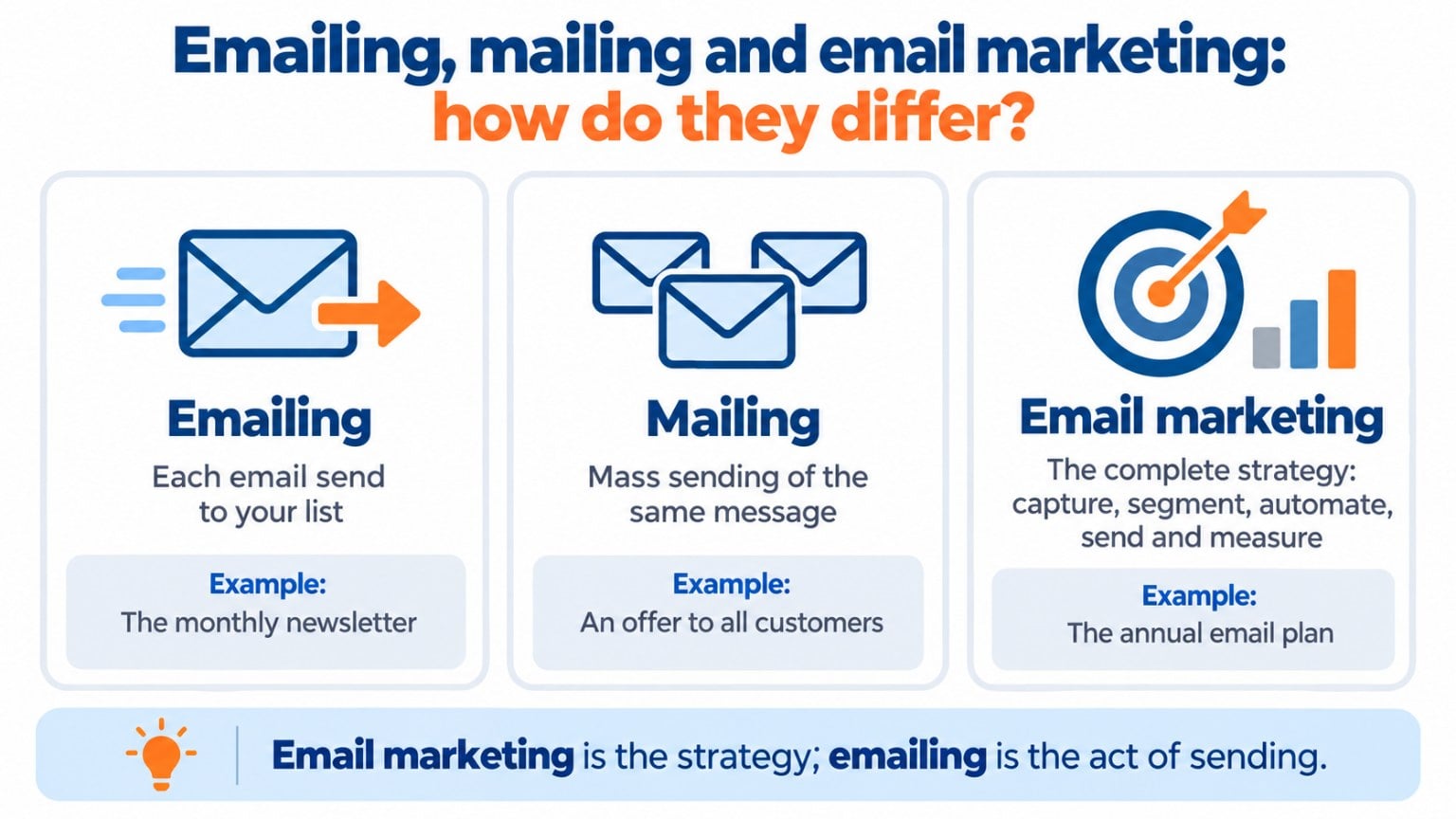
The three terms are used almost as synonyms, but they don’t mean exactly the same thing:
| What it is | Example | |
|---|---|---|
| Emailing | Each email send to a contact list | This month’s newsletter |
| Mailing | Mass sending of the same message. It comes from postal mail and today is mostly used for email | A campaign with an offer sent to all customers |
| Email marketing | The complete strategy: capturing contacts, segmenting, automating, sending and measuring | A store’s annual email communication plan |
Put simply: email marketing is the strategy and emailing is the act of sending. “E-mailing” or “e mailing” are just other ways of writing it. If you want to go deeper into mass sending, check out our guide on how to create a mailing.
Create your first emailing for free
Import your contacts, choose a template and send your first campaign in minutes.
Often, emailing is associated exclusively with sending newsletters or promotions, but its potential goes much further. An effective emailing program can include:
Smart automations
Automatic responses based on user behavior, such as abandoned carts or feedback requests.
Educational campaigns
Emails that teach people how to use a product or announce new features.
Transactional messages
Purchase confirmations, shipping notifications or subscription reminders.
Emailing is an art that combines relevant content, segmentation and design, all aligned with your brand’s goals.
Why choose emailing as a key tool?
Emailing brings many benefits to your business:
Build personalized relationships
Emailing allows for a more intimate interaction with your customers compared to other marketing channels.
You can design messages that are unique to each recipient thanks to segmentation and personalization tools.
Supporting customer loyalty
Brands that keep in constant, useful contact through emailing tend to generate greater loyalty among their customers.
Emails with exclusive content, surveys or reward programs are excellent examples.
Integration with multichannel strategies
Emailing doesn’t operate in isolation.
Its strength lies in its ability to complement social media, SEO and other tactics.
For example, you can use your emails to direct users to your blog or YouTube channel.
Why is emailing such an effective tool for selling?
I’ll answer that with a quick personal anecdote that highlights the greatest benefit of emailing.
A couple of years ago, I made a purchase—a small product, not too expensive, but not incredibly cheap either.
It was one of those hydroponic planters for growing indoor plants easily and with minimal effort.
Nothing out of the ordinary, right? One important detail is missing.
It took me a year to make the purchasing decision.
An entire year.
At the end of the day, it’s just a designer pot with light and water.
What does that have to do with emailing?
A lot.
A whole lot.
So much so that if it hadn’t been for those emails I received from time to time from the product’s seller, I would never have bought it.
And I wouldn’t have bought it because I would have forgotten.
Just like that.
Forgotten.
It’s not that I wasn’t interested in the product, or didn’t like it; it’s that I would have forgotten. I wanted to buy it, just not at that moment.
And it’s one of those things where if you put it off, you eventually forget.
There are plenty of cases like this. Even if you think your product or service meets an urgent need, the reality is that people are famous for putting everything off until later.
Or later still.
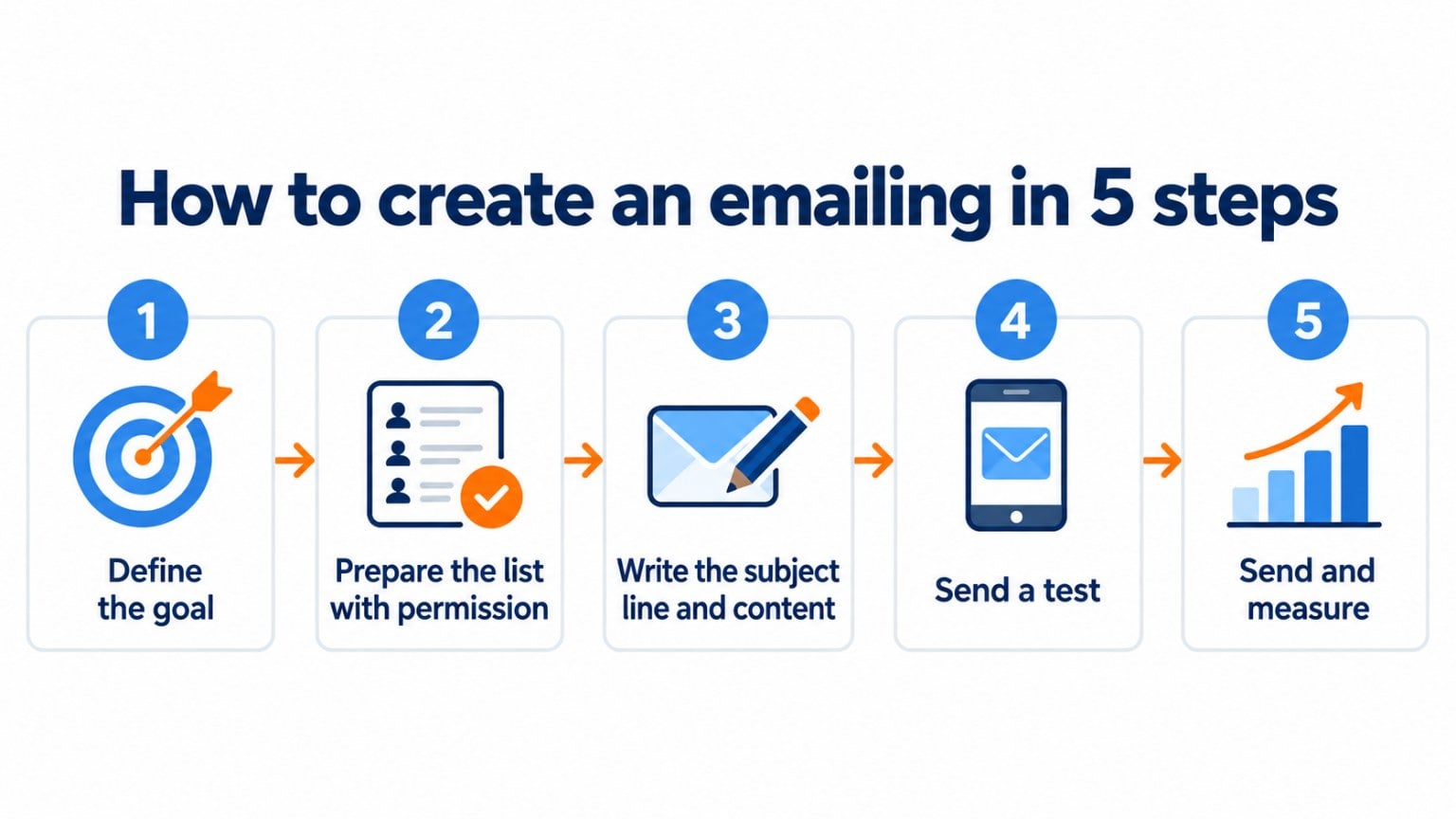
How to create an emailing in 5 steps
- Define your objective. Sell a product, announce news or win back customers. One emailing, one goal.
- Prepare your list. Send only to contacts who have given their permission, ideally with double opt-in, and split them into groups based on their interests.
- Write the subject line and content. A clear subject line, a short message and a single call to action. You can start from an email template.
- Test before sending. Send yourself a test, check how it looks on mobile and check the links. If you can’t decide between two subject lines, run an A/B test.
- Send and measure. Schedule the send for a good time and review the open rate, clicks and unsubscribes to improve the next one.
Best practices for a memorable emailing
To stand out in the sea of emails people receive every day, you need well-defined strategies:
Harness the power of storytelling
Emails are an ideal platform to tell stories that emotionally connect with your audience.
For example, you could share the history of your company, customer stories or the evolution of a product.
Design with mobile in mind
With more than 50% of emails opened on mobile devices, make sure your messages look good on them.
Use plain designs, clear fonts and large, visible calls to action.
Run A/B tests
Experiment with different versions of your emails to find out what works best.
You can test subject lines, designs or even send times to maximize your results.
Add attractive visuals
Images, videos and infographics can enrich the reader’s experience.
However, make sure to optimize their file size so they don’t affect the email’s loading time.
Metrics you can’t ignore
Emailing has the advantage of being measurable in real time. Among the main metrics you should analyze are:
- Open rate: indicates how effective your subject line is and the perceived relevance of the message.
- Click-through rate: reflects the success of your calls to action and email content.
- Conversions: measure the real impact of your emails on the final objectives, such as sales or registrations.
Featured use cases of emailing
Although email has multiple uses, we can’t forget to mention:
Product launches
A well-designed email can build anticipation before the launch of a new product.
Include teaser images, exclusive details, and even early access for subscribers.
Re-engaging inactive customers
Reactivation campaigns are perfect for recovering customers who have stopped interacting with your brand.
Offer special discounts or ask direct questions to understand their current needs.
Content promotion
Share blog posts, videos or webinars directly in your subscribers’ inboxes.
This approach not only increases traffic to your platforms, but also positions your brand as a source of ongoing value.
Does your mailing frequency matter? Are more emails worse?
This is a common, frequently asked question.
You’ll see all kinds of advice online, ranging from “don’t send too much so you don’t exhaust your subscribers” to “send every day for the best results.”
So which do we go with?
It depends on many factors, sure, but there are two things that remain true:
· If you let too much time pass between mailings, your contacts might forget about you.
· If you send with a high frequency, you will need to find ways to maintain their interest.
That is, if you send one email a month, it’s easier for contacts to lose interest. It doesn’t have to happen, but let’s say you’re not “pushing” much for them to end up buying. It’s fairly relaxed communication.
On the other hand, if you want to send daily communications, you need to craft them in a way that keeps the contact interested enough to actually look forward to the next one.
There are many middle grounds between the two extremes.
The only way to know which frequency works best for you is to test until you hit upon the best possible results.
Where to start?
In my opinion, I’d start with one mailing a week, and then increase or reduce based on the results (and your capacity to prepare new emails, of course).
Never stop testing.
I know it’s a bit scary at first because you can lose contacts due to unsubscribes, but if you get past that fear you can get better results.
How Mailrelay helps you
With Mailrelay you can create your emailing from start to finish in a single dashboard. Import your contacts, organize them into groups, design the email with the editor and its templates, and send or schedule it. Then you see the opens, clicks and unsubscribes of each send.
You can also automate recurring emails, such as welcome or birthday messages, with automated emails. With the free account you can send up to 80,000 emails per month to 20,000 contacts, with human support.
Up to 80,000 emails per month for free
Design, send and measure your emailings from a single dashboard, with human support.
Frequently asked questions
What is emailing?
It’s sending emails to a contact list to inform, sell or build loyalty. It’s the practical side of email marketing.
Is emailing the same as mailing?
Almost. Both refer to sending emails to a list. “Mailing” emphasizes mass sending of the same message, while “emailing” is used for any send by email.
How do you spell it: emailing, e-mailing or e mailing?
All three forms are seen, but the most common is “emailing”, all one word.
How often should I send an emailing?
It depends on your audience and what you have to say. A good way to start is a weekly send, adjusting based on opens and unsubscribes.
Can I do emailing for free?
Yes. Many tools have a free plan. With Mailrelay you can send up to 80,000 emails per month for free. You’ll find more options in the post on free mailing.