Bounce rate
The metric that measures the health of your contact list
You send a campaign to 10,000 contacts and, when you check the results, you see that 400 emails didn’t arrive. Is that a lot? Is it normal? Should you be worried? The answer lies in one of the most important email marketing metrics: the bounce rate.
What is the bounce rate?
The bounce rate is the percentage of messages in a campaign that could not be delivered to their recipient. It is calculated on the total number of messages sent.
It applies to both email and SMS. In both cases it tells you the same thing: how many of your messages got lost along the way.
Each of those failed messages is a bounce. And the rate tells you what proportion of your send they represent.
How it’s calculated
The formula is simple:
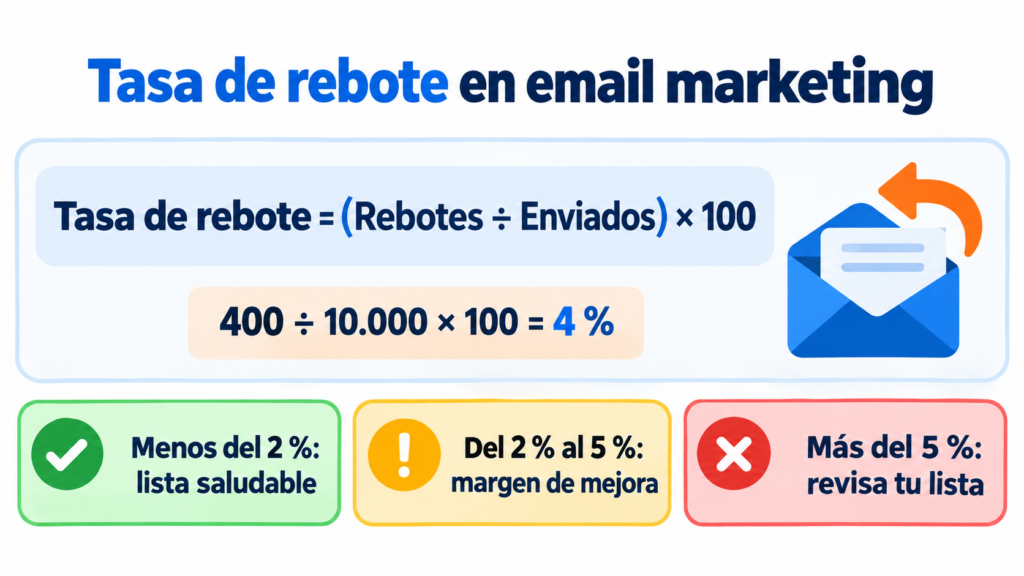
Bounce rate = (bounced messages ÷ sent messages) × 100
Going back to the initial example: 400 bounces out of 10,000 sends gives a rate of 4%.
Most email marketing platforms calculate it automatically in each campaign’s statistics. Many also break it down by bounce type, which is very useful for understanding what’s going on.
Hard bounces and soft bounces
Not all bounces carry the same weight. That’s why it’s worth looking at their two types separately:
- Hard bounce: a permanent error. The address doesn’t exist, the domain is wrong or the server permanently rejects the message.
- Soft bounce: a temporary error. The mailbox is full, the server isn’t responding or the message is too large.
A high hard bounce rate is the most worrying, because it points to a poor-quality contact list. Soft bounces usually resolve themselves, although if the same address fails again and again, you should treat it as permanent.
What bounce rate is acceptable?
As a rough guide, in email marketing it’s best to keep it below 2%. Between 2% and 5%, there’s room for improvement. And above 5%, it’s a clear sign that your list needs an urgent review.
These values vary by industry and type of send. A list collected years ago will have more bounces than a newly built one with active subscribers.
What matters is tracking how it evolves over time. A sudden rise from one campaign to the next almost always points to a specific problem.
Why it matters so much
A high bounce rate affects much more than a single campaign.
Gmail, Outlook and other email providers keep an eye on how many messages you send to non-existent addresses. If there are many, they assume you don’t look after your list, or even that you bought it. That damages your domain reputation and, with it, your deliverability.
As a result, your emails start landing in spam, including the ones you send to valid contacts. It also skews the rest of your email marketing metrics. You end up calculating opens and clicks on a base that isn’t real.
Causes of a high bounce rate
The most common ones are:
- Old lists that haven’t been cleaned in a long time.
- Purchased or rented databases, full of invalid addresses or spam traps.
- Typos when entering the email address in the signup form.
- Technical authentication problems or a poor sending domain reputation.
- Sudden bulk sends from a new domain without prior IP warming.
If you want to learn about more causes and how to fix them, we explain them in our article on email bounce reasons.
How to reduce it
Keeping a low rate is, above all, a matter of habits.
Use double opt-in on your forms. That way, only real addresses confirmed by their owners get onto your list.
Remove hard bounces immediately and move them to a suppression list. Give soft bounces several chances before discarding them.
Do regular list hygiene. Review contacts who haven’t opened in months and decide whether it’s worth trying to re-engage them or unsubscribing them.
And never buy databases. It’s the fastest way to send your bounces soaring and ruin your reputation.
Bounce rate in SMS
In SMS marketing the logic is the same. A message bounces when it can’t be delivered to the recipient’s phone.
The most frequent causes are numbers that no longer exist and formatting errors, such as forgetting the country code. Phones that have been switched off for a long time also play a part. Keeping your phone list up to date and validating the format when you collect numbers greatly reduces this problem.
Bounce rate on a website
The term also has another widely used meaning. In web analytics, the bounce rate measures the percentage of visits that leave a page without interacting with it.
In Google Analytics 4, a bounce is any session that doesn’t qualify as an engaged session. In other words, a visit lasting less than 10 seconds, with no key events and only one page view.
It’s a different metric, even though it shares the name. If you’re interested in this meaning, we cover it in our guide to bounce rate on a blog.
How we help you at Mailrelay
At Mailrelay, we make it easy for you to keep your bounces under control. Every campaign shows its bounce rate in the statistics. And we automatically handle addresses that fail permanently, so you don’t send to them again.
You can also add double opt-in to your forms and segment inactive contacts. All of this on a free plan of up to 80,000 emails a month and 20,000 contacts. If you want to try it, you can create your Mailrelay account today.
Frequently asked questions about the bounce rate
Is the bounce rate calculated on sent or delivered messages? On sent messages. Bounces are precisely the messages that weren’t delivered.
Is the bounce rate the same as the unsubscribe rate? No. A bounce is a message that doesn’t arrive; an unsubscribe is a subscriber who decides to stop receiving your emails.
How often should I clean my list? It depends on your sending volume, but reviewing it every few months is good practice. And always before going back to a list you haven’t used in a while.
In conclusion
The bounce rate is a direct indicator of the health of your contact list. Keeping it low protects your reputation and ensures your campaigns reach the people who really want to receive them.
Check it after every send, act quickly on any increase and look after the quality of your contacts from day one.