
Bounce rate is one of the biggest concerns for many bloggers, and they want to find a solution to this problem.
If this is something that worries you and you want effective solutions, I’ll help you in this post.
When you have a blog, there are a lot of things to keep in mind.
First of all, SEO, because it gives you organic visibility without spending money on advertising, which is appealing because it saves you costs.
But another fundamental aspect to keep firmly in mind is user behavior, since it’s a clear indicator of the interest that an article, and the blog in general, generates.
What really matters when it comes to ranking a blog is that users stay on the site as long as possible.
That’s why you need to add internal links, videos or podcasts so users stay on the page longer.
However, even if you often use this approach, which Google itself recommends to increase audience retention, when you check Google Analytics you may still see a high bounce rate.
And in practical terms, this is harmful, although it doesn’t have to be decisive.
It’s a fairly complex topic and, to get right into the subject, it’s best to start from the beginning.
· What is bounce rate?
Bounce rate is a metric that shows how long users stay on a blog.
If, for example, someone comes to your site, reads a single piece of content and leaves, they’re counted as a bounce.
In other words, if many users do the same, you’ll have a high bounce rate.
However, if most visitors land on one of your articles and then move on to other posts thanks to your internal links, then you’ll have a low bounce rate.
· Is a high bounce rate really harmful?
At first glance, a high bounce rate is obviously harmful. However, there are nuances.
The thing is, a high bounce rate has several causes, and in many cases it isn’t harmful at all: you’ve simply met the user’s goal.
Let’s set the scene…
Suppose you have an informational article. A user lands on it because the information interests them, reads it, feels satisfied and leaves your website because they’ve already achieved their goal.
The problem is that, since they haven’t read other posts on your blog, it’s recorded as a bounce, but is that really what it is? No.
You’ve met the user’s expectations and your job with them is done, but the stats will show a negative percentage.
How is that possible? Well, because in this context Google treats all of these users the same: the one who lands on your blog by mistake, the one who didn’t like your content, and the one you’ve satisfied, because the time on site is low.
So, if you meet the goal, even though their time on the blog is short, will your search rankings be worse? Obviously not.
Google sends your bounce rate soaring, but it knows perfectly well that the user was satisfied.
And so, you’ll have good search rankings.

· Examples of users who spend little time on a blog that ranks on Google
As I always say, theory is great, but practice is much better.
For that, I want to give you two examples from my own blog so you can see it with your own eyes.
► Example 1
Let’s start with my post “How Much Does YouTube Pay per View?”, and take a look at its stats in Google Analytics:

The average time users spend on this article is 48 seconds, with a bounce rate of 25.59%.
The time users spend is relatively low, so it should rank poorly, right?
Yet it’s in the top 2 on Google.
But that’s not all: Google ranks my article above the rest, look at the screenshot:
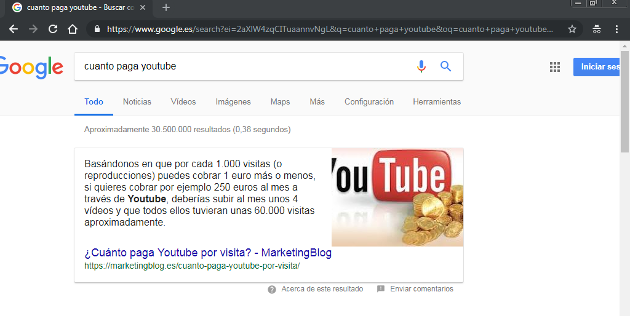
Do you see it? Little time on the page, but the best possible ranking.
► Example 2
The second example I want to give you is my article “What Is Creative Copy?”.
Well, this is a totally different case. Let’s look at its stats:

The average time users spend is 02:43 minutes, with a bounce rate of 30%.
Users stay longer, but the bounce rate is 5% higher. Is the ranking better than in the previous case?
Let’s find out with two screenshots. The first one is for the keyword creative copy and the other one for just copy:

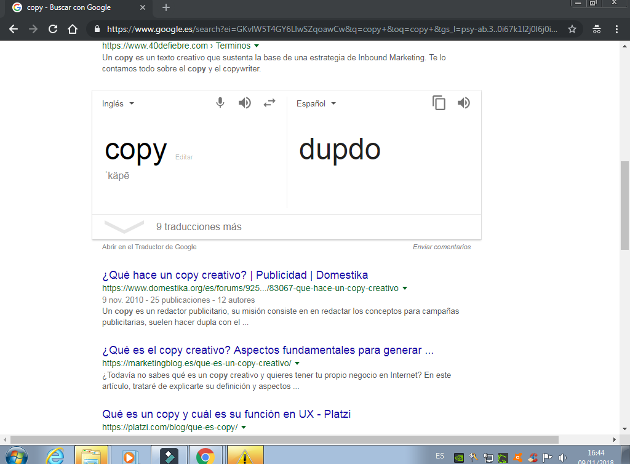
As you can see, in the first example I’m #1 on Google and, in the second, I’m third (although on SEMrush I show up in second place).
And I wonder, is there any difference between the two articles? The truth is, no. In both cases I’ve met the user’s needs.

· Example of an article with a high bounce rate that can actually be harmful
On all blogs, there are certain articles that can be very negative and you need to keep an eye on them, although if you have more than 600 articles like me, things get a little more complicated.
I have one article in particular with 0 seconds of average time on the page and a 100% bounce rate.
A ticking time bomb, basically.
This is the post:

Unbelievable, right?
What should I do in this case?
- Delete the article, because it’s not a text meant to rank and it could hurt me
- Update the article (it’s about 5 years old)
- Find out why users don’t even bother to read it
So far I haven’t done anything, but I’ll get to it very soon.
All I wanted was to show you high bounce rates, both positive and negative.
I think I couldn’t give you a better example.
Do I have poor search rankings?
You might think that because I have this article (and a few more) with a high bounce rate, my search rankings could be affected.
But is that really the case? Let’s check it in SEMrush:
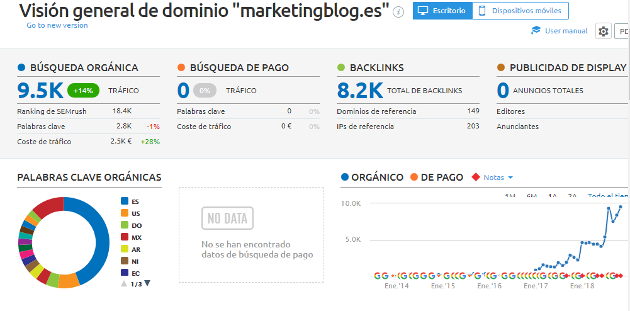
The first SEMrush chart clearly shows my stats shooting upward, and it has the famous N (which means that soon I’ll get another big boost; I’ll explain someday, here or on my blog, what it really means).
And now I want you to see some of the keywords I rank for:
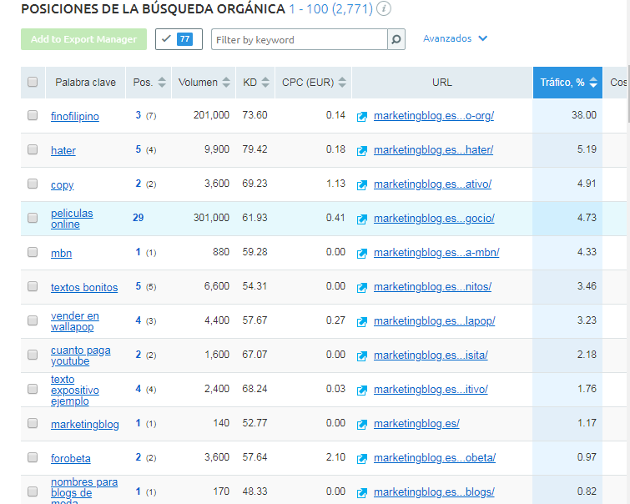
As you can see, I have articles that rank very well, including the keyword “redactor” (“writer”), which is in the top 5 (great for me, since I’m a writer), even though it doesn’t show in the screenshot.
Still have doubts?
I’ll show you my blog’s monthly stats for this year and for the last week in Analytics:
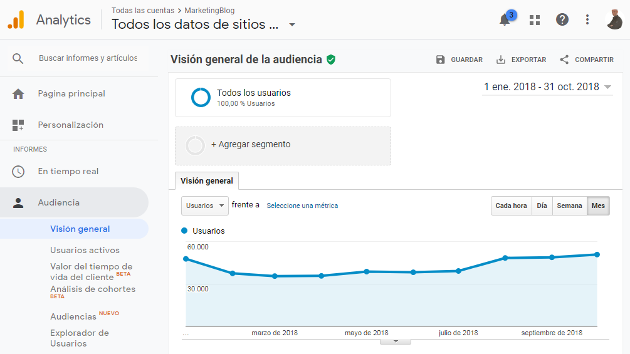
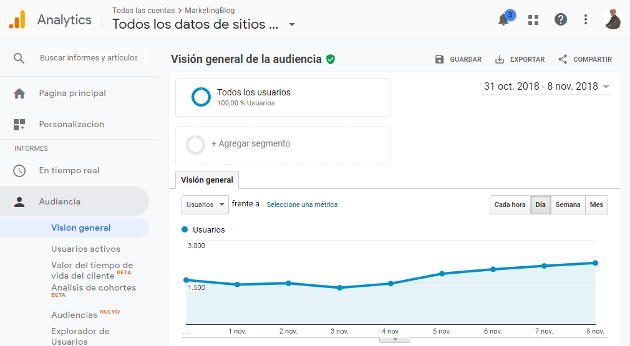
As you can see, I’m getting close to 60,000 monthly visits and I average 1,500-2,000 visits a day.
Taking all these aspects into account, is it now clearer to you that if you meet users’ goals, even if some of your posts have a high bounce rate, you can still have good search rankings?
However, there’s one thing you probably haven’t noticed in my stats (or maybe you have). And that is, apart from the post I showed you with a 100% bounce rate, most of my articles don’t go above 44%.
When the bounce rate is high, it’s normally 80-90%.
How come I don’t have that, if some of my posts don’t even reach a minute of time on the page? That’s exactly what I’m going to explain now, and you’ll be able to do it yourself without any trouble.

· How can you improve bounce rate?
Before I explain anything, I want you to know that, although what I’m about to show you can improve your bounce rate, it won’t change user behavior.
Keep in mind that they’re people like you and me and, therefore, they act of their own free will, and nothing and no one can change that.
With that cleared up, let’s continue…
A very valid option to improve these metrics is to download bounce rate plugins for WordPress, and the story would end right there.
However, there’s a small problem.
The thing is, if you have a lot of plugins installed on your WordPress, adding another one can slow down your blog, which, ironically, would raise your bounce rate because of a poor user experience.
Important note: Before downloading plugins, you need to consider the resources they consume so they don’t hurt your search rankings.
So, if you think they would hurt you, don’t download them, okay?
So what can be done in this situation? Well, I’ll give you a very interesting alternative that can work wonders to improve your bounce rate.
And that alternative is none other than setting the user’s time-on-site threshold so they aren’t counted toward a high bounce rate.
I’d set it to 25 seconds at a minimum, but you can set whatever you like.
But how do you do it? I’ll explain it right now:
- Find the tracking code you’ve placed on your blog. Check whether it’s the universal version; if it isn’t, I recommend switching it because it’s the most up-to-date one
- Paste the line I’m going to leave for you in red to reset the stats:
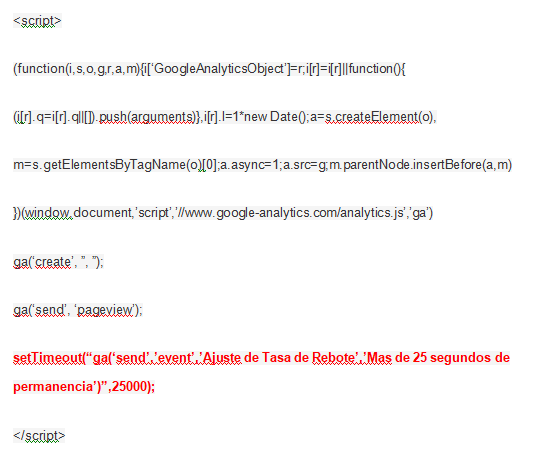
Just by doing this, you’ll drastically change your blog’s bounce rate. Interesting, right?
However, I want you to know one more thing.
And that’s all. Now you know perfectly well what bounce rate is and how to improve it on your blog.

Jose Argudo
CMO at Mailrelay. Writes about email marketing, copywriting and conversion for small businesses and entrepreneurs.