SMPP
The protocol that connects your platform with mobile carriers
When your bank sends you a verification code, the message arrives in just a few seconds. Behind that speed is a direct connection between the sending platform and the carrier’s network. In most cases, that connection speaks a specific language: SMPP.
What is SMPP?
SMPP stands for Short Message Peer-to-Peer. It is an open protocol for exchanging SMS messages between external applications and mobile carriers’ message centers.
It runs over TCP/IP networks, meaning over the internet or private networks. And it is designed to move large volumes of messages quickly and reliably.
To understand it better, think of email. The SMTP protocol is the standard for sending emails between servers. SMPP plays a similar role in the world of SMS.
Origin and versions
The protocol was created in the 1990s by the Irish company Aldiscon. It was later taken over by a developer forum, which eventually became the SMS Forum.
These are the main versions:
- SMPP 3.3 (1997): the first public specification.
- SMPP 3.4 (1999): the most widely adopted version. Among other things, it added bidirectional sessions.
- SMPP 5.0 (2003): the latest published version, with improvements for large-scale sending.
Although 5.0 is the most recent, 3.4 is still the one most used by carriers and providers.
How it works
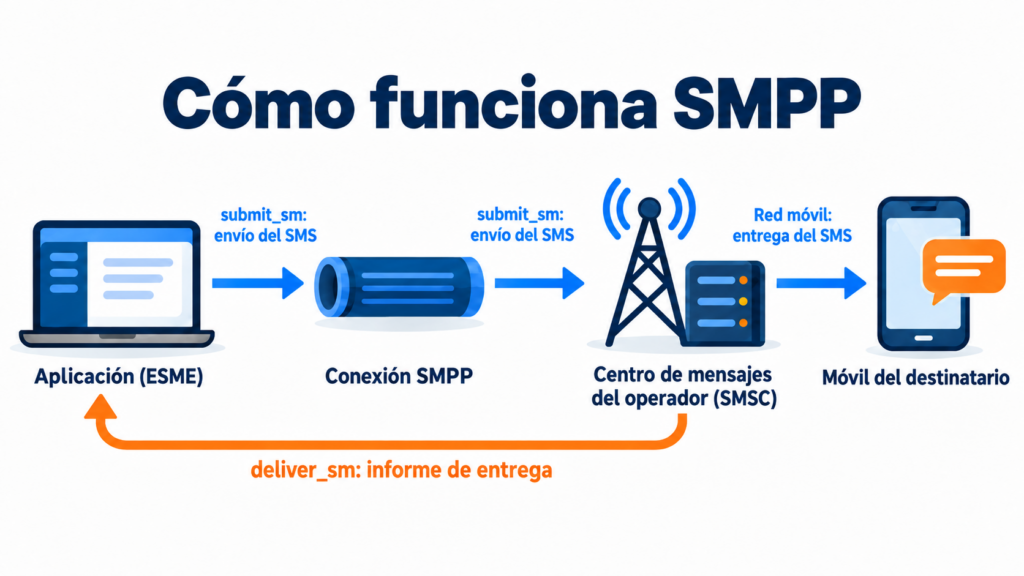
SMPP follows a client-server model. Two components are involved:
The ESME (External Short Messaging Entity) is the application that sends or receives messages. For example, a company’s SMS platform or a bank’s alert system.
The SMSC (Short Message Service Center) is the carrier’s message center. It receives the SMS messages, stores them and delivers them to the recipients’ phones.
The ESME opens a connection with the SMSC and keeps it active for the entire session. Unlike other systems, it doesn’t connect and disconnect for each message. That’s why it can send hundreds of messages per second with very low latency.
There are three session types, depending on what the application needs: send only (transmitter), receive only (receiver) or both at once (transceiver).
The main commands
Communication is based on structured messages called PDUs. Each one has a specific function. These are the most important ones:
- bind: opens the session and identifies the application with its username and password.
- submit_sm: sends a message to the message center for delivery.
- deliver_sm: used by the SMSC to deliver an incoming message or a delivery report to the application.
- enquire_link: checks periodically that the connection is still alive.
- unbind: closes the session cleanly.
Every command gets a response. That way, both sides know at all times whether a message has been accepted or has failed.
Delivery reports
One of SMPP’s most useful features is delivery reports, known as DLRs (delivery reports). When the message reaches the phone, or when it fails, the SMSC sends a notification to the application.
Thanks to them, you know whether each SMS was delivered, whether the number doesn’t exist or whether the phone was switched off. This information is key to measuring your campaigns and keeping your database clean.
SMPP vs. an HTTP API
Today, many providers also offer an HTTP API for sending SMS. Which one should you use?
SMPP is the preferred option for very high volumes and sends where every second counts, such as verification codes. Its persistent connection makes it faster and more efficient. But it requires more technical knowledge to set up and maintain.
An HTTP API is much easier to integrate. All it takes is one web request per message or per batch, and most developers already know how to work with it. For most small and medium-sized businesses, it’s more than enough.
And there’s a third option: using a platform that takes care of everything. In that case, you send your campaigns from a dashboard and the provider manages the connection with the carriers.
What SMPP is used for
It’s behind a large share of professional SMS traffic. Some common uses:
Transactional SMS, such as order confirmations, delivery notifications or one-time codes.
Mass sends or bulk SMS, where a company sends the same campaign to thousands of contacts.
Integration with internal systems, such as a CRM or a booking tool, that send notifications automatically.
It also lets you receive messages. That way, a company can handle replies from its customers, such as an appointment confirmation.
Security
The original version of SMPP doesn’t encrypt data. That’s why reputable providers protect the connection with encrypted channels, such as TLS or a VPN, and restrict access to authorized IP addresses.
This matters because your recipients’ personal data travels through this channel. And its processing must comply with the LOPD. It’s always a good idea to ask your provider how they protect information.
How we help you at Mailrelay
If you want to send SMS without worrying about protocols or carrier connections, Mailrelay makes it easy. With our SMS sending service, you create and schedule your campaigns from the same dashboard you use for email marketing.
You can check the SMS pricing and combine it with your free account, which includes up to 80,000 emails per month and 20,000 contacts. If you want to try it, you can create your Mailrelay account today.
Frequently asked questions about SMPP
Is SMPP the same as SMS? No. SMS is the text message; SMPP is one of the protocols used to send it from an application to the carrier’s network.
Which port does SMPP use? The officially assigned port is 2775, although many providers use others.
Do I need SMPP to do SMS marketing? Not necessarily. If you send from a platform like Mailrelay, the provider handles the technical connection for you.
In conclusion
SMPP is the standard that allows companies and carriers to exchange SMS quickly and at scale. Its persistent connection and delivery reports have made it the foundation of SMS marketing and transactional messaging.
Even so, you don’t need to master it to send your campaigns. What matters is choosing a reliable provider with good connectivity and clear handling of your customers’ data.
Related entries
- Churn Rate
- PDCA cycle
- Closing the sale
- Click to Call (CTC)
- Clickbait
- Webmail client
- Cloaking
- CMO (Chief Marketing Officer)
Find out how Mailrelay can help you with your email marketing strategy.