Modular email design
What it is, its advantages and how to apply it without coding
Modular email design is a method of creating emails based on independent, pre-designed and reusable blocks that are assembled to build complete emails.
This approach also lets you design newsletters without writing HTML code or having any technical knowledge.
Thanks to this system, anyone can combine header, text, image, call-to-action and product section modules in just a few minutes.
As a result, modular design simplifies the creation of corporate emails and ensures visual consistency across all your sends.
What is modular email design?
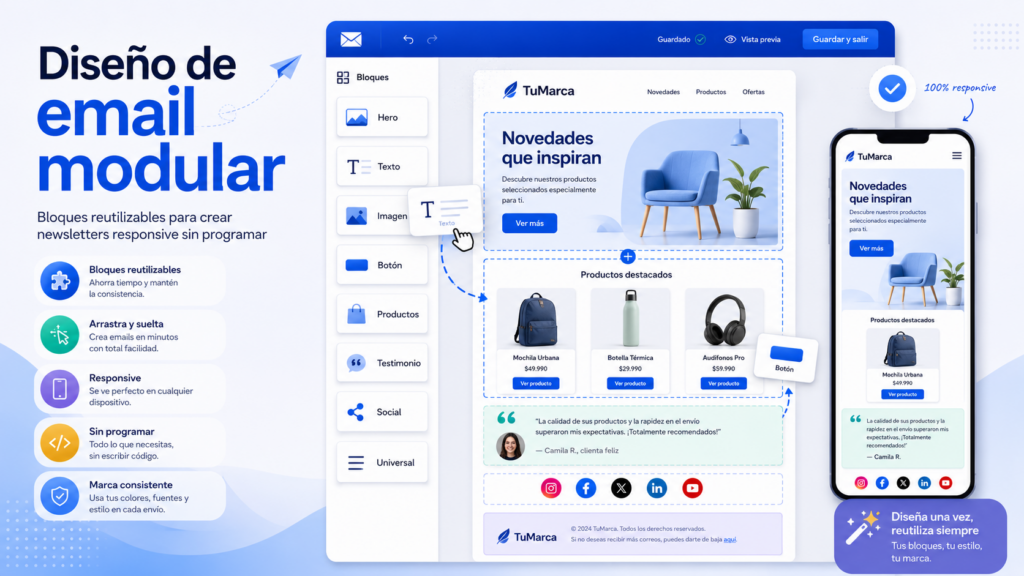
Modular email design consists of dividing the structure of an email into independent blocks or “modules”.
Each module serves a specific function within the message.
For example, there are modules for presenting a headline, promoting a product, or displaying customer testimonials.
These pieces work like interactive building blocks.
Therefore, the user only needs to select the necessary components and drag them into the template.
Because of this flexibility, you don’t need to design every newsletter from scratch.
In addition, modern email marketing platforms include these modules in their visual editors.
This allows you to maintain a consistent brand visual identity across all interactions with the subscriber.
Below you can see an example of the Mailrelay editor:
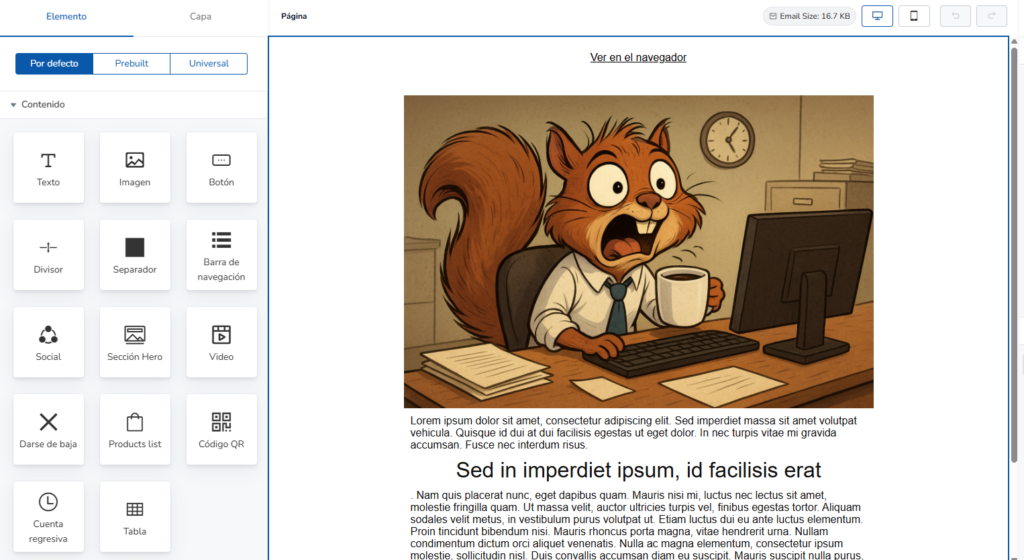
On the left side, you can see the available blocks; you just have to drag them (click and hold) and drop them into the design area you want.
There are three categories of blocks in the editor:
- Default: these are the general blocks you use to design emails, such as text, image, button, etc.
- Prebuilt: these are pre-designed blocks on a variety of topics that you can use to design your email faster with a professional look
- Universal: when you design a block the way you like it, you can save it as “universal” and it will become available in this section for every email you design. This way you save time by having blocks that you always want to look the same.
Advantages of modular design vs. traditional design
The traditional model required coding each email in HTML or relying on rigid designs.
However, modular email design has turned this technical process into a simple, agile task.
Mobile screens account for more than half of all email opens.
For this reason, sending responsive emails is essential.
Modular email design ensures that every block is natively responsive.
This means text, images, and buttons automatically adjust to the screen size.
Consequently, you don’t need to write CSS code or fix visual errors on mobile devices.
2. Quick editing using a drag-and-drop editor with reusable blocks
A drag-and-drop editor allows you to move blocks around with your mouse.
Additionally, you can save your best-performing modules to reuse them in future campaigns.
For example, if you create the perfect layout to display testimonials, you can save that block in your “universal” library.
Afterward, you just have to drag it into your new newsletter and update the text.
This way, you save many hours of work.
3. Advanced personalization with dynamic variables
Modular email design works perfectly with personalized content.
Within each module you can insert dynamic variables that change depending on the subscriber.
These variables allow you to personalize the subject line, the opening greeting, or any other text.
As a result, a single modular design generates thousands of unique versions tailored to each contact on your list.
Mailrelay also lets you create conditional blocks based on your contacts’ custom variables.
Comparison: Traditional design vs. Modular email design
· Traditional HTML design
Traditional HTML design is time-consuming, requiring hours of layout work, plus technical knowledge of HTML and CSS.
When it comes to mobile adaptability, it requires manual testing and adjustments to ensure it looks correct on different devices.
Reusing elements is complicated since it relies on directly copying and pasting code, and dynamic personalization is complex to integrate.
· Modular email design
In contrast, modular email design stands out for its fast creation process, with emails ready in a matter of minutes and requiring no technical skills thanks to no-code platforms.
On mobile, it is automatically responsive, which makes viewing on phones and tablets simpler.
In addition, reusing elements is very easy with saved blocks, as is dynamic personalization, which is easily integrated using variables and tags.
Key components of a modular email system
A well-structured modular email design system contains different types of blocks.
Below, we review the most important ones (you can also see them in the image above):
- Text module: one of the most used blocks; after all, your email needs to include text, right?
- Image block: to add images to your email
- Button: ideal for adding calls to action (CTA)
- Divider: in case you need to separate different sections of your email with a visible line
- Spacer: similar to the previous block, but it is just a space, with no visible elements
- Navigation bar: a block that lets you add a menu to your email, with different links, for example to sections of your website. Keep in mind that it can scatter traffic, so use it in emails whose goal is not to highlight one specific call to action.
- Social: with social media elements
- Hero section: a large block to highlight important text and calls to action. It can also include a background image.
- Video: to include a video block
- Unsubscribe: an essential block in your emails that lets your subscribers unsubscribe
- Product list: to include a list of products in your email
- QR code: in case you want to embed a QR code in your email
- Countdown: useful if you have promotions that end within a specific period of time
- Table: a module that lets you organize information
In addition to these content blocks or modules, the Mailrelay editor also allows you to work modularly with column sections, for example:
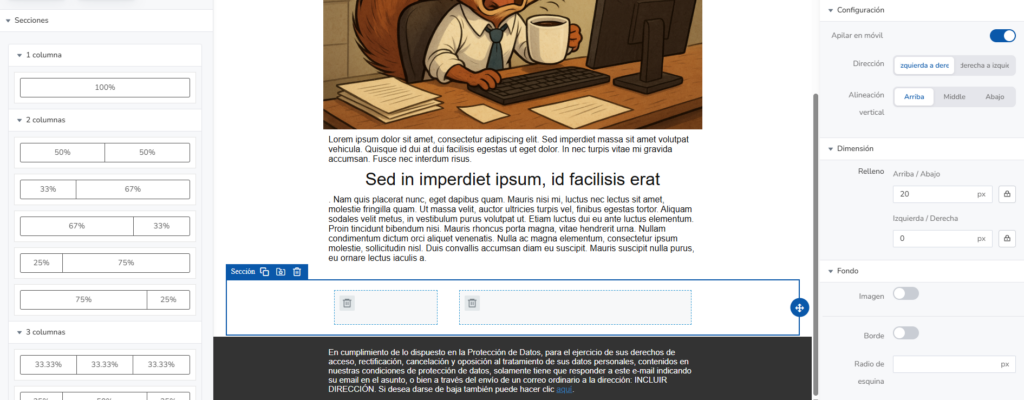
You can create sections with one, two, three and even four columns, with different width distributions for each column.
You can also select their behavior on mobile devices:
- Stack them vertically: so each column is displayed on top of the other
- Don’t stack them: so they keep being displayed side by side
How to implement modular design in your email campaigns
Adopting this methodology into your online marketing strategy is very easy. You just have to follow these steps:
- Define your visual style guide: Set the corporate colors, fonts and margins your brand will use.
- Create your main blocks: Design a standard header, a body text template and a footer.
- Test the dynamic variables: Insert custom tags to check that customer data is displayed correctly.
- Check the mobile preview: Review how the blocks adapt to smartphones and tablets before scheduling the send.
- Save the modules in your platform: Store your most-used blocks in the library of your email marketing tool.
Tools for creating hassle-free modular email marketing
To get the most out of modular email design, you need a platform with an easy-to-use drag-and-drop editor.
For example, Mailrelay offers a very simple dashboard with a no-code visual builder that even includes an AI writing assistant and powerful personalization options.
Not to mention the largest free account available (up to 80,000 emails per month to 20,000 contacts), making it easy for small and medium-sized businesses to test this methodology without any initial investment.
Similarly, you have access to human technical support to resolve any questions quickly.
Frequently asked questions about modular email design (FAQ)
What is modular email design?
Modular email design is a layout technique based on reusable, independent blocks.
It lets you create professional, responsive newsletters using a visual drag-and-drop editor without coding.
Can modular blocks be personalized with dynamic variables?
Yes.
You can insert dynamic variables into any modular block to personalize the subscriber’s name, purchase history, or message subject based on your database tags.
Does modular email design affect email deliverability?
It doesn’t negatively affect it; in fact, quite the opposite.
Because it automatically generates clean, well-structured HTML code, spam filters process the message better. This helps your emails land straight in the inbox.
Do I need design or coding skills to use modular emails?
You don’t need any prior knowledge.
Visual drag-and-drop editors allow you to select, move, and customize every content block with just a few clicks.
What is the difference between a fixed template and modular email design?
A fixed template has a rigid structure that makes changes difficult.
In contrast, modular email design lets you combine, remove or duplicate blocks according to the specific needs of each campaign.