
Sending and delivering transactional emails calls for powerful, reliable email marketing platforms.
These transactional emails need to be delivered quickly and effectively.
That’s because of their very nature, since they’re usually important emails tied to user actions (purchases, sign-ups, notifications, etc.).
In this article, we’ll look at the options Mailrelay offers for this type of email.
What are transactional emails and why do they matter?
Transactional emails are automated messages sent to a recipient after a specific action the user has taken.
This could be a purchase, a sign-up, a password reset request, and so on.
So they’re emails sent in response to a user action.
As you can imagine, this type of email is key to any business.
These messages usually have much higher open and click rates than a promotional email.
The reason is obvious: the recipient is expecting these emails, unlike an unexpected mass email.
That’s why it’s important for these emails to reach the inbox as soon as possible.
Mailrelay lets you send this type of email using either SMTP or the API.
We’ll look at both options.
Send your transactional emails with Mailrelay
Connect your website, store or app via SMTP or API and track opens, clicks and bounces in real time. Try it free for 30 days.
Try SMTP for free
Professional SMTP: the foundation for sending transactional emails with confidence
SMTP stands for Simple Mail Transfer Protocol.
It’s the standard protocol for sending emails over the Internet.
When we talk about a “professional SMTP server,” we mean a dedicated service.
It’s a service that relays your emails to the final recipient whenever the system you’re using requests it.
What advantages does using an SMTP service have over other alternatives, like hosting?
There are several advantages.
To start with infrastructure, an SMTP service like Mailrelay’s has a server infrastructure, dedicated IPs, and staff specifically geared toward sending bulk and transactional emails.
That’s not the case with other alternatives, like hosting.
A solid infrastructure helps the deliverability of your email campaigns.
So your emails reach their destination instead of the spam folder.
On the other hand, an SMTP service can help you avoid sending to bounced addresses, being marked as spam, and so on. This helps keep your sender reputation intact.
And what about sending volume?
That’s another point to consider.
Most alternatives, like the hosting we mentioned, aren’t built for sending bulk emails, so you may run into restrictions.
Restrictions you wouldn’t run into with an SMTP service dedicated to sending emails.
· Is it complicated to set up Mailrelay’s SMTP service?
Quite the opposite — it’s very simple to set up.
In your Mailrelay account, go to Settings – SMTP Settings to activate the service and get your connection details.
This screen will be very useful, since here you can:
- View the connection details
- Change the password
- Turn features on or off (like tracking for statistics)
- Find some code examples
- And if any errors occur, you’ll see them here too
As always, if you have any questions, you can contact our support team so we can help you.

Email API: flexible integration for transactional emails
Besides the SMTP server, Mailrelay also offers a developer API that lets you send transactional emails.
An API (Application Programming Interface) is a set of functions and endpoints.
In simple terms, these are URLs you can call with requests for whatever you want to do.
This lets your application communicate directly with Mailrelay.
For example, you could use Mailrelay API’s Send Emails function.
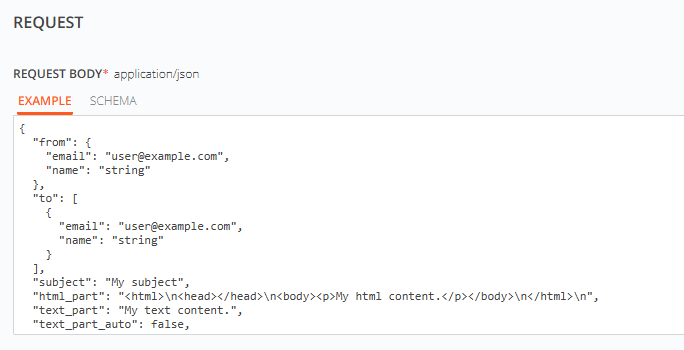
This function lets you send a transactional email by specifying a few basic parameters:
- The sender
- The recipient
- Subject line
- Content
- And a few more optional fields
The API, just like SMTP, is a flexible way to add transactional email sending to your application.
When a user performs a certain action (like creating an account, making a purchase, or requesting a change), your system sends a request to the API to immediately send the corresponding email.
What’s the advantage of using the API?
One of the most interesting is that you can customize each email to the max, making it unique for the recipient.
It’s ideal for scenarios that call for highly tailored automation.

SMTP or API? When to use each option for your transactional emails
Both options can be interchangeable in many scenarios.
When is it better to send via SMTP, and when is it better to go with the API?
Let’s try to sum it up.
· When to choose SMTP:
Using the SMTP server is simpler if you can’t do development work, or if you don’t have programming knowledge.
For example, if you use desktop Outlook or Thunderbird, you can simply connect to Mailrelay’s SMTP, and the emails you send will go out through Mailrelay.
It’s therefore a less technical solution that saves you time.
· When to choose the API:
If you have a development team or know how to code, and you need a more complete integration with your system or application, the API is usually the best solution.
Using the API lets you not only send transactional emails, but also build a more complete integration between Mailrelay and your systems.
· You can use both options:
Of course, nothing stops you from using both options, or starting with one — SMTP, for example — while you develop the API integration.
Mailrelay gives you both options, and you can use one or the other whenever you like.
SMTP or API? With Mailrelay you get both
Use whichever fits your development best, or combine them, with statistics for every send and expert technical support.
See transactional emails
Real-time tracking and statistics to optimize your transactional emails
It’s not just about sending emails — the statistics are essential.
Mailrelay gives you several ways to get statistics on your transactional emails, whether sent via the API or SMTP.
· Where can you see the statistics for SMTP emails sent with Mailrelay?
You can find this information in the Reports – SMTP Emails menu.
On this screen you’ll find plenty of information:
- Emails sent
- Their status
- Sender used
- Dates
- Whether they bounced, and the bounce category
- Whether they were marked as spam
- Or unsubscribed
But there’s more:
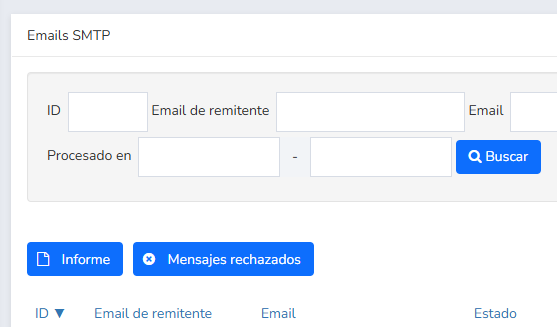
You have two buttons: one for the report, and the other for rejected messages.
The rejected messages button takes you to a report of the emails that weren’t accepted in the SMTP send, along with the reasons why.
It’s a report that can help you fix sending errors, if there are any.
The other button, report, takes you to a visual report of the SMTP sends you’ve made:
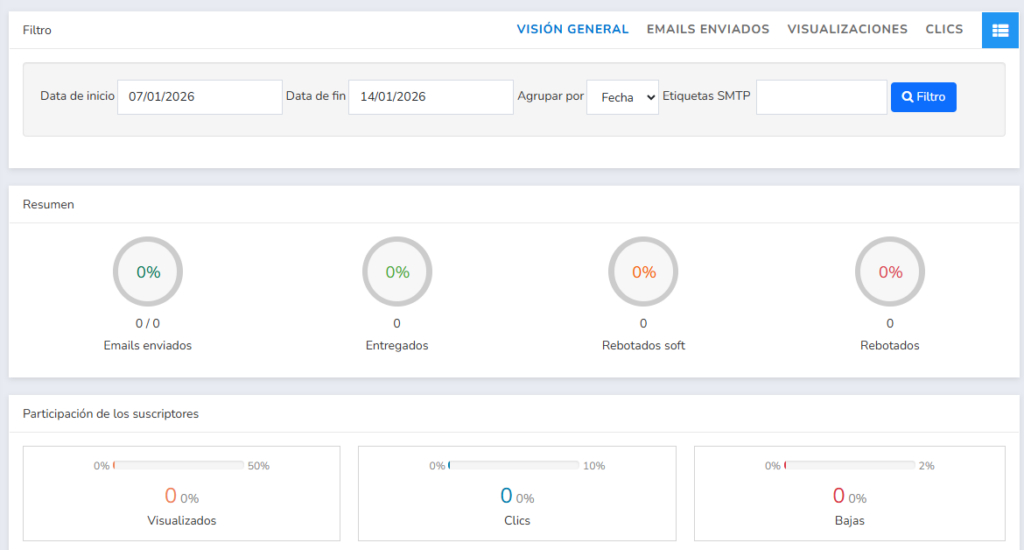
Let’s go over this image in a bit more detail in the following sections.
· Open and click statistics for SMTP sends
One feature most email marketing tools don’t offer is open and click statistics for SMTP sends.
Mailrelay does offer these statistics.
You just need to turn them on in the SMTP settings.
Once you do, both opens and clicks will show up in the report above.
There’s really nothing else to do: turn on the tracking option, send your emails as usual, and Mailrelay will take care of the rest.
Besides the statistics, you can also add tags to your SMTP sends.
Tags let you tell your SMTP sends apart and filter them in the reports.
How do you use SMTP tags?
It’s very simple.
First, turn it on in the Settings – SMTP Settings menu by activating tracking.
Then, in your email subject lines, you can add a tag at the beginning:
- [X-MR-Tags: example]
That tag (which must be a single word, with no spaces) won’t be seen by the contacts who receive your emails — it’s only used by the system to let you filter in the reports.
· And via the API
If you use the API, you can also get the statistics thanks to the Get SMTP Emails endpoint.
It doesn’t matter whether the transactional emails were sent via SMTP or the API — you can get them this way.
With all these features, you can always stay on top of your transactional emails — whether they’re opened, whether they get clicked.
Everything you need.

Mailrelay vs. other platforms: The advantages of our transactional SMTP and API
There are many solutions on the market for sending transactional emails.
From specialized services to well-known email marketing tools like Mailchimp, Mailjet, Brevo (Sendinblue), MailerLite, Acumbamail, or Klaviyo.
What does Mailrelay offer to stand out among all these options?
· A free plan far better than the competition’s:
Mailrelay’s free account lets you send up to 80,000 free emails a month to a list of up to 20,000 contacts, and try SMTP and the API for 30 days.
After that, you can keep using them for €14.95/month or with the Standard and Enterprise plans, which already include them.
No other email marketing tool offers anything like this.
· Dedicated technical support on every plan:
Mailrelay offers full support by email, chat, and phone.
Always from staff who are experts in email marketing.
· Real-time statistics:
As we’ve seen, Mailrelay lets you do something most platforms don’t: get statistics on your transactional sends.
A feature that’s also included in the free plan.
· High deliverability and reliability:
Thanks to our own infrastructure, Mailrelay achieves high delivery rates.
This helps transactional emails reach recipients as quickly as possible.
Try sending transactional emails with Mailrelay
Just create your free Mailrelay account and you can try all the options covered in this article for 30 days. After that, SMTP and API for transactional emails are included in the Standard and Enterprise plans, or you can add them to the free account for €14.95/month.
We hope this service comes in handy!
Create your account and try SMTP for 30 days
No credit card required. After that, it is included in the Standard and Enterprise plans, or €14.95/month on the free account.
Create free account