Strategies used to win customers or catch the attention of a particular audience often combine online and offline actions
Among the former are digital advertising and email marketing, and among the latter are actions such as designing posters and flyers.
Either way, the ideal is to study the business or project in depth so you can choose one or the other (or both). If you want to include offline actions like these in your marketing plan, you’ll need to follow a few guidelines so they really attract attention and look professional.
Just as with email marketing, there are platforms that help us design any poster easily. In just a couple of clicks!
Would you like to know the tips to follow and the websites to use to create your own poster online? I’ll tell you all about it below.
Tips for making posters online
You’ll agree with me that today there are countless things competing for the attention of the same audience.
That’s why it’s essential to know which aspects to pay attention to when you make or design your poster (especially if you decide to do it without a professional’s help).
In this first section, I share some of the most important points with you. I’ll also give you recommendations to keep in mind so that, wherever you hang your posters, they catch people’s attention.
In both online and offline marketing, it’s essential to use attention-grabbing techniques that can generate interest and spark desire in the audience.
From the poster to the inbox
Once you’ve designed your poster, share it with your audience by email. With Mailrelay you can easily create visual newsletters.
Discover MailrelayPut yourself in your audience’s shoes
This is the starting point for any action you take as part of a marketing strategy. If you don’t know who your audience is or what they’re like, you’ll hardly be able to create an online poster that catches their attention.
Both to write the message and to choose its colors, typography and layout, it’s essential to know who we’re addressing.
The nature of the business, the type of customer and the goal clearly influence the design. So designing a poster to announce the opening of a new restaurant is not the same as designing one to promote a language school.
In the first case, more neutral colors such as black, white or gold would probably be used if it’s a high-end restaurant. And in the second, more youthful colors and more casual messages.
Use elements that stir some emotion
If your poster doesn’t stir any emotion, it will probably go unnoticed. This may seem like one of the hardest points, but if you follow guidelines like these, it won’t be so hard. In this regard:
● Use an image that represents what you want to convey. Using several could cause confusion. For example, for the language school, one possible image could be a happy child studying.
● Deliver a clear, concise message. It should aim to generate fear, desire, complicity, affirmation, guilt or curiosity. These are the emotions that most drive people to take action.
Keep the first impression in mind
You should know that the time a consumer spends on a brand is very limited. If you don’t manage to catch their attention in seconds and make a good impression, they’ll probably move on to the next one and not look back.
That’s why you should make sure your poster design is understood at first glance. The different elements it contains must be combined so that there’s no room for misinterpretation or ambiguity.
If after making a poster you think something isn’t clear, work on it again. Others will probably feel the same way (and that will work against you).
Here’s a first example below:
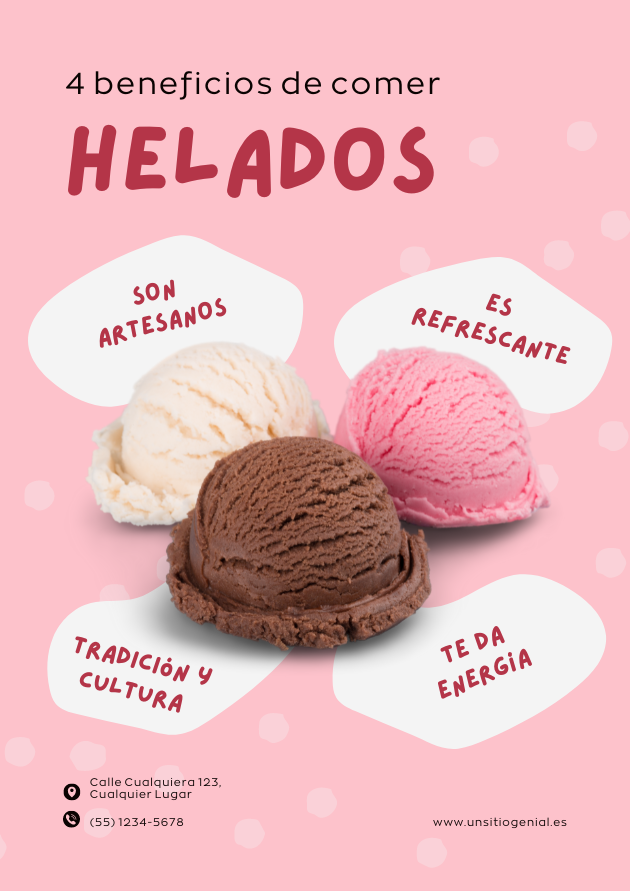
This poster brings together some of the elements we’ve discussed: simplicity, clarity and first impact.
Choose your colors carefully
Colors play a key role in poster design. The way they combine with the different graphic elements, and the meaning and feelings they may evoke, influence how effective the poster is. That’s why I recommend:
● Using predefined palettes. If you use a poster website or an app such as Canva, you’ll find some predefined color palettes. These are groups of colors that go well together and give your poster a professional look.
● Combining complementary colors. This will make different elements stand out and make the final result much more visually appealing.
● Highlighting the calls to action. Finally, I recommend highlighting your calls to action in a more eye-catching color. That way, there will be no doubt about the next step to take to get the promoted offer.
Color psychology holds that each color has an effect on us. For example, some colors stimulate us (such as red) and others calm us (such as blue). Either way, they stir emotions in us.
Try different styles
Even if you’ve chosen your colors and fonts, don’t consider them final until you’ve checked that they go well together. Finding the perfect formula for a professional, suitable style takes time.
If you’ve tried creating a poster online before, you’ll know that a text often looks good with a certain color, size and font, while another text on the same poster may not.
It can also happen that each element looks good on its own, but when you use them together on the poster, the result isn’t what you expected. So the best thing is to run tests or use templates with predefined styles.
Highlight the key information
Another important tip when creating your poster is to highlight the information you want your audience to remember. For instance:
● If you’re promoting an event, the key information will be the place and time.
● If you’re announcing a discount, the % and/or promo code should stand out.
Below you can see a poster that uses color contrast to highlight the key information:

Go for simplicity and clarity
We continue this guide on how to make posters online with a tip that may seem obvious but isn’t always followed. Your poster should be simple, straightforward and clear. Otherwise, it won’t appeal to your target audience.
Chaotic designs in which it’s hard to tell elements apart or read easily usually put people off. So make room for simplicity.
Bring your designs to life in your campaigns
Include your posters and images in attractive newsletters with Mailrelay’s drag & drop editor.
Get started with MailrelayAdd a call to action
Just as with your emails, a poster should include a call to action. For example:
● If you’re announcing an event, you should state where to sign up so people attend.
● If you’re promoting your services, you should add your phone number or email and ask people to get in touch with you.
Remember that the goal of this kind of action is to get a benefit. If you don’t make it clear what your audience needs to do to get it, they’re unlikely to do it.
Use ready-made templates
If you choose to design a poster with a website or online app, you’ll find they offer predefined templates that save time and, above all, look quite professional. With these resources you can:
● Choose a suitable color palette.
● Get a visually appealing layout.
● Add fonts in the right order and size.
● Use styles suited to a particular industry.
● And, in short, create your own poster without being an expert.
It can be the perfect solution for you if you’re not a designer or don’t have much experience with design. What’s more, these templates are usually customizable. You can use their designs as a base and change the images and text to suit your needs.
It’s a very simple process. Just choose the new elements and drag them onto your template. If you’re going to use this kind of resource, I recommend keeping the following in mind:
● Choose a poster website that’s easy to use. Almost all of them meet this requirement, but it doesn’t hurt to add it to this list as a reminder.
● Work on a template from your own industry. This will make it much easier to get a final result that matches the image of your project or business.
● Consider the template’s dimensions. Think about the size of your poster and look for a template with the same dimensions. That way you won’t have to resize the template, and you’ll avoid problems later.
Use high-quality images
If you want to convey professionalism when making a poster online, don’t skimp on image quality. Make sure they’re sharp, with good contrast and lighting, and that they don’t look pixelated. Also avoid odd cropping.
This matters in any marketing action you take, but when it comes to designing a poster you’re going to print, it’s essential that the images are of the highest possible quality.
As you probably know, you can find all kinds of images in image banks. They let you download them in different sizes. Choose the most suitable ones and bring your poster to life.
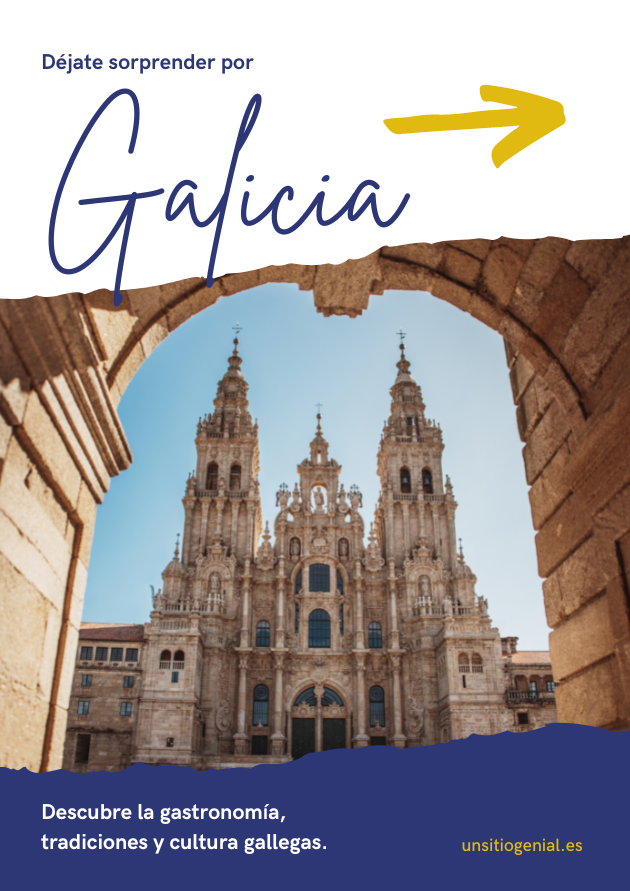
Below you can see an example of a poster that uses a main image as the common thread for the rest of the poster’s message:
Websites for making posters online (for free)
In the previous section, I mentioned that there are websites for making posters online, and that some even include predefined templates that make the whole creative process easier. So which are these poster websites? Below, I share a list of the ones that work best.
Tools play a crucial role in carrying out any marketing project. Just as Mailrelay does for email, poster websites will help you get a professional result.
Canva
It’s undoubtedly the best known. It’s a poster website that also lets you create presentations, social media images, videos, other printable documents, charts, infographics, covers, web images…
It’s very easy and intuitive. It lets you start from a predefined design or a blank canvas. Either way, when you open your creations, you’ll find all the elements you can use in your design in the left-hand margin.
Desygner
Ready to create your poster? If after reading all my tips you’re ready to get down to work, this is another app you can use.
Like Canva, it includes many formats, not just posters. And it’s very simple to use. The whole process is online, and the interfaces are similar.
Visme
Visme is one of the websites I’ve used several times, and I couldn’t leave it out of this article.
It’s completely free. If you want to create your poster, you can go there right now and customize one of its templates or start with a blank canvas.
However, if you want to download your poster as a high-resolution PDF with bleed marks, you’ll need to upgrade to the premium plan. I recommend reviewing both options; if you’re looking for a professional result, it may be worth it.
Venngage
How do you create your own poster without knowing anything about design? All the apps I’m mentioning could answer that question. Venngage is one of them.
Again, it’s a poster website that works in a similar way but, unlike the previous ones, you’ll need to upgrade to a paid plan if you want to download your work.
The free option only lets you create your poster and share it on social media. If you want something printed, you’ll need to choose a paid plan or use one of the previous tools.
Befunky
Finally, I also want to talk about Befunky. This app has an advantage we haven’t seen so far. It can remove the background from an image.
If, when creating your poster, there’s an image whose background you want to remove, Befunky makes it very easy. You won’t have to look for other apps. You can also edit photos and resize them easily. Otherwise, it’s similar to the previous ones.
At this point, I only have one question left for you: what are you going to announce or show on your poster? Define this goal clearly, because it will be the first step in creating your poster following the guidelines I’ve shared in this post. Try these apps and tell us which one worked best for you!
If you combine your posters with online strategies, also take care of the call to action (CTA) in your email marketing campaigns.
This kind of visual piece is part of a broader branded content strategy.
Share your creations with Mailrelay
Turn your designs into email marketing campaigns that grab attention. Try it for free.
Try Mailrelay for free