In email marketing, the main thing is for emails to reach the inbox.
Deliverability measures how many of your emails reach your subscribers’ inboxes.
Worldwide, thousands of companies rely on email to talk to their customers.
However, approximately 20% of sent emails may never reach the inbox due to spam filters and sender reputation issues.
Increasing that percentage will increase profits.
In fact, statistics show that email marketing continues to achieve fantastic results globally.
For instance, average open rates in countries like Spain exceeded 30% last year, well above the global average near 20%.
This indicates that the public responds very well to email marketing.
So?
Optimizing deliverability usually offers higher open rates, more clicks, and ultimately, more conversions.
- 1 How to avoid landing in spam with bulk sending
- 1.1 · Get your subscribers’ consent:
- 1.2 · Don’t buy email databases:
- 1.3 · Always include an unsubscribe link and legal details:
- 1.4 · Use a reliable and recognizable sender:
- 1.5 · Take care of content quality:
- 1.6 · Simple design:
- 1.7 · Send consistently, not all at once:
- 1.8 · Keep your contact list clean:
- 2 Mailrelay interface: simple to use and powerful in features
- 3 Email deliverability status: figures and reality
- 4 SPF, DKIM, and DMARC: why you need to configure them (and how Mailrelay helps you)
- 5 Mailrelay editor, designed for the deliverability of your email campaigns
- 6 Mailrelay’s own IPs to improve the deliverability of your email campaigns
- 7 Everything is important for the deliverability of your emails
How to avoid landing in spam with bulk sending
Sending bulk emails doesn’t have to mean they end up in spam.
You just have to follow some best practices, and volume won’t be a problem.
· Get your subscribers’ consent:
It’s easy to fall into temptation, when looking at email marketing results, to buy an email list.
Don’t do that.
Don’t send emails to people who haven’t requested them.
The best approach is to use clear subscription forms and double opt-in (email confirmation) to ensure each recipient really wants your content.
If someone hasn’t told you “yes, I want to receive your emails,” don’t include them in your list; it’s that simple.
Without permission, any bulk sending, no matter how legal it seems, will be considered spam.
· Don’t buy email databases:
This is insisting a bit on the previous point.
Because it’s important.
Purchased email lists will likely have uninterested contacts, obsolete addresses (bounces), and even spam traps (trap accounts used to detect spammers).
Cleaning these lists is an almost impossible task.
So sending to these types of lists will skyrocket your bounces and complaints, damaging your domain reputation.
Many people have the mistaken concept that a first email will clean these lists.
The reality is that this first email can end up including the sender domain on blacklists.
· Always include an unsubscribe link and legal details:
Every newsletter or promotional email you send must include an unsubscribe link.
Not including it is the easiest way for it to be considered spam.
This is also easy to do, as Mailrelay handles it automatically for you.
On the other hand, adding a legal text is highly recommended, something similar to what you have on your website, with your contact details.
· Use a reliable and recognizable sender:
Always send from a professional email address on your own domain (for example, your_name@your_company.com).
Avoid generic or suspicious senders like free addresses (Gmail, Yahoo) for bulk campaigns.
As they are usually blocked.
· Take care of content quality:
Anti-spam filters analyze the content of your emails.
The texts, images, links, attachments, everything.
There are some tips that might seem a bit old-fashioned:
- Avoid words or phrases that can be considered “spam”
- Exaggerated offers (“Make money fast!”, “100% free now”)
- Excessive use of $ or € symbols
- Abusive use of capital letters or exclamation marks
- Excessive caps, especially in the subject line
Does this mean that using these elements will put the email in spam? And that if they aren’t used, it will reach the inbox?
It’s not that simple.
But, you can ask yourself, if I received this email, would it look like spam to me?
The answer to this question will help you.
· Simple design:
The most effective approach is usually not to overcomplicate things.
A simple newsletter, which conveys the message directly, is usually the most effective.
You have to consider that most recipients won’t have much time, so something brief is usually best.
A complex, convoluted design that doesn’t make the goal clear usually performs worse.
In any case, it’s recommended to run tests to adapt your strategy to your audience.
· Send consistently, not all at once:
This is another point you have to be careful with.
If you have never sent a bulk email campaign, it’s not best to suddenly send to your entire list.
Why?
The reasons are diverse:
- Email clients don’t have references of campaigns from your domain, so they may be suspicious.
- If the list is getting outdated, it’s very possible that many emails will bounce, generate errors, etc.
- It’s also possible that contacts, if some time has passed without receiving emails from you, won’t remember subscribing and will flag you as spam
In short, a common mistake is accumulating a huge list and suddenly sending 100,000 emails at once after months of inactivity.
These sudden spikes in volume can trigger alerts at providers (especially if you haven’t sent anything before).
It’s better to increase the limit little by little, and from there maintain a constant sending volume.
· Keep your contact list clean:
Keeping the contact list clean helps a lot to maintain good deliverability.
If your contact list returns many bounces.
Or you keep trying to send to those bounces.
That sends a bad signal to the different ESPs.
Just like if you receive many spam complaints, or continue sending to emails that wanted to unsubscribe.
Mailrelay helps you keep your contact list clean by detecting bounces, managing unsubscribes, and handling spam complaints.

Mailrelay interface: simple to use and powerful in features
An easy-to-use email marketing tool saves you time and allows you to focus on the more creative parts.
The Mailrelay dashboard is therefore very intuitive:

Why can this interface help you work better?
Mainly because the menus have been organized logically, also adding some shortcuts for the most important actions.
This way you don’t lose time looking for the menu you need.
A general summary of statistics is also shown, regarding the latest email campaigns you have sent.
From this main screen, by using shortcuts, you can:
- Import contacts (for example from a CSV)
- Create a newsletter
- Create an automation
- Create a landing page
The rest of the actions can be carried out directly from the side menu, organized by themes/categories.
For instance
- From the subscribers menu: you will be able to create groups, dynamic segments, custom fields, subscription forms, and import contacts
- In the newsletters menu: you can create your newsletter designs (and send them), RSS newsletters, senders, and A/B tests
- Reports: reports of sent newsletters, automations, SMTP emails, and account plan statistics
- Automations: where you can create various types of automations (registration, drip campaigns, etc.)
- Landing pages: from this section you can create landing pages, where you can insert forms and share them in your acquisition campaigns.
- Media manager: allows you to upload images to use in the design of your newsletters
- SMS: to create and manage SMS campaigns
- WhatsApp: here you can create and manage WhatsApp message campaigns
- Settings: in this important menu you can find, among other things, the general account configuration (with the time zone), SMTP and API settings, event management, and system email drafting (emails sent when a contact registers, etc.)
We will see this in more detail in the next sections.
But I think it’s interesting to highlight that the Mailrelay editor includes AI capabilities so you not only save a lot of time in drafting your emails, but you can avoid deliverability issues.
Why is this so?
Because the newsletter texts, as we have seen before, affect deliverability, and that’s why well-written texts will be more effective.
If you don’t have time or experience, we recommend trying the Mailrelay AI newsletter assistant.

Email deliverability status: figures and reality
Deliverability is not a static measure that remains over time; on the contrary, it is adaptable and reflects the measures that ESPs (like Gmail, Outlook, Yahoo!) take against spam sending.
If we speak generally, at a global level, we find that average deliverability is around 80%.
This means that out of every 100 emails, 20 could end up in spam, bounce, etc.
But this is at a general level.
Averages are like that, they don’t have to reflect the exact reality of each particular case, especially if you do things right.
How is deliverability currently performing?
The truth is that the performance of email marketing campaigns has even improved in recent years.
The average open rate in top-performing regions for bulk email campaigns exceeded 30% during 2024, placing it clearly above the global average (~20-21%).
If we compare this data with other online marketing channels, such as SEM, SEO, social media, etc. We can observe that email marketing is much more effective.
This high percentage of opens indicates that many emails reach the inbox.
What can we consider a good deliverability rate?
It is usually considered that anything above 90% is already a good deliverability rate.
If it is lower, the reasons should be analyzed (email list, message, settings, etc.).
Of course, the better this figure is, the better the campaign results will be.
Gmail as the preferred email provider
This is another important factor to consider.
Email providers.
Gmail dominates a large part of the global market, followed by Outlook/Hotmail and corporate services.
Well.
These services are tightening their authentication and reputation requirements.
We already saw this in another article on our blog.
But we can summarize some of these policies to refresh them here:
- Google and Yahoo require configuring DMARC for sending to more than 5,000 contacts/day
- That you include a working unsubscribe link and maintain a spam complaint rate below 0.3%
In 2024 alone, billions of marketing emails were sent globally, showing a significant increase compared to the previous year.
And as other online marketing tools continue to lose their effectiveness, this volume will keep growing.
Because companies need to run effective marketing campaigns that yield results.
SPF, DKIM, and DMARC: why you need to configure them (and how Mailrelay helps you)
If you want your emails to reach the inbox of Gmail, Outlook, and others, there is an essential aspect that can’t be ignored.
SPF, DKIM, and DMARC settings.
These three terms refer to email authentication protocols that serve to prove to destination servers that your messages are legitimate and actually come from your domain.
That’s why they are so important.
· SPF (Sender Policy Framework):
It is a DNS record that tells receiving email servers which servers or IPs are authorized to send email on behalf of your domain.
For example, if your domain is mycompany.com and you send emails using Mailrelay, in your SPF record you will indicate that Mailrelay servers can send emails on behalf of mycompany.com.
When Gmail receives a message from you, it will check that SPF record; if it finds the sender’s IP there, it will trust the email more.
On the other hand, if someone tries to impersonate you by sending from another unauthorized server, the SPF check will fail and the message will possibly be rejected or marked as spam.
· DKIM (DomainKeys Identified Mail):
It’s like a digital signature.
When activating DKIM, your provider (Mailrelay, in this case) will include an encrypted signature in the header of every email you send.
Receiving servers can verify that signature with the public key you publish in your DNS.
If the signature matches, it means that the email content was not altered and that it was really sent by a server authorized by you.
In short, DKIM guarantees the integrity and authenticity of the message.
· DMARC (Domain-based Message Authentication, Reporting & Conformance):
This is the third pillar, the most recent one.
DMARC relies on SPF and DKIM: it allows specifying a policy on what to do if an email fails SPF/DKIM.
With DMARC, you as the sending domain tell receivers “reject emails that claim to be mycompany.com if they don’t pass SPF/DKIM” or perhaps “send them to spam/quarantine”.
Furthermore, DMARC requires that the From: address visible to the user matches the authenticated domain, avoiding spoofing tricks.
· Why are these settings indispensable for good deliverability?
Because without these settings, different email providers will most likely directly reject received emails, or leave them in the spam folder.
It doesn’t matter if you send one email or thousands, these settings are necessary.
Without them, it’s not possible to know if your emails are really sent by you, or by anyone pretending to be you.
Therefore, they are settings that directly affect deliverability, since without them it is much more possible for emails to be marked as spam.
Mailrelay not only allows you to change these settings, but also helps you check that they are always correct.
You just have to go to the menu Settings – Email authentication:
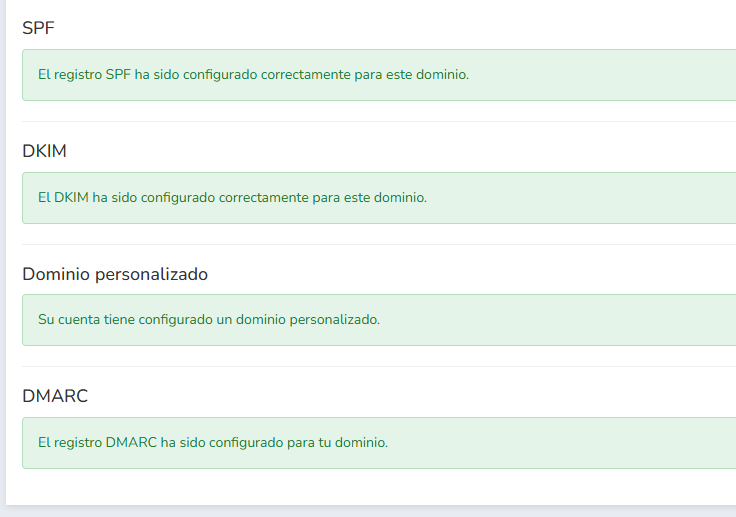
If any configuration were incorrect, it would indicate the changes that must be made.
And you would also find a link, which you can send to your domain provider so they can help you add these settings.
Of course, our support team will also help you with these settings.
It is recommended not to send bulk emails without these settings; review them first.

Mailrelay editor, designed for the deliverability of your email campaigns
The content of your emails affects deliverability, as we have been discussing.
What can happen if the content of your emails resembles spam emails?
Well, basically this:

If the content of your emails looks like spam, it is quite likely that Gmail and others will categorize it as spam.
Simply because it looks like it.
What things can make your email look like spam?
- The email texts (words, errors, general theme…)
- Errors in the HTML code
- Linked domains and URLs (if they are suspicious or on blacklists)
- Link shorteners (in some cases)
- Excessive use of images or lack of text (for example, if the email is simply an image)
- Recently created domain sending a large volume of emails
Is it understandable that you want to send an email that is simply a single image?
Yes, of course, the problem is that, historically, spammers have done precisely that.
To such an extent that email providers are suspicious of these practices.
Luckily, the Mailrelay editor helps you avoid these problems.
· How can the Mailrelay editor help you?
We are going to see several ways; for starters, it can suggest subject lines using AI:
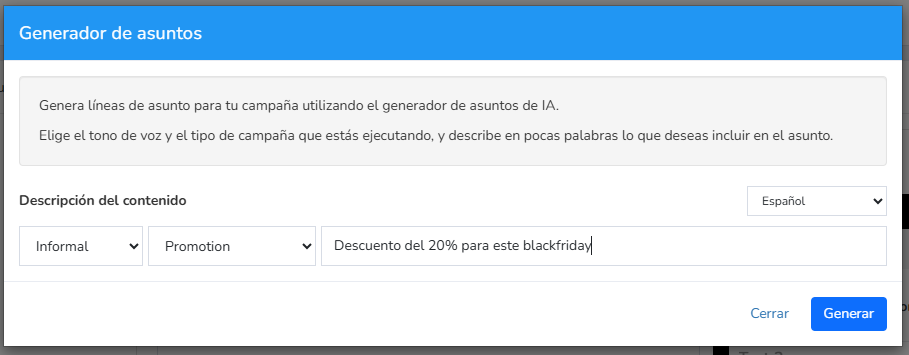
You just have to give it some basic indications, such as the tone, subject type, and brief description.
With this data, it will suggest some options:
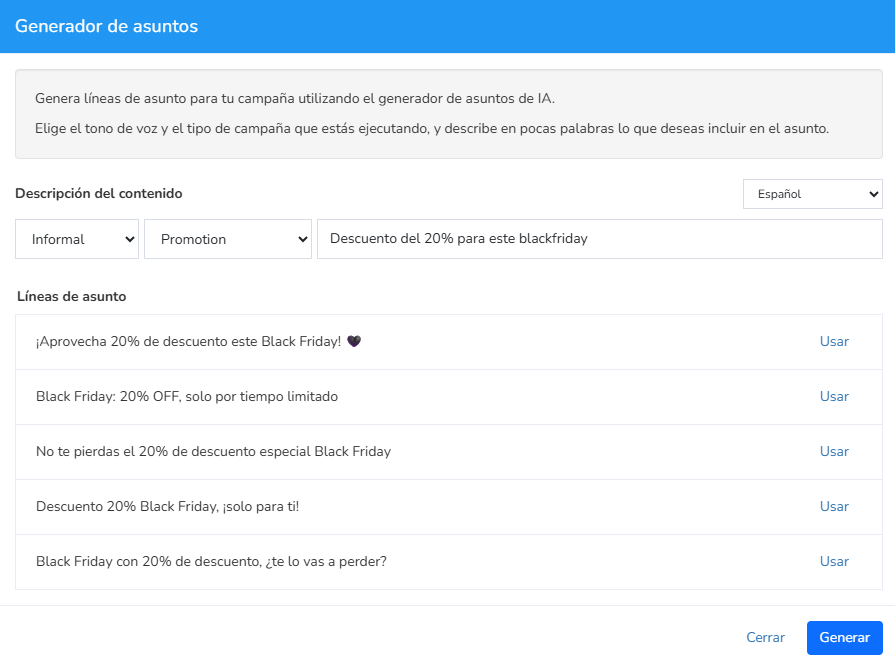
They may not be the best subject lines in the world, but as a starting point, they aren’t bad.
If you don’t have many ideas, use this tool to get suggestions.
The subject lines of your emails is very important.
For the content, you can also use AI options:
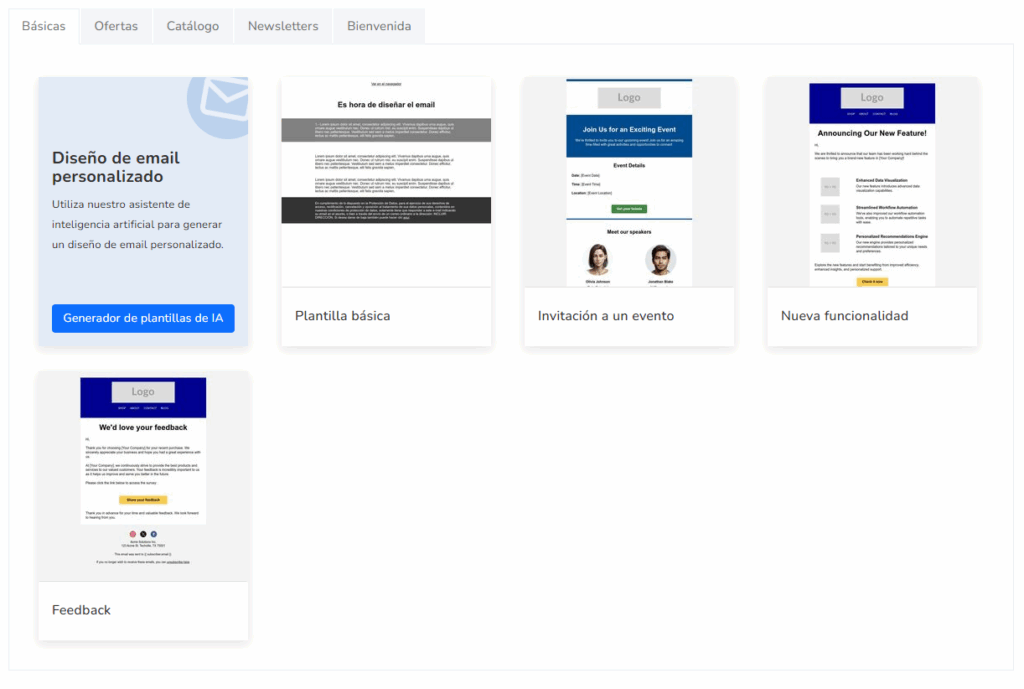
If you select this option, it will only be necessary to enter some basic information:
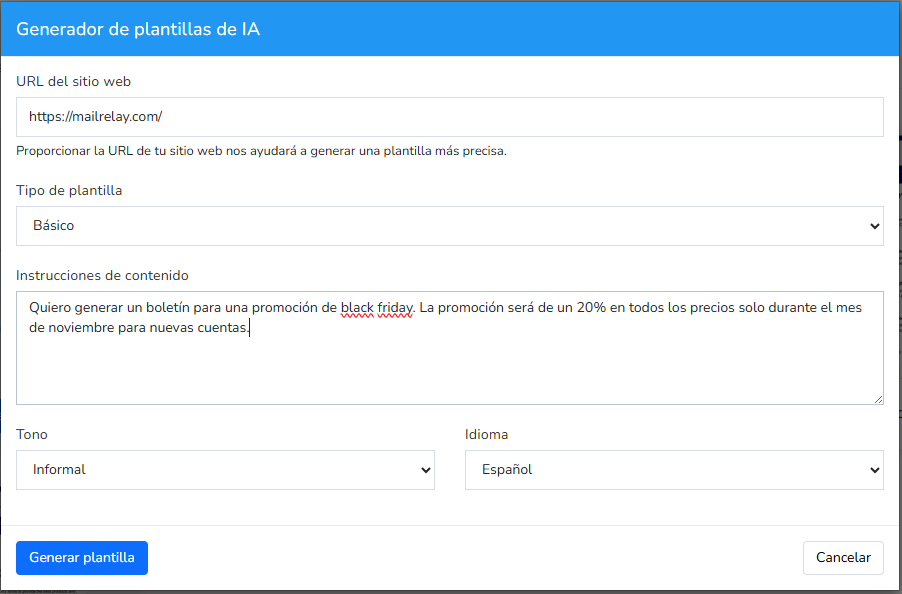
And the generated example would be something like this:

It’s something very simple, yes, but you already have a base text to work with.
The important thing is that if you decide to include several images, this base text will help ensure your email at least has some text, which is essential.
From this base, you can start adding the elements you need:
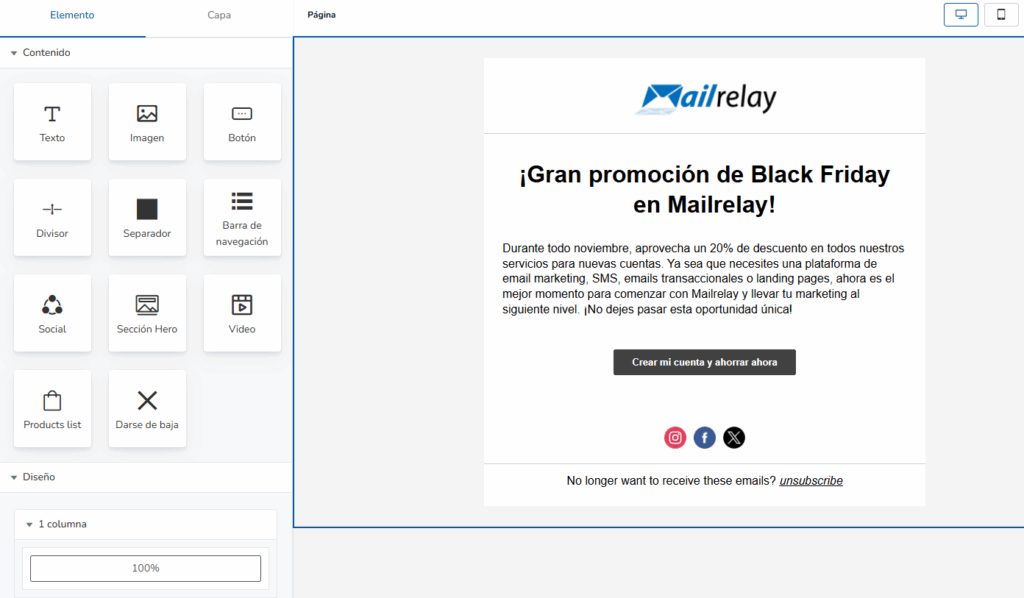
You can add all kinds of blocks you need:
- Text
- Image
- Button
- Dividers
- Spacers
- Navigation bars
- Social block
- Hero
- Video
- Product list (Woocommerce)
- Unsubscribe block
- Columns
To add them, nothing easier than dragging them where you want to put them.
This editor generates correct HTML code so you don’t have problems with different email providers.
Since you don’t need to know or modify HTML, it’s not possible for you to make a mistake on this point.
· Spam rating and report
Before sending your newsletter, it is useful to check for possible errors that make the email be considered spam.
You can find this report while editing the newsletter:
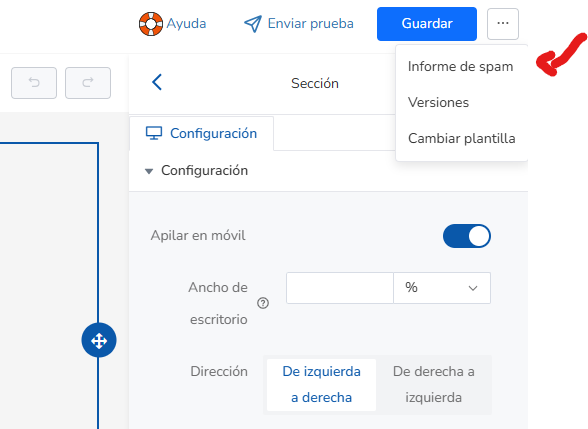
This link will take you to a report on the newsletter content:
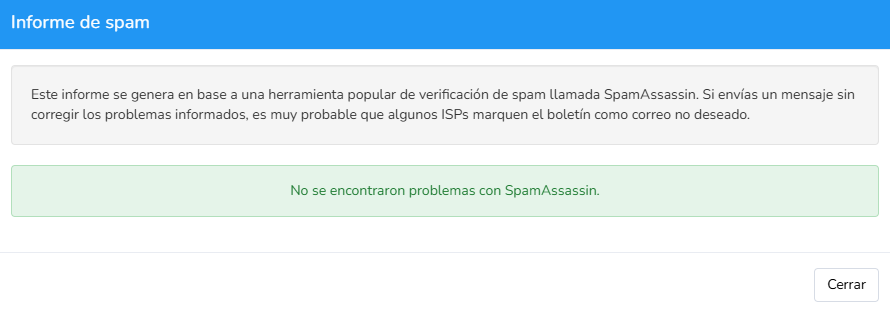
If you find any error message here, it would be advisable to fix it before sending.
Of course, if you don’t know how to do it or have any questions, you can contact our support team so we can help you.
This way you ensure that the newsletter content won’t harm deliverability.
Avoid copying texts from Word documents or web pages.
These texts usually have styles, HTML code, and even hidden links that can result in your email not looking as you expect, or even being categorized as spam.
The recommendation is that if you don’t have much time to write your email, use the editor’s AI options to help you.

Mailrelay’s own IPs to improve the deliverability of your email campaigns
Everything we have seen so far is very important.
But there is a factor that makes Mailrelay help you even more with sending deliverability.
Each email you send goes out from a specific IP address, and receiving email providers keep a record of how each IP behaves (if it sends spam, if many users mark its messages as unwanted, etc.).
Mailrelay has its own high-quality IP ranges, and this is important.
Because in this way, from Mailrelay, we can control the quality of the IPs and what is sent through them.
All automatically so that the IPs are always in the best conditions.
Having our own infrastructure is a great advantage.
Everything is important for the deliverability of your emails
It is important to review all the points we have seen:
- Make sure all settings are correct
- The list must be adequate, not too old, and with contacts who have requested the emails
- The content must be adequate, without errors, and not look like spam
If any of these points are not met, it is possible that some of the emails you send end up in spam.
That’s why if you have any questions, the best thing is to contact our support team so we can help you improve deliverability.