In email marketing, the main thing is for your emails to reach the inbox.
Deliverability measures how many of your emails reach your subscribers’ inboxes.
In Spain, thousands of companies rely on email to communicate with their customers.
However, some of the emails sent never reach the inbox because of spam filters and sender reputation problems.
Increasing that percentage will increase profits.
In fact, email marketing still gets very good results in Spain.
For example, industry studies tend to put the open rate in Spain above the global average.
This shows that Spanish audiences respond very well to email marketing.
So?
Optimizing deliverability will usually bring higher open rates, more clicks and, ultimately, more conversions.
How to avoid landing in spam with bulk sending
Sending bulk emails doesn’t have to mean they end up in spam.
You just have to follow some best practices, and volume won’t be a problem.
· Get your subscribers’ consent:
When you see the results email marketing can deliver, it’s easy to be tempted to buy an email list.
Don’t do that.
Don’t send emails to people who haven’t requested them.
The best approach is to use clear subscription forms and double opt-in (email confirmation) to ensure each recipient really wants your content.
If someone hasn’t told you “yes, I want to receive your emails,” don’t include them in your list; it’s that simple.
Without permission, any bulk sending, no matter how legal it seems, will be considered spam.
· Don’t buy email databases:
This expands a little on the previous point.
Because it’s important.
Purchased email lists will likely contain uninterested contacts, obsolete addresses (bounces) and even spam traps (trap accounts used to detect spammers).
Cleaning these lists is an almost impossible task.
So sending to these types of lists will skyrocket your bounces and complaints, damaging your domain reputation.
Many people mistakenly believe that a first send will clean these lists.
The reality is that this first send can end up getting the sender domain onto blacklists.
· Always include an unsubscribe link and legal details:
Every newsletter or promotional email you send must include an unsubscribe link.
Leaving it out is the easiest way to get it flagged as spam.
This is also easy to do, as Mailrelay handles it automatically for you.
Adding a legal notice is also highly recommended, something similar to what you have on your website, with your contact details.
· Use a reliable and recognizable sender:
Always send from a professional email address on your own domain (for example, your_name@your_company.com).
Avoid generic or suspicious senders like free addresses (Gmail, Yahoo) for bulk campaigns.
They tend to get blocked.
· Take care of content quality:
Anti-spam filters analyze the content of your emails.
The texts, images, links, attachments, everything.
There are some tips that might seem a bit old-fashioned:
- Avoid words or phrases that could be considered “spam”
- Exaggerated offers (“Make money fast!”, “100% free now”)
- Excessive use of $ or € symbols
- Overuse of capital letters or exclamation marks
- Excessive caps, especially in the subject line
Does this mean that using these elements will land the email in spam? And that if you don’t use them, it will reach the inbox?
It’s not that simple.
But you can ask yourself: if I received this email, would it look like spam to me?
The answer to this question will help you.
· Simple design:
The most effective approach is usually not to overcomplicate things.
A simple newsletter, which conveys the message directly, is usually the most effective.
You have to consider that most recipients won’t have much time, so something brief is usually best.
A complex, convoluted design that doesn’t make the goal clear usually performs worse.
In any case, it’s recommended to run tests to adapt your strategy to your audience.
· Send consistently, not all at once:
This is another point you have to be careful with.
If you have never sent a bulk email campaign, suddenly sending to your entire list isn’t the best idea.
Why?
There are several reasons:
- Email providers have no history of sends from your domain, so they may be suspicious.
- If the list is getting outdated, it’s very possible that many emails will bounce, generate errors, etc.
- It’s also possible that contacts, if some time has passed without receiving emails from you, won’t remember subscribing and will flag you as spam
In short, a common mistake is accumulating a huge list and suddenly sending 100,000 emails at once after months of inactivity.
These sudden spikes in volume can trigger alerts at providers (especially if you haven’t sent anything before).
It’s better to increase your volume gradually, and from then on keep a steady sending volume.
· Keep your contact list clean:
Keeping the contact list clean helps a lot to maintain good deliverability.
If your contact list returns many bounces.
Or you keep trying to send to those bounces.
That sends a bad signal to the different ESPs.
The same goes if you receive a lot of spam complaints, or keep sending to addresses that asked to unsubscribe.
Mailrelay helps you keep your contact list clean by detecting bounces, managing unsubscribes, and handling spam complaints.

Mailrelay interface: simple to use and powerful in features
An easy-to-use email marketing tool saves you time and allows you to focus on the more creative parts.
The Mailrelay dashboard is therefore very intuitive:

Why can this interface help you work better?
Mainly because the menus are organized logically, with some shortcuts for the most important actions.
This way you don’t waste time looking for the menu you need.
It also shows a general summary of the statistics for the latest email campaigns you have sent.
From this main screen, by using shortcuts, you can:
- Import contacts (for example from a CSV)
- Create a newsletter
- Create an automation
- Create a landing page
The rest of the actions can be carried out directly from the side menu, organized by themes/categories.
For example:
- From the subscribers menu: you can create groups, dynamic segments, custom fields, subscription forms and imports
- In the newsletters menu: you can create your newsletter designs (and send them), RSS newsletters, senders and A/B tests
- Reports: reports on sent newsletters, automations, SMTP emails and your account plan statistics
- Automations: where you can create different types of automations (sign-up, drip campaigns, etc.)
- Landing pages: from this section you can create landing pages, insert forms in them and share them in your lead generation campaigns.
- Media manager: lets you upload images to use in the design of your newsletters
- SMS: to create and manage SMS campaigns
- WhatsApp: here you can create and manage WhatsApp message campaigns
- Settings: in this important menu you’ll find, among other things, the general account settings (including the time zone), SMTP and API settings, event management and the wording of system emails (the emails sent when a contact signs up, etc.)
We will see this in more detail in the next sections.
But it’s worth highlighting that the Mailrelay editor includes AI capabilities, so not only can you save a lot of time writing your emails, but you can also avoid deliverability issues.
Why is this so?
Because the newsletter texts, as we have seen before, affect deliverability, and that’s why well-written texts will be more effective.
If you don’t have time or experience, we recommend trying the Mailrelay AI newsletter assistant.

The state of email deliverability in Spain: figures and reality
Deliverability is not a static measure that stays the same over time; quite the opposite, it adapts and reflects the measures that ESPs (such as Gmail, Outlook and Yahoo!) take against spam.
Generally speaking, industry studies agree that some emails don’t reach the inbox.
In other words, out of every 100 emails, some may end up in spam, bounce or not be delivered.
But this is at a general level.
Averages are like that: they don’t necessarily reflect the exact reality of each particular case, especially if you do things right.
What is deliverability like in Spain today?
The truth is that the performance of email marketing campaigns has even improved in recent years.
Industry studies tend to put the average campaign open rate in Spain above the global average.
If we compare this data with other online marketing channels, such as SEM, SEO, social media, etc. We can observe that email marketing is much more effective.
A good open rate usually indicates that emails are reaching the inbox.
What can we consider a good deliverability rate?
As a rough benchmark, a deliverability rate of 90% or higher is usually considered good.
If it is lower, the reasons should be analyzed (email list, message, settings, etc.).
Of course, the better this figure is, the better the campaign results will be.
Gmail as the preferred email provider in Spain
This is another important factor to consider.
Email providers.
In Spain, Gmail dominates a large part of the market, followed by Outlook/Hotmail and corporate services.
Alright.
These services are tightening their authentication and reputation requirements.
We already covered this in the article on Gmail, Outlook and Yahoo’s anti-spam requirements.
But we can summarize some of these policies to refresh them here:
- Google and Yahoo require configuring DMARC for sending to more than 5,000 contacts/day
- Include a working unsubscribe link and keep your spam complaint rate below 0.3%
What’s more, the volume of marketing emails sent in Spain keeps growing year after year.
And as other online marketing tools continue to lose their effectiveness, this volume will keep growing.
Because companies need to run effective marketing campaigns that yield results.

SPF, DKIM, and DMARC: why you need to configure them (and how Mailrelay helps you)
If you want your emails to reach the inbox of Gmail, Outlook, and others, there is an essential aspect that can’t be ignored.
SPF, DKIM, and DMARC settings.
These three terms refer to email authentication protocols that serve to prove to destination servers that your messages are legitimate and actually come from your domain.
That’s why they are so important.
· SPF (Sender Policy Framework):
It is a DNS record that tells receiving email servers which servers or IPs are authorized to send email on behalf of your domain.
For example, if your domain is mycompany.com and you send emails using Mailrelay, in your SPF record you will indicate that Mailrelay servers can send emails on behalf of mycompany.com.
When Gmail receives a message from you, it will check that SPF record; if it finds the sender’s IP there, it will trust the email more.
On the other hand, if someone tries to impersonate you by sending from another unauthorized server, the SPF check will fail and the message will likely be rejected or marked as spam.
· DKIM (DomainKeys Identified Mail):
It’s like a digital signature.
When you enable DKIM, your provider (Mailrelay, in this case) will include an encrypted signature in the header of every email you send.
Receiving servers can verify that signature with the public key you publish in your DNS.
If the signature matches, it means that the email content was not altered and that it was really sent by a server authorized by you.
In short, DKIM guarantees the integrity and authenticity of the message.
· DMARC (Domain-based Message Authentication, Reporting & Conformance):
This is the third pillar, and the most recent one.
DMARC relies on SPF and DKIM: it allows specifying a policy on what to do if an email fails SPF/DKIM.
With DMARC, you as the sending domain tell receivers “reject emails that claim to be mycompany.com if they don’t pass SPF/DKIM” or perhaps “send them to spam/quarantine”.
Furthermore, DMARC requires that the From: address visible to the user matches the authenticated domain, avoiding spoofing tricks.
· Why are these settings essential for good deliverability?
Because without these settings, email providers will most likely reject the emails outright or leave them in the spam folder.
It doesn’t matter if you send one email or thousands, these settings are necessary.
Without them, it’s not possible to know if your emails are really sent by you, or by anyone pretending to be you.
Therefore, they are settings that directly affect deliverability, since without them emails are much more likely to be marked as spam.
Mailrelay not only lets you configure these settings, but also helps you check that they are always correct.
Just go to the Settings – Email authentication menu:
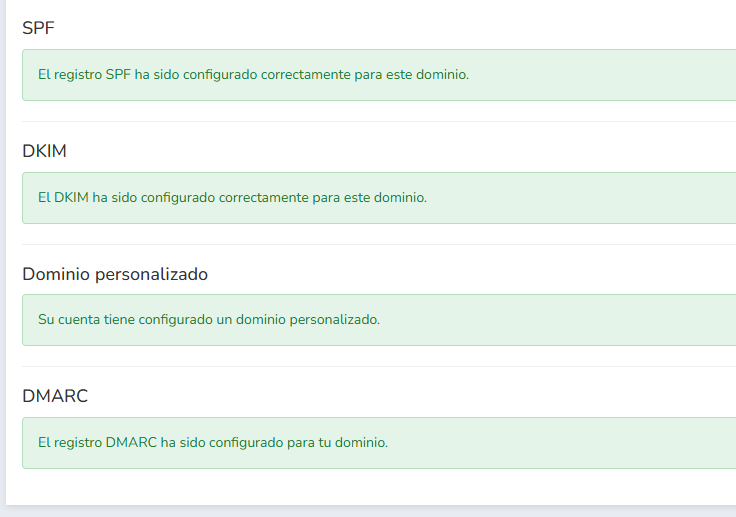
If any setting isn’t correct, it shows you the changes that need to be made.
And you would also find a link, which you can send to your domain provider so they can help you add these settings.
Of course, our support team will also help you with these settings.
It’s best not to send bulk emails without these settings; check them first.

Mailrelay editor, designed for the deliverability of your email campaigns
The content of your emails affects deliverability, as we have been discussing.
What can happen if the content of your emails resembles spam emails?
Well, basically this:

If the content of your emails looks like spam, it is quite likely that Gmail and others will categorize it as spam.
Simply because it looks like it.
What things can make your email look like spam?
- The email’s text (words, errors, overall topic…)
- Errors in the HTML code
- Linked domains and URLs (if they are suspicious or on blacklists)
- Link shorteners (in some cases)
- Excessive use of images or lack of text (for example, if the email is simply an image)
- Recently created domain sending a large volume of emails
Is it understandable that you’d want to send an email that is just a single image?
Yes, of course, the problem is that, historically, spammers have done precisely that.
So much so that email providers are suspicious of this practice.
Luckily, the Mailrelay editor helps you avoid these problems.
· How can the Mailrelay editor help you?
We’ll look at several ways; to start with, it can suggest subject lines using AI:
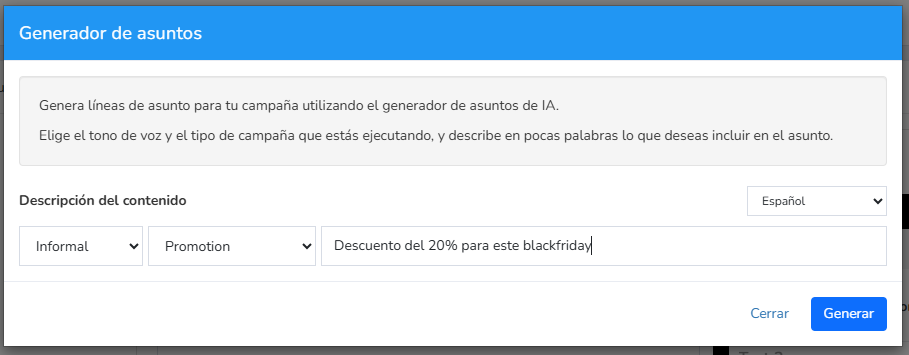
You just have to give it some basic instructions, such as the tone, the type of subject line and a brief description.
With this data, it will suggest some options:
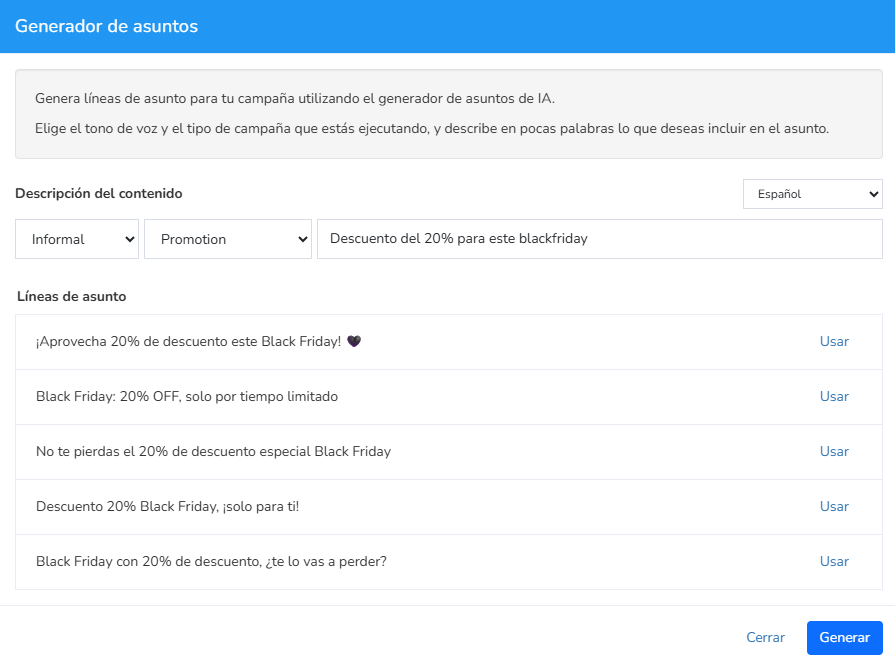
They may not be the best subject lines in the world, but as a starting point they aren’t that bad.
If you don’t have many ideas, use this tool to get suggestions.
The subject line of your emails is very important.
For the content, you can also use AI options:
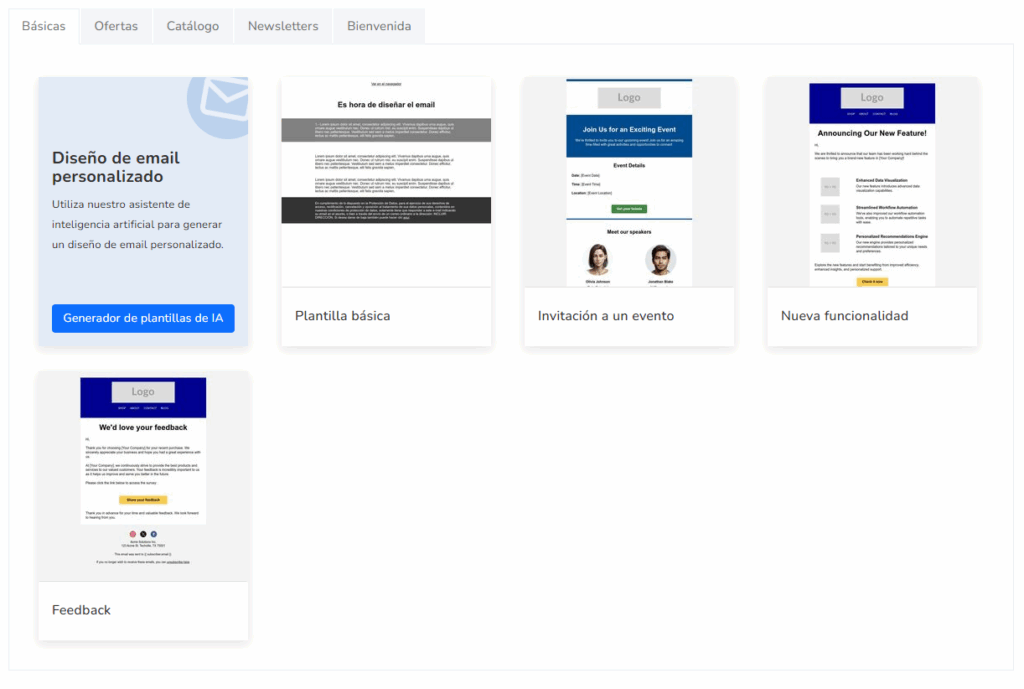
If you select this option, it will only be necessary to enter some basic information:
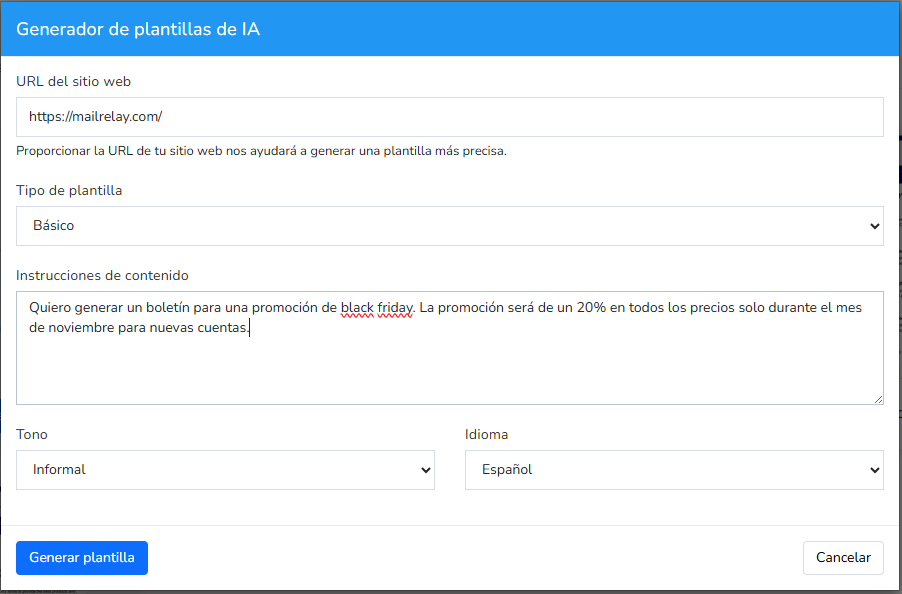
And the generated example would be something like this:

It’s something very simple, yes, but you already have a base text to work with.
The important thing is that if you decide to include several images, this base text will help ensure your email at least has some text, which is essential.
From this base, you can start adding the elements you need:
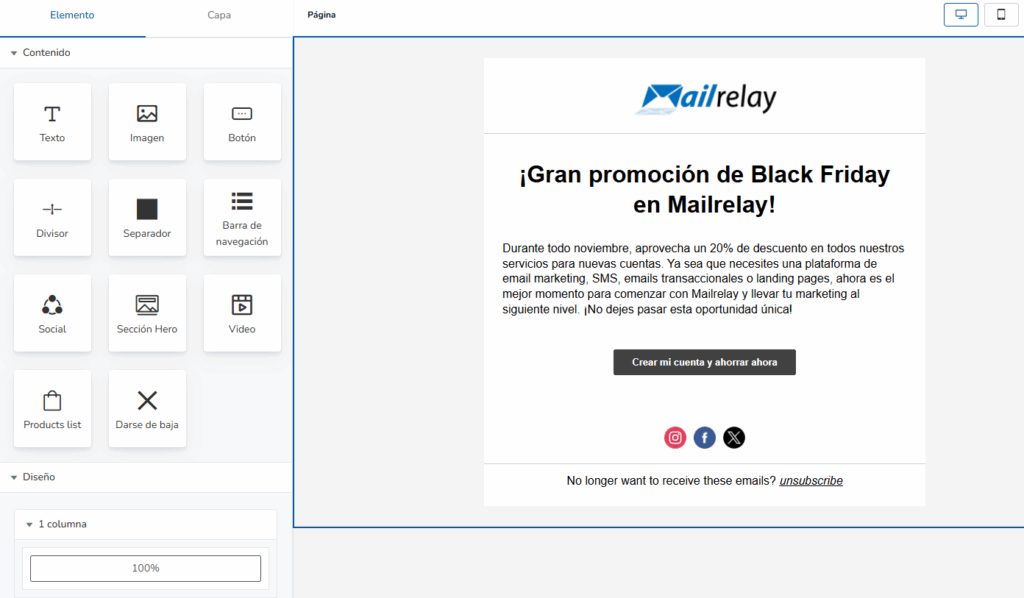
You can add all kinds of blocks you need:
- Text
- Image
- Button
- Dividers
- Spacers
- Navigation bars
- Social block
- Hero
- Video
- Product list (Woocommerce)
- Unsubscribe block
- Columns
Adding them couldn’t be easier: just drag them wherever you want them.
This editor generates correct HTML code so you don’t have problems with different email providers.
Since you don’t need to know or modify HTML, it’s not possible for you to make a mistake on this point.
· Spam rating and report
Before sending your newsletter, it’s useful to check for possible errors that could cause the email to be considered spam.
You can find this report while editing the newsletter:
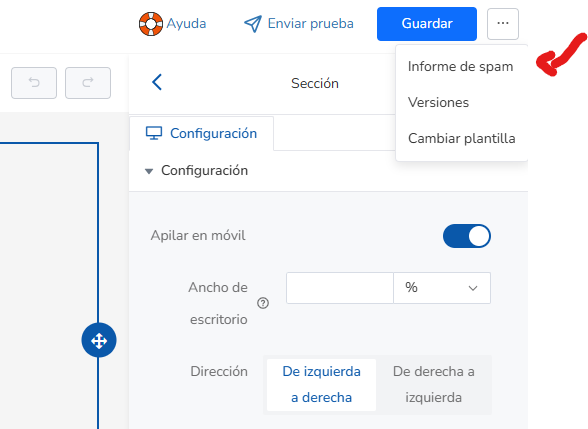
This link will take you to a report on the newsletter content:
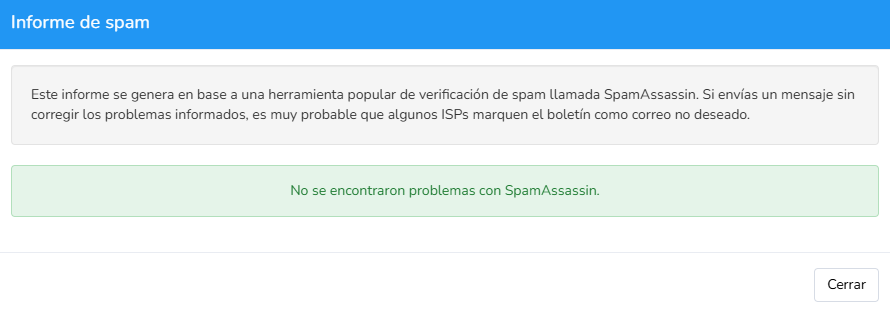
If you find any error message here, it would be advisable to fix it before sending.
Of course, if you don’t know how to do it or have any questions, you can contact our support team so we can help you.
This way you ensure that the newsletter content won’t harm deliverability.
Avoid copying texts from Word documents or web pages.
These texts usually have styles, HTML code, and even hidden links that can result in your email not looking as you expect, or even being categorized as spam.
The recommendation is that if you don’t have much time to write your email, use the editor’s AI options to help you.

Everything we’ve covered so far depends on you: your list, your content and your settings. But the provider’s infrastructure matters too.
Every email you send goes out from an IP address, and email providers keep track of how each one behaves: whether it sends spam, gets a lot of complaints or has a lot of bounces.
All Mailrelay accounts send from Mailrelay’s own IP ranges, shared among senders. These IPs are already warmed up and have a sending history, so you don’t have to start from scratch with a new IP that has no reputation.
What’s more, Mailrelay is built entirely on its own in-house technology, so we control both the infrastructure and what is sent through it.
· Automatic, continuous monitoring
The platform has monitoring systems that work automatically:
- They check whether any IP address has been added to a blacklist.
- They process spam complaints through integrations with email providers.
- They spread the load and absorb sending peaks, for example when you increase the sending speed from the dashboard.
· List cleaning and anti-spam policy
Mailrelay detects bounces and handles unsubscribes and spam complaints automatically, and includes automatic list cleaning on every plan.
In addition, every account must comply with Mailrelay’s anti-spam policy. This protects the reputation of all the senders who share an IP.
· Dedicated IPs: when they make sense
If you send large volumes on a regular basis, or need your reputation not to depend on any other sender, you can get one or more dedicated IPs.
In that case your reputation depends only on your own sending, and the IP needs a warm-up period (IP warming) before you send your full volume.
Dedicated IPs are purchased separately: 1 dedicated IP costs €600/year, 8 IPs €3,360/year and 32 IPs €7,680/year. You’ll find all the details in more Mailrelay services.
| Aspect | Shared IP | Dedicated IP |
|---|---|---|
| Reputation | Shared with other senders and looked after by the platform | Depends only on your own sending |
| Warm-up | Not needed: the IP already has a history | Required before sending your full volume |
| Who it is for | Most senders, including on the free account | Consistently high volumes or companies that want to isolate their reputation |
| Price | Included in every account | From €600/year |
· Critical campaigns
For especially important campaigns, the ESP consulting service lets a Mailrelay systems administrator monitor the sending and pause it if they detect any warning signs. You’ll also find it in more Mailrelay services.
Everything is important for the deliverability of your emails
It is important to review all the points we have seen:
- The settings must be in place and configured correctly
- The list must be suitable, not too old, and made up of contacts who have requested the emails
- The content must be suitable, error-free and not look like spam
If any of these points are not met, it is possible that some of the emails you send end up in spam.
That’s why if you have any questions, the best thing is to contact our support team so we can help you improve deliverability.
Frequently asked questions about deliverability with Mailrelay
· Does Mailrelay have better deliverability than SendGrid?
No provider can guarantee that every email reaches the inbox, because deliverability also depends on domain authentication, list quality and content.
What Mailrelay provides is the infrastructure and the tools: its own IPs with automatic monitoring, SPF, DKIM and DMARC checks in the dashboard, automatic list cleaning and a spam report in the editor.
If you’re comparing providers, our comparison of tools with the best deliverability shows what each one offers. And how to choose an email marketing service with high deliverability covers what to look for before signing up.
By default, all accounts send from Mailrelay’s shared IPs, which are already warmed up and monitored. If you need them, you can get dedicated IPs from €600/year.
· Can I check whether my emails might go to spam before sending them?
Yes. The Mailrelay editor includes a spam report that checks the newsletter content before sending. And in Settings › Email authentication you can check whether SPF, DKIM and DMARC are set up correctly.

Jose Argudo
CMO at Mailrelay. Writes about email marketing, copywriting, and conversion for small businesses and entrepreneurs.