
To choose an email marketing service with high deliverability, check six things: that it lets you authenticate your domain with SPF, DKIM and DMARC, that it removes bounces and complaints automatically, how it looks after its shared IPs and whether it offers a dedicated IP, that it meets Gmail and Yahoo requirements, where its servers are, and what support you’ll get if something goes wrong.
No provider can guarantee that all your emails will reach the inbox. Part of it depends on the platform and part of it on you: on how you get your contacts and what you send them. Here are both.
“Deliverability is a key factor in any email marketing campaign and needs constant care: from the foundation, which is how you get your contacts’ emails, to the content you send and how easy you make it to unsubscribe. More volume, more sales? It’s tempting to think so, especially when your results are already good. But don’t buy lists, because the opposite usually happens. Those contacts don’t know you, they complain, and among them are trap addresses that mailbox providers use to detect spam. Your deliverability drops and you lose what you already had.”
Jose Argudo, CMO at Mailrelay
What deliverability is and why it matters when choosing a service
Deliverability is the percentage of emails that reach the inbox, rather than spam or nowhere at all.
It’s what decides whether your campaign works. If you send 10,000 emails and only 85% reach the inbox, every campaign loses 1,500 readers before it even starts. However good your offer is, those contacts won’t see it.

The 6 things a service with high deliverability must offer
Every platform claims to have good deliverability. To check it, go over these six points before signing up.
1. Authentication with your own domain
The platform should let you set up SPF, DKIM and DMARC with your domain, and guide you through it. Without authentication, Gmail and Outlook distrust your emails from the very first send.
2. Automatic handling of bounces, unsubscribes and complaints
Hard bounces, unsubscribes and spam complaints should be removed from your list automatically. If you keep sending to addresses that don’t exist or to people who have already complained, your reputation drops.
With a normal volume, a well-maintained shared IP works well and doesn’t need warming up. Ask how the provider monitors it: blacklists, complaints and control over the accounts that send from it. If you send high volumes consistently, check whether you can get a dedicated IP. You’ll find what each tool offers in our comparison of the tools with the best deliverability.
4. Gmail, Yahoo and Outlook requirements
Since 2024, Gmail and Yahoo require anyone sending more than 5,000 emails a day to have authentication, one-click unsubscribe and a complaint rate below 0.3%. Outlook followed in 2025. The platform should make it easy for you to meet them. We explain them in what Outlook, Gmail and Yahoo require.
5. Servers in the European Union
If your contacts are in Europe, keeping the data in the EU helps you comply with the GDPR and simplifies contracts with your clients.
6. Support when something goes wrong
Deliverability problems aren’t solved with a generic article. Check whether you’ll get help from a real person on the plan you’re going to use, and whether they know about authentication, bounces and blacklists.
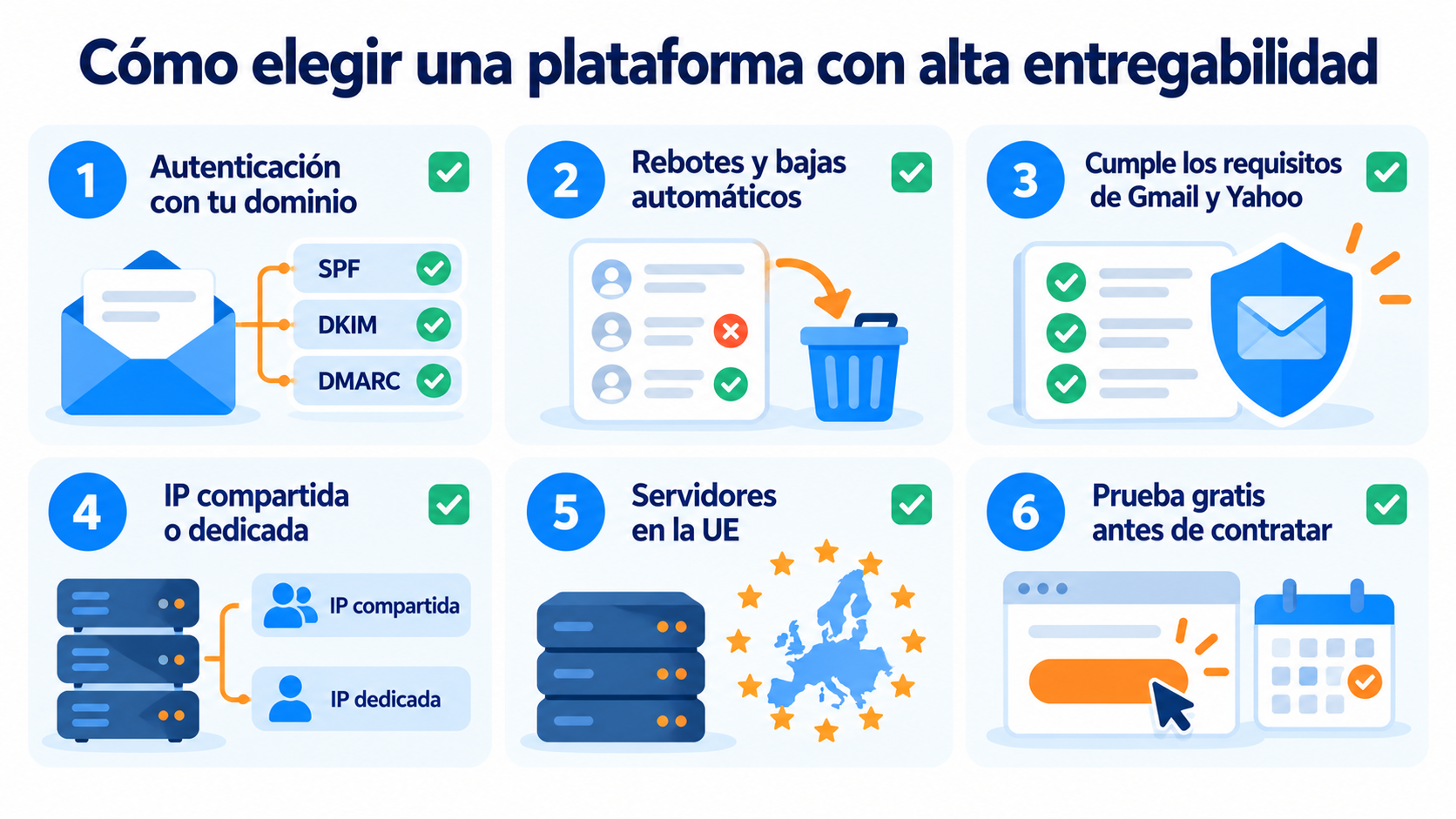
Test your deliverability with a free account
Send a test campaign to your own accounts and see where it lands.
It’s the most common technical question when comparing services. This table sums up the difference:
| Aspect | Shared IP | Dedicated IP |
|---|---|---|
| Reputation | Shared with other senders and looked after by the platform | Depends only on your own sending |
| Warm-up | Not needed: the IP already has a history | Needs to be warmed up gradually |
| Recommended volume | Low or medium, or irregular sending | High and consistent |
| Cost | Included in the plan | Paid separately |
A dedicated IP with low volume can work against you: mailbox providers don’t have enough history to trust it. For most SMEs, a well-monitored shared IP is the best option.
What depends on you
The best platform can’t make up for a bad list. These practices are as important as the service you choose.
Get your contacts with permission
Don’t buy lists. Use your own forms and, if you can, double opt-in. That way you avoid fake addresses and spam traps.
Send content your contacts expect
Mailbox providers look at whether people open, click or delete your emails without reading them. Segment your list and send each group what interests them.
Keep a steady pace
Sudden spikes in sending alert the filters. If you’ve never done bulk sending, start gradually.
Check your campaigns before sending them
A spam analysis detects broken links, suspicious words or code problems. In Mailrelay, you have it right in the newsletter editor:

Measure and adjust
Check bounces, complaints and unsubscribes after each send. If they go up, something has changed in your list or your content.
Set up SPF, DKIM and DMARC in minutes
Follow our step-by-step tutorial to authenticate your domain in Mailrelay.
How to check deliverability before signing up
The most reliable way to find out whether a service delivers well is to try it:
- Open a free account and authenticate your domain.
- Send a test campaign to your own Gmail, Outlook and Yahoo accounts.
- See where it lands: primary inbox, promotions or spam.
- Run it through a spam checker, such as mail-tester, and check the score.
How Mailrelay helps you
At Mailrelay, we look after the deliverability of every account, including free ones.
| What you need | How Mailrelay solves it |
|---|---|
| Authenticate your domain | SPF, DKIM and DMARC, with a step-by-step tutorial |
| IPs with a good reputation | Our own shared IPs, already warmed up and monitored automatically (blacklists and complaints) |
| More control if you send a lot | Dedicated IPs from €600 a year |
| A clean list | Automatic removal of bounces, unsubscribes and complaints on all plans |
| Check before sending | Spam analysis in the newsletter editor |
| Data in Europe | Servers in the European Union |
| Help when something goes wrong | Human support by ticket on all plans, chat from Standard and phone on Enterprise |
All accounts must comply with our anti-spam policy, and we review new accounts’ activity to protect the reputation of the IPs you share with other senders. We explain it in detail in how Mailrelay protects deliverability.
Start sending for free
Up to 80,000 free emails a month, with human support on every plan.
Frequently asked questions about choosing a service with high deliverability
Which email marketing service has the best deliverability?
No provider can guarantee that all your emails will reach the inbox, because deliverability also depends on your list, your content and your domain authentication. What you can compare is how each provider manages its IPs, what tools it offers and what support it provides. We cover it in the comparison of the tools with the best deliverability.
Almost all email marketing platforms send from shared IPs by default: Mailrelay, Brevo, Mailchimp, Mailjet and MailerLite, among others. What makes the difference is how they look after them: whether they monitor blacklists, process complaints and control which accounts send from them. At Mailrelay, the shared IPs are our own, already warmed up and monitored automatically.
Which email marketing services have a good IP reputation?
The reputation of a shared IP depends on everyone who sends from it. That’s why the platforms with a good reputation are the ones that require permission, review new accounts and remove bounces and complaints automatically. Ask about it before signing up and do a test send to your own accounts.
For most senders, a well-monitored shared IP works well and doesn’t need warming up. A dedicated IP makes sense if you send large volumes consistently and want your reputation to depend only on your own sending.
How does Mailrelay protect its customers’ deliverability?
With its own shared IPs, monitored automatically. The platform monitors blacklists and spam complaints, spreads the load and reviews account activity. It also includes automatic list cleaning and requires all accounts to comply with its anti-spam policy.
Can I test Mailrelay’s deliverability before paying?
Yes. The free account lets you send up to 80,000 emails a month to 20,000 contacts. That way you can measure the results with your own list before changing plans.

Jose Argudo
CMO at Mailrelay. Writes about email marketing, copywriting and conversion for SMEs and entrepreneurs.