DNSBL: what it is, how it works and what "blocked by DNSBL" means
The list that makes a server reject your email before reading it: how it detects you, why it lists you and how to get off it
If an email has bounced back to you with the message “blocked by DNSBL”, the receiving server rejected it because the IP that sent it is on a blocklist. It is not a problem with your mailbox or the recipient’s.
Here you’ll find what a DNSBL is, how the lookup works, what that bounce means and what to do to get off the list.
What is a DNSBL?
A DNSBL (DNS-based Blackhole List or Domain Name System Block List) is a list of IP addresses associated with sending spam that is queried through the DNS system. Mail servers use it to decide, in milliseconds, whether to accept or reject a message.
It is the most widespread type of blacklist in email. You will also see the name RBL (Real-time Blackhole List), which in practice is used as a synonym. How it works technically is described in the IETF’s RFC 5782.
The first one was the MAPS RBL, created in 1997 by Paul Vixie and Dave Rand. Today there are dozens, each with its own criteria for listing and delisting addresses.
How does a DNSBL work?
The lookup relies on DNS, the same system that translates domain names into IP addresses. That way, any server can query the list without downloading all of it.
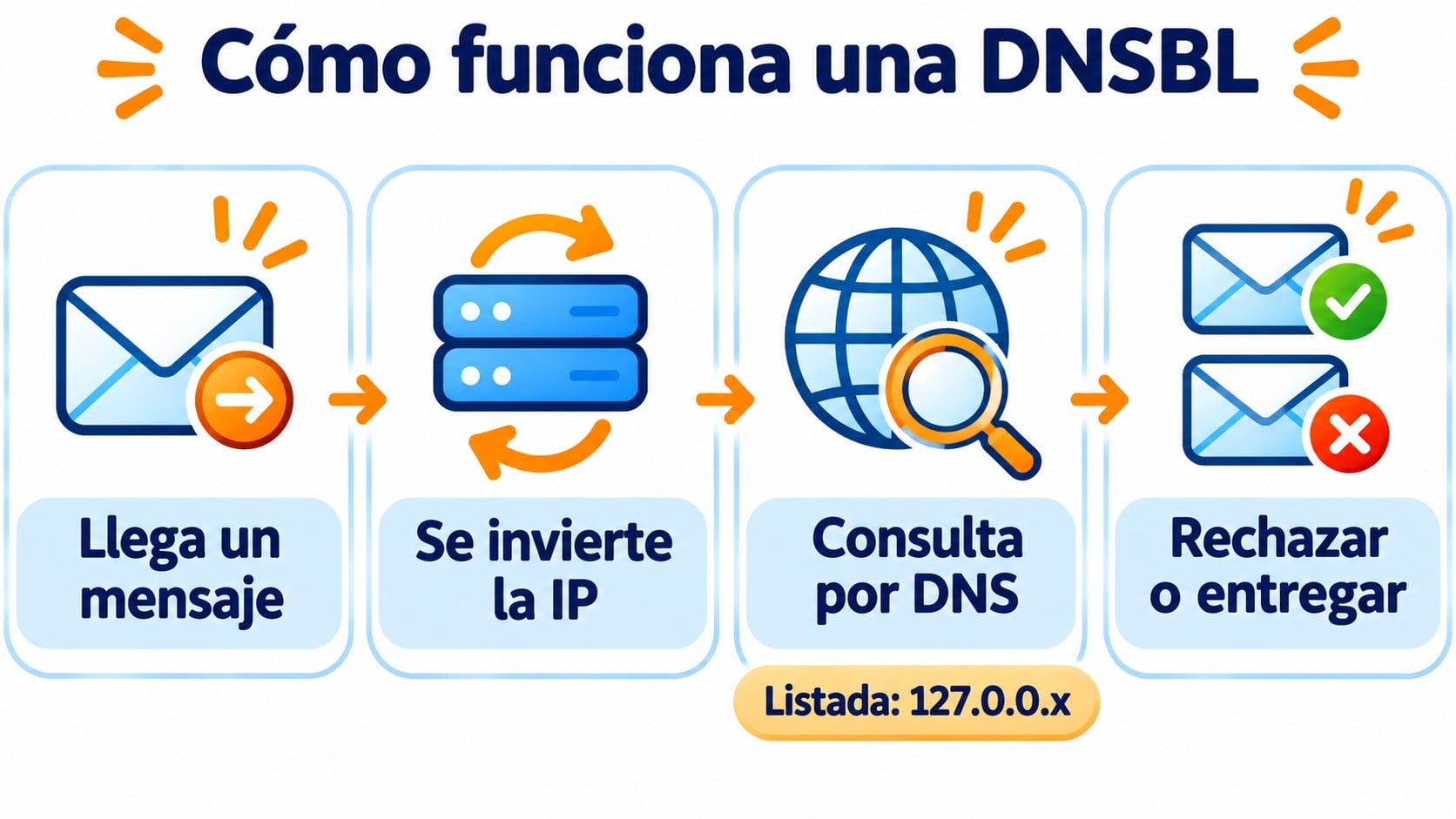
- A message arrives. The receiving server sees the IP trying to deliver it, for example 192.0.2.25.
- It reverses the IP and looks it up. It queries 25.2.0.192 followed by the list’s domain, such as zen.spamhaus.org.
- It reads the response. If the IP is not listed, there is no response. If it is, the list returns an address of the form 127.0.0.x, which indicates the reason.
- It decides. Depending on its policy, it rejects the message, sends it to spam or adds points to it in its filter.
Send without worrying about your IP reputation
Double opt-in on every signup, hard bounces removed automatically and human support if something bounces. 80,000 free emails a month.
What “blocked by DNSBL” means
It is the text of a bounce. The recipient’s server checked one or more lists, found the sending IP and rejected the email before accepting it. It usually comes with a 550 or 554 code and often with the name of the list and a link to check the reason.
| Part of the bounce | What it tells you |
|---|---|
| 550 or 554 code | Permanent rejection. The message will not be delivered even if you retry. |
| List name | Which DNSBL has blocked you (Spamhaus, Barracuda, SpamCop…). |
| IP shown | The IP that is listed. It may be your server’s or your provider’s. |
| Link | The list’s page where you can see the reason and request delisting. |
If you send from your company email, the listed IP is usually your server’s or your hosting provider’s. If you use an email marketing platform, contact its support before changing anything.
The best-known DNSBLs
Not all of them carry the same weight. The ones used by the major providers and corporate anti-spam gateways have a much bigger effect on your deliverability.
| List | What stands out | How to get delisted |
|---|---|---|
| Spamhaus | The most widely used. Its ZEN list combines several lists. | Form on its website, after fixing the cause. |
| Barracuda (BRBL) | Used by its corporate filters. | Removal request at Barracuda Central. |
| SpamCop | Fed by user reports. | Expires on its own if reports stop coming in. |
| UCEPROTECT | It can list entire IP ranges. | Automatic expiry or paid removal. |
Other well-known lists, such as SORBS, no longer exist. SORBS shut down in June 2024, so if any system still queries it, you should remove it from its configuration.
Why your IP ends up on a DNSBL
Lists don’t penalize anyone at random. There is almost always one of these causes behind it:
- Spamtraps. You send to trap addresses that never subscribed, which is typical of purchased or very old lists. We explain this in spamtraps.
- Complaints. Many recipients mark your emails as spam.
- Bounces. You send to many addresses that don’t exist.
- Compromised devices. An infected computer or a stolen account sends spam from your network without you knowing.
- Misconfigured server. A server that accepts relaying mail from anyone (open relay) gets listed very quickly.
How to get off a DNSBL
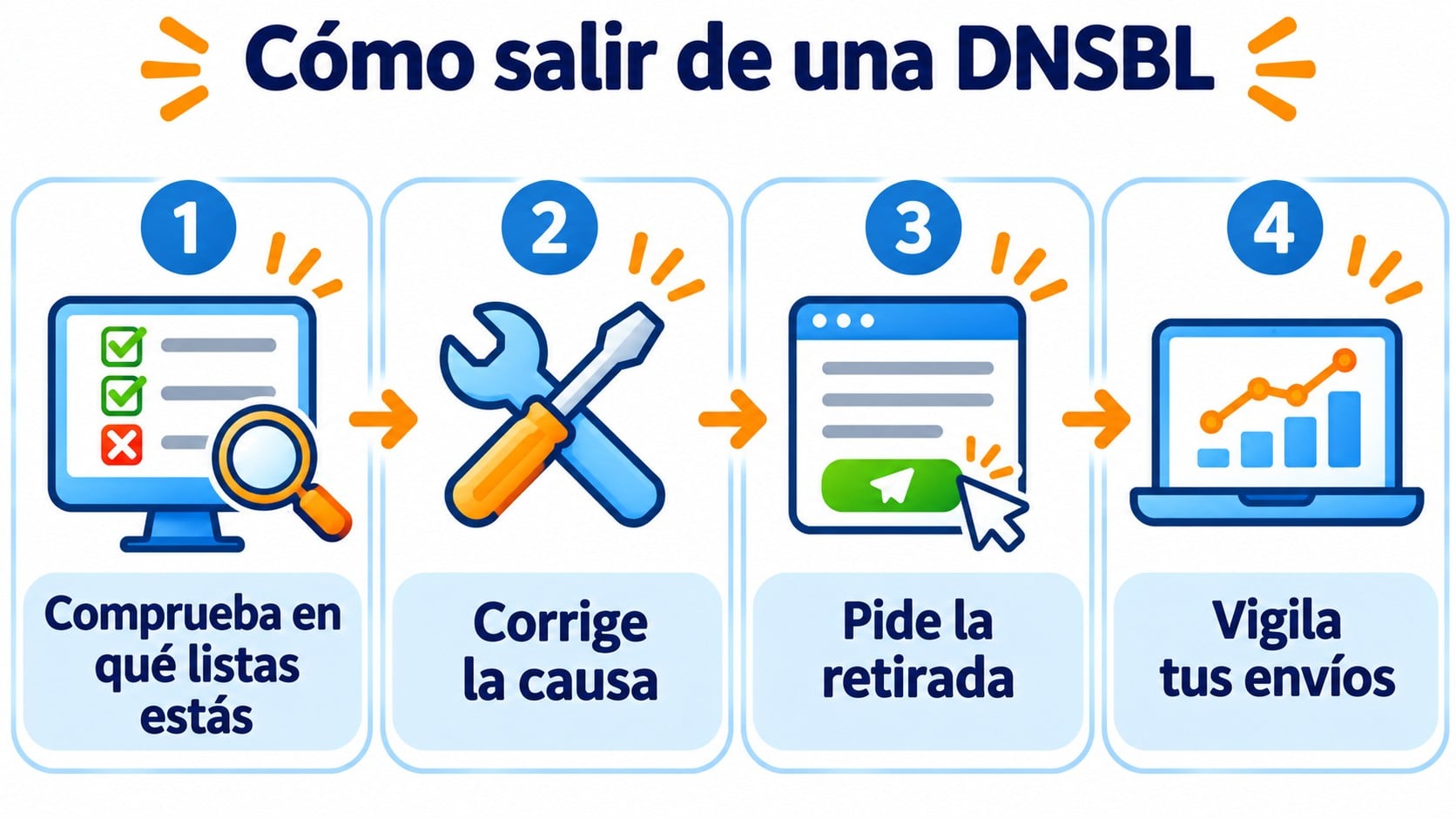
- Check which lists you are on. Look up the IP from the bounce on each list’s website or in a checker that covers several at once.
- Fix the cause. Clean your contact list, close the compromised account or fix the server. If you request delisting without fixing anything, you will be listed again.
- Request delisting. Use the form of the list that is blocking you. Some remove the IP on their own after a few days.
- Monitor your next sends. Keep an eye on bounces and complaints for a few weeks to confirm that everything is back to normal.
How Mailrelay helps you
With Mailrelay, you don’t manage the reputation of the sending IPs yourself. Signups always use double opt-in, which keeps out trap addresses and addresses that nobody has confirmed. Hard bounces are flagged as bounced and no longer receive your sends.
You can set up SPF and DKIM for your domain and, if your volume justifies it, work with a dedicated IP. If a send bounces because of a blocklist, you get human support on every plan to look into it, including the free account with 80,000 emails a month to 20,000 contacts.
Keep your campaigns off blocklists
Create your free account, set up SPF and DKIM and send to 20,000 contacts with lists that have confirmed their signup.
Frequently asked questions
What is the difference between DNSBL and RBL?
In practice, none. RBL was the name of the first list of this kind and it stuck as a general term. DNSBL describes how they are queried: through DNS.
How long does it take for an IP to get off a DNSBL?
It depends on the list. Some remove the IP within hours of the request and others let it expire on its own after a few days if there are no new problems.
Does being on a DNSBL affect Gmail or Outlook?
Gmail and Outlook mainly use their own reputation systems. Even so, being on lists like Spamhaus usually goes hand in hand with deliverability problems with those providers, because the causes are the same.
Key takeaways about DNSBLs
A DNSBL is a list of IPs that servers query via DNS to reject spam. If you get a “blocked by DNSBL” bounce, check which list is blocking you, fix the cause and request delisting. The best prevention is to send only to contacts who have confirmed their signup.