Email throttling: why your emails get stuck in the queue and how to avoid it
When the receiving server slows down your emails: what queued emails mean and how to send without running into the providers' limits
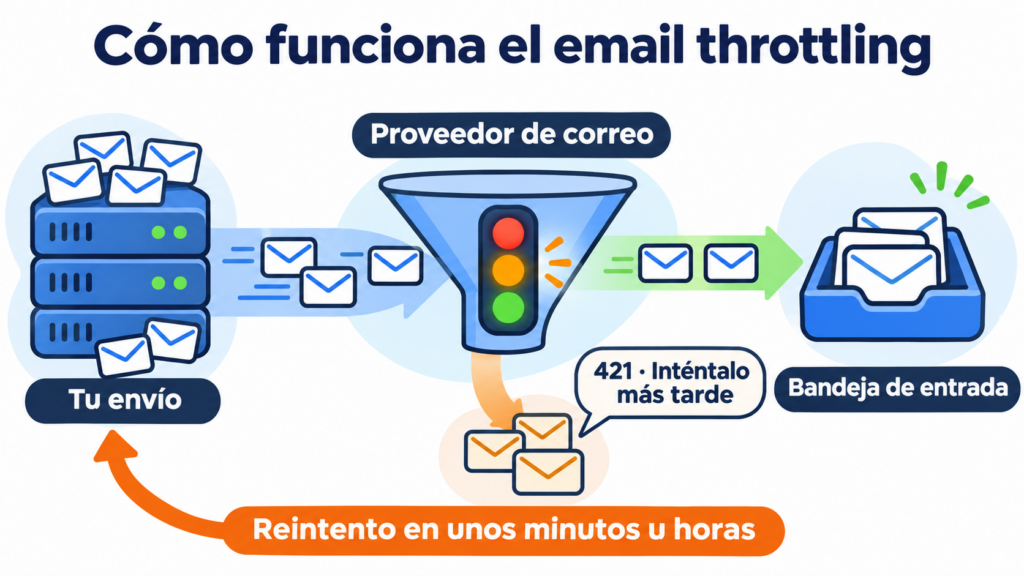
Email throttling is the brake a mailbox provider such as Gmail, Outlook or Yahoo applies when it receives too many emails from the same sender in a short time. It accepts some of them and asks for the rest to be resent later.
The term is also used for the opposite: when the sender spreads their sending over time so as not to trigger that brake.
Both sides share the same goal: getting your emails into the inbox.
What is email throttling?
Throttling means “choking” or “regulating the flow”, like the throttle valve of an engine. In email, it means limiting the rate at which messages are let in.
Each provider decides how many emails per minute or per hour it accepts from each sender. That allowance depends above all on your sender reputation.
If you send faster than it allows, the server replies with a temporary error and your sending tool tries again later.
That is why, with email throttling, emails are not lost: they are delayed. Part of the campaign arrives within minutes and another part takes hours.
It is worth not confusing it with other related concepts:
| Term | What it is | What happens to the email |
|---|---|---|
| Email throttling | The receiving provider limits the incoming rate | It is delayed and retried |
| Sending limits | Maximum number of emails your mailbox or platform lets you send | It is not sent until the quota resets or you upgrade your plan |
| Soft bounce | Temporary error for any reason, such as a full mailbox | It is retried and, if it keeps failing, it counts as a bounce |
| Greylist | The server deliberately rejects the first attempt from an unknown sender | It arrives on the second attempt |
| Block | The provider rejects your emails permanently | It is not delivered |
Why do providers slow down your sending?
Providers apply email throttling to anything that looks like spam. A sender that suddenly sends thousands of emails could be a company running a campaign or an infected computer. Until they are sure, they let the emails through little by little.
These are the situations that trigger it most often:
- A volume that is unusual for you. Sending ten times more than usual, or coming back after months without sending.
- A new IP or domain with no history. That is why IP warming is done.
- Spam complaints and addresses that do not exist. They show that the list is not well maintained.
- Lack of authentication. Gmail limits emails that do not pass SPF, DKIM or DMARC.
- Low engagement. If many recipients ignore or delete your emails, the provider trusts you less.
Send without worrying about the queue
Mailrelay retries the emails the provider holds back for you and shows you their status in every mailing, on the free account too.
How to tell if you are being throttled
The clearest sign is a campaign that takes hours to be delivered to one particular provider, while it reaches all the others right away. In your statistics you will see these as queued, pending or deferred emails.
The receiving server explains it in its response. Codes that start with 4 are temporary errors: the email can be retried. These are the most common:
| Provider | Code | What it means |
|---|---|---|
| Gmail | 421 4.7.28 | Gmail has detected an unusual rate of emails from your IP or domain and is temporarily limiting it |
| Gmail | 421 4.7.0 | The sending IP has a very low reputation |
| Gmail | 421 4.7.26, 4.7.27, 4.7.30 and 4.7.40 | The email is limited because it is not authenticated or does not pass SPF, DKIM or DMARC |
| Gmail | 450 4.2.1 | The recipient is receiving emails too quickly |
| Yahoo | 421 4.7.0 [TSS04] | Messages delayed due to unexpected volume or user complaints |
| Outlook and Hotmail | 451 4.7.650 | The IP is temporarily limited because of its reputation |
The email standard, the SMTP protocol, provides for these cases. It recommends retrying with at least 30 minutes between attempts and not giving up before 4 or 5 days. Email marketing tools do this automatically.
What to do if your emails are stuck in the queue
The first thing to do is nothing for a few hours. The system is already retrying and most of the emails end up being delivered.
Then follow these steps:
- Check the queue after about four hours. If the number of pending emails goes down, delivery is progressing.
- See which provider is affected. If it is only one, the problem is your reputation with that provider. Check in Google Postmaster Tools how Gmail sees you.
- Review what has changed. A higher volume than usual, a new list or months without sending explain most cases.
And above all, do not rush to send again:
If you see that your last campaign has a lot of queued emails, do not send another campaign to the same group of contacts. It could make the problem worse. Instead, contact our support team so they can analyze what may be happening and give you better advice.
Jose Argudo, CMO at Mailrelay
At Mailrelay we explain it step by step in why some emails get stuck in the queue.
How to avoid email throttling
Email throttling cannot be eliminated completely, because each provider decides on it. But you can make it rare and short-lived. What helps most:
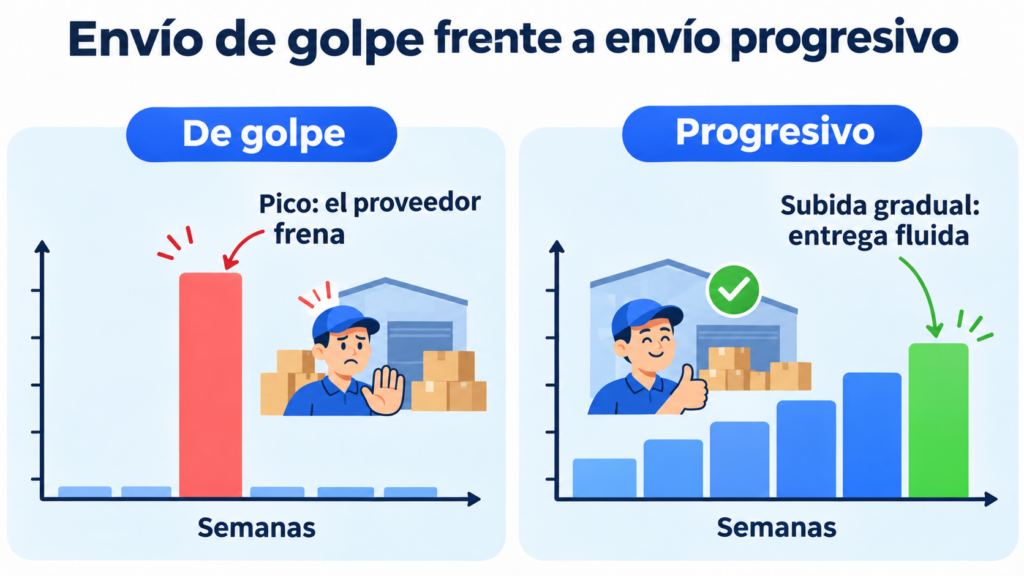
- Increase your volume gradually. If you are going from 2,000 to 50,000 emails, do it over several weeks. It is the basis of email warm-up.
- Send regularly. A steady pace builds trust. Spikes and pauses take it away.
- Authenticate your domain. Set up SPF, DKIM and DMARC on your sending domain.
- Look after your list. Double opt-in and list hygiene reduce bounces and complaints.
- Start with your most engaged contacts. In a large campaign, send first to the contacts who click. Their positive response improves delivery for the rest.
An example of email throttling
An online home decor store has not sent anything for six months. For Black Friday it decides to email all of its 30,000 contacts at once, many of them with Gmail addresses.
Within an hour almost all the emails reach Outlook and Yahoo, but Gmail accepts only some of them. The rest stay in the queue with code 421 4.7.28. Some take half a day to be delivered, when the sale has already started.
The following year, the store does the opposite. Three weeks before, it sends a weekly newsletter, first to those who bought that year and then to everyone else. On the day of the sale, Gmail already recognizes its sending pattern and the campaign is delivered in minutes.
How Mailrelay helps you
In Mailrelay, emails held back by a provider appear as “Queued” in each campaign’s detailed sending report. The system automatically retries them until the destination server accepts them. You do not have to do anything.
In addition, Mailrelay adjusts the delivery rate to each provider on its own, based on different parameters. This is sender-side email throttling: spreading out the sending so as not to trigger the receiving server’s brake.
To make email throttling the exception, you can authenticate your sending domain, segment by each subscriber’s reputation and send to the most active ones first.
If you send high volumes, you can also get a dedicated IP, and the team will help you warm it up.
All of this starts with the free account, with up to 80,000 emails a month and 20,000 contacts, with no daily or hourly limit.
Get your campaigns delivered at their own pace
Authenticate your domain, segment by activity and send up to 80,000 emails a month without paying a thing.
Frequently asked questions
These are the most common questions about email throttling.
Is email throttling the same as a soft bounce?
It is a type of soft bounce. Both are temporary errors and are retried.
The difference lies in the cause. With throttling, the problem is the sender’s sending rate or reputation. With other soft bounces, it may be a full mailbox or a server that is down.
How long does an email held back by throttling take to arrive?
Usually, anywhere from a few minutes to a few hours. If the provider keeps limiting, the retries can go on for several days, until the email is delivered or treated as bounced.
Yes, for better and for worse. On a shared IP, the reputation belongs to all the senders who use it.
If they all follow good practices, the IP has a good reputation and there is hardly any throttling. If you send large volumes regularly, a dedicated IP gives you more control.